Features Signal Trends
Interactive charts showing your connection quality over time. Each chart includes colored reference zones based on VFKD (Vodafone Kabel Deutschland) guidelines so you can immediately see when values leave the safe range.
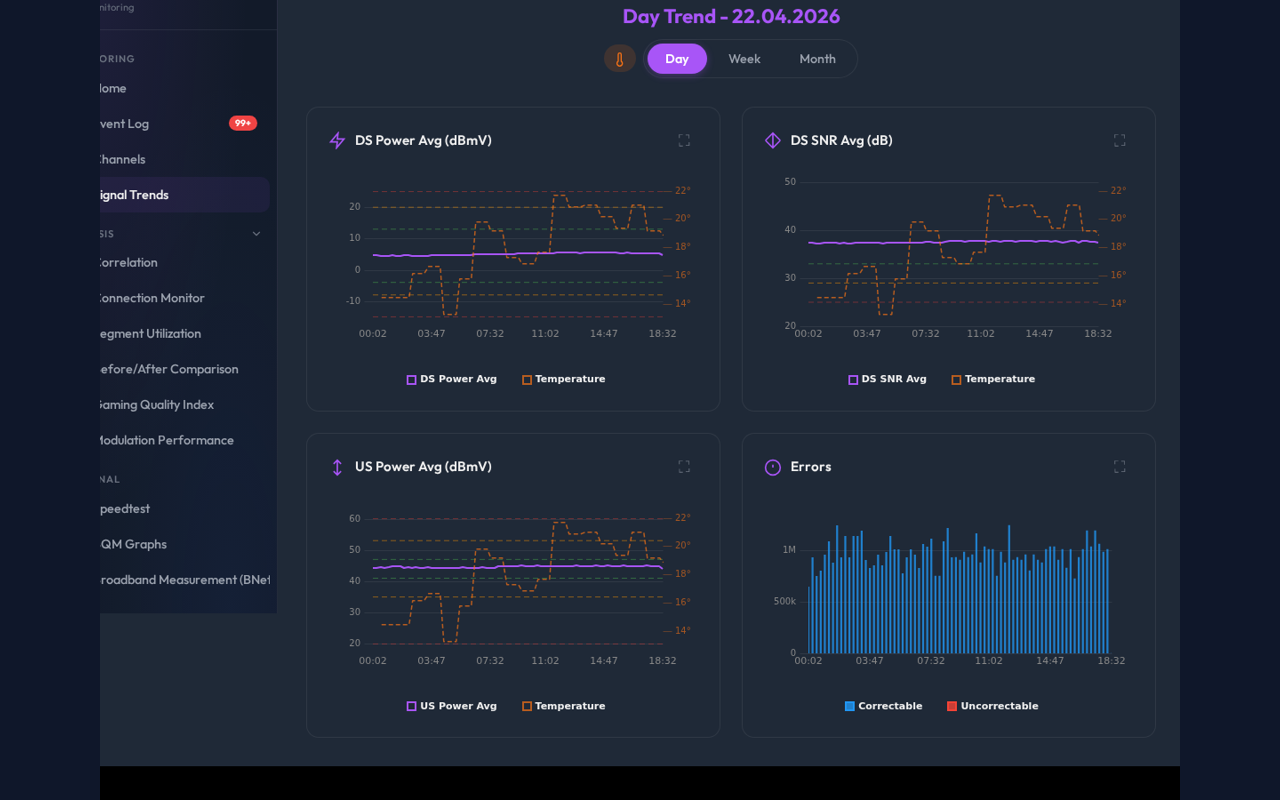
Three views available as tabs:
- Day: Last 24 hours with per-poll resolution (~15 min intervals)
- Week: Last 7 days
- Month: Last 30 days
If you need to compare two distinct periods instead of one rolling range, use Before/After Comparison. That view adds presets, side-by-side summaries, and complaint-ready evidence export.
Shows your received signal level. Too low means weak signal, too high means overload.
| Zone | 256QAM (DOCSIS 3.0) | 1024/4096QAM (DOCSIS 3.1) |
|---|---|---|
| Green (good) | -3.9 to +13.0 dBmV | -1.9 to +15.0 dBmV |
| Amber (tolerated) | -5.9 to +18.0 dBmV | -3.9 to +20.0 dBmV |
| Red (critical) | below -8.0 or above +20.0 | below -6.0 or above +22.0 |
What to do: Sustained values outside the green zone usually indicate a cable or amplifier problem. If all channels drift together, the cause is likely before the splitter. If only some channels are affected, check individual connectors.
Shows your modem's transmit power. Higher values mean the modem is compensating for signal loss on the return path.
| Zone | EuroDOCSIS 3.0 | DOCSIS 3.1 |
|---|---|---|
| Green (good) | 41.1 to 47.0 dBmV | 44.1 to 47.0 dBmV |
| Amber (tolerated) | 37.1 to 51.0 dBmV | 40.1 to 48.0 dBmV |
| Red (critical) | below 35.0 or above 53.0 | below 38.0 or above 50.0 |
What to do: Upstream power creeping upward over days or weeks suggests increasing cable attenuation, often caused by corroding connectors or water ingress. Sudden jumps may indicate a splitter or amplifier failure.
Signal-to-Noise Ratio (or Modulation Error Ratio). Higher is better. Dropping SNR means more noise on your line.
| Zone | 256QAM | 1024QAM | 4096QAM (OFDM) |
|---|---|---|---|
| Green (good) | above 33.0 dB | above 39.0 dB | above 40.0 dB |
| Amber (warning) | 30.0 to 33.0 dB | 36.0 to 39.0 dB | 36.0 to 40.0 dB |
| Red (critical) | below 30.0 dB | below 36.0 dB | below 36.0 dB |
What to do: Evening SNR dips (18:00-23:00) often indicate neighborhood congestion on shared cable segments. Persistent low SNR across all channels points to ingress noise, typically from loose connectors or damaged shielding.
Correctable (FEC) and uncorrectable error counts as stacked bars.
- Correctable errors are normal in small numbers. They indicate noise that the modem's Forward Error Correction can handle.
- Uncorrectable errors mean data was lost and had to be retransmitted. More than a few hundred per day is a problem. Spikes of 1,000+ between polls trigger an Event Log entry.
What to do: If uncorrectable errors consistently appear on the same channel(s), use the Channel Timeline to identify the affected frequency. This helps your ISP's technician pinpoint the source of interference.
Click the expand icon in the top-right corner of any chart to open a full-screen modal with a re-rendered, larger version. Same reference zones apply. Close with Escape or clicking outside.
Hover over any data point to see the exact value and timestamp. Useful for finding the precise moment when a threshold was crossed.