User Plans
BLXCode keeps durable Markdown plans inside the workspace so you can track multi-step work beside the task manager and the BLXCode Agent.
<workspace>/.agents/plans/
  PLANS.md              # protected index (never deleted)
  my-feature.md         # individual plan files
Opening or switching to a workspace runs workspace_ensure_agents, which creates .agents/plans/ and seeds PLANS.md when missing.
PLANS.md is the plan index. BLXCode will not delete it through the UI. Other .md files in this folder are normal plans you can create, rename, or remove.
Each plan can declare a canonical task section:
-
## Tasks, or -
## Todos(alias)
One task per line, using this form:
## Tasks

- [ ] `setup-api` - Add REST endpoints
- [>] `wire-ui` - Connect the plans panel
- [!] `blocked-ci` - Waiting on runner quota
- [x] `seed-index` - Create PLANS.md entry
- [-] `spike-old` - Cancelled experiment| Marker | Status |
|---|---|
[ ] |
pending |
[>] |
in progress |
[!] |
blocked |
[x] |
completed |
[-] |
cancelled |
The backtick-wrapped task-id is stable. BLXCode uses it when syncing with .blxcode/tasks/.
Open Plans from the right workbench rail (between Browser and Memory).
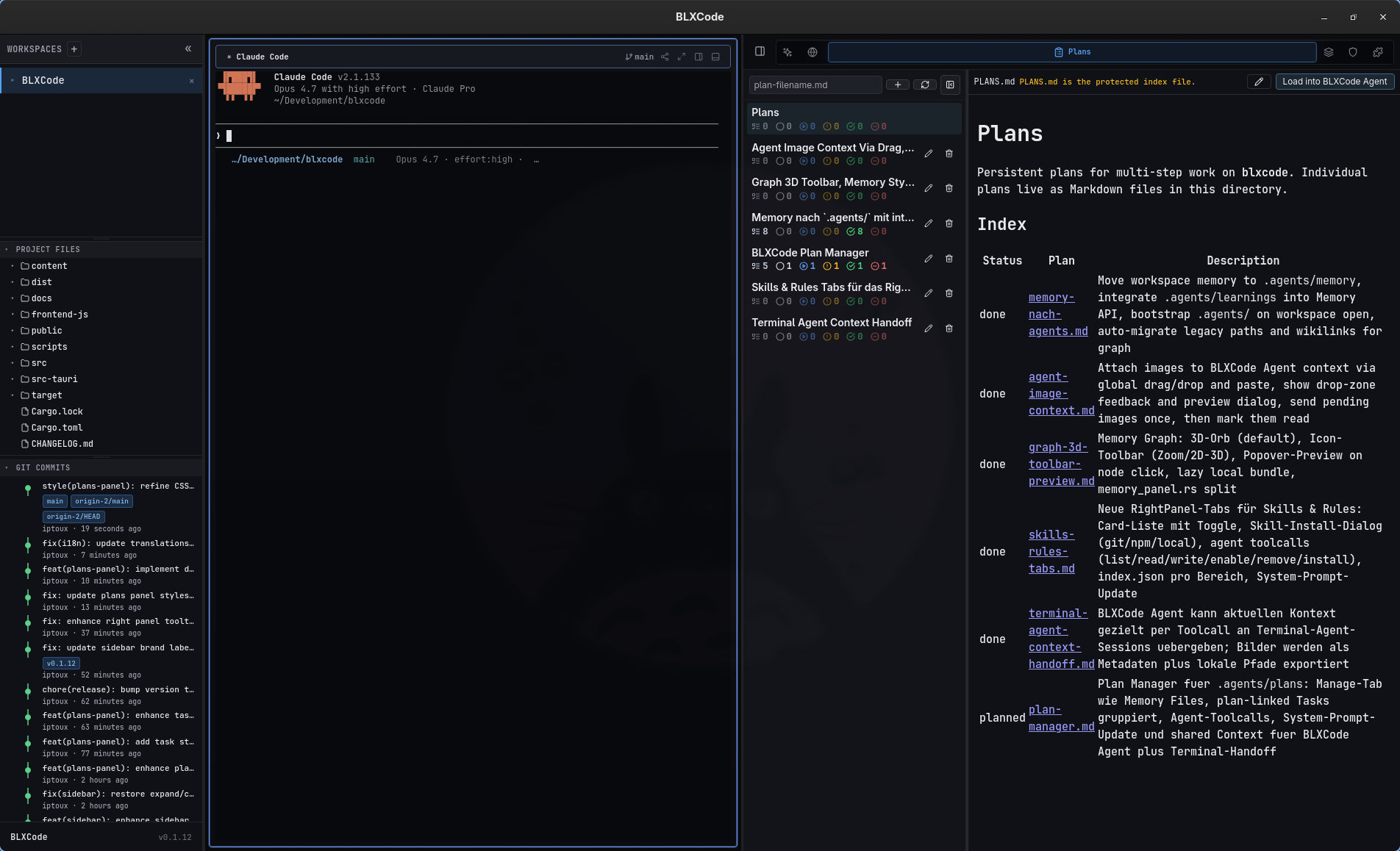
The panel provides:
- A resizable plan list (width persisted as
blxcode_plans_list_width_px_v1). - Per-plan task summary chips (counts by status with icons).
- A Markdown editor with debounced auto-save.
- Preview toggle.
- Create, rename, and delete (except
PLANS.md). - Load into BLXCode Agent — parses the plan's task section into the workspace task store and attaches the plan to agent context.
On workspace activation, BLXCode restores the last active plan path (activePlanPath in the workbench snapshot).
Switch the Plans toolbar to Kanban (alongside Editor and Preview).
- Aggregates tasks from all plan files in the workspace (
PLANS.mdindex is excluded). -
Free tasks without
planPathstay in the Agent task list only — not on the board. - Columns match task statuses: pending, in progress, blocked, completed, cancelled.
-
Drag cards between columns to change status; BLXCode writes the matching
[ ]/[>]/[!]/[x]/[-]marker back into the plan Markdown. -
Drag columns to reorder; hide or show empty columns. Layout persists in
.blxcode/kanban/index.json.
Quick-add and delete actions on cards keep the board and plan files in sync. When a card’s task is mirrored in .blxcode/tasks/, status updates best-effort sync there too.
Tasks in .blxcode/tasks/index.json can reference a plan:
-
planPath— relative path under.agents/plans/(for examplemy-feature.md). -
planTaskId— the`id`from the plan Markdown line.
Load into Agent (plan_load) replaces only tasks whose planPath matches the loaded plan. Free tasks (no planPath) are left untouched.
When you change a plan-linked task's status in the Agent panel or via task_update, BLXCode writes the matching marker back into the plan Markdown automatically.
In the Agent panel task list, plan-linked tasks are grouped by plan first; unrelated tasks appear under Free Tasks.
See Memory And Tasks for the task store format and Agent Providers for agent tools.
Server-side plan tools (Tauri-backed):
-
plan_list,plan_read,plan_create,plan_write,plan_delete,plan_rename -
plan_load— sync plan tasks into the task manager -
plan_sync_from_tasks— write task-store status back into plan Markdown
Client-side context tools:
-
plan_context_list,plan_context_attach,plan_context_detach
Shared context kinds: PlanIndex, PlanFile, PlanTaskGroup. Attached plans are rendered separately from memory in the context prompt.
After a reload or harness restart, plan_list plus task_list reconstruct in-flight work; plan files and the task store survive on disk.
When sending workspace context to an external CLI agent, harness.send_agent_context can include plans and tasks (see Workspaces — Terminal agent context handoff). The rendered Markdown block lists attached plans with per-plan status counts and compact task lists.
flowchart LR
  PlanMd[".agents/plans/*.md"]
  PlanLoad[plan_load]
  TaskJson[".blxcode/tasks/index.json"]
  Agent[BLXCode Agent]
  PlanMd -->|parse ## Tasks| PlanLoad
  PlanLoad --> TaskJson
  TaskJson -->|task_update| PlanMd
  PlanMd --> Agent
  TaskJson --> Agent
- Memory And Tasks — free tasks and memory storage
- Agent Providers — turn checklist, resume keywords, tool groups
- Workspaces — handoff and persistence