
An AI-powered CLI tool for scraping legal cases from Indian Kanoon and extracting evidence using local LLMs.
Forensic-LLM combines web scraping with AI-powered analysis to help legal researchers, lawyers, and forensic analysts efficiently extract and analyze evidence from Indian court judgments.
Forensic-LLM is a comprehensive tool with two integrated components:
- Case Scraper - Intelligently scrapes legal cases from Indian Kanoon website with interactive court/year/keyword selection
- AI Evidence Extractor - Uses local LLM (Ollama) to analyze cases and extract structured evidence automatically
Forensic LLM Working/
├── Extractor/
│   ├── browse_scraper.py          # Main interactive scraper (CLI entry point)
│   ├── raw output/                # Scraped case data (JSON files)
│   │   └── search_cases_*.json
│   └── evidence_extraction.log    # Log file for evidence extraction
├── Analysis/
│   ├── evidence_extractor.py      # AI-powered evidence extraction
│   └── Output/                    # Extracted evidence (JSON files)
│       └── evidence_*.json
├── forensic_llm_cli.py            # CLI wrapper (creates 'forensic-llm' command)
├── setup.py                       # Package installation script
├── requirements.txt               # Python dependencies
├── forensic-llm.bat              # Windows batch file launcher
├── forensic-llm.ps1              # PowerShell launcher
└── README.md                      # This file
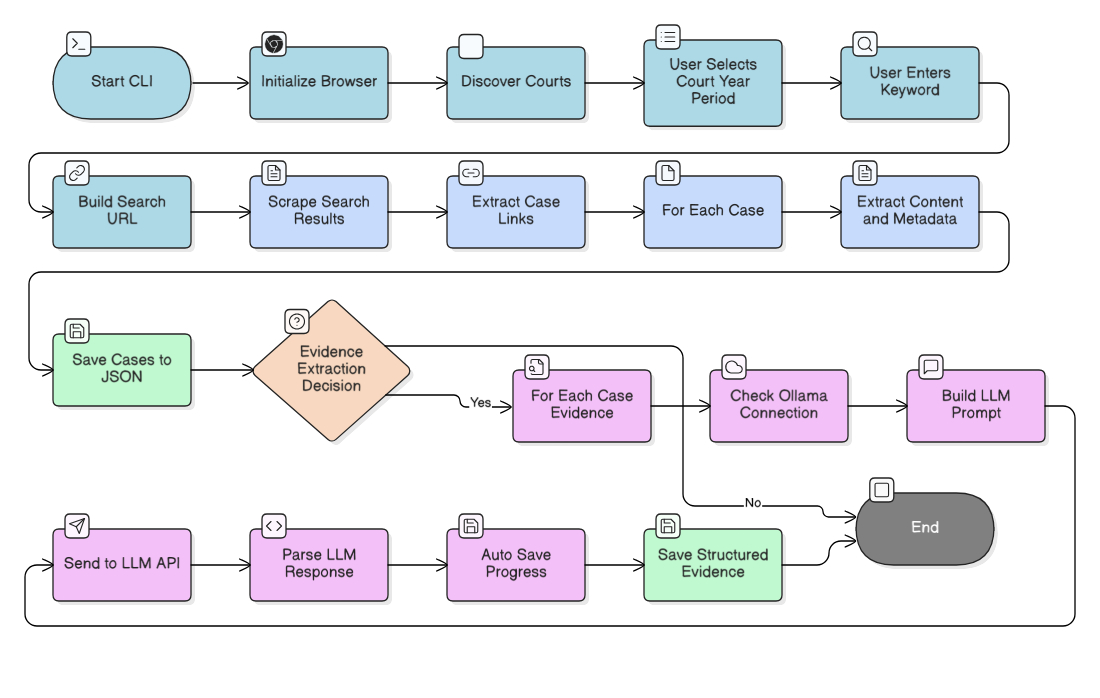
When you run forensic-llm, you'll be guided through an interactive process:
Before installing Forensic-LLM, ensure you have:
- Download from python.org
- Important: Check "Add Python to PATH" during installation
- Verify:
python --version
- Download from chrome.google.com
- Required for web scraping (runs in headless mode)
- Download from ollama.ai
- Install and start the Ollama service
- Pull the required model:
ollama pull gemma3:4b
- Note: Ollama is only needed for evidence extraction, not for scraping
Download or clone the project folder to your PC:
C:\Forensic LLM\Forensic LLM Working
Open a terminal/command prompt in the project folder:
cd "C:\Forensic LLM\Forensic LLM Working"
pip install -r requirements.txt
Installed packages:
rich>=13.0.0- Beautiful terminal UI with tables, panels, and progress barsundetected-chromedriver- Web scraping (handles Chrome automatically)beautifulsoup4- HTML parsingselenium- Browser automationrequests- HTTP requests (for Ollama API)tqdm- Progress bars (used by some components)
Install the package in editable mode:
python -m pip install -e .This creates the forensic-llm command that you can run from anywhere.
Note: If you get "Access is denied" error:
- Use
python -m pipinstead of justpip - Or run PowerShell/Command Prompt as Administrator
Test that the command works:
forensic-llmYou should see a welcome banner and the interactive menu should start.
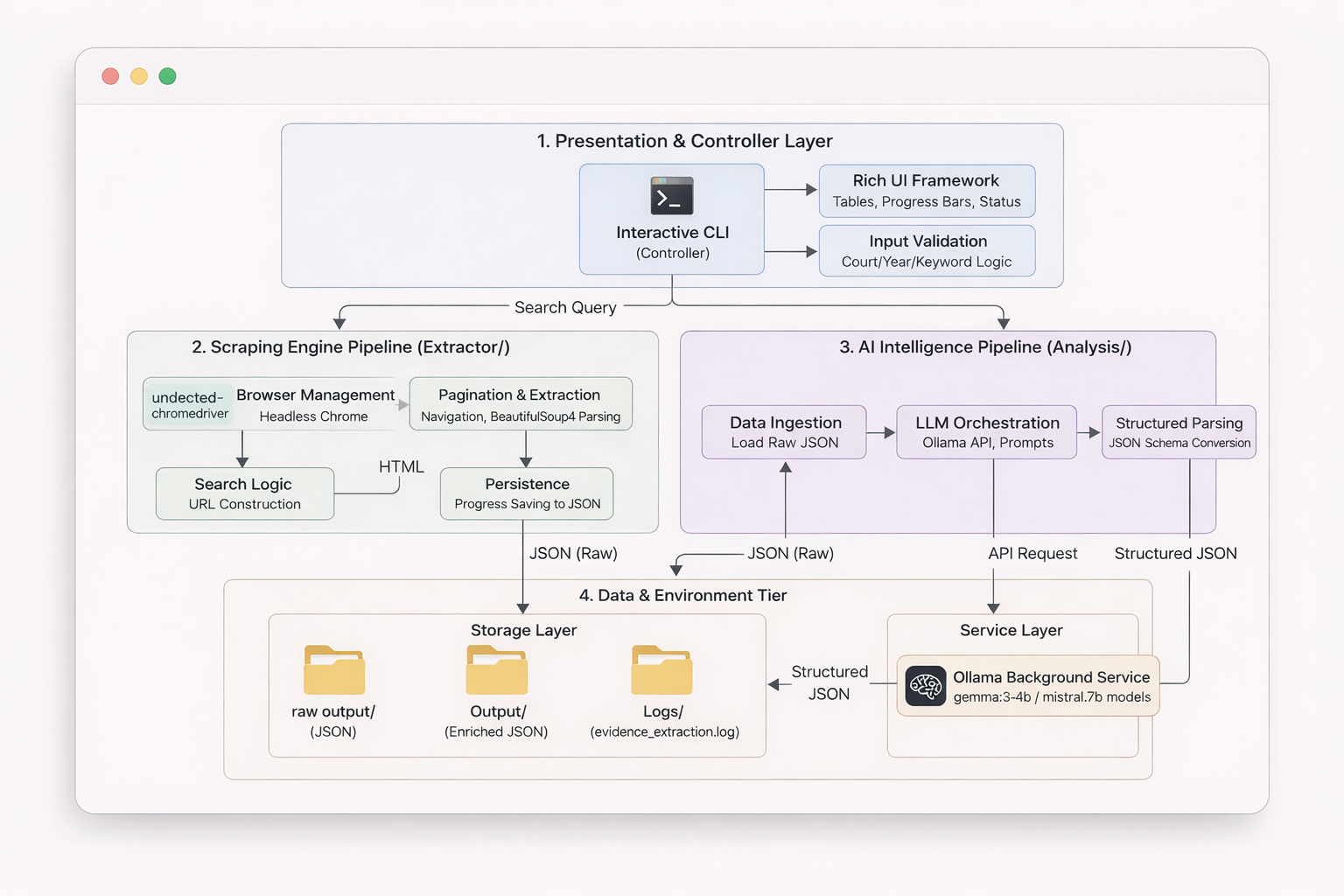
After installation, run from anywhere:
forensic-llmIf you prefer not to install the command:
cd "C:\Forensic LLM\Forensic LLM Working\Extractor"
python browse_scraper.pyWhen you run forensic-llm, you'll be guided through an interactive process:
.jpg)
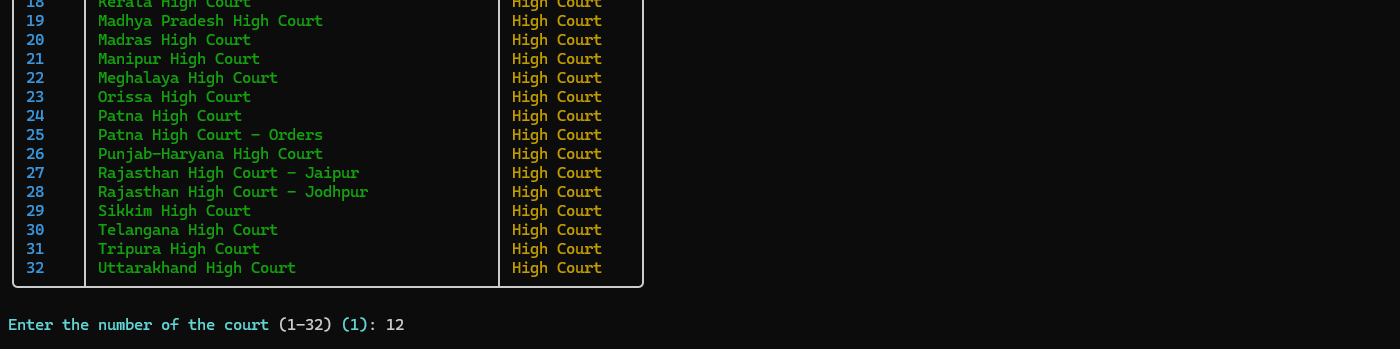
- The tool automatically discovers all available courts from Indian Kanoon
- Choose from Supreme Court or High Courts
- A beautiful table displays all options with numbers
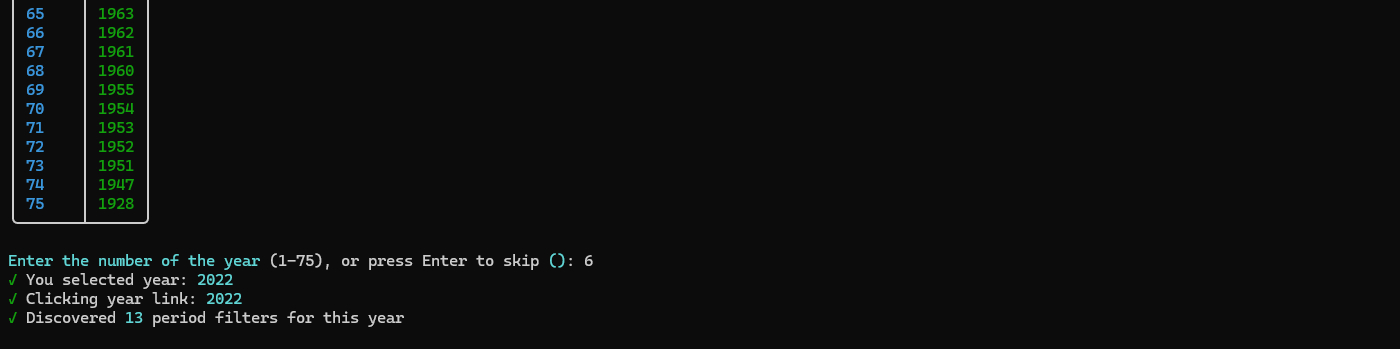
- Browse available years for the selected court
- Press Enter to skip and scrape all years
- Years are displayed in a formatted table
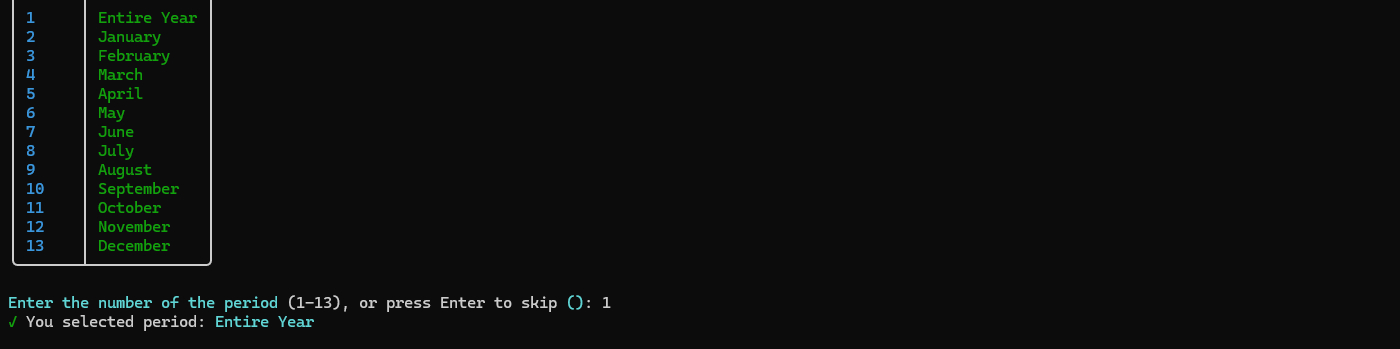
- If a year is selected, choose a specific month or "Entire Year"
- Press Enter to skip and scrape the entire year
- Useful for targeted searches
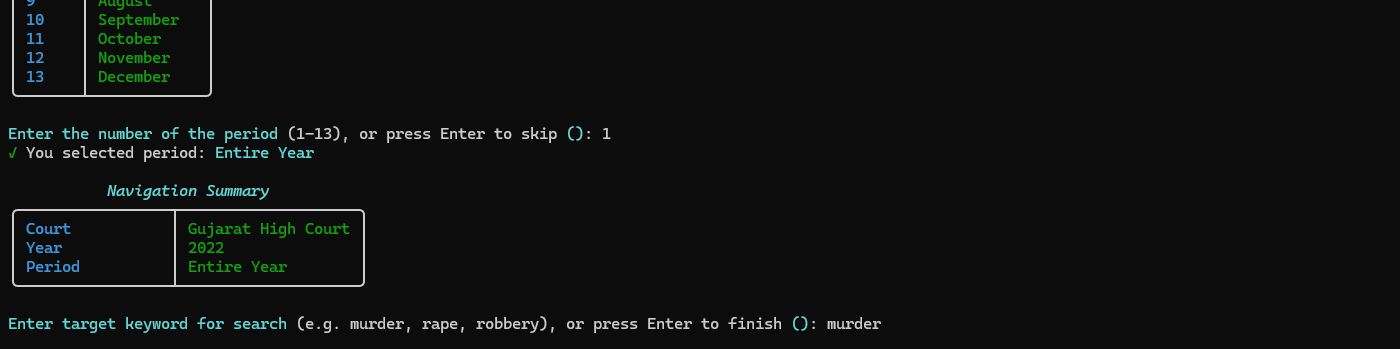
- Enter a keyword to search for (e.g., "murder", "rape", "robbery")
- The tool builds a search query automatically
- Shows you the search URL before proceeding
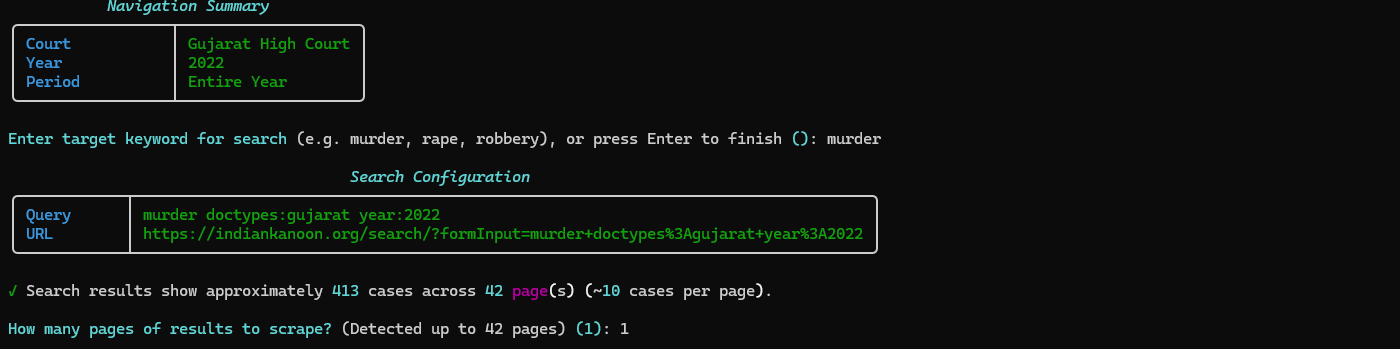
- The tool inspects search results and shows total pages/cases
- Enter how many pages you want to scrape
- Progress is tracked with a live progress bar
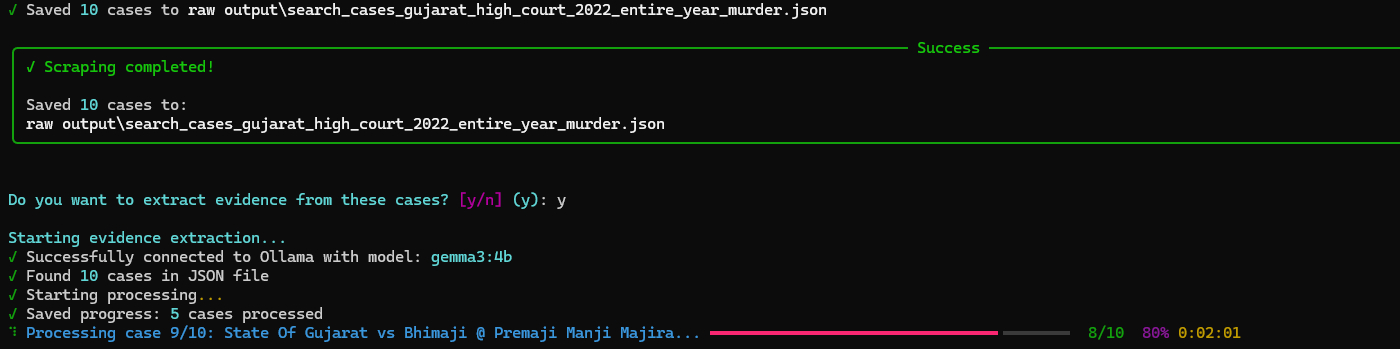
- After scraping completes, you'll be asked if you want to extract evidence
- If yes, the AI analysis starts automatically
- No need to run a separate command!
If you want to extract evidence separately or from existing files:
cd Analysis
python evidence_extractor.py
The script will:
- Automatically find the latest scraped JSON file
- Use AI (Ollama) to analyze each case
- Extract different types of evidence (physical, digital, witness testimony, etc.)
- Save results to
Output/folder with timestamp
Specify a file manually:
python evidence_extractor.py --json "Extractor/raw output/your_file.json"When running the evidence extractor manually:
python evidence_extractor.py [OPTIONS]Available Options:
| Option | Description | Default |
|---|---|---|
--json |
Specify a JSON file to process (from scraper) | Auto-detect latest |
--csv |
Specify a CSV file to process (alternative format) | Auto-detect latest |
--output |
Set custom output file path | Auto-generated with timestamp |
--model |
Change AI model (default: gemma3:4b) | gemma3:4b |
--max-cases |
Limit number of cases to process | All cases |
--start |
Start from a specific case number (useful for resuming) | 0 |
Examples:
# Process specific file with limit
python evidence_extractor.py --json "Extractor/raw output/cases.json" --max-cases 10

# Resume from case 50
python evidence_extractor.py --json "cases.json" --start 50

# Use different AI model
python evidence_extractor.py --json "cases.json" --model "llama2:7b"

# Process CSV file
python evidence_extractor.py --csv "cases.csv" --max-cases 20Each case in the scraped JSON file includes:
{
  "court": "Madhya Pradesh High Court",
  "case_title": "State vs. John Doe",
  "case_date": "2020-01-15",
  "case_link": "https://indiankanoon.org/doc/...",
  "case_content": "Full judgment text...",
  "year": "2020",
  "period": "January",
  "keyword": "murder"
}
Fields:
court- Court namecase_title- Title of the casecase_date- Date of judgmentcase_link- URL to the case on Indian Kanooncase_content- Full text of the judgmentyear,period,keyword- Search filters used
Each case analysis includes structured evidence:
{
  "case_title": "State vs. John Doe",
  "case_index": 0,
  "case_link": "https://indiankanoon.org/doc/...",
  "court": "Madhya Pradesh High Court",
  "case_date": "2020-01-15",
  "evidence_found": [
    {
      "evidence": "Detailed description",
      "type": "physical/digital/witness/document/forensic/circumstantial/other",
      "strength": "strong/moderate/weak",
      "relevance": "high/medium/low",
      "source": "where the evidence came from"
    }
  ],
  "physical_evidence": ["weapons", "documents", "clothing"],
  "digital_evidence": ["emails", "texts", "camera footage"],
  "witness_testimony": ["eyewitness accounts", "expert testimony"],
  "forensic_evidence": ["DNA", "fingerprints", "ballistics"],
  "documentary_evidence": ["contracts", "records", "certificates"],
  "circumstantial_evidence": ["motive", "opportunity"],
  "key_facts": ["fact1", "fact2"],
  "legal_issues": ["issue1", "issue2"],
  "outcome": "Court decision",
  "summary": "Brief summary"
}- Operating System: Windows 10/11, macOS, or Linux
- Python: 3.7 or higher
- RAM: 4GB minimum (8GB recommended for AI processing)
- Storage: 500MB free space
- Internet: Stable connection for scraping
- Python 3.7+ - Download
- Google Chrome - Download
- Ollama - Download
- Required model:
gemma3:4b(install with:ollama pull gemma3:4b) - Note: Only needed for evidence extraction, not scraping
- Required model:
All required packages are listed in requirements.txt and installed automatically:
rich>=13.0.0- Terminal UI with tables, panels, progress barsundetected-chromedriver- Web scraping (auto-handles Chrome)beautifulsoup4- HTML parsingselenium- Browser automationrequests- HTTP requests (for Ollama API)tqdm- Progress bars
To set up on a new PC:
- Copy the entire project folder
- Install Python 3.7+ and add to PATH
- Install Chrome browser
- Install Ollama and pull the model:
ollama pull gemma3:4b - Run:
pip install -r requirements.txt - Run:
python -m pip install -e . - Test:
forensic-llm
You can use any Ollama model for evidence extraction:
# List available models
ollama list

# Pull a different model (larger models = better quality, slower)
ollama pull llama2:7b
ollama pull mistral:7b
ollama pull codellama:7b

# Use it in evidence extraction
python evidence_extractor.py --json "cases.json" --model "llama2:7b"
Model Recommendations:
gemma3:4b- Fast, good quality (default)llama2:7b- Better quality, slowermistral:7b- Balanced quality/speed
Process multiple files:
Windows (PowerShell):
Get-ChildItem "Extractor\raw output\*.json" | ForEach-Object {
    python Analysis\evidence_extractor.py --json $_.FullName
}
Linux/macOS:
for file in Extractor/raw\ output/*.json; do
    python Analysis/evidence_extractor.py --json "$file"
doneIf evidence extraction is interrupted, you can resume:
# Resume from case 50 (if extraction stopped at case 49)
python evidence_extractor.py --json "cases.json" --start 50
Progress is auto-saved every 5 cases, so you won't lose much work.
Solutions:
- Make sure you ran
pip install -e .from the project root folder - Verify installation: Check
%APPDATA%\Python\Python313\Scripts\(or similar) forforensic-llm.exe - Reinstall:
python -m pip install -e . --force-reinstall - Add Python Scripts to PATH if needed
Solutions:
- Start Ollama:
ollama serve(or start the Ollama service) - Check model:
ollama list(should showgemma3:4b) - Install model if missing:
ollama pull gemma3:4b - Check connection:
curl http://localhost:11434/api/tags(or visit in browser) - Verify Ollama is running: Check Task Manager (Windows) or
ps aux | grep ollama(Linux/macOS)
Solutions:
- Update Chrome to the latest version
- The script uses
undetected-chromedriverwhich should auto-update - If issues persist, try running Chrome manually first
- Check Chrome version:
chrome://version/ - Restart your computer if Chrome processes are stuck
Solutions:
- Try different keywords (be specific: "murder", "homicide", "assault")
- Check if the court/year combination has cases available
- Some courts may have limited historical data
- Try broader search terms
- Verify the search URL works in a browser
- Check if Indian Kanoon website is accessible
Solutions:
- Make sure you're in the correct directory
- Reinstall dependencies:
pip install -r requirements.txt --force-reinstall - Check Python version:
python --version(should be 3.7+) - Use virtual environment:
python -m venv venvthen activate it - Verify all packages installed:
pip list
Solutions:
- Run terminal as Administrator (Windows) or use
sudo(Linux/macOS) - Use
python -m pipinstead of justpip - Check file/folder permissions
- Ensure you have write access to the project directory
Solutions:
- Check if Cloudflare protection is blocking (wait longer)
- Verify the search query returns results in a browser
- Try a different keyword or court
- Check network connection
- Some courts may require different search syntax
Solutions:
- Verify Ollama is running:
ollama list - Check model is installed:
ollama pull gemma3:4b - Try a different model:
--model llama2:7b - Check case content is not empty in JSON file
- Verify JSON file format is correct
- Website Delays: The scraper includes delays to respect the website and avoid overloading servers
- Progress Saving: Evidence extraction saves progress every 5 cases, so you can stop and resume
- File Naming: All output files include timestamps in their names for easy tracking
- Ollama Required: Evidence extraction requires Ollama to be running locally (not needed for scraping)
- Headless Mode: The browser runs in headless mode (no visible window) for faster operation
- Cloudflare Protection: The scraper automatically waits for Cloudflare protection to pass
- Rate Limiting: Built-in delays prevent overwhelming the Indian Kanoon servers
For issues or questions:
- Check the troubleshooting section above
- Verify all prerequisites are installed correctly
- Check that Ollama is running and the model is installed
- Ensure Chrome browser is up to date
- Review log files:
Extractor/evidence_extraction.log
This project is provided as-is for educational and research purposes. Please respect the terms of service of Indian Kanoon when using this tool.
- Indian Kanoon - For providing access to legal case data
- Ollama - For providing local LLM capabilities
- Rich - For the beautiful terminal UI library
- Selenium & BeautifulSoup - For web scraping capabilities
Made with ❤️ for legal researchers and forensic analysts