 SerialUI provides a graphical interface to send and receive text and data from the serial port or BLE connection (Nordic UART Service).
It includes a serial plotter for displaying numerical data.
It offers features beyond other serial terminals. For example, in addition to features found on Arduino IDE Monitor or Plotter it offers:
- Serial over BLE (NUS)
- Recording of received data
- Extended charting of the data
Throughput is similar to other serial terminal programs.
This program is written in python using PyQt  and Bleak
  as well as PyQtGraph
  or fastplotlib
  .
.
Under development are binary data transmission and indicating data with display elements other than a chart.
The main program is SerialUI.py. It uses files in the assets, docs and helper folders.
Video using ESP32 with testBLESerial program. Data is transmitted using BLE Serial and maximum transfer test shows > 100 kByte/s. Device is initally connected to application with serial USB and then with serial BLE.
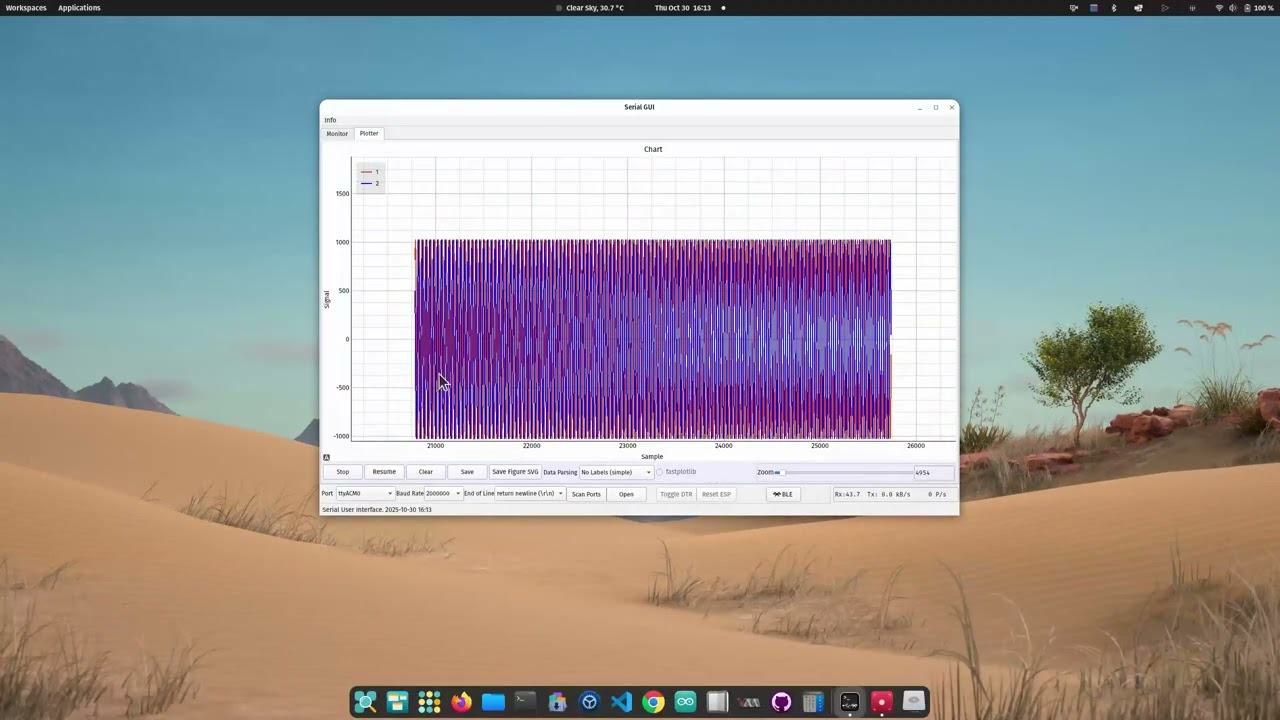
The serial monitor interface

The serial charting interface

Serial BLE extension

Either use the executable from the release assets or run the program with python3 SerialUI.py
Use the executable from the release assets. No packages will need to be installed.
Clone this repository into a folder where you store python programs and install the packages described below.
To work of the source code either download the zip or git clone https://github.com/uutzinger/SerialUI.git to that folder.
This program has dependencies. You can install them with (replace pip with conda if you use spider):
One liner Windows:
- pip3 install pyqt6 pyqtgraph markdown wmi bleak
One liner Linux:
- pip3 install pyqt6 pyqtgraph markdown pyudev bleak
The following python modules are needed:
pyqt6orpyqt5for user interface (pyqt6 is tested)pyqtgraphfor plottingfastplotlibfor high throughput plottingnumpyfor data gathering and manipulationmarkdownto display help filewmion Windows for USB device notificationspyudevon Linux for USB device notificationsbleakfor bluetooth communicationnumbafor accelerating numpy code
There is build script in scripts/release.sh or release.ps1 to activate the C accelerated text parser. You can also build the optional accelerated text parser navigate in your shell to the helper folder and execute:
python3 setup.py build_ext --inplace -vIf you are using virtual env for python don't forget to activate it.
If you rebuild, clean the previous build with:
python3 setup.py clean --all || truerm -rf build *.egg-info .eggs
This requires a Cpp compiler and the python packages pybind11 and setuptools to be available.
A future version will also need:
scipyimage decompression (FFT)cobsserial data encoding (byte stuffing)tampfor compression (lightweight for microcontrollers)
The programs configuration is stored in config.py (main folder). Here you can enable/disable features such as:
- USE_FASTPLOTLIB: Plotting with fastplotlib instead of pyqtgraph
- USE_BLE: enable serial communication over BLE
- USE_BLUETOOTHCTL: enable pairing and trusting of BLE devices (available on Unix like systems)
The standalone executable does not provide access to the configuration file.
The program is organized into modules.
The NUS provides a serial interface similar to regular USB interface for microcontrollers.
The implementation on a microcontroller requires more programming effort than a simple Serial.print especially if secure connections and automatic reconnection is considered. BLE connections can be optimized for low power, extended distance or high throughput.
A detailed example is the BLE test program which was used to test SerialUI.
With ESP32-S3 a transfer rate of more than 100kByte/s can be expected when BLE connection is optimized for high throughput.
The data parser extract values and variable names from lines of text. Besides a python version, there is a C accelerated version available. For supported data formats see: Data Parsing Approach
Indicating data is not implemented yet: Feature not implemented yet.
Fastplotlib itself is under development. There is a cusom legend.py in python libraries folder that is needed when you enable fastplotlib in the config file. The file replaces the legend.py of the creators. It needs more work.
During program startup the library and the chart widget are initialized. This requires building the pipeline for the GPU which takes 5-10 seconds. During that time the program might be sluggish.
In the Arduino_programs folder are example programs that simulate data for serial UART and BLE connection.
A detailed comparison of SerialUI with other serial IO programs was conducted.
The SerialUI is as performant as other good terminal programs. The maximum text transfer of an ESP32-S3 over USB is about 800k bytes/s and 100k bytes/s over BLE. With a Cortex-M7 (Teensy) we reached about 7M bytes/s over USB.
With both fastplotlib and pyqtgraph we can plot two channels with at least 200k samples per second at 10Hz plotting refresh rate. When large display history is needed fastplotlib with a dedicated GPU is better suited as plotting engine.
The following libraries are used:
- asyncio for bleak
** - bleak - BLE
** - cobs - serial binary
**** - fastplotlib - GPU based charting
***beta - datetime
- difflib - device ID comparison
- html - html display
- logging
- markdown - markdown display
- math
- numpy - data buffer and display
- numba - accelerator
* - os
- pathlib
- platform
- pybind11 - text parsing acceleration
* - PyQt5 or 6 - UI
- pyqtgraph - charting
- re - regular expression filter
- scipy - fft
*** - setuptools
* - tamp - compressor
*** - textwrap - logging
- time
- typing
- wmi - USB events or pyudev - USB events
- zlib - compressor
***
[*] not required but will accelerate the program,
[**] needed if BLE is enabled,
[***] needed if fastplotlib is enabled,
[***] future version
Use of release scripts from the repository root. The release version is read from VERSION in config.py.
Option style:
- Linux shell convention uses
--long-option(for example--build-executable). - PowerShell convention uses
-Parameter(for example-BuildExecutable). scripts/release.shaccepts both styles for parity (--build-executableand-build-executable).
Linux examples (scripts/release.sh):
- Show options:
./scripts/release.sh --help - Build C-accelerated parser extension before packaging:
./scripts/release.sh --build-c-accelerated - Build standalone executable (also creates
dist/SerialUI.zip):./scripts/release.sh --build-executable - Build, commit, tag, and push:
./scripts/release.sh --build-executable --build-c-accelerated --commit --tag --push - Create GitHub release for an existing version tag without rebuilding:
./scripts/release.sh --release - Upload existing archives in
dist/(*.tar.gz,*.zip) to an existing release:./scripts/release.sh --upload-assets
Windows examples (scripts/release.ps1):
- Show options:
.\scripts\release.ps1 -Help - Build standalone executable (also creates
dist\SerialUI-<version>-windows-<arch>.zip):.\scripts\release.ps1 -BuildExecutable - Build standalone executable + C-accelerated parser:
.\scripts\release.ps1 -BuildExecutable -BuildCAccelerated - Upload existing archives in
dist\to an existing release:.\scripts\release.ps1 -UploadAssets
Urs Utzinger, 2022-2025 (University of Arizona),
Cameron K Brooks, 2024 (Western University),
GPT-5.3, OpenAI