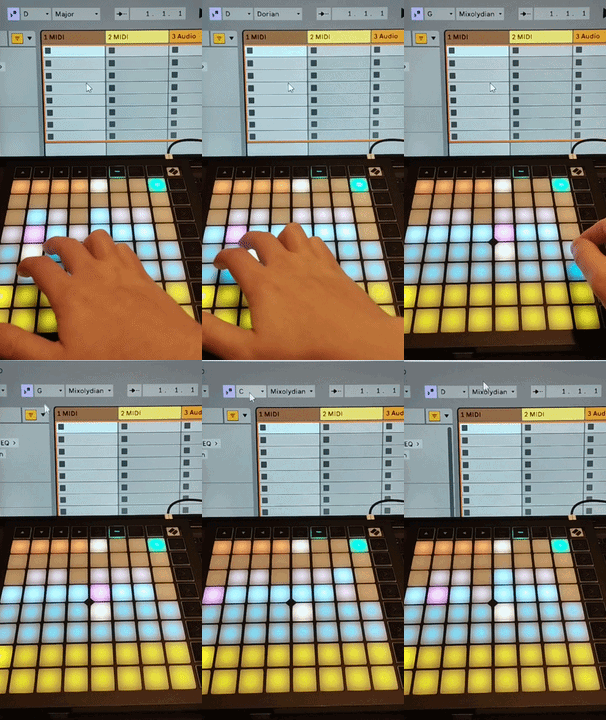
Play Ableton Live scales on Launchpad X and automatically synchronize the controller scale mode with the Ableton Live Global Scale.
LaunchpadX_Scale2Sync is an Ableton Live Remote Script that keeps the scale and key settings synchronized between Novation Launchpad X and Ableton Live 12.
Launchpad X scale mode and Ableton Live Global Scale are not synchronized by default.
This means the controller and the project can easily use different scales, which often leads to wrong notes during improvisation.
Musicians often have to manually match the scale between the controller and the DAW.
LaunchpadX_Scale2Sync automatically synchronizes Launchpad X Note Mode with the Ableton Live Global Scale.
When the project loads, the controller is already configured with the correct scale.
- Play Ableton Live scales directly on Launchpad X in Note Mode
- Synchronize the project or track scale with Launchpad X
- Apply the Launchpad scale as the Ableton Live Global Scale
- Keep your familiar finger layout between sessions
- Preserve Overlap layout settings between sessions
The script turns Launchpad X into a powerful creative tool for melodic improvisation.
Scale synchronization allows you to focus on playing and exploring musical ideas without worrying about wrong notes.
Unlike plugins or Max for Live devices, a Remote Script works natively inside Ableton Live.
Once installed, it runs automatically every time Live starts.
There is no device to insert into a project.
Just open your project and start playing.
- Ableton Live 12
- Novation Launchpad X
- macOS
- Windows
Current version
2.0.2
The script is available on Gumroad: