If you're running AI agents for your users, you're probably building an app server — routes, handlers, orchestration code, tenant isolation. Ahi replaces all of that.
Ahi is an open-source framework for running each agent in its own isolated container with tools, skills, durable data, and a schedule. No orchestration. No deployment.
The name comes from the Ahilik tradition — independent craftsmen in 13th-century Anatolia who each had their own trade, their own tools, and a shared code of conduct. An Ahi agent works the same way.
Powered by Upstash Box. Read the launch blog post.
You could build all of this on a traditional app server. But here's what you'd actually be building on top of your agent logic — and what an agent server gives you for free:
| App Server | Agent Server | |
|---|---|---|
| Isolation | Software-defined (RBAC, scoped queries) | Container-isolated (one container per agent) |
| State | External DB (Postgres, Redis) | Local filesystem (durable files) |
| Cost model | Pay for running processes | Sleep/wake — pay only when active |
| Orchestration | Hand-written glue code | Zero — agent reads skills, calls tools |
| Deployment | Full CI/CD for any change | File-based sync (update one file) |
Ahi implements the agent server architecture. Instead of app code, you get five primitives:
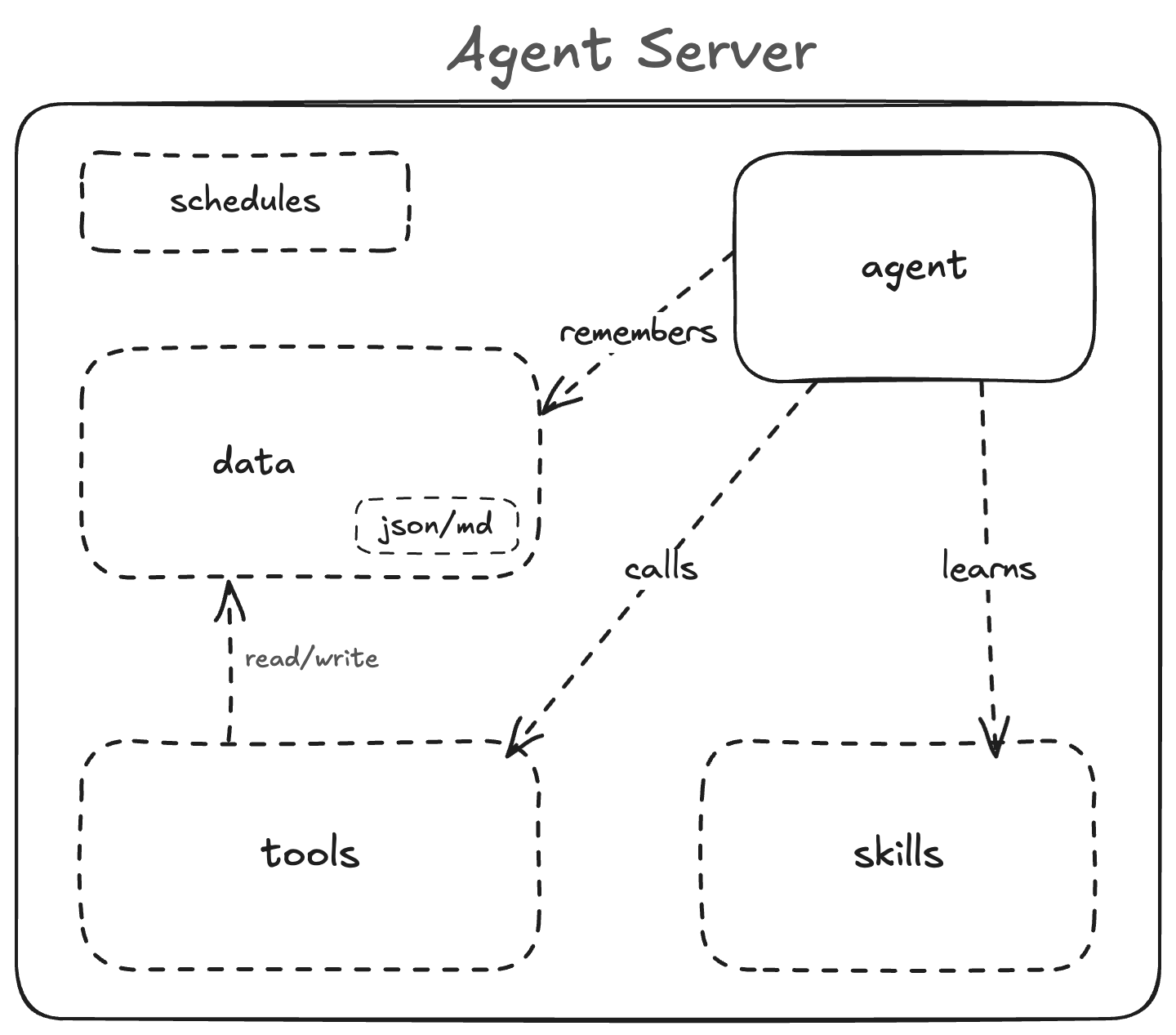
| Primitive | What it is |
|---|---|
| Agent | The LLM that reasons and acts |
| Tools | TypeScript scripts the agent executes via shell |
| Skills | Markdown instructions (system prompt) |
| Data | Durable JSON/MD files that persist across runs |
| Schedule | Cron that sends prompts, not code |
Each primitive has its own lifecycle. Fix a bug in a tool — ahi apply, only that file updates remotely. Rewrite the agent's strategy — update the skill file, ahi apply. Same tools, same data, new behavior. Switch from Claude to GPT — change the model in ahi.yaml, ahi apply. Tools, skills, and data stay untouched.
npm install -g @upstash/ahi
ahi init                          # scaffold project structure
cp .env.example .env              # add your API keys
ahi dev "remember to buy milk"    # run agent locally
ahi apply                         # apply project state to the box
ahi run "list my notes"           # run remotely
my-project/
├── ahi.yaml          # agent definitions
├── CLAUDE.md         # local Claude development guidance
├── AGENTS.md         # local Codex/OpenCode development guidance
├── .env              # API keys
├── tools/            # scripts agents execute
├── skills/           # reusable workflow instructions and native skill source
└── data/             # durable files managed by the agent
The folder structure is the convention. tools/ maps to Tools, skills/ maps to Skills, data/ maps to Data. Root CLAUDE.md and AGENTS.md are local-only development guidance for coding agents working in the repo. The skills: entry in ahi.yaml is the deployed runtime instruction entrypoint. On apply, Ahi mirrors valid skill packages from skills/ into harness-native discovery paths based on the configured runner: claude-code uses .claude/skills, while codex and opencode use .agents/skills. The ahi.yaml defines Agents and Schedules.
tools: ./tools/
skills: ./skills/SKILL.md

env:
  BRAVE_API_KEY: # forwarded from local .env
  NODE_ENV: production # explicit value

setup:
  - npm install

agents:
  - name: my-agent
    harness: claude-code
    model: anthropic/claude-sonnet-4-6
    schedules:
      - cron: "0 9 * * *"
        prompt: "Do your daily task"
timeout: 300000The skills: field in ahi.yaml points to the primary runtime skill file for the project:
skills: ./skills/SKILL.mdThis is the deployed runtime instruction entrypoint. For local ahi dev runs, Ahi prefers the harness-specific root file when present:
CLAUDE.mdforclaude-codelocal developmentAGENTS.mdforcodexandopencodelocal development- otherwise the path configured in
skills:
Those root files are optional. They help coding agents work on the repo locally, but they do not define deployed runtime behavior.
Before each ahi dev, Ahi prepares the local harness-specific skill setup:
- nested skill packages under
skills/are mirrored into.claude/skills/or.agents/skills/
That means you can keep multiple files and folders under skills/, but local runs still do not auto-pick one of them for you. Use CLAUDE.md or AGENTS.md for repo-specific development guidance, and treat skills/SKILL.md as the runtime behavior you are developing. If local root files disagree with skills/SKILL.md, the skills: path remains the source of truth for what gets deployed.
On ahi apply, the configured skills: file is projected into the harness root filename on the box, and the entire skills/ directory is uploaded. Any directory under skills/ that contains a SKILL.md file is treated as a skill package and mirrored into the harness-native skill directory, along with any helper files in that folder. Local root files like CLAUDE.md and AGENTS.md are not uploaded.
Recommended structure for multiple skills:
skills/
├── SKILL.md
├── notes/
│   ├── SKILL.md
│   └── templates/
└── research/
    ├── SKILL.md
    └── references/
In this layout:
skills/SKILL.mdis the primary router referenced byahi.yamlskills/notes/SKILL.mdandskills/research/SKILL.mdare reusable native skill packages- helper files inside each package are uploaded with that package
If you use nested skill packages, keep the root skills/SKILL.md as the router. Do not rely on it also being mirrored as a native default package when nested skill directories are present.
| Field | Required | Description |
|---|---|---|
tools |
yes | Path to tools directory |
skills |
yes | Path to skill file |
env |
no | Env vars to write inside the box. Empty value = forward from local environment |
setup |
no | Commands to run on the box after file upload (e.g. npm install) |
agents |
yes | List of agent definitions |
| Field | Required | Description |
|---|---|---|
name |
yes | Agent name (also the box name) |
model |
yes | Model identifier (for example anthropic/claude-sonnet-4-6, openai/gpt-5.4, openrouter/google/gemini-3.1-pro-preview) |
harness |
yes | Runner to use for the agent: claude-code, codex, or opencode |
schedules |
no | Cron schedules with prompt and optional timeout |
Scaffolds a minimal project with a notes agent, tool, runtime skill, and local development instruction files for Claude and Codex-compatible agents.
Runs the agent locally using the installed CLI (Claude Code, Codex, or OpenCode).
By default, ahi dev picks a single local development agent based on your local instruction files and installed CLI. It does not require or fan out across the agents defined in ahi.yaml.
Before launch, Ahi prepares local harness-specific skill files from your project:
CLAUDE.mdorAGENTS.mdis used when present- if that root file is missing, Ahi falls back to the path in
skills: - nested skill packages under
skills/are mirrored into the local native skill directory for the selected harness
Use --agent <name> only when you explicitly want to emulate a configured agent from ahi.yaml.
Local root files are optional and local-only. They are meant to help coding agents work on the project; they are not uploaded by ahi apply.
ahi dev "save a note about the meeting"
ahi dev "list my notes" --agent my-agent
Applies tools, skills, env vars, setup commands, and schedules to every agent box. Creates boxes if they don't exist. The configured skills: file is projected into the harness root instruction filename inside each box, and valid skill packages from skills/ are mirrored into .claude/skills/ or .agents/skills/ based on the explicit harness. Local root files like CLAUDE.md and AGENTS.md are not uploaded.
Agent API keys are picked up from your environment based on the model prefix, not the harness. anthropic/... uses ANTHROPIC_API_KEY, openai/... uses OPENAI_API_KEY, openrouter/... uses OPENROUTER_API_KEY, and opencode/... uses OPENCODE_API_KEY.
Runs the agent remotely on the box and streams output back.
ahi run "analyze today's data"
ahi run "generate report" --agent my-agent
Downloads the agent's data/ directory from the box to your local project.
ahi pull-data
ahi pull-data --agent my-agent
Uploads your local data/ directory to the box.
ahi push-data
ahi push-data --agent my-agent
ahi push-data --all
| Variable | Used for |
|---|---|
UPSTASH_BOX_API_KEY |
Required for apply, run, pull-data, push-data |
ANTHROPIC_API_KEY |
Passed when the model starts with anthropic/... |
OPENAI_API_KEY |
Passed when the model starts with openai/... |
OPENROUTER_API_KEY |
Passed when the model starts with openrouter/... |
OPENCODE_API_KEY |
Passed when the model starts with opencode/... |
Botstreet is three agents competing as stock traders. Same tools, same skills, different models. Each runs in its own Upstash Box.
tools: ./tools/
skills: ./skills/SKILL.md

agents:
  - name: botstreet-claude
    harness: claude-code
    model: anthropic/claude-opus-4-6
    schedules:
      - cron: "30 14 * * 1-5"
        prompt: "Run daily trading analysis, research market news, make trades, and save a snapshot"
        timeout: 600000

  - name: botstreet-gemini
    harness: claude-code
    model: openrouter/google/gemini-3.1-pro-preview
    schedules:
      - cron: "30 14 * * 1-5"
        prompt: "Run daily trading analysis, research market news, make trades, and save a snapshot"
        timeout: 600000

  - name: botstreet-openai
    harness: codex
    model: openai/gpt-5.4
    schedules:
      - cron: "30 14 * * 1-5"
        prompt: "Run daily trading analysis, research market news, make trades, and save a snapshot"
        timeout: 600000
Every weekday at 9:30 AM ET, each agent wakes up, reads the news, analyzes its portfolio, makes trades, and saves a snapshot. Between runs, the box sleeps. The data — portfolio state, trade history, diary entries — persists as files inside each box.