Sources
The source modelling repository attempts to answer questions about all things relating to the sources of earthquakes, interacting with the New Zealand Community Fault Model, rupture propagation, slip models, but most importantly source geometry. This page will help you answer questions like:
- How do I find the corners of a fault?
- What are the closest points between two faults?
- How do I compute an evenly spaced set of grid points along a fault?
- What is the insert property of fault plane here (dip_dir, strike, dip, ...) of this fault?
It may be tempting to write your own code to do this! However, it is easy to shoot yourself in the foot with misleading assumptions that don't hold in generality. Examples of such assumptions and mistakes include:
- Always assuming dip direction is 90 degrees from strike (it isn't in NSHM2022!), and
- Always assuming the top depth of the fault is zero.
- Always assuming the corners of the points you're given are in the strike-direction (they aren't in the NSHM or community fault model!)
Tip
Just want to have your questions answered? See the FAQ section.
The goal of the source_modelling.sources module is to provide a Pythonic interface to source geometry. It must be general to accommodate new kinds of sources, and it should not depend on naming conventions that can change (type-I, type-II, etc). The definition should minimise parameter redundancy. That is, instead of providing strike, dip, length, width, bottom, top, we should let as many parameters as possible be derived. The bottom and top depth values for example, can be derived from strike, dip, length, and width values. In fact, all the essential parameters can be found ideally from the supplied corners of a fault plane in three dimensions. The fault corners, rather than the standard centroid-dip-strike-length-width-... specification we have used in the past, will now be the privileged information defining a fault. Everything else will be measured from the definition of the corners. This has a number of advantages over the old approach:
- It completely minimises parameter redundancy, and ensures that all the paramaters are geometrically consistent. It will now be impossible, for example, to specify a plane with inconsistent length, width and depth parameters since these will be derived from the corners of the fault.
- Using corners allows us to frame problems of fault geometry as problems in linear algebra. The advantage of this is that we can take advantage of the wealth of tools available in numpy, scipy, etc. In the past, we would write functions like
geo.ll2gpand do everything without any vectorisation. In the future we can use matrix transformations to manipulate faults in an efficient and concise manner.
We also refrain from using inheritance hierarchies and factories to define sources, instead using simple dataclasses and duck-typing. This approach more closely matches Python development standards than, for example, factories and other gang-of-four (see "Design Patterns: Elements of Reusable Object-Oriented Software") style patterns common to Java. Accordingly, there is no Source superclass, and instead a Protocol (like an interface) that defines the functions that should exist for any object to be considered a source geometry.
A source geometry is an object with two properties:
- A geometric definition of its bounds. For a fault plane, this is its corners, for a point-source the bounds are the point itself.
- A local coordinate system. This local coordinate system is
essential for finding points inside the fault. EMOD3D has its own
definitions of fault-local coordinates, for example, which we pass
as
shypanddhypparameters togenslipand friends.
Note that this definition does not require the geometry to be flat like a plane, or connected, or anything. It is simply a closed and bounded region with coordinates. The choice of a general definition is to allow for the flexible addition of sources to this framework, such a rough surfaces.
While we have five types of sources (per Source Modelling for GMSim), there are essentially only three source geometries we work with:
-
Point Source Geometry: This is a 0-dimensional geometry consisting of a single point. The
source_modelling.sourcesmodule uses thePointclass to model the source geometry for a point. -
Plane Geometry: This a 2-dimensional source geometry consisting of a single plane. The extents of the geometry are its corners. The
source_modelling.sourcesmodule uses thePlaneclass to model single plane geometry. -
Multi-Planar Geometry: This is a 2-dimensional source geometry consisting of a number of connected planes. The extents of the geometry are the corners of the end fault planes. The
source_modelling.sourcesmodule uses theFaultclass to model multi-planar geometry.
Type-1 fault are an instance of the first geometry, type-2 faults are plane geometries, and type-4 and type-5 are multi-planar geometries.
Note that the term 2-dimensional here refers to the dimensions of the local coordinate system, rather than their appearance as "flat". Both planar and multi-planar geometry are 2-dimensional because they can be given a local coordinate system with only two parameters
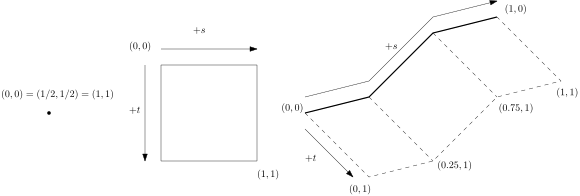
To make the source module easy to use, we have elected to normalise all the coordinate systems so that the coordinate systems are always points
Sources defined in source_modelling.sources will have two methods for converting back and forth between fault local and global coordinate systems:
-
fault_coordinates_to_wgs_depth_coordinates: Going from fault-local coordinates to global coordinates. -
wgs_depth_coordinates_to_fault_coordinates: Going from global coordinates to fault-local coordinates if the global coordinates lie in the source geometry. Sources will raise aValueErrorif the supplied coordinates are not in the domain.
Below is a kind of cookbook demonstrating how to use the new sources module to answer source geometry questions.
Q: How do I create a geometry with a given strike, dip, dip direction, etc
A: For planes, the Plane.from_centroid_strike_dip method makes things easy. This method has a number of optional parameters you can initialise a plane with.
fault_plane = Plane.from_centroid_strike_dip(
    centroid=np.array([45.0, 170.0, 10.0]),  # Latitude, Longitude, Depth (km)
    dip=30.0,  # Dip angle in degrees
    length=20.0,  # Length of the fault plane in km
    width=10.0,  # Width of the fault plane in km
    strike=90.0,  # Strike angle in degrees
)

fault_plane = Plane.from_centroid_strike_dip(
    centroid=np.array([42.5, 172.5]),  # Latitude and Longitude (no depth provided)
    dip=45.0,  # Dip angle in degrees
    length=30.0,  # Length of the fault plane in km
    width=15.0,  # Width of the fault plane in km
    dbottom=20.0,  # Bottom depth of the fault plane in km
    strike_nztm=110.0,  # NZTM strike angle in degrees
)
Note
This method includes consistency checks to make sure that, for example, dtop and dbottom are consistent with dip. If you get errors that say the parameters of your fault plane are inconsistent, it is likely because you (or the paper you found them from) have rounded some values to the nearest degree, metre, kilometre, etc. Try removing one or more of your constraints.
Q: How do I find the corners of a geometry?
A: Using the corners property for either the Plane or Fault class.
source = Plane(...) # or Fault
source.corners
Q: How can I find the basic parameters of the geometry (strike, dip, rake, etc.)?
A: A Plane source has these defined as properties computed from the corners you supply to construct the source
plane = Plane(...)
strike = plane.strike
dip = plane.dip
dip_dir = plane.dip_dir
length = plane.length
length_metres = plane.length_m
For some geometries, some of these values are not going to be well-defined (what is the strike of a multi-planar geometry when it changes?).
Note
The strike and dip_dir have counter-parts strike_nztm and dip_dir_nztm which are the bearings from NZTM north instead of true north. You should use these if you are working in NZTM yourself.
Q: How can I discretise my geometry into a number of evenly spaced points?
A: Here fault-local coordinates really shine because they make discretising sources extremely trivial:
complicated_fault_geometry = FaultPlane(predefined_corners)
# define a meshgrid of points, 50 along the strike and 100 along the dip.
xv, yv = np.meshgrid(np.linspace(0, 1, num=50), np.linspace(0, 1, num=100))
fault_local_meshgrid = np.vstack([xv.ravel(), yv.ravel()])
# Convert the fault local coordinates into global coordinates
global_point_meshgrid = (
     complicated_fault_geometry.fault_coordinates_to_wgs_depth_coordinates(
         fault_local_meshgrid
     )
)
Q: How can I find the closest points between two fault geometries?
A: You can use sources.closest_point_between_sources to find the closest points between two sources.
source_a = Plane(...)
source_b = Fault(...)

point_on_a_local, point_on_b_local = sources.closest_point_between_sources(source_a, source_b)
distance_between_sources = coordinates.distance_between_wgs_depth_coordinates(
    source_a.fault_local_coordinates_to_wgs_depth_coordinates(point_on_a_local),
    source_b.fault_local_coordinates_to_wgs_depth_coordinates(point_on_b_local),
)