A high-fidelity Progressive Web Application (PWA) designed for keeping score in Baseball and Softball games. This application replicates the experience of a traditional paper scoresheet while providing the power of digital tracking, including automatic statistics, real-time synchronization, and complete offline capability.
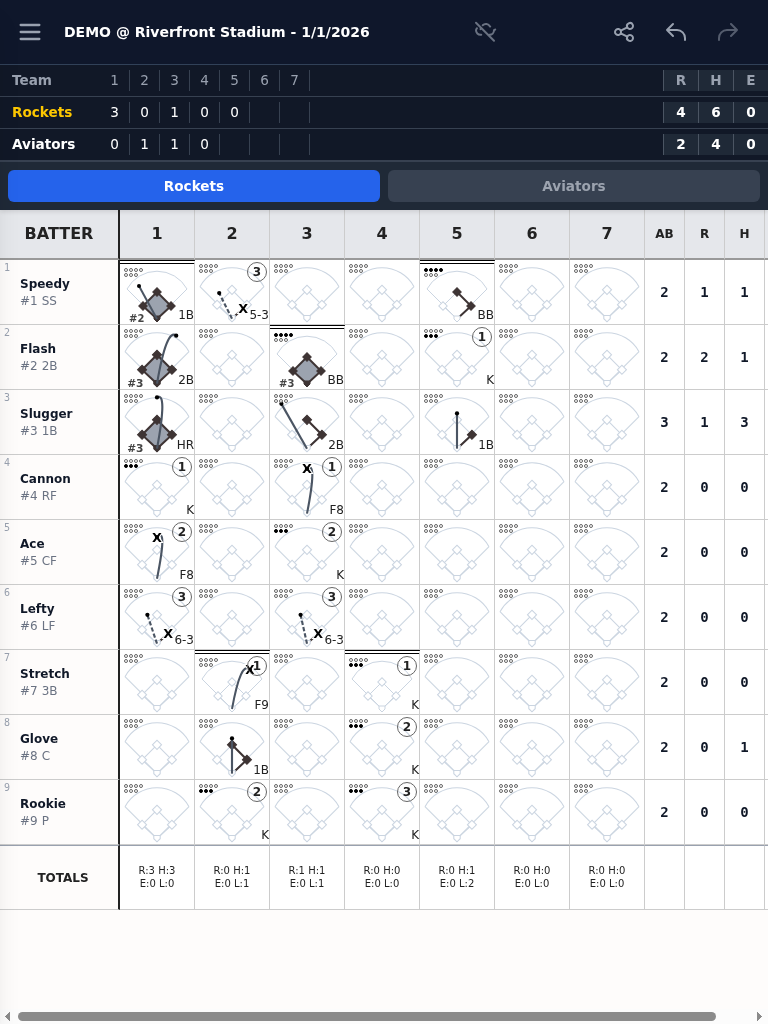
- Digital Scoresheet: A responsive grid layout that mimics a traditional paper scorebook, optimized for mobile and tablet devices.
- Event Sourcing Architecture: State is derived from a linear, append-only
actionLog, ensuring data integrity and enabling robust Undo/Redo functionality. - Contextual Scoring Overlay (CSO): A guided, touch-friendly interface for recording plays, including an interactive diamond for runner visualization.
- Advanced Scoring Support: Handles complex scenarios like Double/Triple Plays, Batter-out-of-Order (BOO), and play corrections.
- Real-time Synchronization: WebSocket-based synchronization ensures data is backed up to the cloud and synced across devices instantly.
- Offline-First: Fully functional without an internet connection using IndexedDB for local storage and a Service Worker for asset caching.
- Comprehensive Stats: Automatic calculation of box scores, season-long leaderboards, and visual spray charts.
Comprehensive engineering and design documentation is available in the docs/ directory:
- Engineering Design Document: The main entry point for technical documentation, including:
- Development Guide: Instructions for building, running, and testing the application.
- Glossary & Definitions: Authoritative reference for scoring codes and statistical formulas.
Skorekeeper is built on the principle of Event Sourcing. Every game event is stored as a discrete action in an authoritative, append-only log. The UI and application state are deterministic projections of this log, allowing for:
- Perfect History: Complete auditability and multi-level Undo/Redo.
- Seamless Collaboration: Multiple users can score the same game with automatic conflict resolution.
- Local-First Reliability: Instant interactions even when offline, with transparent background synchronization.
This entire application—from concept to code—was architected and implemented with the assistance of Google's Gemini AI. Gemini served as a pair programmer, code reviewer, and technical writer throughout the development process, ensuring robust software engineering practices, security compliance, and comprehensive documentation were maintained at every step. This "AI-in-the-loop" workflow accelerated feature delivery while strictly adhering to the project's authoritative design specifications.
- Node.js: For managing dependencies and compiling Tailwind CSS.
- Go: Standard library used for the backend server.
- Docker: Required for running the headless E2E test suite.
- Build the application:
./build.sh
- Run the server:
go run . --use-mock-auth --debug - Run the tests:
./run-tests.sh
- Frontend: Vanilla JavaScript (ES Modules), HTML5, Tailwind CSS.
- Backend: Go (Standard Library).
- Storage: IndexedDB (Client), GameStore (Server).
- Synchronization: WebSockets.
- Testing: Jest (Unit), ChromeDP (E2E), ESLint.