

Tikz-feyn is a LaTeX package which generates Feynman diagrams using the PGF/TikZ package.
📖 Read the full documentation online
Feature requests, bugs, feedback, and comments are always welcome!
I originally created this package to make typing notes for a quantum field theory class easier, but now it's available for the whole world to use.
You'll need the tikz, xparse, and ifthen packages for LaTeX, all
of which are available in texlive.
Quick Install (Single Project)
Download tikz-feyn.sty and place it in your LaTeX project directory, then use:
\usepackage{tikz-feyn}System-Wide Installation
- Download the latest release from the releases page
- Extract the archive
- Copy
tikz-feyn.styto your local texmf tree:- Linux:
~/texmf/tex/latex/tikz-feyn/ - macOS:
~/Library/texmf/tex/latex/tikz-feyn/ - Windows:
%USERPROFILE%\texmf\tex\latex\tikz-feyn\
- Linux:
- Run
texhashormktexlsr(if required by your distribution)
Tikz-feyn can be loaded by
\usepackage{tikz-feyn}A Feynman diagram can be constructed in one of three environments:
tfeynproduces display-style diagrams, which are suitable for standalone diagrams or equations, for example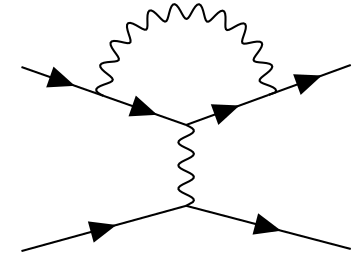
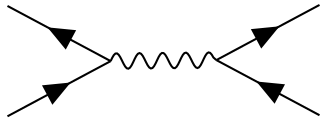
tfeyninproduces inline Feynman diagrams which can be inserted into text, or into an equation, for example
tfeynmaproduces diagrams sized for math mode with adjustable scaling
In the current implementation of Tikz-feyn each Feynman diagram is
composed of a number of columns. For example,
contains four columns. We construct a column using the \tfcol macro:
\tfcol(0,0){a, b, ..., z}[<vertical space>]This creates a column of vertices, each equally-spaced, with the names, a, b, through to z. The bottom of the column will be aligned to the coordinates in the first, optional, argument.
To join vertices with edges use the \tf macro, for example
\tf[f]{a1,a2}joins vertices a1 and a2 with a fermion. The full set of arguments for \tf is
\tf[<particle>]{<vertices>}[<inner direction>]If you include a new vertex inside the list of vertices it will be
created between the first and last vertices in the list, and its
positioning can be dictated by the third argument as either u (up),
d (down), l (left), or r (right). So a more complex example,
\tf[f]{a1,c1,a2}[r]joins a1 to a2 with a fermion, but it creates a vertex called c1
in a column to the right of them, and vertically half-way between them.
To see all of this in action, let's have a full example of a diagram:
\begin{tfeyn}
	\tfcol{a1, a2}
	\tfcol{b1, b2}
	\tf[f]{a1,c1,a2}[r]
	\tf[f]{b1,c3,b2}[l]
	\tf[p]{c1, c3}
\end{tfeyn}
So we set up two
sets of vertices, a1 and a2, and b1, and b2. Next we connect
a1 to a2 with a fermion, and we make a node, c1 half way along
that edge, to the right of the a column, and we do something similar
on the b column, but to the left. We can now connect c1 and c2
with a photon (p), and we have the completed diagram:
It's possible to do all sorts of other fancy stuff, thanks to the underlying TikZ package.
Arcs and loops can be created within diagrams by adding the l style to a \tf macro:
\tf[p,l]{v4,v6}and if necessary, it can be customised by adding a looseness key:
\tf[p,l, looseness=1]{i,o}which adjusts the circularity of the arc. For an extreme example, take a diagram composed only loops and arcs:
\begin{tfeyn}
  \tfcol{i}[1cm]
  \tfcol{o}
  \tf[p,l, looseness=1]{i,o}
  \tf[p,l, looseness=1]{o,i}
  \tf[f,l]{i,o}
  \tf[f,l]{o,i}
\end{tfeyn}
which produces the output

Any TikZ style can be applied to any vertex, so to make a red photon just write
\tf[p,red] {i,o}for example.
All three environments accept optional parameters to customize spacing:
\begin{tfeyn}[<column separation>][<row separation>][<horizontal intermediate spacing>][<vertical intermediate spacing>]For example:
\begin{tfeyn}[2cm][0.5cm][0.7cm][0.3cm]
  % diagram commands here
\end{tfeyn}
Default values:
tfeyn: column sep = 2cm, row sep = 0.5cm, h-int = 0.7cm, v-int = 0.3cmtfeynin: column sep = 2em, row sep = 0.1ex, h-int = 0.6em, v-int = 0.05extfeynma: column sep = 2em, row sep = 1ex, h-int = 0.6em, v-int = 0.3em
By default, vertices are invisible connection points. To draw visible vertices, use the vertex style:
\node[vertex] at (a1) {};This creates a small filled circle at the vertex position. You can also combine this with TikZ styles for customization:
\node[vertex, red, minimum size=4pt] at (a1) {};Each particle in a Feynman diagram is represented as an edge, and in Tikz-feyn, each particle is created by styling an edge. The following styles are available:
| Particle | Style name(s) | Description | Example |
|---|---|---|---|
| Photon | p, photon | Wavy line (sine wave) | \tf[p]{i,o} |
| W Boson | w, wboson | Coiled double line (1pt spacing) | \tf[w]{i,o} |
| Z Boson | z, zboson | Coiled double line (2pt spacing) | \tf[z]{i,o} |
| Higgs Boson | h, higgs | Dotted line | \tf[h]{i,o} |
| Gluon | g, gluon | Coiled line | \tf[g]{i,o} |
| Graviton | G, graviton | Double coiled line | \tf[G]{i,o} |
| Fermion | f, fermion | Solid line with arrow | \tf[f]{i,o} |
You can implement your own particle styles by defining new TikZ styles. For example:
\tikzset{
  meson/.style={
    dashed,
    thick
  },
  m/.style={meson}
}
Then use it like any built-in particle: \tf[m]{i,o}
You can also combine styles with standard TikZ options:
\tf[p, red, thick]{i,o}  % A thick red photon
\tf[f, blue, ->]{i,o} % A blue fermion with arrowTo compile the example document:
pdflatex tikz-feyn.texTo compile the test suite:
pdflatex test-suite.texThe package includes a comprehensive test suite (test-suite.tex) that exercises all features. All tests are automatically run via GitHub Actions on every push and pull request.
Contributions are welcome! Please:
- Fork the repository
- Create a feature branch
- Make your changes
- Ensure the test suite compiles without errors
- Submit a pull request
The CI system will automatically verify that your changes compile correctly.
This project uses GitHub Actions for automated testing:
- Build workflow: Compiles all LaTeX documents
- Test workflow: Comprehensive testing including document compilation and package validation
- Release workflow: Automatically creates release packages when version tags are pushed
See .github/workflows/README.md for more details.
