This project implements an asynchronous deep research tool for Open WebUI that performs iterative internet searches using a SearXNG-compatible endpoint.
Author: Teodor Cucu (Credits to Jacob DeLacerda for giving me the Idea)
Version: 0.1.5
License: MIT
This project implements an asynchronous deep research tool that performs iterative internet searches using a SearXNG-compatible endpoint. It processes search results by scraping the content of the returned pages with BeautifulSoup, refines the search query if too few results are obtained, and finally generates a comprehensive Markdown report. Throughout the search process, status updates and citation events are sent to a frontend via a callback function.
-
Install the Tool:
First, install the tool from [https://openwebui.com/t/t30d0r99/research/]. -
Install the Prompt (REQUIRED):
Then, install the prompt from [https://openwebui.com/p/t30d0r99/research]. -
Set SRXNG URL:
Set your SRXNG URL under Tools. -
Open a New Chat and Activate Research:
Open your chat application and enable the research mode.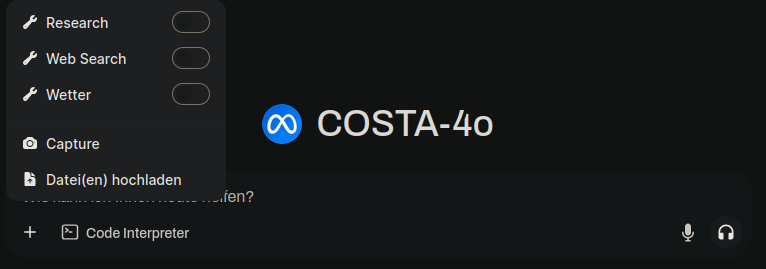
-
Use the Prompt:
Enter the prompt in the chat, replacing (TOPIC) with your desired topic.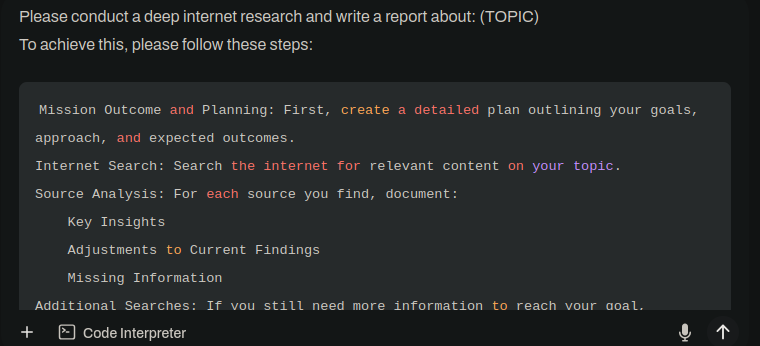
-
Observe the Process:
The research is only initiated when you see status updates like "Internet search initiated..." and "Iteration X: Searching for...".
Each iteration will display how many pages were fetched.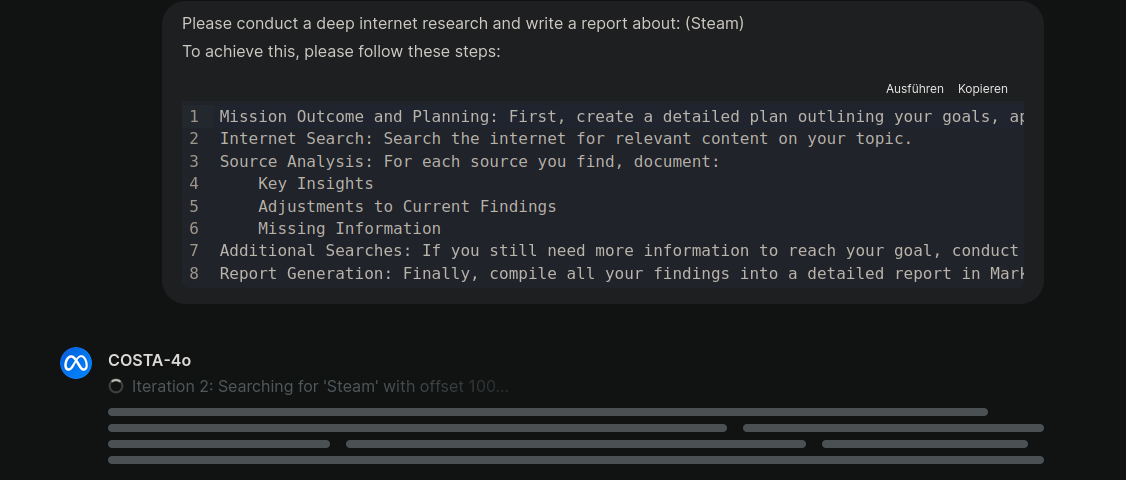
-
Completion and Citations:
Once complete, you should see the final report along with citation events listing the sources. Enjoy!
Code Structure
- HelpFunctions Class
The HelpFunctions class provides utility functions for text processing and web scraping:
get_base_url(url: str) -> str
Extracts the base URL (scheme and domain) from a full URL.

generate_excerpt(content: str, max_length: int = 200) -> str
Returns a shortened excerpt of the content if it exceeds the specified length.

format_text(text: str) -> str
Normalizes and cleans up text by removing extra whitespace.

remove_emojis(text: str) -> str
Removes emojis by filtering out characters whose Unicode category starts with "So".

truncate_to_n_words(text: str, n: int) -> str
Splits the text into words and returns the first n words.

fallback_scrape(url_site: str, timeout: int = 20) -> Any
Attempts to scrape the content of a webpage using BeautifulSoup.
    Uses a browser-like User-Agent to prevent blocks.
    Makes an HTTP GET request with a timeout.
    Removes <script> and <style> tags and extracts text.
    Returns the cleaned text only if its length is at least 50 characters; otherwise, returns None.

process_search_result(result: dict, valves: Any) -> Any
Processes a single search result:
    Validates the URL and checks it against an ignore list (IGNORED_WEBSITES).
    Attempts to scrape the page content using fallback_scrape.
    Falls back to using the snippet provided in the result if scraping fails.
    Discards results with content shorter than 50 characters.
    Returns a dictionary with the cleaned title, URL, truncated content, and snippet.
- EventEmitter Class
The EventEmitter class is used to send asynchronous status events to the frontend:
Constructor
Initializes the emitter with a callback function.

emit(description: str, status: str, done: bool)
Sends an event with a fixed type "status" along with a payload that includes:
    status (e.g., "in_progress", "error", "complete")
    description (a message describing the current state)
    done (a boolean indicating whether the process is finished)
- Tools Class
The Tools class orchestrates the search process, result processing, and report generation. Inner Class: Tools.Valves (Configuration Model)
A Pydantic model that stores configuration settings:
SRNXG_API_BASE_URL
The base URL for the SearXNG API (default: http://192.168.3.42:9090).

IGNORED_WEBSITES
A comma-separated list of website domains to ignore.

TOTAL_PAGES_COUNT
The number of pages to search per query (used for pagination).

RETURNED_PAGES_COUNT
The maximum number of pages to return as valid results.

PAGE_CONTENT_WORDS_LIMIT
The word limit for content extracted from each page.

CITATION_LINKS
A flag indicating whether citation metadata should be sent to the frontend.
Methods in Tools:
refine_query(topic: str, iteration: int) -> str
Enhances the search query by appending an extra phrase based on the current iteration. This deepens the search if fewer than the minimum valid results are found.

generate_report(topic: str, results: list) -> str
Generates a Markdown report summarizing the research findings.
    The report includes a "Mission Outcome and Planning" section and details for each source (including key insights, adjustments, and missing information).
    A citations section lists all sources with hyperlinks.

search_web(query: str, __event_emitter__: Callable[[dict], Any] = None) -> str
The core asynchronous method that performs the following steps:

    Initialization:
    Sends an initial status event indicating that the internet search has started.

    Iterative Searching (Maximum 5 Iterations):
        For each iteration, calculates an offset (based on the iteration number and TOTAL_PAGES_COUNT) to paginate results.
        Sends a status event for the current iteration, including the offset.
        Constructs query parameters (using q, format, number_of_results, and offset) and calls the SearXNG API.
        Processes the search results concurrently using a ThreadPoolExecutor and the process_search_result method.
        If the number of valid results in an iteration is less than 3, refines the query (using refine_query) and sends a status event stating that another search is conducted due to missing information.

    Completion:
        If valid results are found, sends citation events for each result and a citation summary event to the frontend.
        Sends a final "complete" status event indicating the number of pages retrieved.

    Report Generation:
    Generates and returns a Markdown report using generate_report once all iterations are complete.
Startup: An instance of the Tools class is created. This loads the configuration settings from the Valves model and initializes HTTP headers.
The search_web method is called with a query and an event emitter callback. An initial event is sent (e.g., "Internet search initiated for: test. Please wait...").
The method runs a loop for up to 5 iterations.
For each iteration, it calculates an offset for pagination and sends a status update indicating the current iteration and offset.
It then makes a request to the SearXNG API endpoint (e.g., http://192.168.3.42:9090/search?q=...) and processes the returned results concurrently.
If an iteration produces fewer than 3 valid results, a "Missing Information" event is sent, the query is refined, and the loop continues with the refined query.
After each iteration, a status event is sent indicating how many valid results were added.
Once the iterations are complete (or if the desired number of results is reached), if there are valid results, citation events are sent to the frontend along with a summary event listing all visited websites.
A final status event ("Web search completed...") is sent.
A comprehensive Markdown report is generated summarizing all findings and returned as the final output.


