
The community-led standard for real-time observability and monitoring of Solace Event Brokers.
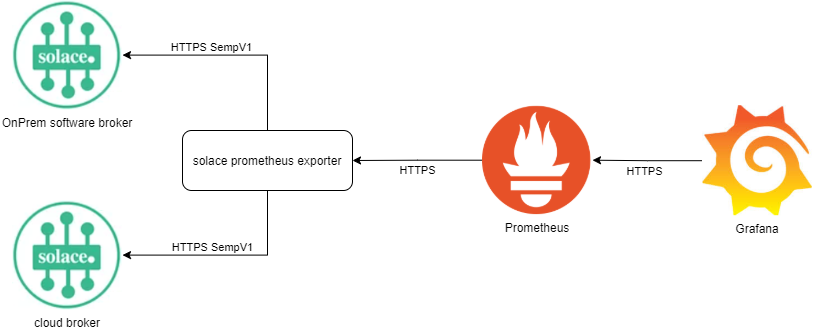
The fastest way to get visibility into your Solace Broker is using Docker:
docker run -d \
  -p 9628:9628 \
  -e SOLACE_SCRAPE_URI=http://<your-broker-ip>:8080 \
  -e SOLACE_USERNAME=admin \
  -e SOLACE_PASSWORD=admin \
  solacecommunity/solace-prometheus-exporter
Access your metrics immediately at http://localhost:9628/solace-std
-
Modular Scraping: Use the
/solaceendpoint with GET parameters to fetch exactly what you need, saving broker resources. -
Enterprise Security: Full support for TLS encryption, OAuth 2.0, and mTLS authentication.
-
Cloud-Native Ready: Optimized for Docker and Kubernetes environments with native Prometheus port registration (9628).
solace_prometheus_exporter -h
usage: solace_prometheus_exporter [<flags>]

Flags:
  -h, --help                     Show context-sensitive help (also try --help-long and --help-man).
      --log.level=info           Only log messages with the given severity or above. One of: [debug, info, warn, error]
      --log.format=logfmt        Output format of log messages. One of: [logfmt, json]
      --config-file=CONFIG-FILE  Path and name of config file. See sample file solace_prometheus_exporter.ini.
The exporter can be configured via Environment Variables, a Config File (.ini), or URL Parameters.
Check out the Configuration Guide for all settings.
The broker provides the following endpoints:
http://<host>:<port>/                    Document page showing list of endpoints
http://<host>:<port>/metrics             Golang and standard Prometheus metrics
http://<host>:<port>/solace-std          legacy, via config: Solace metrics for System and VPN levels
http://<host>:<port>/solace-det          legacy, via config: Solace metrics for Messaging Clients and Queues
http://<host>:<port>/solace-broker-std   legacy, via config: Solace Broker only Standard Metrics (System)
http://<host>:<port>/solace-vpn-std      legacy, via config: Solace Vpn only Standard Metrics (VPN), available to non-global access right admins
http://<host>:<port>/solace-vpn-stats    legacy, via config: Solace Vpn only Statistics Metrics (VPN), available to non-global access right admins
http://<host>:<port>/solace-vpn-det      legacy, via config: Solace Vpn only Detailed Metrics (VPN), available to non-global access right admins
http://<host>:<port>/solace              The modular endpoint
The /solace endpoint is the most flexible way to scrape data. You can filter by VPN, Item, and even specific Metrics.
http://localhost:9628/solace?m.QueueStats=myVpn|BRAVO*
The exporter supports over 30 targets, including:
- System: Health, Version, Disk, Memory, Redundancy.
- VPN: VpnStats, BridgeStats, VpnSpool.
- Clients: ClientStats, ClientConnections, SlowSubscriber.
- Queues: QueueStats, QueueDetails, QueueStatsV2.
For a full list of all targets and their CLI equivalents, see the Configuration Guide.
We welcome contributions! Whether it's a bug report, a new feature, or improved documentation. If you want to build the exporter from source or contribute code:
- Clone the repo
- Run
make build - Run with
./bin/solace_prometheus_exporter --config-file=your_config.ini
Please read the Contribution Guide for our code of conduct and the process for submitting pull requests and issues.
- Video: Integrating Prometheus and Grafana with Solace
- Blog: How to Use OAuth with solace-prometheus-exporter
Distributed under MIT.