Version: v1.2.1
FPS: ~12–16 on CPU (buffalo_s)
Accuracy: 95%+ (w/ anti-spoof model)
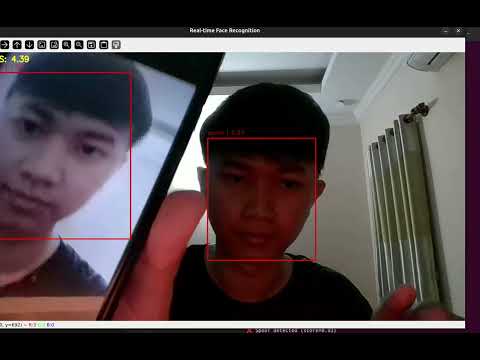
This is a real-time face recognition system with optional anti-spoofing, built using:
- 🤖 InsightFace for face detection & embedding (SCRFD + ArcFace)
- 🎭 MiniFASNet for spoof detection
- ⚡ Cosine similarity for face matching
- 📦 SQLite for local embedding + match logging
- 🧵 Threaded webcam capture for smooth frame processing
- 🔁 Debouncing to prevent noisy log entries
- 🧑💻 Command-line interface for easy control
- 🧠 Unified face detection + embedding (SCRFD + ArcFace)
- 🎭 Real-time spoof detection via MiniFASNet
- 💾 SQLite logging (
name,confidence,timestamp) - ⏱️ FPS counter, Timer profiler, Logger debouncer
- 🔄 Thread-safe video capture
- 🚀 Train spoof detection model with your own dataset
- 🧩 Modular CLI system (register, capture, test)
| Version | Improvements |
|---|---|
| v1.0.0 | Basic YOLOv8 → ArcFace pipeline + SQLite logging |
| v1.1.0 | Unified InsightFace pipeline (SCRFD + ArcFace) |
| v1.1.1 | Threaded webcam + debouncing + faster DB logging |
| v1.2.1 | Anti-spoofing (MiniFASNet), CLI mode switch, self-training |
python main.pyYou'll see an interactive menu:
1. Face Recognition Only
2. Face Recognition + Anti-Spoofing
3. Exit
Each mode provides options:
1. Register face
2. Test
3. Go back
1. Register face
2. Capture real/fake and train
3. Test
4. Go back
# In CLI → Spoofing Mode → "Capture real/fake and train"What it does:
- Opens webcam
- You press:
r→ save real imagef→ save fake image
- After capture, it trains MiniFASNet on the dataset
Output: models/anti_spoofing/minifasnet_custom_data.pth
face-recognition/
│
├── config/              # App settings
├── core/                # FPSCounter, Timer, webcam manager
├── db/                  # SQLite, face embedding + log DB
├── modules/             # FaceDetector, Embedder, Matcher, Spoof model
├── trainers/            # Fine-tuning logic (MiniFASNet)
├── utils/               # Drawing, debouncer, etc.
│
├── main.py              # Entry point (CLI menu)
├── run_recognition.py   # Handles recognition mode
├── run_spoofing.py      # Handles spoofing mode
├── face_registration.py # Register face with name
├── collect_dataset.py   # CLI tool to collect real/fake spoof data
├── requirements.txt
├── requirements_local.txt
├── Dockerfile
├── docker-compose.yml
└── README.md| Mode | FPS | Accuracy | Notes |
|---|---|---|---|
| Face Recognition | ~12–16 | ≥ 95% | ArcFace (buffalo_s) |
| With Spoofing | ~6–7 | ~95% (2-class) | MiniFASNet (fine tuning) |
Tested on CPU only (AMD Ryzen AI 7)
~200 real + 200 fake images (per your dataset)

# Install base deps
pip install -r requirements.txt

# Optional: for dev tools
pip install -r requirements_local.txtMIT © 2025 Sokritha Yen