

Use OpenAI, Anthropic, or Gemini models inside Visual Studio Code
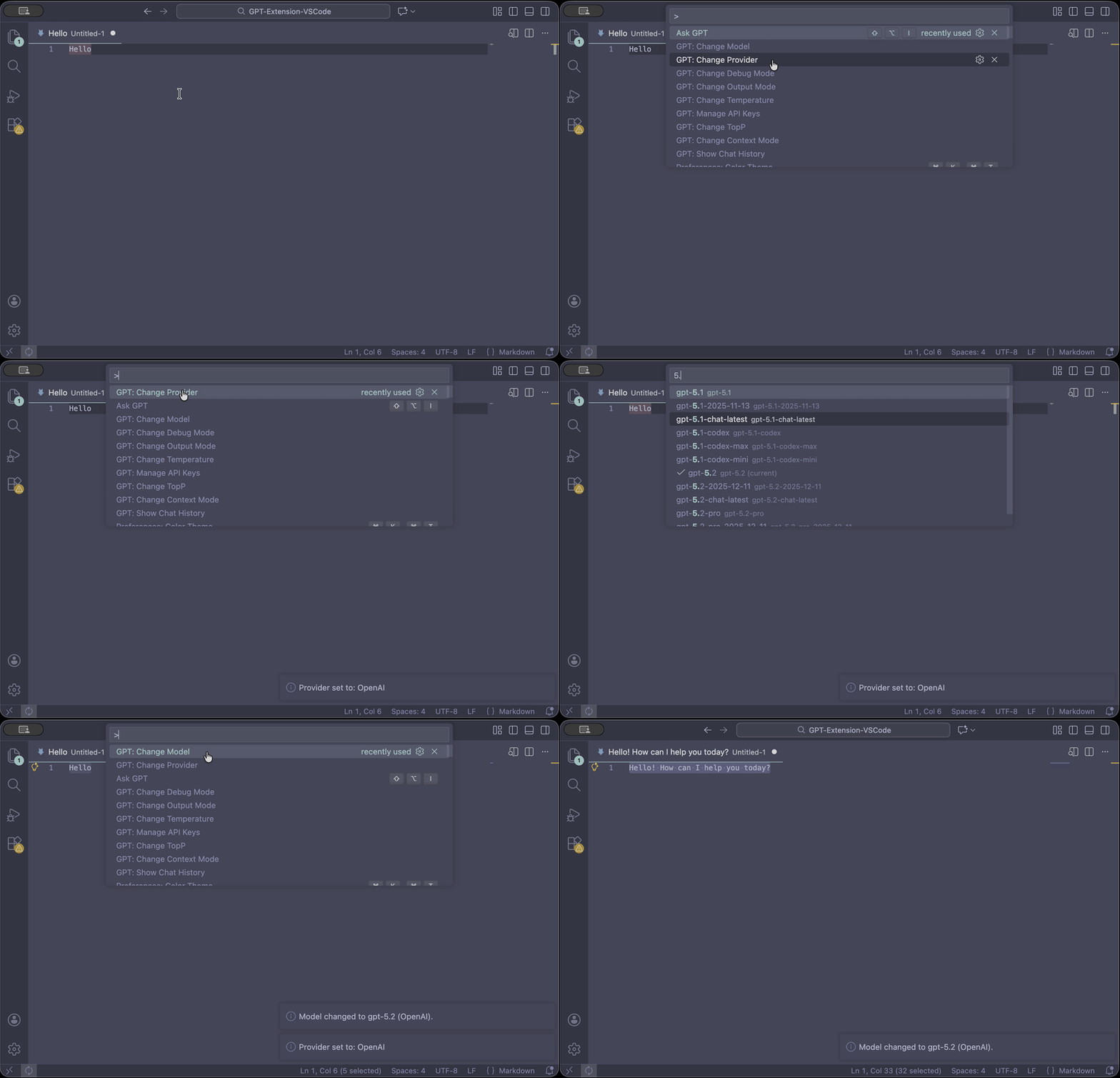
Prerequisite: an API key from your provider (OpenAI / Anthropic / Gemini).
- Run GPT: Setup
- Select any text in the editor
- Press Alt + Shift + I (Ask GPT)
No key set? Ask GPT will prompt you to set one and automatically retry once.
- How it works
- How to use
- 🔑 Setup & API keys
- 🧠 Providers & models
- 🧩 Project instructions (.gpt-instruction)
- 🧰 Commands
- 🛠️ Troubleshooting
- 💙 Support
- License
- You select text (or a full file) → GPT sends that content to the currently selected model/provider and returns a response.
- Responses are shown either in a new file or by replacing the selection (configurable).
- API keys are stored securely in VS Code SecretStorage when available.
- API keys: stored in VS Code SecretStorage when available; otherwise stored for the current session only.
- Logging: debug logs intentionally avoid secrets and prompt contents.
- Chat history: kept in-memory during the session; you can export it manually.
- Select text
- Run Ask GPT (Alt + Shift + I)
Use Ask GPT with File when you need full-file context (refactors, audits, “explain this file”).
One onboarding flow:
- Choose a provider (OpenAI / Anthropic / Gemini)
- Set an API key if missing
- Optionally pick a model
Sets/updates the API key for the currently selected provider.
Manage keys across providers (view status, set/update, remove).
Legacy OpenAI keys previously stored in globalState are migrated automatically when SecretStorage is available.
- Default provider: OpenAI
- Switch provider: GPT: Change Provider
- Change model: GPT: Change Model
- Pick from a built-in list or use Custom model id…
- Refresh model list (online) appears only after an API key is configured for the active provider
Place a .gpt-instruction file in your workspace to automatically prefix each query with project-specific guidance.
-
Multi-root: resolves per workspace folder based on the active document.
-
Lookup modes:
workspaceRoot(default): reads<workspaceFolder>/.gpt-instructionnearestParent: closest parent.gpt-instructionwins
-
Nearest-parent behavior:
- An empty
.gpt-instructionsuppresses parent instructions. - This mode can be more expensive in very large repos (recursive watcher).
- An empty
-
Size limits:
- Content beyond the configured max is truncated with a warning.
- In remote/virtual workspaces, very large files may be ignored for safety.
- GPT: Setup — onboarding
- Ask GPT — run on selection (Alt + Shift + I)
- Ask GPT with File — run on entire file
- GPT: Set API Key — set key for active provider
- GPT: Manage API Keys — manage keys across providers
- GPT: Change Provider
- GPT: Change Model
- GPT: Change Token Limit
- GPT: Change Output Mode — Replace Selection vs New File
- GPT: Change Context Mode — No Context / Last N / Full
- GPT: Set Context Length
- GPT: Export Chat History
- GPT: Show Chat History
- GPT: Clear Chat History
- GPT: Change Debug Mode — show/hide the GPT Debug output channel
- Run GPT: Setup (recommended) or GPT: Set API Key
- Confirm provider via GPT: Change Provider
- Run GPT: Change Model
- If a key is configured, use Refresh model list (online) or choose Custom model id…
- Retry later or check your provider plan/quota.
- OpenAI usage dashboard: https://platform.openai.com/account/usage
- Toggle GPT: Change Debug Mode
- Check the GPT Debug output channel (no secrets or prompts are logged)
If this extension saves you time, you can support ongoing maintenance:
- ☕ Buy Me a Coffee: https://buymeacoffee.com/silasnevstad
- ⭐ GitHub Sponsors: https://github.com/sponsors/silasnevstad
MIT License — see LICENSE