This is a maintained and extended fork of Akiko Takano's Redmine Banner plugin, with support and enhancements for Redmine 4 / 5 / 6.
- Original repository: https://github.com/akiko-pusu/redmine_banner
- This fork: https://github.com/seraph3000/redmine_banner
- Supported Redmine: 4.x / 5.x / 6.x
- Redmine 4 / 5 / 6 support
- Role-based project banners (configure different messages per role)
- Forced display option (always show the banner under certain conditions)
- Role label colorization (show role labels with colors per role)
- Banner macro feature
- Countdown (deadlines, maintenance windows, etc.)
- Date / time
- Environment info (PROD / STG / DEV, etc.)
- User info (last login, login rank, etc.)
- Localization fixes and small UI improvements
README.md is the English documentation. README_ja.md is the Japanese version.
Role-based Project Banners
Display different messages to different roles within the same project.

Banner Macros
Add dynamic content to your banners using macros.
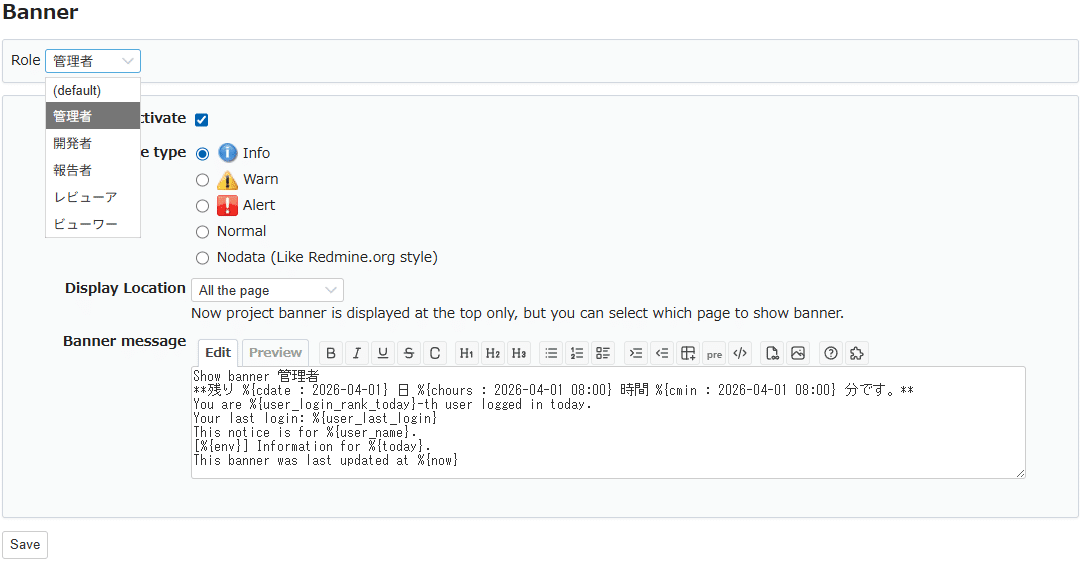
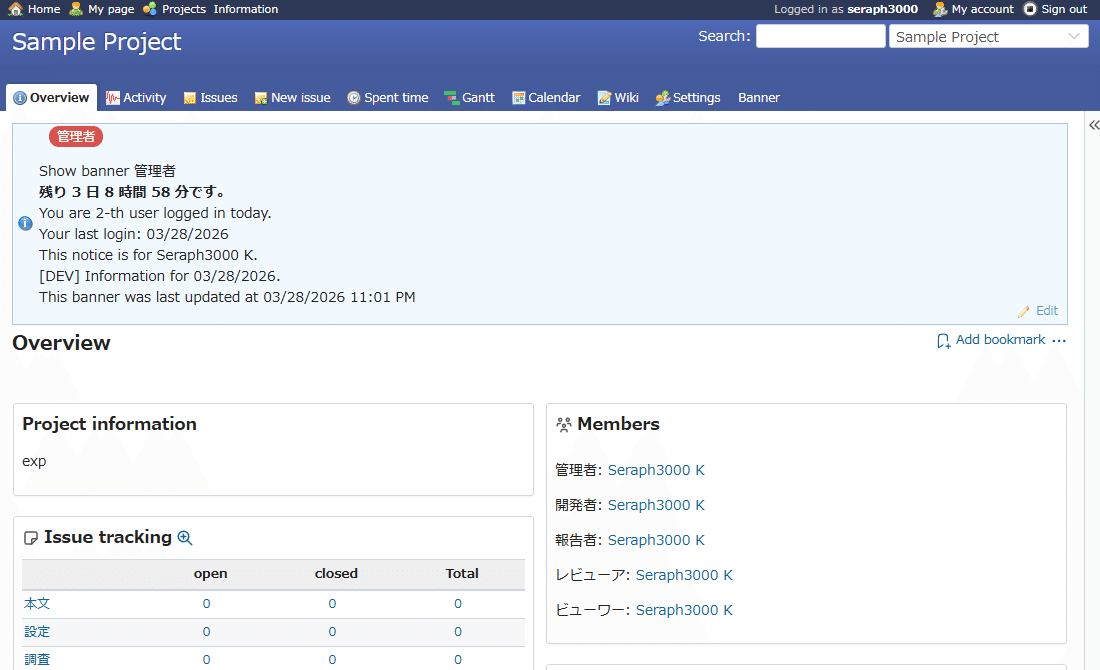
For a detailed introduction (in Japanese), see: https://note.com/taba_muichi/n/ncf2c00d2c54b
-
Copy this plugin into your Redmine
pluginsdirectory.Example:
REDMINE_ROOT/plugins/redmine_banner -
Run the plugin migration.
bundle exec rake redmine:plugins:migrate NAME=redmine_banner RAILS_ENV=production -
Restart Redmine.
Follow the restart procedure for your application server (Passenger / Puma / Thin / Unicorn, etc.).
When upgrading from 0.3.4, you may see an error like the following at boot time:
Zeitwerk::NameError (expected file ... to define ...)
This is due to stricter Zeitwerk autoloading (naming convention checks) in newer Redmine/Rails versions.
Recommended Fix
- Do not overwrite the plugin directory in-place. Remove
plugins/redmine_bannerfirst, then deploy the latest version (clean deploy recommended). - Restart Redmine.
Note
If old files remain, mismatches between file paths and Ruby class/module names can trigger Zeitwerk::NameError.
Run the following command:
bundle exec rake redmine:plugins:migrate NAME=redmine_banner VERSION=0 RAILS_ENV=production- Log in as an administrator.
- Go to Administration → Plugins → Redmine Banner → Configure.
- Turn Enable banner ON, then configure the message, type, position, etc.
- Click Apply to display the banner site-wide.
You can use the banner macros (described below) in the global banner message.
This fork supports expanding special patterns in banner messages as macros, for both global and project banners.
- All macros are written in the format
%{...}. - Many macros are calculated automatically based on the current time and the logged-in user.
- For anonymous users (not logged in), some macros return an empty string.
These macros display the remaining time until a specified date/time. The date/time is interpreted according to Redmine/user timezone settings.
Available macros:
-
%{cdate:YYYY-MM-DD HH:MM}Remaining days until the specified time (integer) -
%{chours:YYYY-MM-DD HH:MM}Remaining hours (0–23) excluding full days -
%{cmin:YYYY-MM-DD HH:MM}Remaining minutes (0–59) excluding full days and hours -
%{ctime:YYYY-MM-DD HH:MM}Total remaining time inHH:MMformat Example:120:15(= 120 hours 15 minutes)
Maintenance will start in
%{cdate:2026-02-02 08:00} days
%{chours:2026-02-02 08:00} hours
%{cmin:2026-02-02 08:00} minutes.
Behavior after the specified time has passed:
cdate/chours/cminreturn0ctimereturns00:00
-
%{today}Displays the current date based on the user's language and date format (internally usesformat_date) -
%{now}Displays the current date and time based on the user's language and time format (internally usesformat_time)
Example:
This notice is as of %{today}.
This banner was updated at %{now}.
%{env}Returns a label based on the Redmine Rails environment, such asPROD,STG,DEV, etc. (exact mapping depends on this fork's implementation)
Example:
[%{env}] Environment notice.
This is useful if you operate multiple instances (production / staging / development) and want to make the environment obvious.
These macros return values only for logged-in users. For anonymous users, they return an empty string.
%{user_name}Returns the display name of the current user (equivalent toUser.current.name)
Example:
Notice for %{user_name}.
%{user_last_login}DisplaysUser.current.last_login_onusing the user's language/time format. Not shown on the login page (/login) (returns empty).
Example:
Your last login: %{user_last_login}
%{user_login_rank_today}Returns "what number login you are today" among users who logged in on the same date. Not shown on the login page (/login) (returns empty). Example:5→ "You are the 5th login today."
Example:
You are the %{user_login_rank_today}th user to log in today.
Note: This macro counts users based on
users.last_login_on. On very large instances, this may add some DB load. Avoid using it if performance is a concern.
This plugin can also be used as a project module.
- In the target project, go to Settings → Modules and enable Banner.
- A Banner tab will appear in the project settings.
- Configure the project-specific banner in the Banner tab.
Project banners can also use the same banner macros as global banners.
This fork allows you to define role-specific banners per project.
- Each banner record has
project_idandrole_id.- When
role_idisNULL, the banner is treated as the default (common to all roles).
- When
- When showing a banner in a project, selection works as follows:
- Get the list of roles the current user has in that project.
- If there are banners for those roles:
- Select one banner based on the highest-priority role, using the Redmine role
position.
- Select one banner based on the highest-priority role, using the Redmine role
- If no role-specific banner matches:
- Show the default banner (
role_id = NULL) if present.
- Show the default banner (
- If nothing matches:
- No banner is shown for that project.
-
For project managers:
"Before starting the sprint, please review unassigned issues."
-
For reporters:
"When creating issues, please fill in the 'Steps to reproduce' field."
If you don't configure any role-specific banners, the plugin behaves like the original: one banner per project.
- Project banners do not support timer settings (start/end datetime).
- Project banners can only be displayed at the top of the project page. Footer display is not supported.
- For Redmine 3.x, use the upstream plugin's older versions (0.1.x series) instead of this fork.
- Fix: global banner could not be saved when edited from a project page as an admin (routing error to
/global_banner/<project>). The global banner now always posts correctly toglobal_banner#update.
- Add banner macro feature for both global and project banners
- Countdown macros:
cdate,chours,cmin,ctime - Date/time:
today,now - Environment:
env - User info:
user_name,user_last_login,user_login_rank_today
- Countdown macros:
- Apply macro expansion to both global and project banners
- Add
role_idcolumn tobannerstable - Add logic to select project banners based on user roles
- Implement role-based banner feature for project banners
- Maintain compatibility with existing installations (works as before when
role_idis not used)
For earlier changes, please see the original plugin's changelog:
- Original repository https://github.com/akiko-pusu/redmine_banner
- This fork https://github.com/seraph3000/redmine_banner
This software is licensed under the GNU GPL v2, same as the original plugin.
- See
COPYRIGHTandCOPYINGfor details. - Original copyright remains with Akiko Takano.
- Additional changes in this fork are provided under the same license.