CLI tool to convert ISO 10303 STEP (AP203/AP214) files to glTF 2.0 using OpenCascade

You need OpenCascade 7.5+ with RapidJSON.
Using system packages (Ubuntu 22.04+ ships OpenCascade 7.5+):
sudo apt-get install libocct-data-exchange-dev libocct-draw-dev rapidjson-dev
Or install build dependencies for compiling OpenCascade from source:
sudo apt-get install ca-certificates \
    libcurl4 libuv1 cmake \
    libfreetype6-dev \
    tcl-dev tk-dev \
    libxmu-dev libxi-dev
To compile from source (on OSX make sure to use gcc, not clang):
git clone https://github.com/Tencent/rapidjson.git
cd rapidjson
git checkout 8f4c021fa2f1e001d2376095928fc0532adf2ae6
mkdir build
cd build
cmake ..
sudo make install
Requires OpenCascade 7.5+ (for RWGltf_CafWriter and Message_ProgressRange API).
To compile from source (on OSX make sure to use gcc, not clang):
git clone https://github.com/Open-Cascade-SAS/OCCT.git
cd OCCT
git checkout V7_9_3
mkdir build
cd build
cmake .. -DUSE_RAPIDJSON:BOOL=ON
sudo make install
To compile static from source (on OSX make sure to use gcc, not clang):
git clone https://github.com/Open-Cascade-SAS/OCCT.git
cd OCCT
git checkout V7_9_3
mkdir build
cd build
cmake .. -DUSE_RAPIDJSON:BOOL=ON -DBUILD_LIBRARY_TYPE:String=Static
sudo make install
To compile from source on OSX:
make
Once you have compiled it, just use it as:
step2gltf STEPFILENAME GLTFFILENAME
File extension defines glTF 2.0 variant:
- ".gltf" - glTF JSON with a separate .bin file for binary resources.
- ".glb" - binary glTF.
You may also need to specify LD_LIBRARY_PATH when OpenCascade is installed to /usr/local
LD_LIBRARY_PATH=/usr/local/lib:$LD_LIBRARY_PATH step2gltf STEPFILENAME GLTFFILENAME
https://github.khronos.org/glTF-Validator/
Binary glTF shall have *.glb extension.
Open https://gltf-viewer.donmccurdy.com and upload result file.
https://github.com/KhronosGroup/glTF/blob/master/README.md
The algorithm of shape triangulation is provided by the functionality of BRepMesh_IncrementalMesh class, which adds a triangulation of the shape to its topological data structure. This triangulation is used to visualize the shape in shaded mode.
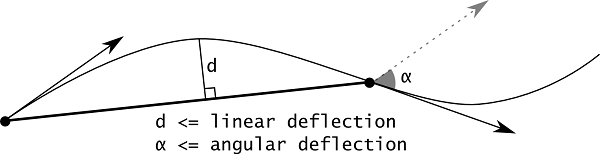
Linear deflection limits the distance between triangles and the face interior.
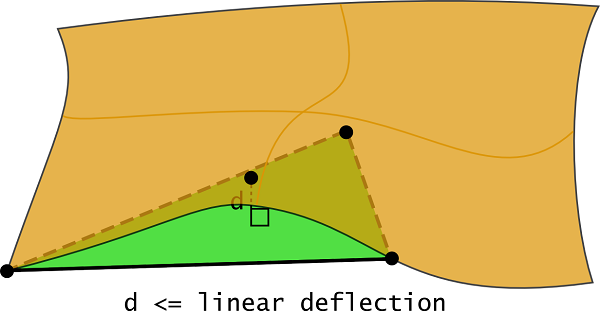
Note that if a given value of linear deflection is less than shape tolerance then the algorithm will skip this value and will take into account the shape tolerance.
The application should provide deflection parameters to compute a satisfactory mesh. Angular deflection is relatively simple and allows using a default value (12-20 degrees). Linear deflection has an absolute meaning and the application should provide the correct value for its models. Giving small values may result in a too huge mesh (consuming a lot of memory, which results in a long computation time and slow rendering) while big values result in an ugly mesh.
For an application working in dimensions known in advance it can be reasonable to use the absolute linear deflection for all models. This provides meshes according to metrics and precision used in the application (for example, it it is known that the model will be stored in meters, 0.004 m is enough for most tasks).