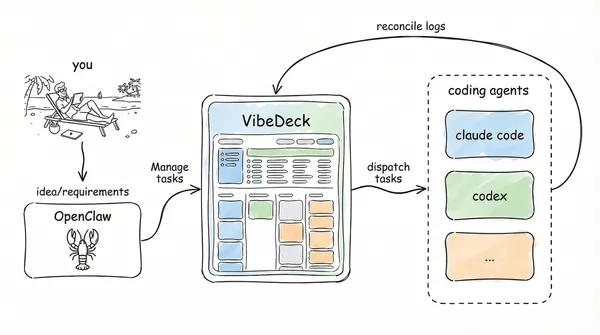
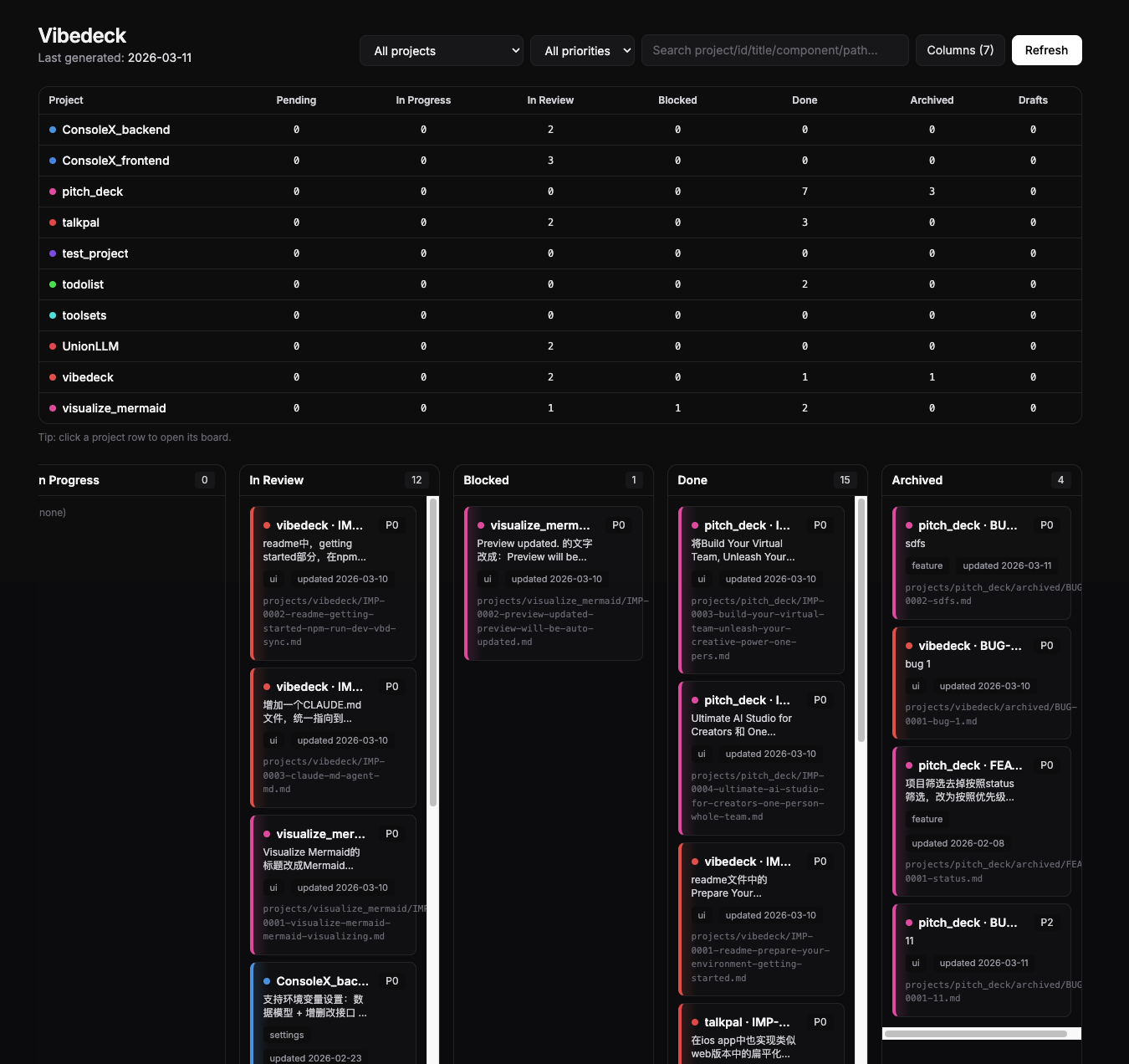
VibeDeck is a local-first Kanban hub built for personal developer workflows. It combines Markdown requirement cards, a visual board, terminal-first operations, OpenClaw-powered natural-language card creation, and automated dispatch to coding agents so you can run a lightweight Vibe Coding workflow across one or more projects.

As an independent developer, I need to manage multiple projects at the same time. I want to capture and raise requirements whenever they appear, without being blocked by location, device, or time. I also need those requirements to become clear enough that an AI Assistant can reliably drive a Coding Agent to begin work, while the overall project management process stays simple, clear, and orderly.
VibeDeck was created from that need: a local-first way to turn scattered ideas into structured cards, structured cards into executable agent tasks, and multiple project streams into one organized Kanban workflow.
- Local-first. Markdown cards, local repositories, and local automation remain at the center of the workflow.
- Agent-friendly. VibeDeck provides a set of
vbdCLI tools designed so Coding Agents can understand and execute work reliably. - Keep it simple. The system stays intentionally lightweight, relying only on files, terminal commands, and a small board rather than a heavy project-management platform. Because it is aimed primarily at solo developers, it also avoids complex role and permission systems.
- Flexible execution. The coding layer can switch between different agent workflows based on your preference, including Codex and Claude Code, and supports both interactive and non-interactive worker launch patterns.
- Capture development requirements at any time.
- Use OpenClaw skills or the
vbdCLI to quickly turn natural-language ideas into requirement cards.
- Use OpenClaw skills or the
- Turn requirements into agent-executable tasks.
- Store specs, acceptance criteria, notes, and status in Markdown so each card stays readable, editable, and easy to refine over time.
- Visualize and manage cards through the board.
- Review progress across projects in the local board, move cards with drag-and-drop, and keep work visible without introducing too much process overhead.
- Dispatch implementation to Coding Agents.
- Use commands such as
vbd roll tickto send ready cards to Codex, Claude Code, or OpenClaw-assisted runners.
- Use commands such as
- Reconcile execution results back into the same system.
- Let VibeDeck sync logs, status, and board summaries back into the local workflow so project management stays simple, clear, and orderly.
flowchart TD
    User([Developer / AI Assistant])

    subgraph Hub [VibeDeck Hub]
        Card[Markdown requirement cards]
        Board(Board dashboard / STATUS.md)
    end

    subgraph TargetRepo [Target project repository]
        Worktree[Dedicated Worktree<br>/.worktrees/]
        Agent[[Coding Agent<br>Codex / Claude Code]]
        Result[Execution results and logs<br>/.prd-autopilot/]
        Git[(Git source code)]
    end

    %% Capture and board management
    User -- "1. Natural-language or CLI card creation\n(vbd add)" --> Card
    Card -- "vbd sync" --> Board
    Board -. "Visual progress" .-> User

    %% Dispatch
    Card -- "2. vbd roll dispatch\n(assign work automatically)" --> Worktree
    Worktree -. "reuse / mount" .-> Git
    Worktree -- "inject context" --> Agent

    %% Agent execution
    Agent -- "3. Modify code / commit / create PR" --> Git
    Agent -- "Produce standardized JSON" --> Result

    %% Reconcile
    Result -- "4. vbd roll reconcile\n(write back status / notes / diagnostics)" --> Card
- Node.js
>=20 - npm
>=10 - Git
- Optional:
tmux, recommended when usingrollwith--runner tmux
- Install dependencies:
npm install- Use the CLI locally from the repository first:
node ./bin/vbd.mjs helpOptional:
- If you want to use the
vbdcommand directly while developing this checkout, runnpm link. - Only run
npm install -g .when you explicitly want to install it as a global command on the current machine.
The examples below use vbd as the CLI command by default. If you have not run npm link or a global install, replace it with node ./bin/vbd.mjs.
- Run an initial sync before opening the Kanban dashboard:
vbd syncThe sync command scans cards under projects/, builds the board summary, and writes the output to STATUS.md and public/status.json.
- Start the Kanban dashboard:
npm run devOpen http://localhost:5566/ in your browser to view the VibeDeck board interface.
Card state is defined by the status field in frontmatter. The supported states are:
Drafts: raw ideas, excluded from daily rotation, and moved toPendingonly after manual review.Pending: ready for auto-dispatch and included in daily rotation.In Progress: currently being handled by a Coding Agent.Blocked: removed from the execution loop because of missing specification, missing acceptance criteria, external dependencies, infrastructure issues, or another blocker.In Review: waiting for human review before moving toDoneor back toPending.Done: completed work that can later be archived.Archived: archived cards, excluded from daily rotation.
stateDiagram-v2
    [*] --> Drafts : Create card (vbd add)
    Drafts --> Pending : Fill in context, AC, and notes

    note right of Pending : Ready to enter the automation pipeline
    Pending --> In_Progress : Dispatch work (vbd roll dispatch)

    state In_Progress {
        [*] --> Setup : Create dedicated Worktree
        Setup --> AgentRun : Start Coding Agent
        AgentRun --> ResultJSON : Produce JSON result
        ResultJSON --> [*]
    }

    note right of In_Progress : Coding Agent automation stage

    In_Progress --> In_Review : Successful execution (Commit/PR) <br/> vbd roll reconcile
    In_Progress --> Blocked : Blocked or failed execution <br/> vbd roll reconcile

    Blocked --> Pending : Human intervention resolves blockers

    In_Review --> Done : Human review approves
    In_Review --> Pending : Rejected or sent back for rework

    Done --> Archived : Project shipped / cleaned up (vbd archive)
    Archived --> [*]
vibedeck-supervisor: integrates with personal AI assistants such as OpenClaw and handles project and requirement-card management. When integrating with OpenClaw, install it into the OpenClaw skills directory.vibedeck-worker: integrates with Coding Agents such as Codex and Claude Code and executes the concrete development task for a single card. Install this skill in the Coding Agent skill directory. See the Codex skills directory and the Claude Code skills directory.
- Use the terminal command
vbd project addto create a project interactively. - After integrating OpenClaw, you can also create a project through an OpenClaw-supported channel. Example prompt:
Please help me create a project in VibeDeck named <project>, map it to the local working directory <workdir>, and then run git init in that directory.
- Use the terminal command
vbd addto create a new requirement card interactively. - You can also create a card through OpenClaw natural-language interaction. Example prompt:
Please help me create a new card in VibeDeck under the <project> project. The title is <title>, the content is <content>, and the initial status is Draft.
Use vbd roll dispatch to dispatch all eligible Pending cards. By default, VibeDeck uses process as the runner and codex as the Coding Agent command. If you prefer Claude Code, switch with --agent claude.
vbd roll dispatchvbd roll dispatch also supports a variety of flags to control dispatch behavior, such as limiting concurrency, targeting a specific project, or choosing the interaction model. See Dispatch Command Details.
If you want a run to count as successful only after it also creates a PR, add --create-pr:
vbd roll dispatch --create-prAfter board tasks finish running, VibeDeck creates a .prd-autopilot directory inside the project repository and writes result files there. Use vbd roll reconcile to read completed worker results and write back card status, notes, and logs.
vbd roll reconcileYou can schedule dispatch and reconcile with cron or launchd. Example:
# Dispatch every 30 minutes
0,30 * * * * vbd roll dispatch --max-parallel 2

# Reconcile every 5 minutes
*/5 * * * * vbd roll reconcileThe simplest way to understand VibeDeck’s vbd CLI is to think of it as three layers of capability:
- Project registry commands: tell the hub which local repositories exist and where they live.
- Card lifecycle commands: create cards, change states, archive cards, and refresh board summaries.
- Dispatch commands: create worktrees, start Coding Agents, reconcile results, and move delivery forward.
| Command | Purpose / Typical use |
|---|---|
vbd help |
Show top-level CLI syntax and aliases. Useful when you need a quick reminder of available entrypoints. |
vbd hub |
Print the absolute paths of the hub root and the projects directory. Useful for verifying which hub the current shell is targeting. |
vbd project add / vbd project new |
Create a project in the hub and optionally register its repo path. Useful when onboarding a new repository into the hub. |
vbd project map add |
Add or update a project → repo mapping. Useful when the project already exists but the repo path is missing or changed. |
vbd project map list |
Print the current mapping table. Useful for checking which local repository each project points to. |
vbd project list |
List known projects in the hub. Useful for seeing which projects are currently managed. |
vbd add / vbd new / vbd create |
Create a new requirement card. Useful for adding a new task to the board. |
vbd move |
Change a card lifecycle state. Useful for manually moving work forward. |
vbd archive |
Remove a card from the active board. Useful when a card is finished or abandoned. |
vbd list pending |
Show cards currently waiting to be dispatched. Useful for checking the next batch before dispatch. |
vbd sync |
Rebuild STATUS.md and public/status.json. Useful when board summaries or dashboard data need refreshing. |
vbd roll dispatch |
Start workers for eligible pending cards. Useful when you want to begin or continue implementation work. |
vbd roll reconcile |
Read worker results and write them back into cards. Useful when you want to pull execution results into the board. |
vbd roll tick |
Run one complete supervisor cycle: reconcile first, then dispatch. Useful when you want a single command to advance the full pipeline. |
Dispatch commands revolve around mapped repositories, isolated worktrees, prompt files, result files, and worker logs. This is the command group that actually drives the Coding Agent.
Start new workers for eligible pending cards.
vbd roll dispatchWhat dispatch does:
- check project mappings, DoR gates, and other prerequisites
- create or reuse a dedicated worktree for each card
- generate prompt, log, and result file paths
- launch workers up to the
--max-parallellimit
What dispatch does not do:
- it does not reconcile completed worker results first
- it does not automatically advance already-finished
in-progresscards
Most commonly used flags:
--project <name>: dispatch only one project--max-parallel <n>: limit the number of active workers--runner tmux|process|command: choose how workers are launched--agent codex|claude: choose the Coding Agent CLI family--agent-invoke exec|prompt: choose non-interactive vs interactive agent behavior--agent-mode <mode>: choose the automation or permission mode--model <id>: pin the agent model--dor strict|loose|off: choose the Definition of Ready gate level before dispatch--create-pr: require a successful run to also create a PR--dry-run: preview only, without changing files or launching workers--sync false: skip the summary refresh after dispatch-related changes
Common examples:
Dispatch only one project:
vbd roll dispatch --project <your_project>Raise the concurrency limit:
vbd roll dispatch --max-parallel 4Preview what would start without actually executing it:
vbd roll dispatch --dry-runRequire every successful worker to also create a PR:
vbd roll dispatch --create-prRun Codex in non-interactive mode without relying on tmux:
vbd roll dispatch --runner process --agent codex --agent-invoke execRun Codex in interactive tmux mode:
vbd roll dispatch --runner tmux --agent codex --agent-invoke promptRun Codex in non-interactive mode while still hosting it inside tmux:
vbd roll dispatch --runner tmux --agent codex --agent-invoke execRun Claude Code in interactive tmux mode:
vbd roll dispatch --runner tmux --agent claude --agent-invoke promptRun Claude Code in non-interactive mode while inheriting the current shell environment as directly as possible:
vbd roll dispatch --runner process --agent claude --agent-invoke execRun Claude Code in non-interactive mode while still hosting it inside tmux:
vbd roll dispatch --runner tmux --agent claude --agent-invoke execRead completed worker artifacts and write results back into cards.
vbd roll reconcileWhat reconcile does:
- keep still-running workers in
in-progress - read worker result JSON and logs
- move successful executions to
in-review - move invalid or blocked executions to
blocked - append summaries, validation details, commit information, and PR information to the card
- add status suffixes to finished
tmuxsessions when applicable
Common examples:
# Reconcile results for only one project
vbd roll reconcile --project <your_project>

# Preview the result first, then perform the real reconcile
vbd roll reconcile --dry-run

# Wait longer before treating an infrastructure issue as blocked
vbd roll reconcile --infra-grace-hours 12Run one full supervisor cycle in a safe order:
- reconcile completed worker results
- continue dispatching newly eligible cards within the concurrency limit
vbd roll tickTypical scheduler usage:
vbd roll tick --project <your_project> --max-parallel 2These two flags are easy to confuse, but they answer two very different questions:
--runner: how VibeDeck launches the worker process--agent-invoke: which interaction model the Coding Agent uses after launch
| Runner | Meaning | Has TTY | Best for |
|---|---|---|---|
tmux |
Start one detached tmux session per card |
Yes | attach/debug workflows, long-running tasks, interactive agents |
process |
Start a detached background process directly | No | simpler exec automation and environment inheritance closer to the current shell |
command |
Execute a custom shell template through --runner-command |
Depends on the template | advanced wrappers, remote launchers, custom orchestrators |
| Invoke | Meaning | Best for |
|---|---|---|
exec |
Non-interactive execution; the agent returns a final result in one run | background automation, process runner, scheduled tasks |
prompt |
Interactive / TUI execution; the agent expects a TTY | tmux-hosted interactive sessions, debugging, human intervention |
Recommended combinations:
tmux + prompt: interactive worker hosted in a detached terminal sessiontmux + exec: valid combination; a non-interactive worker hosted intmuxfor attachability or easier log inspectionprocess + exec: the simplest non-interactive automation pathprocess + prompt: invalid, because prompt mode requires a TTY
When you run vbd roll dispatch, vbd roll reconcile, or vbd roll tick through the vbd wrapper without explicitly providing flags, VibeDeck fills in defaults from the current environment and vbd.config.json.
Current defaults:
- Hub root: auto-detected from
--hub, the current working tree, orvbd.config.json > hubRoot - Project filter: none, so all projects are scanned
- Max parallel workers:
2 - DoR gate:
loose - Runner:
process - tmux session prefix:
vbd - Worktree directory:
.worktrees - Coding Agent:
codex - Coding Agent command:
codex - Agent invocation: Codex defaults to
exec; Claude Code defaults toprompt; Claude defaults toexecwhenrunner=process - Agent mode:
danger - Agent model: not pinned unless you explicitly pass
--model - Create PR:
false - Sync after changes:
true
Out of the box, the default local workflow is best understood as process + codex + exec.
vbd.config.json is optional. The vbd wrapper reads it to provide defaults for vbd roll ... and a small set of hub-level defaults.
Minimal example using the unified agent keys:
{
  "hubRoot": ".",
  "autopilot": {
    "maxParallel": 2,
    "runner": "process",
    "agent": "claude",
    "agentInvoke": "exec",
    "agentMode": "danger",
    "dor": "loose",
    "createPr": false,
    "sync": true
  },
  "editor": "code"
}
Worker credential and runtime guidance:
- keep API tokens and similar sensitive values in environment variables or untracked local files
- if a Coding Agent or PR creation step depends on GitHub authentication, verify that your chosen runner can actually see those credentials
runner=processusually inherits the current shell environment more directlyrunner=tmuxdepends on thetmuxserver environment, so proxy variables or authentication variables may sometimes need to be synchronized intotmux
projects/<project>/*.md: active cards and local workspace dataprojects/<project>/archived/*.md: archived cards_templates/: shared card templatesscripts/: implementation for cards, board generation, and dispatch logicbin/vbd.mjs: CLI wrapper entrypointsrc/: dashboard frontendtests/: Node test suite
npm run dev
npm run build
npm run test
npm run vbd:syncprojects/,STATUS.md, andpublic/status.jsonare ignored by default to avoid leaking local project dataPROJECTS.jsonis the preferred project mapping registry and should usually be written throughvbd project map add- Keep sensitive credentials in environment variables or untracked local files
- Contribution guide:
CONTRIBUTING.md - Security policy:
SECURITY.md
MIT. See LICENSE for details.