A full-stack desktop toolchain for designing, generating, and monitoring interpreted finite state machines. Built as a final project for the ICP course at FIT VUT, it spans multiple disciplines: visual graph modeling, formal syntax parsing (XML), on-the-fly C++ source generation, compiler chaining, and networked Inter-Process Communication (IPC).
It covers the complete engineering loop: define a state machine visually, serialize it to XML, generate a standalone runnable C++ daemon, shell out to compile it, and monitor its real-time telemetry over a TCP socket.
The submitted version received 97/100.
This project can be viewed as an integrated IDE for state logic. The complexity lies in perfectly synchronizing different representations of the same logical machine across multiple layers of abstraction.
- Visual Model (Qt): The user's interaction layer.
- AST & Serialization (XML): The canonical truth of the automaton, separated from GUI concerns.
- Metaprogramming Layer (C++ CodeGen): Translating the model's structure, standard library behaviors, and user-provided C++ snippets into a completely standalone Qt/C++ source file.
- Compilation & OS Process Management: The GUI invokes system compilers (
g++,pkg-config) to build the generated code and spawns it as a child process. - Networked Telemetry (TCP): The GUI connects back to the generated process using a continuously streaming XML protocol, translating backend execution into visual state updates.
The TOF (Timer-Off) example demonstrates the complete lifecycle of an automaton within the tool suite.
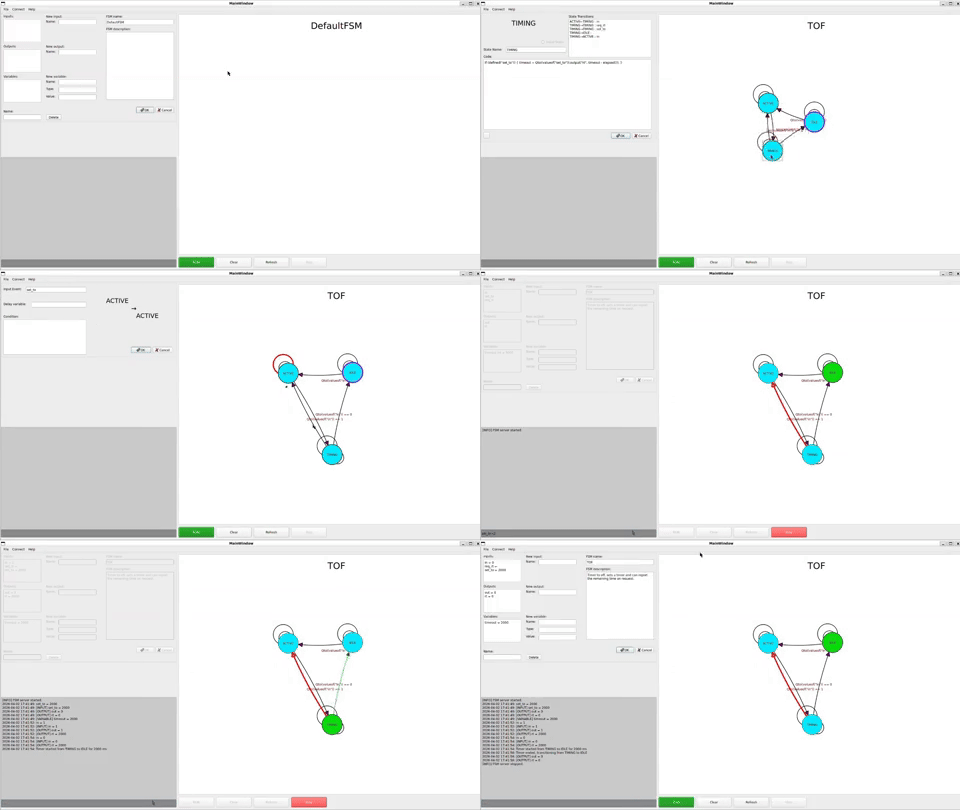
Importing an XML definition completely rebuilds the structural graph of the machine. The parser dynamically instantiates the nodes and edges, preserving inputs, outputs, variables, and inlined C++ routines. Watch as the GUI connects into the live telemetry loop instantly.
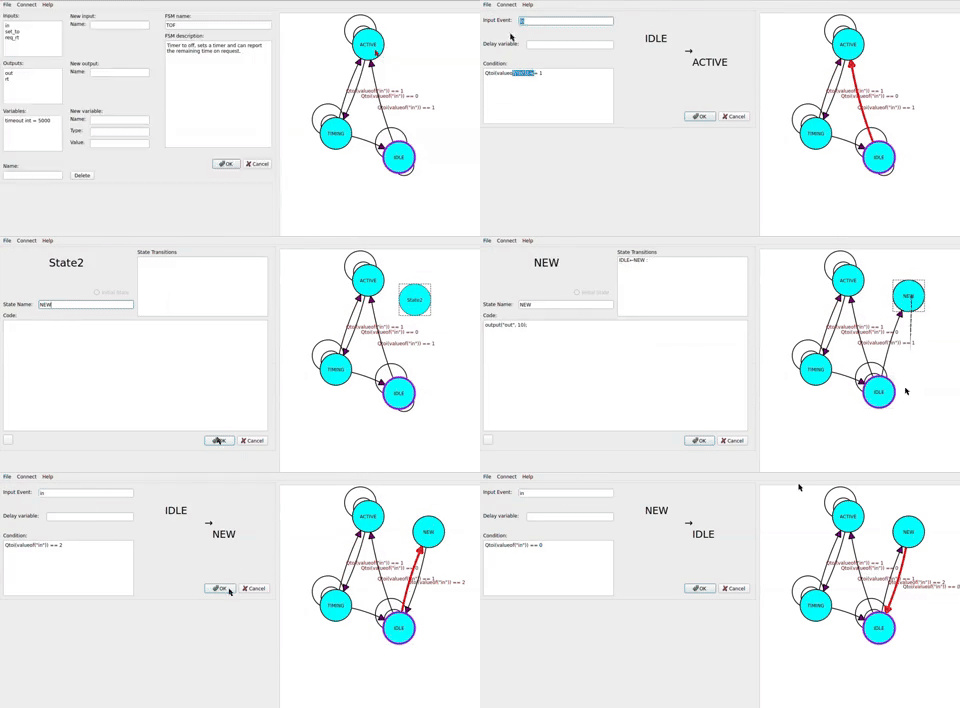
Here, visual interactions seamlessly mutate the underlying abstract structure. By adding new states, setting local state-action code ({ output(...) }), and wiring transitions with guards, the user manipulates the machine logic directly in the editor. Because code and graph share the same data definitions, modifications survive the round-trip through export and re-import.
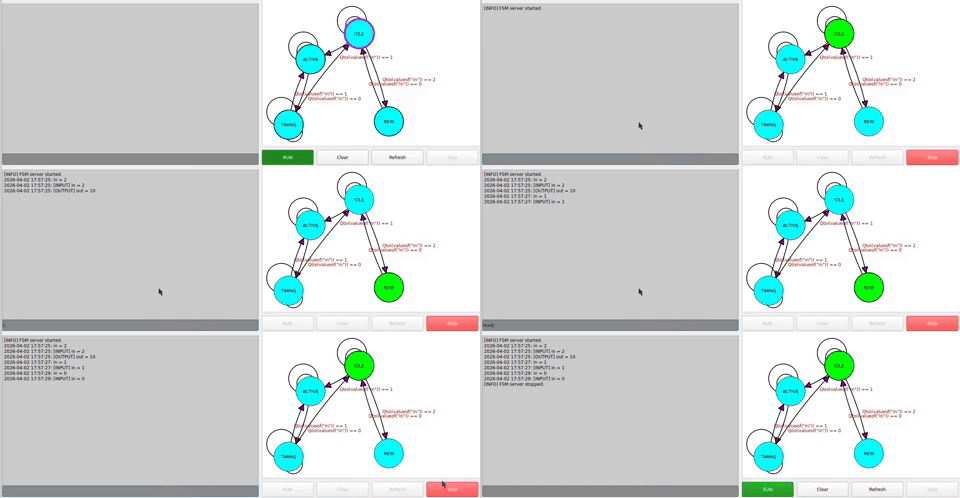
After modifying the automaton, hitting "Run" triggers a deeply technical sequence beneath the hood: the model is exported to XML, cross-compiled via the code generator into C++, compiled by the system toolchain, executed as a background process, and immediately connected-to by the Qt graphical monitor. The new visual branch lights up as execution routes through it.
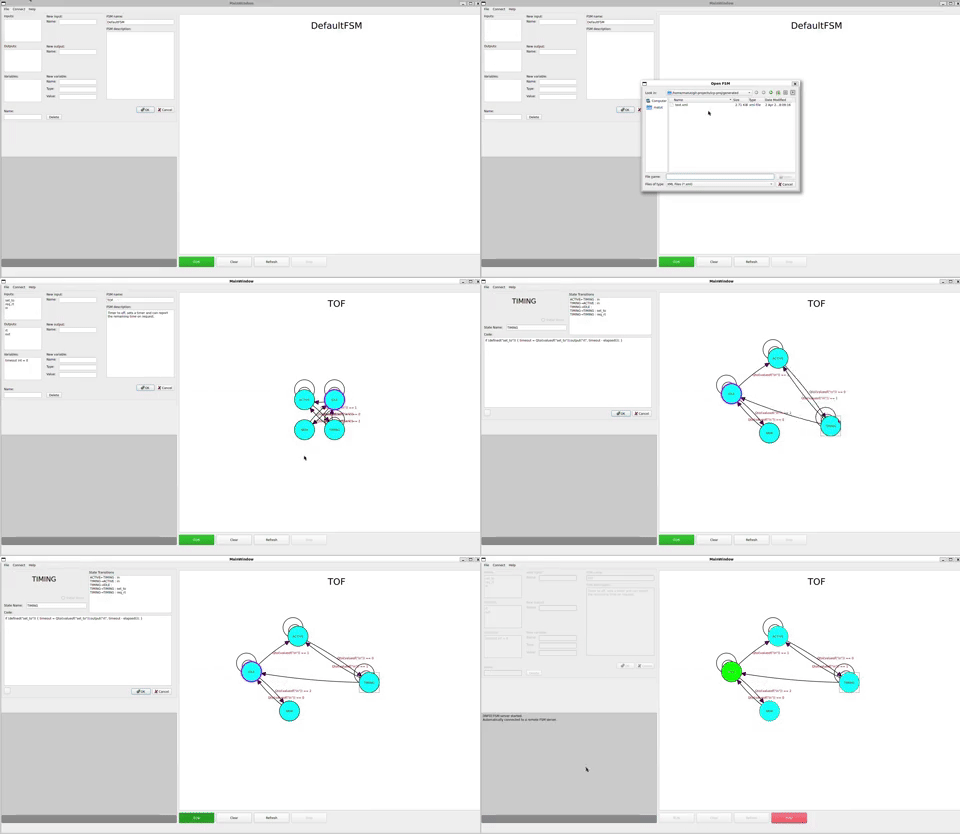
Because the canonical format is an extensible XML representation, picking up work from previous states is trivial. This demonstrates importing the edited TOF machine back into a fresh instance of the workspace.
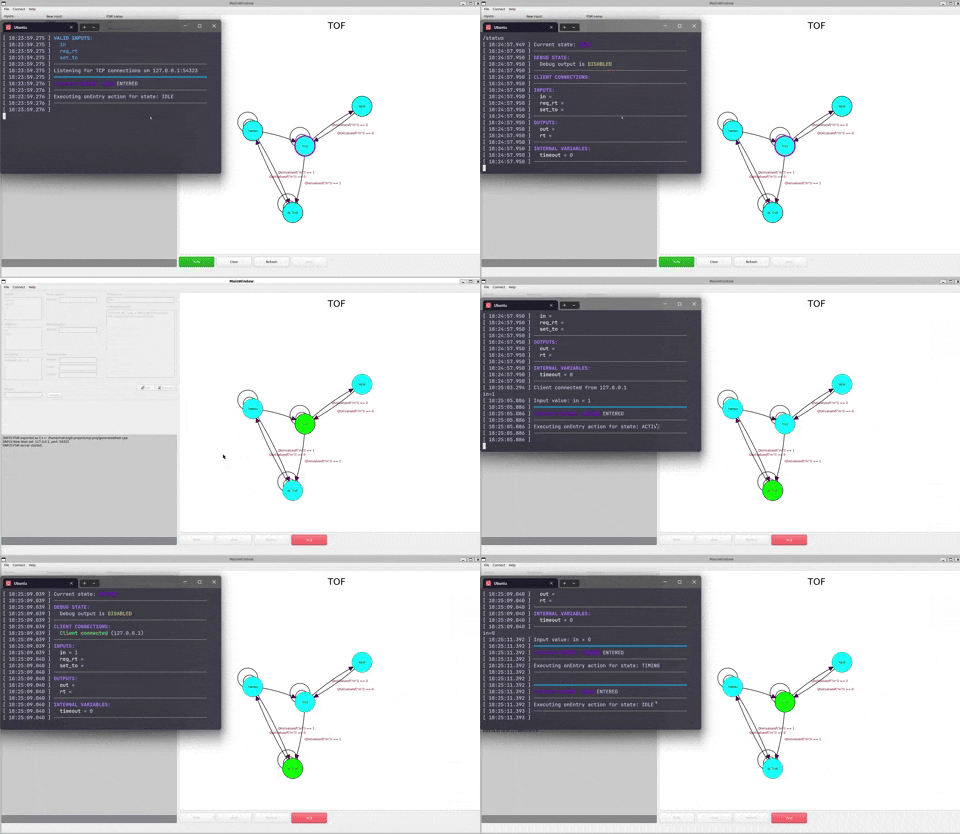
This highlights the IPC decoupling. The GUI is not executing the automaton. It is merely a TCP client attaching itself to a socket opened by the generated standalone execution daemon. The executable streams XML packets (timer updates, state changes) which the GUI parses and projects back onto the visual diagram in real time.
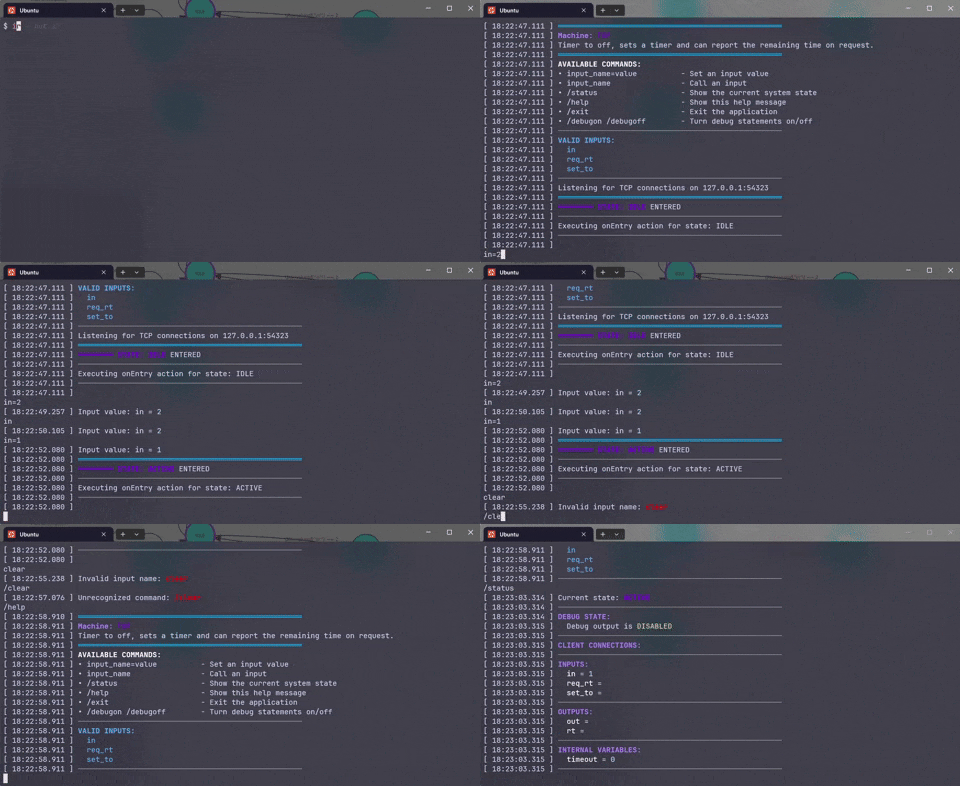
Because the generated daemon handles its own logic, it offers a CLI interface for inputs. This empowers scriptable testing or integration with outside processes that do not require any graphical overhead.
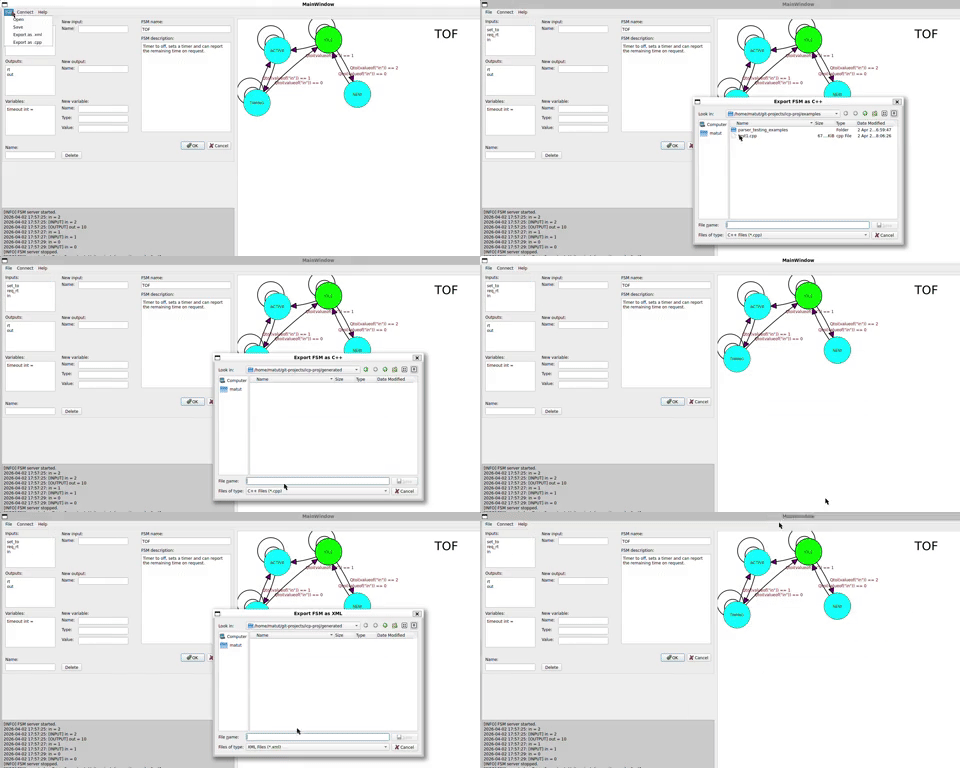
The automaton can be cleanly emitted as a .cpp payload. This file contains the state machine classes, the internal variable routing, a standalone TCP server, and an input parser block that handles external triggers.
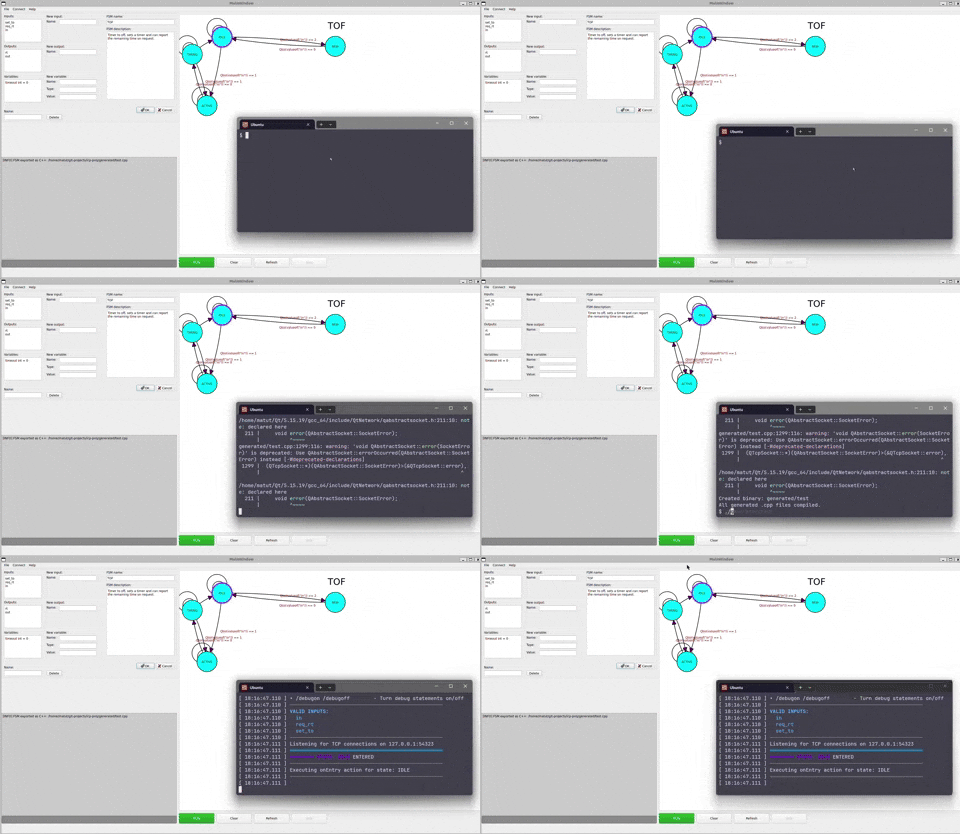
Once generated, the C++ interpreter is completely decoupled from the editor. It brings its own event loop, terminal parser, networking layer, timer management, and state machine transitions.
All these systems orchestrate around this simple plaintext root definition. It is readable, diffable, and completely independent of any proprietary binary wrappers.
<automaton name="TOF">
  <inputs>
    <input name="in"/>
    <input name="set_to"/>
  </inputs>
  <outputs>
    <output name="out"/>
    <output name="rt"/>
  </outputs>
  <variables>
    <variable name="timeout" type="int" value="5000"/>
  </variables>
  <transition from="IDLE" to="ACTIVE">
    <condition event="in"><![CDATA[Qtoi(valueof("in")) == 1]]></condition>
  </transition>
</automaton>The project implements a Moore-type interpreted finite state machine, extended heavily to function as a software controller. In practice, it mirrors an Execution Control Chart (ECC) found in IEC 61499 industrial control systems.
Key behavioral upgrades:
- C++ Native Actions: States run arbitrary C++ on entry.
- Complex Guardianship: Transitions rely on real-time hardware variables, delays, input triggers, and boolean evaluations.
- Dynamic Scheduling: Timed delays (
@ timeout) are embedded in the automaton model, granting proactive reactivity (it takes action based on its own internal clocks rather than waiting for inputs). - Embedded Abstraction: The code generator supplies a helper DSL inside the C++ execution environment (
valueof(),defined(),elapsed(), andoutput()), making the small C++ entry snippets powerful and succinct.
Because the GUI and the executing runtime are completely severed by a network boundary, they speak a strict XML dialect over TCP. This has huge implications for the generalizability of the runtime:
A client drives the machine with generic commands:
<command type="set"><name>in</name><value>1</value></command>
<command type="call"><name>req_rt</name></command>
<command type="status"></command>
And the executing daemon responds asynchronously with lifecycle state updates:
<event type="timerStart"><from>TIMING</from><to>IDLE</to><ms>5000</ms></event>
<event type="output"><name>out</name><value>1</value></event>
This ensures that the generated interpreter could theoretically be managed by a web server, a Python testing script, or another industrial standard dashboard with zero modification to the FSM.
The project successfully divides responsibilities to prevent monolithic spaghetti code, distributing subsystems across different logical domains (parsing, GUI, networking, OS processes):

| Component Level | Responsibility & Field |
|---|---|
Backend Model (fsm, state) |
In-memory object graphs representing states and transition routes. |
Serialization (xmlparser) |
DOM parsing and writing to establish the structure as the canonical source of truth. |
Code Generation (CodeGenerator) |
Compiler meta-design. Stringifying logical schemas, transitions, and inline C++ actions into compilable macros. |
Networking (GuiClient) |
Managing async TCP socket I/O in Qt to bridge external telemetry back to the GUI. |
Frontend UI (AutomatView, etc) |
Qt Graphics / Canvas implementation and interactive state diagrammatics. |

Rather than duplicating deep technical decisions here, please refer to doc/architecture.pdf for a rigorous breakdown. Exploring that document is recommended to understand:
- TCP/XML Protocol Specification: Network framing, keep-alives, broadcast mechanics, and full sequence diagrams mapping how the GUI acts as an IPC client.
- Qt State Machine Extension Details: How the custom FSM class hierarchy wraps native Qt states to incorporate runtime data, timers, and variables independently of the UI.
- Formal XML Schema Requirements: The structural rules behind serialization and deserialization of the Moore machine format.
- Extensive Component Context: Thorough details on GUI contextual editing states, and code generation translation.
Building a pipeline this interconnected required tapping into an array of ecosystems:
- C++17 for strict type safety and modern language features natively mapped in user scripts.
- Qt 5 (Widgets, Core, Gui, Network, Xml) for GUI scaffolding, TCP server bindings, DOM manipulation, and asynchronous event loops.
- CMake / Make for reliable multi-stage daemon compilation.
- Doxygen for rigorous API generation.
- Linux / GCC (specifically modeled around FIT/Merlin expectations) to harness low-level process spawning (
sys/wait.h,unistd.h) underneathQProcess.
-
Qt 5 development libraries
-
cmake,make,g++,pkg-config,doxygen
# Build the editor toolkit
make

# Run the unified GUI
make run

# Build all generated independent daemons stored in generated/
make gen

# Export API references
make doxygenThe repository ships with several example automata that cover both simple and timed behavior:
| Example | What it demonstrates |
|---|---|
Addition.xml |
Event-driven arithmetic with a short delayed reset |
CounterWithReset.xml |
Stateful counting logic |
EdgeDetector.xml |
Input-change driven behavior |
TimeoutOnly.xml |
Minimal timer-based transition flow |
Timers.xml |
Multiple timer-oriented transitions |
TOF5.xml, TOF5s.xml |
Timer-off style control logic |
TrafficLight.xml |
A larger timed automaton with several outputs and phases |
(Additional parser tests are housed under examples/parser_testing_examples/)
This project was developed around the FIT/Merlin Linux environment and the build files currently reflect that. In particular:
CMakeLists.txtpoints to a specific Qt 5.9.2 installation pathmake runsetsQT_QPA_PLATFORM_PLUGIN_PATHfor that same environment- the generated runtime build path also assumes a Qt 5.9 style setup available through
pkg-config
So if you are building outside that environment, expect to adjust the Qt paths first. The code itself is standard Qt/C++, but the current build configuration is opinionated about where Qt lives.
- The inscription language is intentionally limited to small synchronous C++ snippets, it is not a full embedded scripting environment
- All generated variables are global in the runtime layer, so naming discipline matters
├── src/
│   ├── backend/         # FSM model, XML parser, generator, client, logger
│   ├── frontend/        # Qt GUI, scene editor, state and transition items
│   └── main.cpp         # Application entry point
├── examples/            # Sample automata and parser test inputs
├── doc/                 # Generated docs and architecture.pdf
├── Makefile             # Main developer entry point
├── CMakeLists.txt       # Qt/CMake project definition
├── Doxyfile             # Doxygen configuration
└── README.txt # Original short course-project summaryBuilt by:
| Name | Main focus |
|---|---|
| Matúš Csirik | Project lead, code generation, runtime client, documentation |
| Lukáš Pšeja | FSM core model, parser, logging |
| Václav Sovák | GUI diagram editor, runtime interaction |