6. Contribute Your Code
It would be appreciated if you would like to contribute to this project.
Before starting your development, please refer to the class architecture below to understand how PyDynamoDB works:
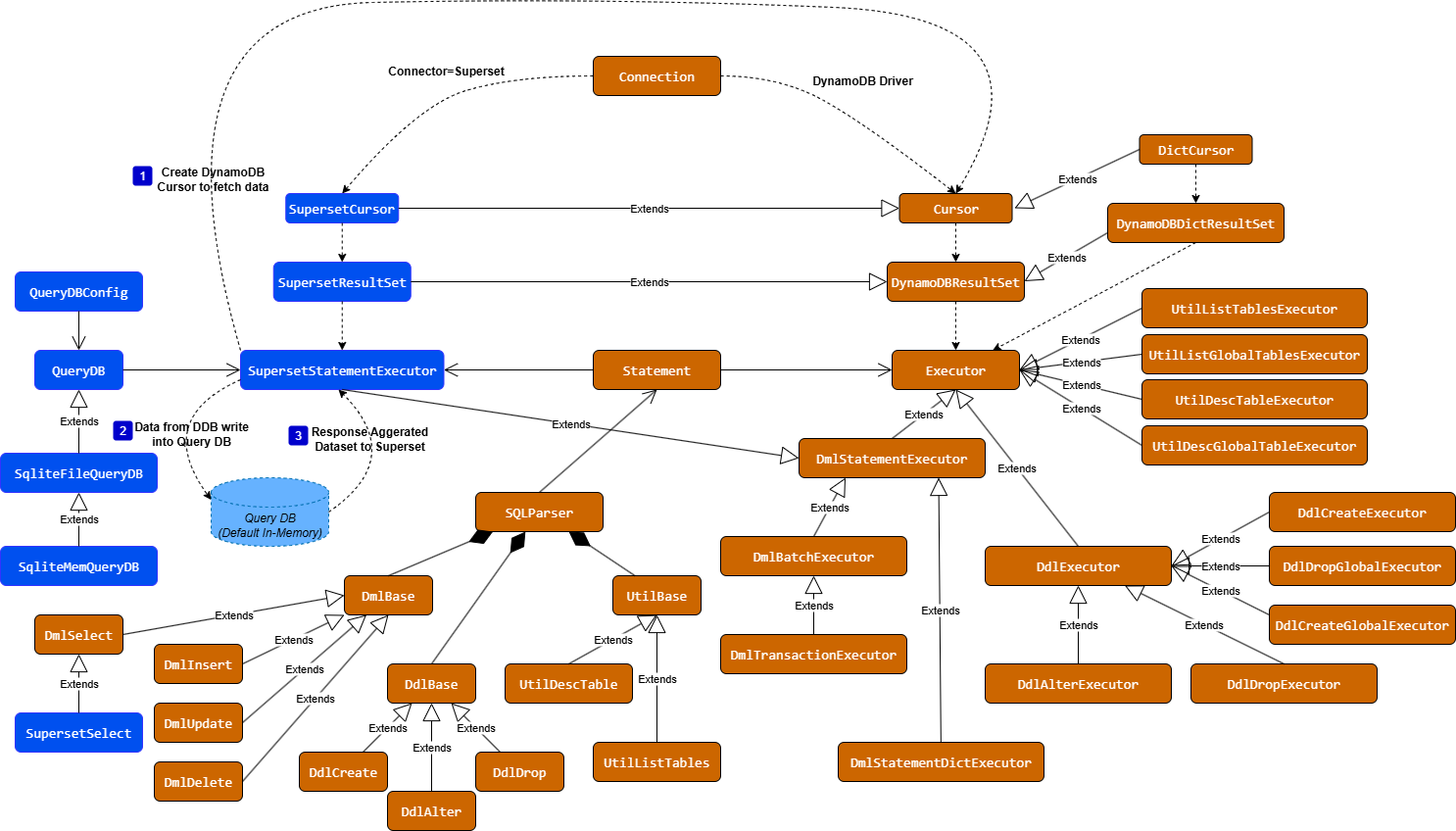
To run the test cases of PyDynamoDB project, you have to set the environment variables appropriately.
# Use Local or Remote DDB
USE_LOCAL_DDB=true

# Remote DDB Settings
AWS_DEFAULT_REGION=<<Remote Region Name>>
AWS_ACCESS_KEY_ID=<<Access Key>>
AWS_SECRET_ACCESS_KEY=<<Secret Key>>

# Local DDB
LOCAL_DDB_ENDPOINT_URL=http://localhost:8000

# Sqlite by default. If customized QueryDB, set PYDYNAMODB_QUERYDB_CLASS
PYDYNAMODB_QUERYDB_TYPE=sqlite
# Customized QueryDB Class if not sqlite
PYDYNAMODB_QUERYDB_CLASS=module_name:class_name
# QueryDB URL. If sqlite is specified, :memory: or path/to/query.db set here
PYDYNAMODB_QUERYDB_URL=:memory:
# Batch size when data load into QueryDB
PYDYNAMODB_QUERYDB_LOAD_BATCH_SIZE=200
# Expired time of data (seconds)
PYDYNAMODB_QUERYDB_EXPIRE_TIME=30
# Purge data if exceed the purge time (seconds)
PYDYNAMODB_QUERYDB_PURGE_TIME=86400

# SQLAlchemy Setting
SQLA_FOLDER=<<SQLAlchemy Code Repo (>=1.0.0, <2.0.0)>>
SQLA_SRC=${SQLA_FOLDER}/lib
SQLA_LIBS=${SQLA_FOLDER}/venv/lib/site-packages
PYTHONPATH=${SQLA_LIBS};${SQLA_SRC};${WORKSPACE_FOLDER};If you are using VS Code, just put all the Environment Variables above into .env file. Then place .env file into the root folder of workspace.
Here is a sample of .env file as minimum requirements
USE_LOCAL_DDB=true
AWS_DEFAULT_REGION=us-east-1
AWS_ACCESS_KEY_ID=dummy
AWS_SECRET_ACCESS_KEY=dummy
LOCAL_DDB_ENDPOINT_URL=http://localhost:8000Use black & flake8 to format source code before code commit.
black pydynamodb
flake8 pydynamodbInstall Local DDB, please see: Deploying DynamoDB locally on your computer. If you want to run tests with local DDB, please make sure environment variables are set properly.