Django REST API for personal finance tracking. Build and manage portfolios, accounts, and transactions with powerful financial analytics. Deployed on Render's Always Free tier with PostgreSQL.
🎬 Watch Demo Video | 🚀 Live API | 📦 Frontend Repo | 🔧 Tech Stack
🔌 Backend API: https://bucket-vault-backend.onrender.com
🌐 Frontend App: https://bucket-vault-frontend.vercel.app
📚 Frontend Repo: https://github.com/omrawal/bucket-vault-frontend
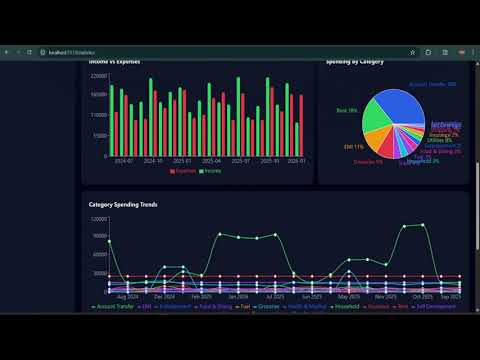
Watch the full demo: https://www.youtube.com/watch?v=84DRh-DOnF8
See how the backend powers:
- Portfolio & account management
- Real-time transaction processing
- Account balance auto-updates
- Statistics & analytics queries
- 1,500+ dummy transactions (20 months of data)
✨ Portfolio Management - Create multiple financial portfolios with custom buckets
✨ Account System - Support for Bank, DMAT, and Physical Asset accounts
✨ Smart Categories - Default + custom transaction categories (Income/Expense/Transfer)
✨ Transaction Tracking - Full transaction history with automatic balance updates
✨ Transfer Support - Create linked debit/credit transactions for inter-account transfers
✨ Balance Snapshots - Monthly end-of-day balance history for net worth tracking
✨ Statistics API - Aggregated financial data for dashboards and charts
✨ Signals-Based - Auto-generate portfolio defaults on creation
✨ PostgreSQL Ready - Full-featured SQL database on Render free tier
✨ CORS Configured - Secure cross-origin requests from frontend
✨ Pagination & Filtering - Efficient API queries with date range, account, and category filters
| Layer | Technology |
|---|---|
| Framework | Django 4.x + Django REST Framework |
| Database | PostgreSQL (Render free tier) |
| Auth | Token authentication (built-in) |
| Serialization | DRF Serializers |
| Signal Handlers | Django signals for auto-balance updates |
| Management Commands | Seed dummy data (1,500+ transactions) |
| Deployment | Render (Always Free tier) |
| Web Server | Gunicorn |
| Static Files | WhiteNoise |
| Frontend | React 18.x + Vite (Vercel) |
bucket-vault-backend/
├── finance/
│   ├── migrations/              # Database migrations
│   │   ├── 0001_initial.py
│   │   ├── 0002_add_fields.py
│   │   └── ...
│   ├── management/
│   │   └── commands/
│   │       └── populate_dummy_data.py   # Seed 1,500 transactions
│   ├── models.py               # Core models
│   │   ├── Portfolio
│   │   ├── Bucket
│   │   ├── AccountType
│   │   ├── AccountCategory
│   │   ├── Account
│   │   ├── TransactionCategory
│   │   ├── Transaction
│   │   └── BalanceSnapshot
│   ├── views.py                # API endpoints
│   ├── serializers.py          # DRF serializers
│   ├── urls.py                 # URL routing
│   ├── signals.py              # Signal handlers for auto-updates
│   ├── tests.py                # Unit & integration tests
│   ├── admin.py                # Django admin config
│   └── apps.py
├── finance_project/
│   ├── settings.py             # Django settings (with Render config)
│   ├── urls.py                 # Main URL config
│   ├── wsgi.py                 # WSGI entry point
│   └── asgi.py
├── manage.py                   # Django management CLI
├── requirements.txt            # Python dependencies
├── build.sh                    # Render build script
├── .env.example                # Environment variables template
├── .gitignore
└── README.md
- Python 3.10+
- PostgreSQL 12+ (or SQLite for local development)
- pip and venv
- Git
git clone https://github.com/omrawal/bucket-vault-backend.git
cd bucket-vault-backendpython -m venv venv
# On macOS/Linux:
source venv/bin/activate
# On Windows:
venv\Scripts\activatepip install -r requirements.txtcp .env.example .envEdit .env:
# Django
SECRET_KEY=your-secret-key-here
DEBUG=True
ALLOWED_HOSTS=localhost,127.0.0.1

# Database (local development with SQLite)
DATABASE_URL=sqlite:///db.sqlite3

# CORS (for React frontend)
CORS_ALLOWED_ORIGINS=http://localhost:5173,http://localhost:3000

# Optional
PYTHON_VERSION=3.11.0
Generate a secure SECRET_KEY:
python -c 'from django.core.management.utils import get_random_secret_key; print(get_random_secret_key())'python manage.py migratepython manage.py createsuperuser
# Follow prompts to create admin userPopulate with 1,500+ realistic transactions (June 2024 - Jan 2026):
# Clear existing data and repopulate
python manage.py populate_dummy_data --clear

# Or just add to existing
python manage.py populate_dummy_data
This creates:
- 1 Portfolio with default buckets & account types
- 7 accounts (HDFC, SBI, ICICI FD, Zerodha equity/MF/SGB, Gold)
- 1,500+ transactions with realistic patterns:
- Monthly salary (₹85-95k)
- Quarterly bonuses (₹30-50k)
- Recurring expenses (rent, utilities, groceries, fuel)
- Investment SIPs and equity purchases
- Inter-account transfers
- 20 monthly balance snapshots per account
python manage.py runserverAPI available at http://localhost:8000
Browse API:
- Dashboard: http://localhost:8000/
- Admin: http://localhost:8000/admin
# Development
python manage.py runserver              # Start dev server (port 8000)
python manage.py shell                  # Django interactive shell

# Database
python manage.py migrate                # Apply migrations
python manage.py makemigrations         # Create new migrations
python manage.py showmigrations         # Show migration status

# Data
python manage.py populate_dummy_data    # Seed dummy data
python manage.py populate_dummy_data --clear  # Clear + reseed

# Admin
python manage.py createsuperuser        # Create admin user
python manage.py changepassword         # Change user password

# Testing
python manage.py test                   # Run all tests
python manage.py test finance           # Run app tests

# Production
python manage.py collectstatic          # Collect static files
gunicorn finance_project.wsgi:application # Run production serverContainer for all user financial data. Each user can have multiple portfolios.
class Portfolio(models.Model):
    name = models.CharField(max_length=100)
    description = models.TextField(blank=True)
    user = models.CharField(default="demo_user", max_length=100)
    created_at = models.DateTimeField(auto_now_add=True)
Signals: On creation, auto-generates default buckets, account types, categories.
Bank accounts, investment accounts, or physical assets.
class Account(models.Model):
    portfolio = models.ForeignKey(Portfolio, ...)
    name = models.CharField(max_length=100)  # "HDFC Savings"
    category = models.ForeignKey(AccountCategory, ...)
    bucket = models.ForeignKey(Bucket, ...)  # "Growth" or "Safety"
    balance = models.DecimalField(max_digits=12, decimal_places=2)
Features:
- Balance auto-updates on transaction creation (via signals)
- Supports multiple account types (Bank, DMAT, Physical)
- Organized by bucket for financial planning
Income, expense, or internal transfer record.
class Transaction(models.Model):
    TYPE_CHOICES = [('Credit', 'Credit'), ('Debit', 'Debit')]

    account = models.ForeignKey(Account, ...)
    date = models.DateField()
    type = models.CharField(max_length=10, choices=TYPE_CHOICES)
    amount = models.DecimalField(max_digits=12, decimal_places=2)
    category = models.ForeignKey(TransactionCategory, ...)
    note = models.CharField(max_length=200, blank=True)
Features:
- Indexed on account + date for fast queries
- Category filtering for analytics
- Auto-linked balance updates
Categorize income, expenses, and transfers.
class TransactionCategory(models.Model):
    CATEGORY_TYPES = [
        ('Income', 'Income'),
        ('Expense', 'Expense'),
        ('Transfer', 'Transfer'),
    ]

    portfolio = models.ForeignKey(Portfolio, ...)
    name = models.CharField(max_length=50)
    type = models.CharField(choices=CATEGORY_TYPES)
    description = models.TextField(blank=True)
    is_default = models.BooleanField(default=False)
Defaults auto-created:
- Income: Salary, Bonus, Dividend, Interest, Freelance, Refund, etc.
- Expense: Food, Rent, EMI, Travel, Shopping, Insurance, etc.
- Transfer: Account Transfer, Wallet Transfer
Monthly balance history for net worth tracking and trends.
class BalanceSnapshot(models.Model):
    account = models.ForeignKey(Account, ...)
    balance = models.DecimalField(max_digits=12, decimal_places=2)
    snapshot_date = models.DateField()
    created_at = models.DateTimeField(auto_now_add=True)

    class Meta:
        unique_together = ("account", "snapshot_date")
        indexes = [
            models.Index(fields=['account', 'snapshot_date']),
        ]
Auto-created on each transaction with update_or_create.
GET    /api/portfolios/                    # List all portfolios
POST   /api/portfolios/                    # Create portfolio
GET    /api/portfolios/{id}/               # Get portfolio details
PUT    /api/portfolios/{id}/               # Update portfolio
DELETE /api/portfolios/{id}/               # Delete portfolio
Example:
curl -X POST http://localhost:8000/api/portfolios/ \
  -H "Content-Type: application/json" \
  -d '{
    "name": "My Portfolio",
    "description": "Personal finance tracker"
}'GET /api/accounts/?portfolio_id=1 # List accounts for portfolio
POST /api/accounts/ # Create account
GET /api/accounts/{id}/ # Get account details
PUT /api/accounts/{id}/ # Update account
DELETE /api/accounts/{id}/ # Delete accountExample:
curl -X POST http://localhost:8000/api/accounts/ \
  -H "Content-Type: application/json" \
  -d '{
    "portfolio": 1,
    "name": "HDFC Savings",
    "category": 1,
    "bucket": 1,
    "balance": "50000.00"
}'GET /api/transactions/?account_id=1&date_from=2024-01-01 # List with filters
POST /api/transactions/ # Create transaction
GET /api/transactions/{id}/ # Get transaction details
PUT /api/transactions/{id}/ # Update transaction
DELETE /api/transactions/{id}/ # Delete transactionFilters:
account_id- Filter by accountdate_from- Start date (YYYY-MM-DD)date_to- End date (YYYY-MM-DD)category_id- Filter by category
Example:
curl -X POST http://localhost:8000/api/transactions/ \
  -H "Content-Type: application/json" \
  -d '{
    "account": 1,
    "date": "2026-02-12",
    "type": "Credit",
    "amount": "90000.00",
    "category": 1,
    "note": "Monthly salary"
}'POST /api/transfers/ # Create transfer between accountsRequest:
{
  "from_account_id": 1,
  "to_account_id": 2,
  "amount": "15000.00",
  "date": "2026-02-12",
  "note": "MF SIP transfer"
}
Response: Creates 2 transactions automatically:
- Debit from
from_account - Credit to
to_account
GET /api/statistics/?portfolio_id=1&date_from=2024-01-01&date_to=2026-02-12Response:
{
  "total_income": 2410000.00,
  "total_expenses": 3086350.00,
  "net_cash_flow": -676350.00,
  "current_net_worth": 580000.00,
  "current_net_worth_change_percent": 34.88,
  "monthly_breakdown": [
    {
      "month": "2024-06",
      "income": 90000.00,
      "expenses": 125000.00,
      "net": -35000.00
    },
    // ... more months
  ],
  "category_breakdown": {
    "Rent": 500000.00,
    "Utilities": 85000.00,
    "Food & Dining": 453000.00,
    // ... more categories
  },
  "account_wise_balance": {
    "HDFC Savings": 25000.00,
    "Zerodha Equity": 350000.00,
    // ... more accounts
  }
}settings.py automatically uses SQLite:
DATABASES = {
    'default': {
        'ENGINE': 'django.db.backends.sqlite3',
        'NAME': BASE_DIR / 'db.sqlite3',
    }
}Set DATABASE_URL environment variable:
DATABASE_URL=postgres://user:password@host:5432/dbnameDjango automatically detects and uses PostgreSQL via dj-database-url.
Whitelist frontend URLs in settings.py:
CORS_ALLOWED_ORIGINS = os.getenv(
    'CORS_ALLOWED_ORIGINS',
    'http://localhost:5173,http://localhost:3000'
).split(',')
For production on Vercel:
CORS_ALLOWED_ORIGINS=https://bucket-vault-frontend.vercel.app- Go to Render Dashboard
- Click New + → PostgreSQL
- Configure:
- Name:
finance-app-db - Database: (auto-generated)
- User: (auto-generated)
- Region: Singapore (closest to Mumbai)
- Instance Type: Free
- Name:
- Click Create Database
- Copy Internal Database URL
-
Go to Render Dashboard → New + → Web Service
-
Connect GitHub repo
bucket-vault-backend -
Configure:
- Name:
bucket-vault-backend - Region: Singapore
- Branch:
main - Build Command:
./build.sh - Start Command:
gunicorn finance_project.wsgi:application - Instance Type: Free
- Name:
-
Add Environment Variables:
SECRET_KEY=<generate-random-50-char-string> DEBUG=False ALLOWED_HOSTS=bucket-vault-backend.onrender.com DATABASE_URL=<paste-internal-database-url> CORS_ALLOWED_ORIGINS=https://bucket-vault-frontend.vercel.app PYTHON_VERSION=3.11.0 -
Click Create Web Service
On Vercel, update environment variable:
VITE_API_URL=https://bucket-vault-backend.onrender.com
Backend is now live! 🚀
@receiver(post_save, sender=Transaction)
def update_account_balance_on_transaction(sender, instance, created, **kwargs):
    if created:
        account = instance.account
        if instance.type == "Credit":
            account.balance += Decimal(instance.amount)
        elif instance.type == "Debit":
            account.balance -= Decimal(instance.amount)
        account.save()
Triggered on: New transaction creation → Balance auto-updates
@receiver(post_save, sender=Transaction)
def create_daily_balance_snapshot(sender, instance, created, **kwargs):
    if created:
        BalanceSnapshot.objects.update_or_create(
            account=instance.account,
            snapshot_date=instance.date,
            defaults={'balance': instance.account.balance}
        )
Triggered on: New transaction → Monthly balance recorded
@receiver(post_save, sender=Portfolio)
def create_default_buckets(sender, instance, created, **kwargs):
    if created:
        Bucket.objects.create(portfolio=instance, name="Growth")
        Bucket.objects.create(portfolio=instance, name="Safety")
Triggered on: Portfolio creation → Buckets auto-created
python manage.py testpython manage.py test finance.tests.PortfolioTestCasepip install coverage
coverage run --source='.' manage.py test
coverage report
coverage html # Generate HTML reportpython manage.py makemigrationspython manage.py migratepython manage.py showmigrationspython manage.py migrate finance 0001 # Rollback to specific migrationSymptom: django.db.utils.OperationalError: could not connect to server
Solution:
- Check
DATABASE_URLenvironment variable - Verify PostgreSQL is running (for local dev)
- For Render, use Internal Database URL, not External
Symptom: "Access to XMLHttpRequest at 'https://api.example.com' blocked by CORS policy"
Solution:
-
Update
CORS_ALLOWED_ORIGINSinsettings.py:CORS_ALLOWED_ORIGINS = ['https://bucket-vault-frontend.vercel.app']
-
Redeploy backend on Render
Solution:
# Clear migration history and reapply
python manage.py migrate finance zero
python manage.py migrateSolution:
python manage.py collectstatic --noinputAlready optimized:
Account+dateindex onTransactiondateindex onBalanceSnapshotunique_togetherconstraints for data integrity
Use select_related() and prefetch_related():
# Good
accounts = Account.objects.select_related('portfolio', 'bucket')

# Avoid N+1 queries
transactions = Transaction.objects.select_related('account', 'category')Large result sets should be paginated:
GET /api/transactions/?portfolio_id=1&page=1&page_size=20Never commit .env or secrets:
# .gitignore
.env
.env.local
db.sqlite3Generate unique SECRET_KEY for each environment:
python -c 'from django.core.management.utils import get_random_secret_key; print(get_random_secret_key())'Only allow trusted frontend origins:
CORS_ALLOWED_ORIGINS = ['https://bucket-vault-frontend.vercel.app']DRF serializers and ORM prevent SQL injection automatically.
Contributions welcome!
- Fork the repository
- Create feature branch:
git checkout -b feature/amazing-feature
- Make changes and test locally
- Commit with clear message:
git commit -m "feat: add amazing feature" - Push and create Pull Request
- Portfolio management
- Multi-account support
- Transaction tracking & categorization
- Balance snapshots & net worth history
- Statistics API
- Deployment on Render free tier
- User authentication (JWT/OAuth)
- Budget alerts & notifications
- Recurring transactions
- Data export (CSV/PDF)
- Advanced filtering & search
- Multi-currency support
- Mobile app (Django + React Native)
- Frontend Repository: https://github.com/omrawal/bucket-vault-frontend
- Live App: https://bucket-vault-frontend.vercel.app
- Live API: https://bucket-vault-backend.onrender.com
- Demo Video: https://www.youtube.com/watch?v=84DRh-DOnF8
- Django Docs: https://docs.djangoproject.com/
- DRF Docs: https://www.django-rest-framework.org/
- Render Docs: https://render.com/docs
- PostgreSQL Docs: https://www.postgresql.org/docs/
Found a bug or have a suggestion?
- GitHub Issues: https://github.com/omrawal/bucket-vault-backend/issues
- LinkedIn: https://linkedin.com/in/omrawal
- Email: omrawal2801@gmail.com
Om Rawal - Full-Stack Software Engineer
- 🔗 GitHub: https://github.com/omrawal
- 💼 LinkedIn: https://linkedin.com/in/omrawal
- 📧 Email: omrawal2801@gmail.com
Built with Django + PostgreSQL 🎯 | Deployed on Render 🚀
Last updated: February 2026