My submission for cm3110 Mobile App Development
Note: The app will have limited functionality until a user generates their own API keys for the NASA and OpenCage Reverse Geocoding APIs. Guidance on how to do this is in the files: iss_locator_frag.java and meteor_locator_frag.java. Some features (such as coordinate tracking and distance calculations) will still work without this.
Where ISS it? - The app to track the ISS and find asteroids
The App includes the following functionality
- The ability to view the current location of the ISS
- The ability to view the distance between yourself and the ISS
- The ability to view todays meteors and their information
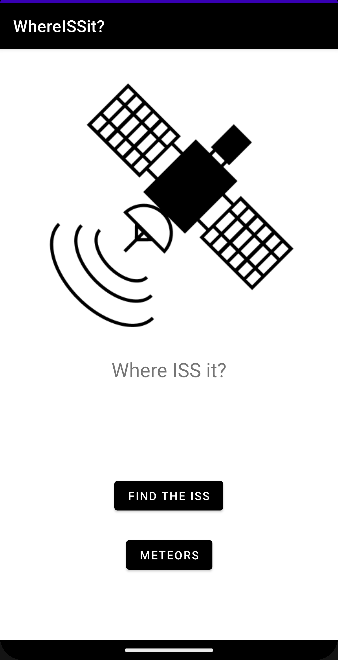
The home page uses the following and layout managers:
- A ImageView to display the App's Logo
- A Simple TextView with the APP's Title
- A Button to navigate to the ISS Locator page on the user's input
- A Button to navigate to the Meteor Information page on the user's input
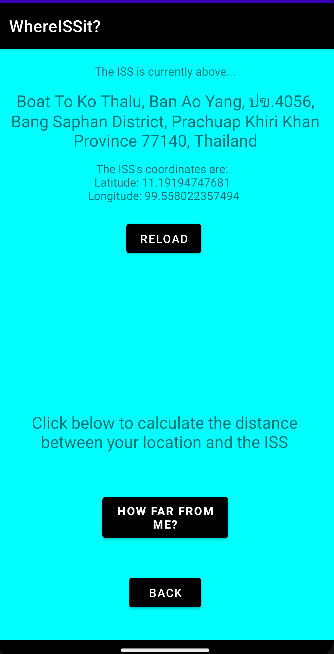
The ISS Locator page uses the following widgets and layout managers:
- A simple TextView (txtISSAbove) with the text, "The ISS is currently above..." in it.
- A TextView (txtCountry) which is used to display the Address and/or Country that the ISS is above - this updates when the page is accessed, or when the Reload Button is pressed. It uses data from OpenCage's reverse Geocoding API (Coordinates to Location)
- A TextView (coordinateTextView) which is used to display the ISS's precise coordinates - like the Country TextView this also updates when the page is accessed, or when the Reload button is pressed. It uses coordinate data from Where The ISS At?'s API. This same data is used to later be converted to a Location using OpenCage's API for the Country TextView.
- A "Reload" button (btnRefresh) which allows the user to reload the data from the API to get the latest coordinates. When clicked, this button creates an API GET request and downloads coordinate data from Where The ISS At?'s API. It then uses this with OpenCage's API to create another GET request, this time for OpenCage to get a location. The Coordinate and Country TextViews are then updated with these values. This is also triggered on page load
- A TextView (distanceTxtView) which, when location permissions are granted, will respond and display the distance between the user and the ISS using the coordinates from Where The ISS At?'s API and Android's location services(A mobile specific feature). It will compare the two values and then, using the Haversine Formula, will generate a distance in kilometers.
- A "How far from me?" button (locationTrackBtn) which the user can use to give location access, and once this is granted, it will allow the Distance TextView to update with the distance calculated.
- A "Back" button (btnBackISS) which allows the user to navigate back to the Home page
- Location access on this page is a mobile specific functionality
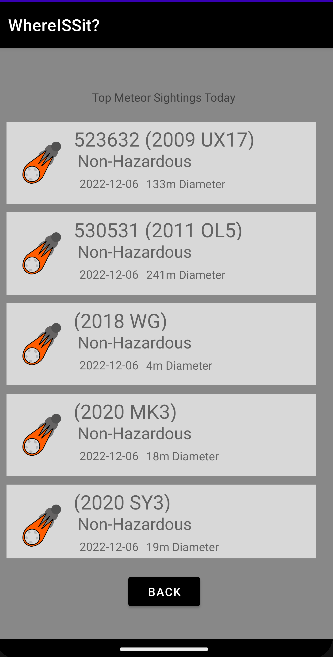
The Meteor Information Page uses the following and layout managers:
- A Simple TextView (txtMeteorTitle) which displays the text, "Top Meteor Sightings Today"
- A RecyclerView (recycleViewMeteors) which is used to show meteor information to the user - this is updated upon loading the page if an internet connection is present. A GET request is sent to NASA's NeoWs API to get today's top meteors and their data. The RecyclerView is then updated with this information.
- A Loading bar (meteorLoadingBar) which is used to indicate to the user that the RecyclerView is loading. It hides when the data is loaded.
- A "Back" button (btnBackMeteor) which allows the user to navigate back to the Home page.
Each page has a landscape counterpart layout which is triggered when the device is rotated. These contain the exact same functionality as the landscape pages, although have different layouts.
- Each page uses a ConstraintLayout layout manager in order to position the widgets in a neat and professional manner
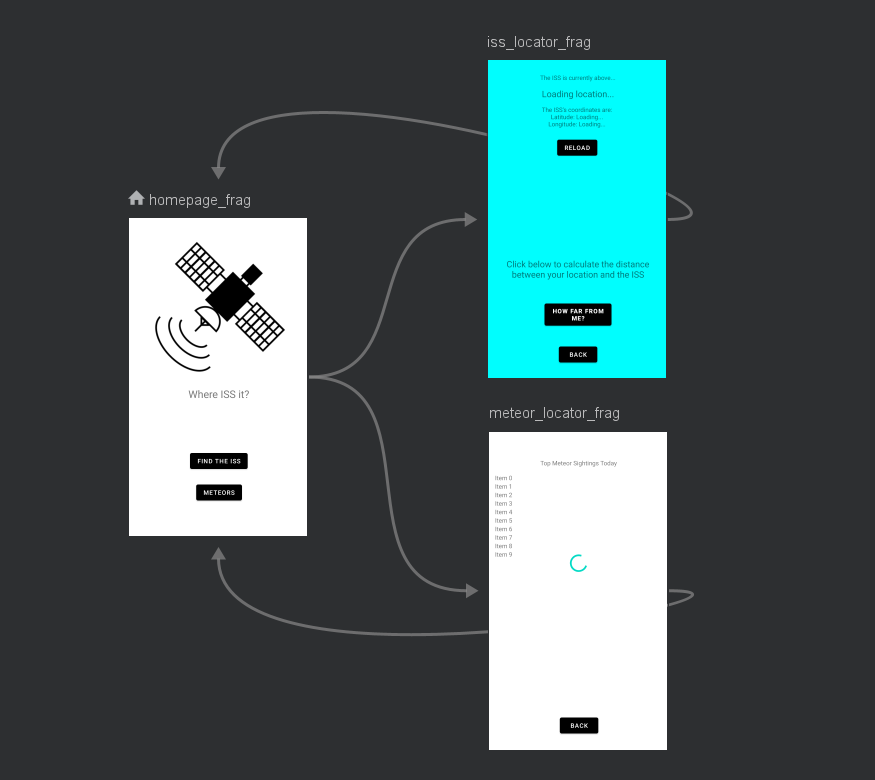
The following graph indicates how a user can navigate through the app. Starting off at the Home page, the user can navigate to either the ISS Locator page (iss_locator_frag) or the Meteor Information page (meteor_locator_frag).
From either of these pages the user can simply navigate back to the home page using the Back button and from there they may access the other page - The ISS Locator and Meteor information pages are not directly linked but can both be accessed through the Home Page
I found creating an app very challenging at the start, but as I worked on it it became much more interesting and I was able to learn a lot about APIs, Android development and Java and XML code. I feel the app could have been better if I had allocated more time to it, I could have added more interesting features and sorted out any more possible bugs. I am overall proud of the app that I managed to make and feel the API use went well, alongside the navigation and general functionality of the app. In future projects I would definitely use android studio again as it is very easy to use. I would also like to adapt my app in the future and keep on working on it as I find it genuinely interesting to work on.
- The App uses Where The ISS At?'s public api to gather the coordinates of the ISS when needed
- The app also uses NASA's public NeoWs (Near Earth Object Web Service) API to gather information about meteors
- It also uses OpenCage's Free Geocoding API to process coordinates to get a location.
Haversine formula https://www.geeksforgeeks.org/program-distance-two-points-earth/ Last accessed 6/12/2022 15:30pm[Online]