
- OpenStudioLandscapes
- Get started
- Q&A
- Who is OpenStudioLandscapes for?
- Can OpenStudioLandscapes provide a solution for distributed teams?
- I don't see a lot of documentation for OpenStudioLandscapes. How can I gain insight?
- What problem does OpenStudioLandscapes solve?
- How is OpenStudioLandscapes different from other potential solutions?
- So, tell me! What exactly does it produce?
- OpenStudioLandscapes long term dependency hell: out of the frying pan into the fire?
- I don't like Pipeline! I'm a free thinker and I don't like boudaries!
- I have zero understanding for bugs! Who can I blame?
- How can I support this Project?
- Documentation
- Community
- Publications
- Current Feature Statuses
Setup and launch custom production environments with render farm, production tracking, automation and more - your 3D Animation and VFX pipeline backbone - with ease, independence and scalability! The way YOU want it!
Tip
OpenStudioLandscapes is not another Pipeline Tool. It is not another application to dictate how you have to work. OpenStudioLandscapes is here to help you build a structured foundation for any Pipeline Tool you might decide to use at some point in your studio.
An open source toolkit - a declarative build system - to easily create reproducible production environments based on your studio (even down to per production) needs: create Landscapes for production, testing, debugging, development, migration, DB restore etc.

No more black boxes. No more path dependencies due to bad decisions made in the past. Stay flexible and adaptable with this modular and declarative system by reconfiguring any production environment with ease:
- ✅ Easily add, edit, replace or remove services
- ✅ Duplicate entire production Landscapes for testing, debugging or development
- ✅ Code as source of truth:
- ✅ Always stay on top of things with Landscape Maps and node tree representations of Python code
- ✅ Limit manual documentation to a bare minimum
- ✅ Git controlled config store
- ✅ OpenStudioLandscapes is (primarily) powered by Dagster and Docker
- ✅ Fully Python based
- ✅ Build your own studio automation
- ✅ and share it (scripts, packages etc.) across Landscapes
- ✅ Do you like project based studio services?
- ✅ No problem with OpenStudioLandscapes
- ✅ Landscapes can run on a single host as well as on multiple hosts
Important
Warning
The following installation process will modify your system!
The reference system is Ubuntu 22.04 LTS (Jammy Jellyfish).
Other distros do work (OpenStudioLandscapes was developed on an Arch based Linux distro), however, the installation process will be different.
Important
Installation and execution of OpenStudioLandscapes as root is not allowed
and must be performed as normal (unprivileged) user.
Doing so as root will result in a non-functional
setup (https://github.com/michimussato/OpenStudioLandscapes/issues/2).
Error message:
"root" execution of the PostgreSQL server is not permitted.
The server must be started under an unprivileged user ID to prevent
possible system security compromise.  See the documentation for
more information on how to properly start the server.
Tip
You might have to install git and make first.
On Ubuntu:
sudo apt update && sudo apt install -y git makegit clone https://github.com/michimussato/OpenStudioLandscapes.git \
&& cd OpenStudioLandscapes
# Check out a specific branch by:
# List branches:
# git branch -a
# Checkout branch:
# git checkout <branch>make sys_deps_installTip
Messages like:
E: Could not get lock /var/lib/dpkg/lock-frontend. It is held by process 5198 (unattended-upgr)
N: Be aware that removing the lock file is not a solution and may break your system.
E: Unable to acquire the dpkg frontend lock (/var/lib/dpkg/lock-frontend), is another process using it?
or
Waiting for cache lock: Could not get lock /var/lib/dpkg/lock-frontend. It is held by process 3450 (unattended-upgr)
indicate that Ubuntu is running an unattended (automatic) system update in the background. Take a look at the Reference System
sudo rebootImportant
After reboot and before continuing, verify that the
user is member of the docker group:
$ groups ${USER}
user adm cdrom sudo dip plugdev lpadmin lxd sambashare docker
If you get error(s) similar to these:
[...]
unable to get image 'docker.io/postgres:17': permission denied while trying to connect to the Docker daemon socket at unix:///var/run/docker.sock: Get "http://%2Fvar%2Frun%2Fdocker.sock/v1.51/images/docker.io/postgres:17/json": dial unix /var/run/docker.sock: connect: permission denied
[...]
or
permission denied while trying to connect to the Docker daemon socket at unix:///var/run/docker.sock: Get "http://%2Fvar%2Frun%2Fdocker.sock/v1.51/containers/json?all=1&filters=%7B%22label%22%3A%7B%22com.docker.compose.config-hash%22%3Atrue%2C%22com.docker.compose.oneoff%3DFalse%22%3Atrue%2C%22com.docker.compose.project%3Dopenstudiolandscapes-dagster-postgres%22%3Atrue%7D%7D": dial unix /var/run/docker.sock: connect: permission denied
you most likely forgot to reboot your system - just reboot to fix this.
Background: adding a user to a group (namely docker) takes effect
only after the next successful login.
# Make sure you are back in the repository directory:
# cd OpenStudioLandscapes
make openstudiolandscapes_installDocumentation is broken out into the individual Features.
You will find direction on the README.md file of the Feature you're interested in.
For example here: OpenStudioLandscapes-Kitsu
A full list of available Features is available here
Tip
To install all cloned Features, you can run the following code snippet:
for d in ./.features/* ; do
  pip install --editable ${d}
done;The video tutorial will give you a good, basic understanding of how to
- launch OpenStudioLandscapes
- interact with Dagster
- create a Landscape
- inspect a Landscape and individual Features with Landscape Maps
- launch a Landscape
The video includes the following steps (among others):
The following commandline options are available:
# cd OpenStudioLandscapes
# source .venv/bin/activate

$ openstudiolandscapes --help
usage: openstudiolandscapes [-h] [-v] [-vv] [--attach-grafana-alloy-to-compose-scope]
                            [--domain-wan OPENSTUDIOLANDSCAPES__DOMAIN_WAN]
                            [--config-store OPENSTUDIOLANDSCAPES__CONFIGSTORE_ROOT]
                            [--config-store-vcs OPENSTUDIOLANDSCAPES__CONFIGSTORE_VCS]
                            [--landscapes-root OPENSTUDIOLANDSCAPES__DOT_LANDSCAPES_ROOT]
                            [--landscapes-id OPENSTUDIOLANDSCAPES__LANDSCAPE_ID]
                            [--skip-update-check | --auto-update]
                            {update,clone-feature} ...

positional arguments:
  {update,clone-feature}
    clone-feature       Clone a feature from a given repository and print installation instructions.

options:
  -h, --help            show this help message and exit
  -v, --verbose         set loglevel to INFO
  -vv, --very-verbose   set loglevel to DEBUG
  --attach-grafana-alloy-to-compose-scope
                        Attach Alloy container to Compose Scope.
  --attach-pangolin-site-to-compose-scope
                        Attach Newt container to Compose Scope.
  --domain-wan OPENSTUDIOLANDSCAPES__DOMAIN_WAN
                        Set the WAN domain name (i.e. openstudiolandscapes.com).
  --config-store OPENSTUDIOLANDSCAPES__CONFIGSTORE_ROOT
                        Set the configuration store path.
  --landscapes-root OPENSTUDIOLANDSCAPES__DOT_LANDSCAPES_ROOT
                        Set the Landscape root path. A `.landscapes` subdirectory will be created and
                        used.
  --config-store-vcs OPENSTUDIOLANDSCAPES__CONFIGSTORE_VCS
                        If the config store is part of a Git repository already, you can specify the
                        path to the repo here. Defaults to the same value like
                        `OPENSTUDIOLANDSCAPES__CONFIGSTORE_ROOT`.
  --landscapes-id OPENSTUDIOLANDSCAPES__LANDSCAPE_ID
                        Lock the landscape_id to this value.
  --skip-update-check   Skip checking for codebase updates.
  --auto-update         Automatically pull codebase updates.
# cd OpenStudioLandscapes
# source .venv/bin/activate

$ openstudiolandscapes clone-feature --help
usage: openstudiolandscapes clone-feature [-h] --repo REPO

options:
  -h, --help            show this help message and exit
  --repo REPO, -r REP
# cd OpenStudioLandscapes
source .venv/bin/activate
openstudiolandscapes
Tip
The default location for all Landscapes is
within the local Git checkout:
OpenStudioLandscapes/.landscapes.
You can change this behavior by specifying a custom
Landscapes root with --landscapes-root=~/MyOpenStudioLandscapes
(please note: a .landscapes directory will be created
inside the directory you specified).
And head over to the Dagster Dev web UI:
http://127.0.0.1:3000/asset-groups
Note
If Dagster web UI is running on a different port
(default: 3000), just make sure this is reflected in
the URL you are trying to access.
And click Materialize All.
Tip
Every time you Materialize All, a new Landscape ID and
therefore a new Landscape directory structure will be generated
If you want to lock Landscape ID generation or edit a specific
Landscape ID, you can specify --landscapes-id=My-Custom-Landscape

Navigate the Compose Scope Group (for example default) and select the
docker_compose_commands Asset:

and click the command to copy it to the clipboard:

This command can then be pasted directly into a terminal and executed ("up" script):
user@user-VirtualBox:~/OpenStudioLandscapes$ /home/user/OpenStudioLandscapes/.landscapes/2025-12-25-20-51-33-e2d28dae9d3a4deaa7844363dce61126/ComposeScope_DEV_default/docker_compose/docker_compose_up.sh
~/OpenStudioLandscapes/.landscapes/2025-12-25-20-51-33-e2d28dae9d3a4deaa7844363dce61126/ComposeScope_DEV_default/docker_compose ~/OpenStudioLandscapes
Working Directory: /home/user/OpenStudioLandscapes/.landscapes/2025-12-25-20-51-33-e2d28dae9d3a4deaa7844363dce61126/ComposeScope_DEV_default/docker_compose
 Network OpenStudioLandscapes_Kitsu.compose_networks_network.2025-12-25-20-51-33-e2d28dae9d3a4deaa7844363dce61126 Creating
 Network OpenStudioLandscapes_Kitsu.compose_networks_network.2025-12-25-20-51-33-e2d28dae9d3a4deaa7844363dce61126 Created
 Network 2025-12-25-20-51-33-e2d28dae9d3a4deaa7844363dce61126-default_default Creating
 Network 2025-12-25-20-51-33-e2d28dae9d3a4deaa7844363dce61126-default_default Created
 Container kitsu-init-db.2025-12-25-20-51-33-e2d28dae9d3a4deaa7844363dce61126 Creating
 Container kitsu-init-db.2025-12-25-20-51-33-e2d28dae9d3a4deaa7844363dce61126 Created
 Container kitsu.2025-12-25-20-51-33-e2d28dae9d3a4deaa7844363dce61126 Creating
 Container kitsu.2025-12-25-20-51-33-e2d28dae9d3a4deaa7844363dce61126 Created
 Container kitsu-init-db.2025-12-25-20-51-33-e2d28dae9d3a4deaa7844363dce61126 Starting
 Container kitsu-init-db.2025-12-25-20-51-33-e2d28dae9d3a4deaa7844363dce61126 Started
 Container kitsu-init-db.2025-12-25-20-51-33-e2d28dae9d3a4deaa7844363dce61126 Waiting
 Container kitsu-init-db.2025-12-25-20-51-33-e2d28dae9d3a4deaa7844363dce61126 Exited
 Container kitsu.2025-12-25-20-51-33-e2d28dae9d3a4deaa7844363dce61126 Starting
 Container kitsu.2025-12-25-20-51-33-e2d28dae9d3a4deaa7844363dce61126 Started
kitsu.2025-12-25-20-51-33-e2d28dae9d3a4deaa7844363dce61126  | Running Zou...
[...]
("down" script)
user@user-VirtualBox:~/OpenStudioLandscapes$ /home/user/OpenStudioLandscapes/.landscapes/2025-12-25-20-51-33-e2d28dae9d3a4deaa7844363dce61126/ComposeScope_DEV_default/docker_compose/docker_compose_down.sh
~/OpenStudioLandscapes/.landscapes/2025-12-25-20-51-33-e2d28dae9d3a4deaa7844363dce61126/ComposeScope_DEV_default/docker_compose ~/OpenStudioLandscapes
Working Directory: /home/user/OpenStudioLandscapes/.landscapes/2025-12-25-20-51-33-e2d28dae9d3a4deaa7844363dce61126/ComposeScope_DEV_default/docker_compose
 Container kitsu.2025-12-25-20-51-33-e2d28dae9d3a4deaa7844363dce61126 Stopping
 Container kitsu.2025-12-25-20-51-33-e2d28dae9d3a4deaa7844363dce61126 Stopped
 Container kitsu.2025-12-25-20-51-33-e2d28dae9d3a4deaa7844363dce61126 Removing
 Container kitsu.2025-12-25-20-51-33-e2d28dae9d3a4deaa7844363dce61126 Removed
 Container kitsu-init-db.2025-12-25-20-51-33-e2d28dae9d3a4deaa7844363dce61126 Stopping
 Container kitsu-init-db.2025-12-25-20-51-33-e2d28dae9d3a4deaa7844363dce61126 Stopped
 Container kitsu-init-db.2025-12-25-20-51-33-e2d28dae9d3a4deaa7844363dce61126 Removing
 Container kitsu-init-db.2025-12-25-20-51-33-e2d28dae9d3a4deaa7844363dce61126 Removed
 Network OpenStudioLandscapes_Kitsu.compose_networks_network.2025-12-25-20-51-33-e2d28dae9d3a4deaa7844363dce61126 Removing
 Network 2025-12-25-20-51-33-e2d28dae9d3a4deaa7844363dce61126-default_default Removing
 Network OpenStudioLandscapes_Kitsu.compose_networks_network.2025-12-25-20-51-33-e2d28dae9d3a4deaa7844363dce61126 Removed
 Network 2025-12-25-20-51-33-e2d28dae9d3a4deaa7844363dce61126-default_default Removed
By default, OpenStudioLandscapes creates
~/.config/OpenStudioLandscapes when openstudiolandscapes
is executed. All config.yml files
will be placed inside this default config store.
Tip
You can change the default config store location
by specifying --config-store=~/.config/OpenStudioLandscape/my-other-config-root.
Dagster (and therefore OpenStudioLandscapes) reads a local
.env file at the root of the OpenStudioLandscapes Git
repository directory.
To update OpenStudioLandscapes and all your Features, you can run the following code snippet.
# cd OpenStudioLandscapes
source .venv/bin/activate
openstudiolandscapes update
Note
The following error
# cd OpenStudioLandscapes
$ openstudiolandscapes update
usage: openstudiolandscapes [-h] [-v] [-vv]
openstudiolandscapes: error: unrecognized arguments: update
means that your codebase is too old. To fix this, run
# cd OpenStudioLandscapes
git pull
and your codebase should contain the necessary functionality.
This platform is aimed towards students, one-man-shows and small to medium-sized studios where only limited resources for pipeline engineers and technical directors are available. This system allows those studios to share a common underlying system. And whatever your individual pipeline needs are, you can then build your tools on top of this common, stable, flexible and scalable system.
The scope of this project are users with some technical skills. OpenStudioLandscapes is intended to run on a Linux based system and will remain to do so. However, if you are able to install Ubuntu as a virtual machine on a Windows PC, you're pretty much good to go.
Sure it can! OpenStudioLandscapes together with Pangolin can allow you to grant remote users access to your locally (or wherever your Landscape will be running) hosted production tracking system for example.
Tip
Acting as a service provider (which is what you are in this case) has its own unique set of challenges. OpenStudioLandscapesHub is an attempt (WIP) to give you a basic infrastructure to minimize the barrier down to a minimum.
Pangolin allows for Features of a single Landscape to be distributed across different sites via SSH tunnels (see also OpenStudioLandscapes Compose Scopes).
For example, to wrap a Landscape with a
Pangoline Site,
you can run OpenStudioLandscapes with --attach-pangolin-site-to-compose-scope
and then provide the required secrets to the Landscape Compose Scope
up command environment as follows:
Important
Please note that Pangolin Sites can only wrap full Compose Scopes.
Compose Scopes can have arbitrary names, like license_server or
production_tracking for example.
Therefore, a dynamic Compose Scope name will also be assigned to
the environment varibles that carry the secrets.
More about the relevant values here: Pangolin NEWT Variables
# The PANGOLIN_ENDPOINT variable for the compose scope `license_server`:
OPENSTUDIOLANDSCAPES__PANGOLIN_SITE__COMPOSE_SCOPE_LICENSE_SERVER__PANGOLIN_ENDPOINT="https://app.pangolin.net"

# The NEWT_ID variable for the compose scope `license_server`:
OPENSTUDIOLANDSCAPES__PANGOLIN_SITE__COMPOSE_SCOPE_LICENSE_SERVER__NEWT_ID="2ix2t8xk22ubpfy"

# The NEWT_SECRET variable for the compose scope `license_server`:
OPENSTUDIOLANDSCAPES__PANGOLIN_SITE__COMPOSE_SCOPE_LICENSE_SERVER__NEWT_SECRET="nnisrfsdfc7prqsp9ewo1dvtvci50j5uiqotez00dgap0ii2"
So, let's take the ComposeScope license_server for example.
It provides three services:
sesi-gcc-9-3-houdini-20: A license server for Houdininuke-rlm-8: A license server for Nukenewt_service.compose_scope-license_server.2025-12-23-19-19-03-4346bdbc4d1c45c4a8a91948275b2086: the Pangolin NEWT service that wraps the two license servers


The resulting command to launch a Landscape that will connect as a Pangolin Site provided by Dagster:
OPENSTUDIOLANDSCAPES__PANGOLIN_SITE__COMPOSE_SCOPE_LICENSE_SERVER__PANGOLIN_ENDPOINT="https://app.pangolin.net" \
    && OPENSTUDIOLANDSCAPES__PANGOLIN_SITE__COMPOSE_SCOPE_LICENSE_SERVER__NEWT_ID="2ix2t8xk22ubpfy" \
    && OPENSTUDIOLANDSCAPES__PANGOLIN_SITE__COMPOSE_SCOPE_LICENSE_SERVER__NEWT_SECRET="nnisrfsdfc7prqsp9ewo1dvtvci50j5uiqotez00dgap0ii2" \
    && path/to/.landscapes/<LANDSCAPE_ID>/ComposeScope_license_server/docker_compose/docker_compose_up.sh
A successfully established connection and registration as a Pangolin Site will be presented in the Pangolin Admin Web UI:

The Pangolin Resources above Site provides will be shown on the Resources page:

And will populate the provided services (RLM license server in this case):

The RLM web UI is listening on port 4041 (actually the container
port is the relevant one here):

And voilà! SSL encrypted RLM license server web UI accessible from the internet with user based authentication (provided by Pangolin):

OpenStudioLandscapes is build on Dagster. Dagster itself offers Markdown compatible descriptions for Assets. OpenStudioLandscapes aims to leverage this capability wherever possible.
Important
This allows for dynamic documentation without having the need to compile static documentation. Another good side effect is that you will find documentation and information where you need it.
Example:

A bit more context about the how and why can be found here.
Tip
More Dagster related information and references to resources can be found directly on the OpenStudioLandscapes-Dagster Feature README.
To get a good understanding of how to work with Dagster, the Getting Started with Dagster section in particular is a good place to start.
What's separating the men from the boys is the production backbone. Large studios spent years and years of man (and woman) hours and millions of dollars to build robust automation to support their production while smaller ones are (in those regards - no matter how recent and advanced the tools they use are) decades behind. So, in one sense, OpenStudioLandscapes is a time machine by giving you the ability to jump a few years ahead of yourself by giving you a pre-made on-prem production environment at very little cost.
The second problem it is trying to solve is one that you (as a small company) do not have yet. Ideally, before you start thinking about automating processes, you want to have a robust underlying system. However, what usually happens is that studios skip this crucial step. This almost inevitably leads to tech dept in the future after growth has happened - a house of cards built upside down.
Caution
So, you wanna replace or remove your old little script that you wrote 5 years ago which is being used in so many places you can't even remember? There you have it. Better don't touch it. Better continue building your system around it. Right? Wrong!
OpenStudioLandscapes is here to change that by making sure your future you is not going to regret decisions of its past you by providing structure while keeping systems and pipeline features as isolated (read: portable) as possible!
OpenStudioLandscapes provides an opinionated platform for different services that are commonly used in animation and VFX productions - the learning curve for deployment and configuration can be quite substantial for every individual service - and I'm no expert in most of them. The OpenStudioLandscapes project has no control over these third party services. A side effect of this is that there is no common way of orchestration and deployment for these services:
- some services are containerized, others are not
- different services come with different OS and package dependencies
OpenStudioLandscapes tries to flatten the learning curve for all services by providing functional Features based on common defaults so that you get a full production Landscape up and running quickly. However, if special configuration applies to your environment, OpenStudioLandscapes still tries to maintain this possibility.
I'm sure the same functionality can be achieved with other tools like Kubernetes, Ansible and different orchestrators. However, a combination of Docker, Docker Compose and Dagster has proven (so far) to be the best match for fast development, self documentation and maintenance.
Good you're asking! To get an idea what the actual output
(or product if you will) of OpenStudioLandscapes
looks like, here's the deal: OpenStudioLandscapes generates
a hierarchical tree of docker-compose.yaml files - basically as many
individual trees as there are Compose Scopes. For some Features, Docker
images and (sometimes) pre-configured docker-compose.yaml files already
exist and OpenStudioLandscapes will use those. For other services, there
is neither a Docker image nor docker-compose.yaml files. In those cases,
OpenStudioLandscapes generates both dynamically.
On top of that, OpenStudioLandscapes creates diagrams - visual representations - of all your services. If you're into (like myself) dynamic, worry-free documentation of what you are actually working with, here's a Landscape Map of a Landscape:
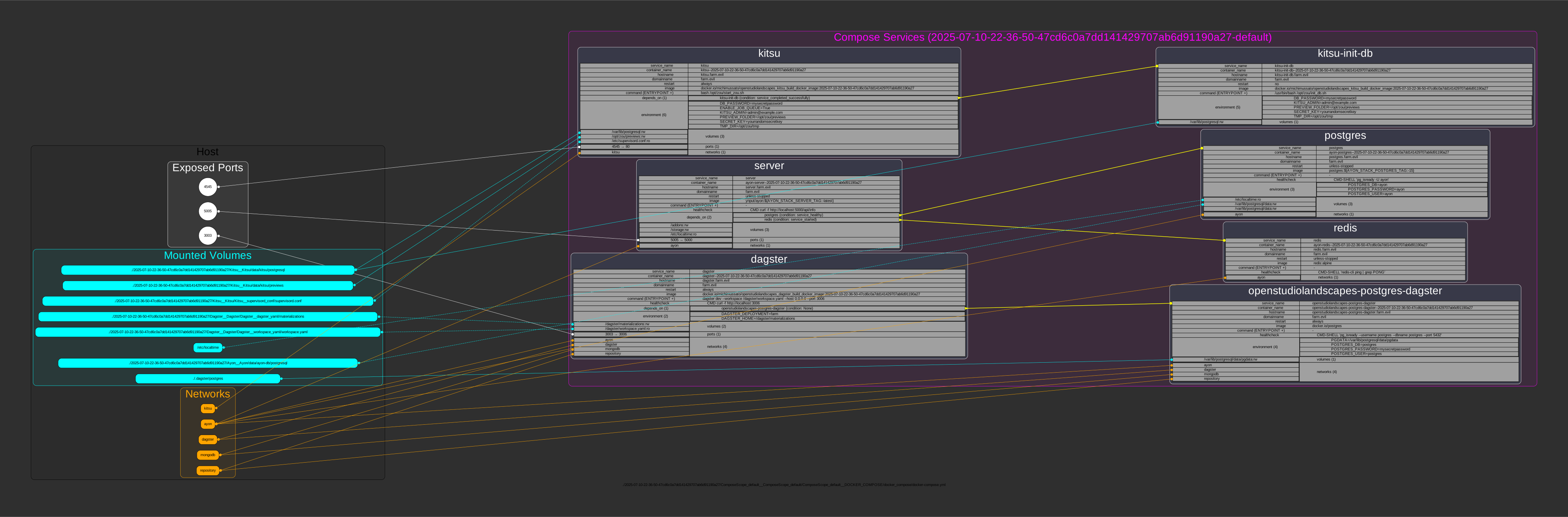
And the cool thing is, Dagster also does it's thing with the Asset descriptions! You'll be provided with one single command (just click it to copy it to your clipboard) to launch the diagrammed Landscape:

In Brief I was writing about staying flexible and independent. What happens if OpenStudioLandscapes disappears as a project? Can I rely on it long term? I can't predict the future and we'll see about the projects' adoption. OpenStudioLandscapes itself does not make you dependent on it as much as you think: you can run and use your Landscapes without OpenStudioLandscapes. OpenStudioLandscapes only creates them. The Landscapes themselves, however, depend on Docker and other third party tools for example. Those tools are de facto industry standard.
When we're talking about Features: same thing. For example, Kitsu community is growing and being dependent on it long term is becoming less risky.
Important
What if there is a new production tracking solution in five years time? Or - like with Deadline entering "Maintenance Mode" - a third party tool gets deprecated?
This is exactly were OpenStudioLandscapes can shine: swap one render manager for another with minimal effort. Adjust your infrastructure in case you want to. And sometimes also simply because you have to.
Tip
A Feature template (work in progress) is provided for developers to integrate new Features: OpenStudioLandscapes-Template.
The reputation of pipeline can be ambiguous. On one hand, it's here to increase efficiency. On the other hand, it does so limiting options - by forcing us to work within specific guidelines.
Again, OpenStudioLandscapes will not (and cannot) tell you how you work and which workflow the hole grail is. This is up to you and your team. With OpenStudioLandscapes you just set the playground in that sense.
Important
Which render manager is the one most suitable for your environment? Do you want to use multiple production tracking systems side by side? This is where OpenStudioLandscapes can assist you:
getting those systems up and running quickly and cleanly - how you configure and use them is not OpenStudioLandscapes' choice to make. It's yours and yours alone.
Bear in mind: OpenStudioLandscapes is a young project. There are still many items to be implemented (and potentially bug-fixed). I lack experience in many fields when it comes to software development. The documentation is not in a shape I would like to see it in (dynamic, wherever possible). So, before adding Features to OpenStudioLandscapes, I plan to work on stability, documentation and support. To avoid filling in the wrong gaps, I would like to mainly fill in those that are being asked for - and this is your part. Ask anything. Request anything. Suggest anything. Anything that leads to a better experience - without hiccups and without too much noise at the same time - from installation to usage. If your field of expertise can improve this project, please step forward and jump on board!
Tip
Now, in case you do feel inclined to blame somebody, here's some info About the Author.
Also, feel free to connect on Discord for exchange.
Feature requests and general issues can be posted here:
If you can isolate an issue to a specific Feature, each Feature has its own issue tracker as well. For example:
If you feel like this is a project you would like to support, feel free to join! There are, however, some specific areas where I am looking for help in particular:
I do not have a clue how to best set up and release the components of
OpenStudioLandscapes. I did think about git submodules to make
sure that dependencies are set to the correct versions/commits. A different
approach was using git tags. None of which seems to be easy to handle across
multiple repositories. Will a monorepo solve this problem without introducing new
difficulties? Please, share your thoughts and experiences!
Todo
Now, it's time to head over to the Wiki!


Note
More helpful documentation is WIP.
Note
Features listed here could be re-activated based on demand.