My JSFX plugins
Go Reaper->Options->Show Reaper resource path in explorer/finder then open the folder "Effects". Then just drop these files here. May be I'll add ReaPack support later. Also, you need to install two libraries. Cookdsp library (download from here http://ajaxsoundstudio.com/software/cookdsp/ or https://github.com/belangeo/cookdsp) and geraintluff library for GUI (link for ReaPack - https://raw.githubusercontent.com/geraintluff/jsfx-ui-lib/master/ui-lib.jsfx-inc , direct link to code - https://stash.reaper.fm/v/32955/ui-lib.zip)
This plugin is a simple waveshaping distortion + some EQ for input and output signals to make it sound like a default metal amp. Of course, I took some general ideas from other amplifier plugins. Please, use it before IR loader, e.g. convolution Cabinet Sim (default Reaper plugin). You can use a compressor between this plugin and cab.
This button sets the amount of input gain (before the waveshaper). The input signal is not the same as your sound before the plugin: it goes through some EQ first.
This button sets the amount of output gain (after the waveshaper). Again, it's applied to a waveshaped signal with some fixed EQ + tune EQ that you can control. Be careful with that since there is no hardclipper at the end of the plugin - you should control clipping by looking at the output indicator.
Here we have three sliders to control some low, mid and high character.
This plugins adds artificial "growling" to your voice in a such way: it tracks your voice's note using Yin algorithm, then modulates it with a sine wave. There are different harmonics you can use for modulation: octave down (sine frequency is 2 times less than your voice's frequency), 7 semintones down, two octaves down, 12+7 semitones down. Generally, you should only use it on vowels.
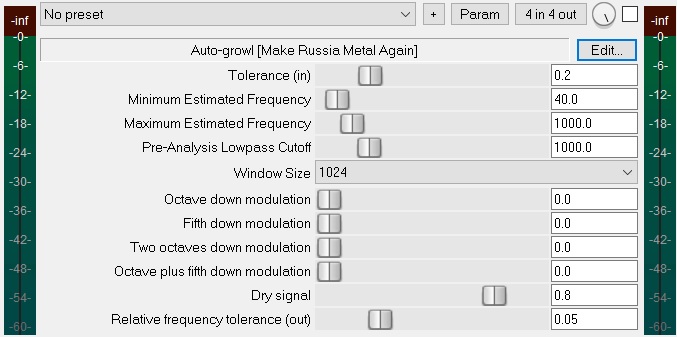
Yin algorithm parameter, meaning note sensivity while traking
Yin algorithm parameter, meaning the lowest note possible
Yin algorithm parameter, meaning the highest note possible
Yin algorithm parameter, internal lowpass for the input signal to reduce unnesessary part of the signal.
Yin algorithm parameter, the highest value leads to better averaging of the note, but adds lattency and reduces sensivity
Add a signal modulated by frequency of your voice, multiplied by 0.5
Add a signal modulated by frequency of your voice, multiplied by 2/3
Add a signal modulated by frequency of your voice, multiplied by 0.25
Add a signal modulated by frequency of your voice, multiplied by 1/3
Yin algorithm's output is your voice's note. This parameter means sensivity to this note.