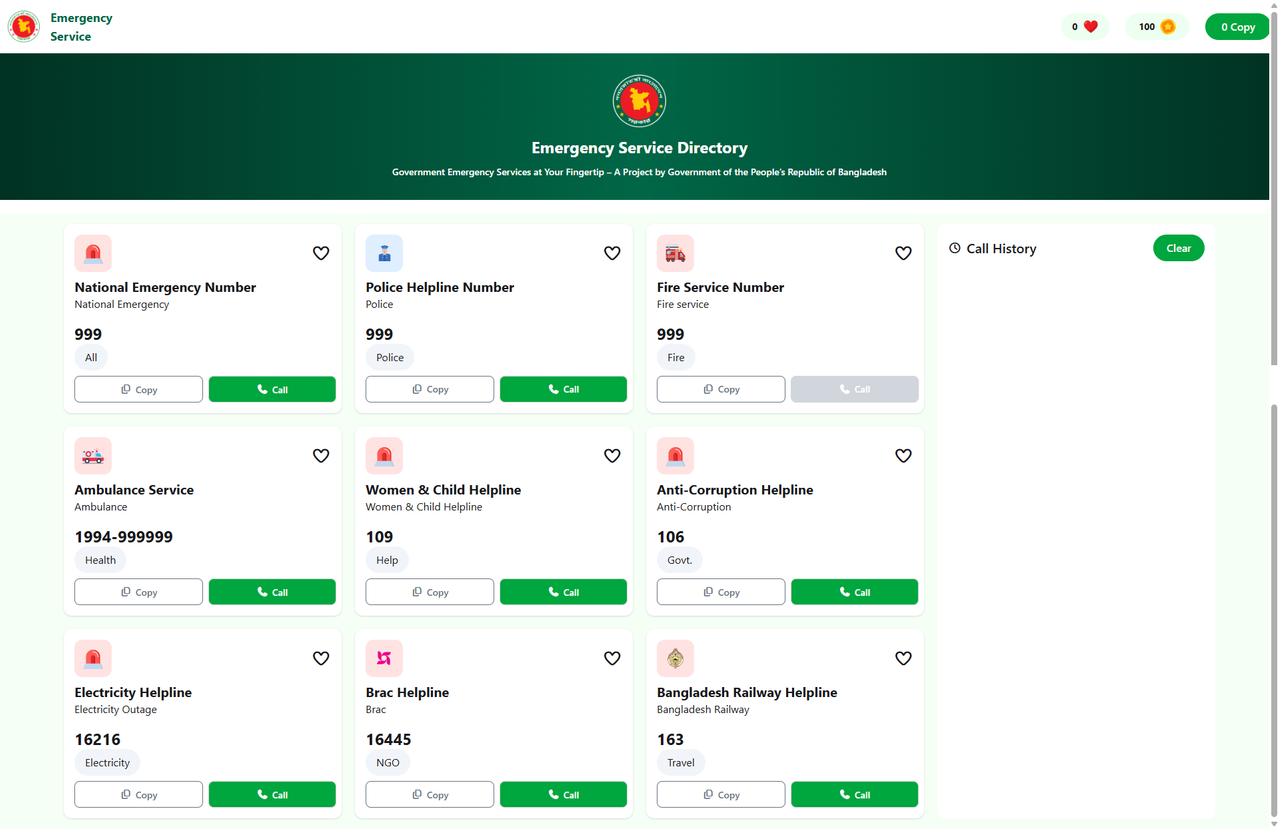
Emergency Hotline is a simple web application built to provide emergency contact information in an intuitive and user-friendly interface. Users can quickly access important numbers in case of emergencies.
- About
- Features
- Tech Stack
- Screenshots / Demo
- Getting Started
- Installation
- Usage
- JavaScript Q&A
- Contact
This project is part of a web development assignment that focuses on DOM manipulation, event handling, and dynamic content creation using vanilla JavaScript, HTML, and CSS. Users can see emergency hotline numbers and interact with elements dynamically.
View emergency hotline numbers for different services Responsive design (mobile & desktop) Interactive buttons and dynamic UI updates using JavaScript Clean and simple user interface
Frontend: HTML5, CSS3, JavaScript DOM Manipulation & Events: Vanilla JS (getElementById, getElementsByClassName, querySelector, querySelectorAll)
GitHub Pages
https://mahmud014.github.io/Emergency-Hotline-Assignment-5/
git clone https://github.com/mahmud014/Emergency-Hotline-Assignment-5.git cd Emergency-Hotline-Assignment-5
No additional dependencies are required for this project.
- Open the index.html file
- Browse and interact with emergency hotline numbers
- Click buttons to see dynamic DOM changes
-
getElementById
- Selects a unique element by ID
- Returns a single DOM element
- document.getElementById("anyThing");
-
getElementsByClassName
- Selects multiple elements with the same class
- Returns an array-like HTMLCollection
- document.getElementsByClassName("anyClass");
-
querySelector / querySelectorAll
- querySelector selects the first matching element
- querySelectorAll selects all matching elements as a NodeList
const div = document.createElement("div"); div.textContent = "Hello World"; document.body.appendChild(div);
- createElement creates a new DOM element
- You can add text, HTML, or images to it
- Insert it into the DOM using appendChild or other DOM methods
- Event bubbling is when an event starts at the target element and flows upward to parent elements
- Works from child → parent → document
- Assign an event listener to a parent element to handle events on child elements
- Useful for dynamically added child elements
- Works because of event bubbling
-
preventDefault()
- Stops default browser behavior (e.g., form submission reload)
-
stopPropagation()
- Stops the event from bubbling to parent elements
- Author: Md. Shukur Mahmud
- 📧 Email: anik955720@gmail.com
- 🔗 GitHub: https://github.com/mahmud014
- 🔗 LinkedIn: https://www.linkedin.com/in/md-shukur-mahmud-387439261/