Distributed terminal-native issue tracker backed by Git.
Issue tracking is a core part of software development, but it often becomes a painful context-switching exercise with poor ergonomics. Epiq provides issue tracking as a portable, integrated part of the development environment, with access to all the powerful tooling developers are used to.
You can manage all your projects directly via the command line in a visual kanban board and edit content in your favorite editor.
With great attention to user ergonomics and developer experience, epiq makes project management painless and friction free.
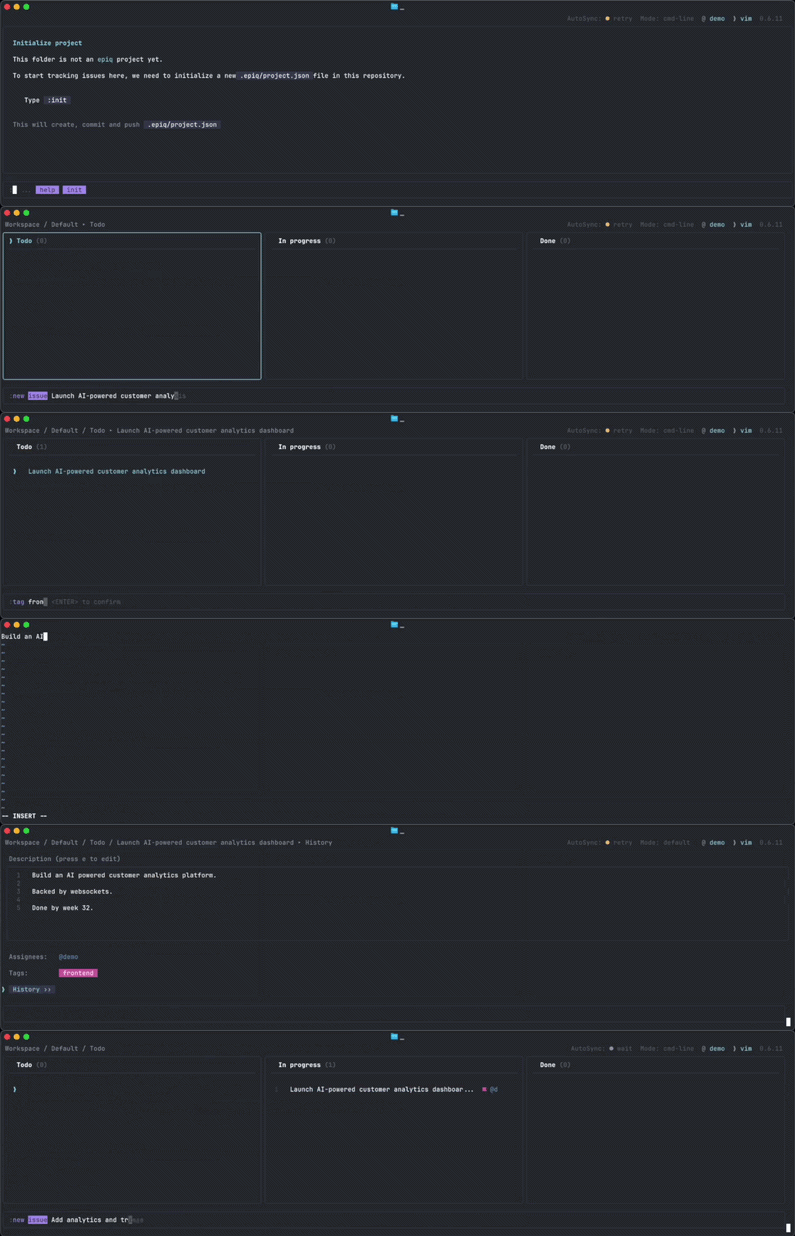
Epiq is a vim-inspired issue tracker that brings project management into the terminal. It renders directly in ASCII and persists state as an immutable distributed event log, versioned and synchronized through Git.
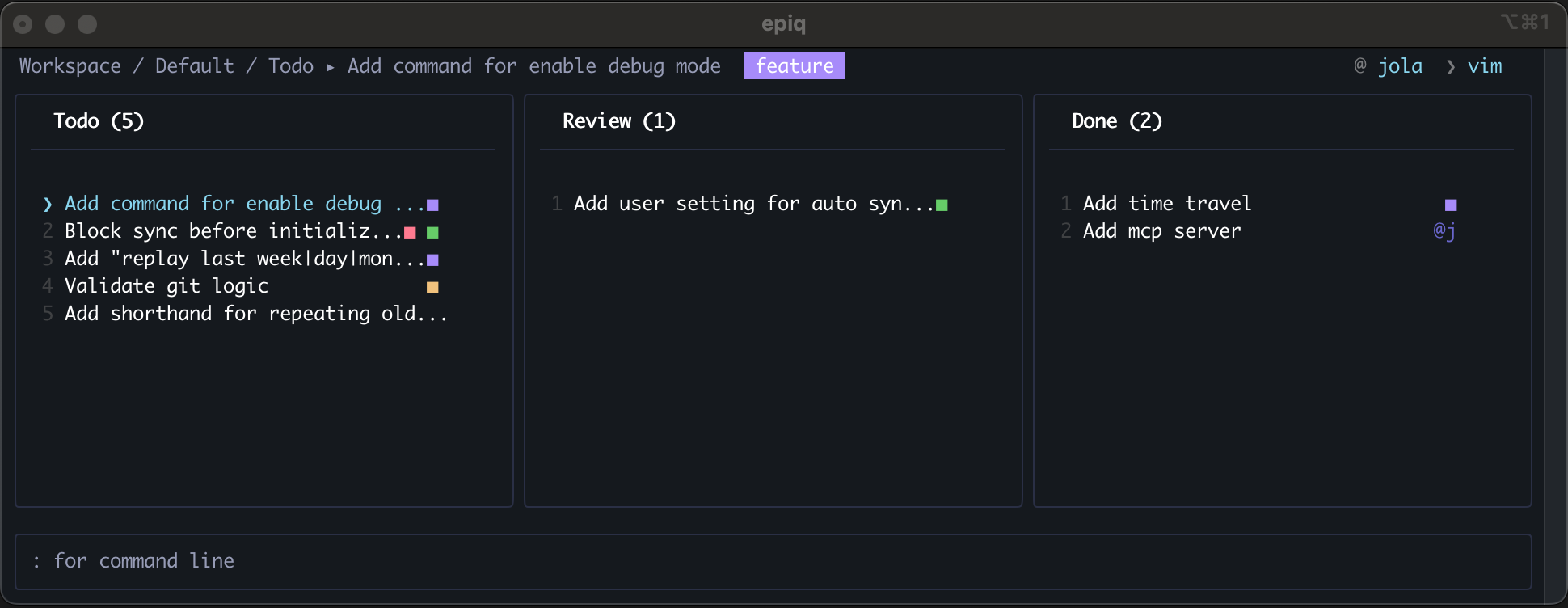
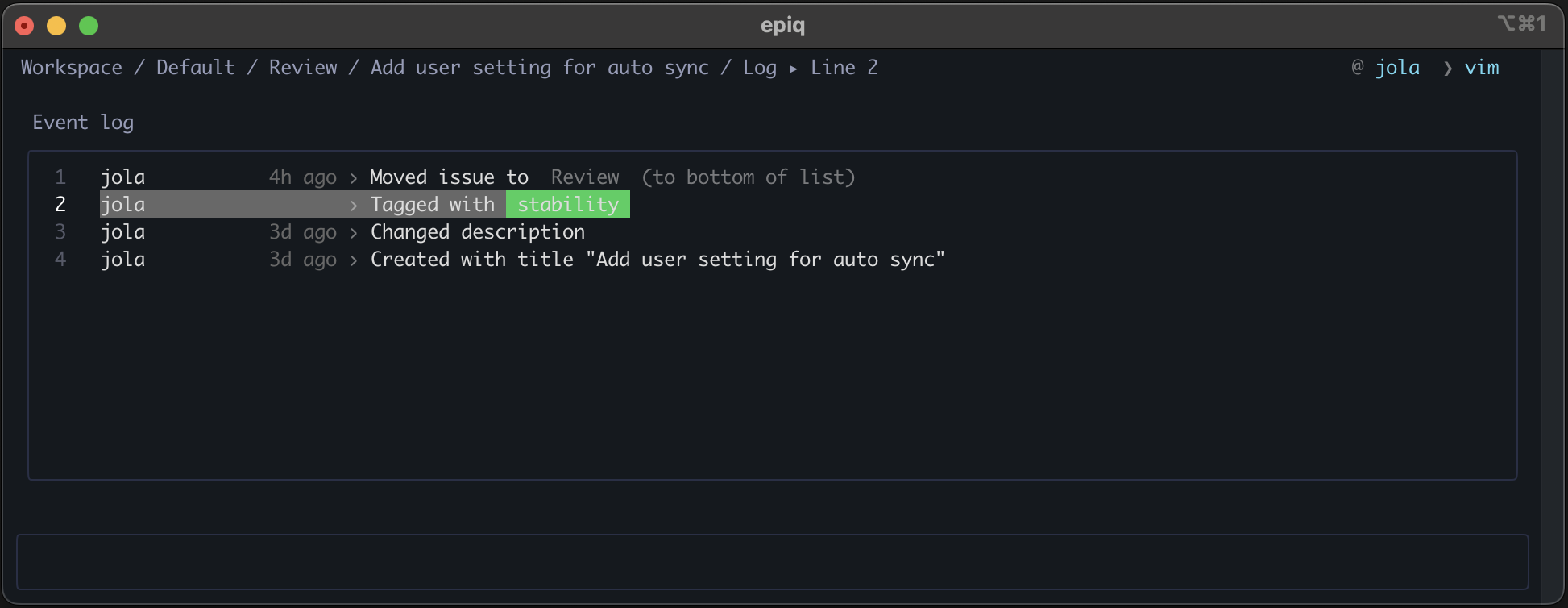
- Issue tracking — track work in tickets with name, description, tags, assignees, history log, etc.
- Ergonomics — fast keyboard-driven UX, command line with history, syntax highlighting etc.
- Command palette — press
?to open a scrollable overview of all available commands and descriptions - Time travel — inspect your app 1h, 1 week or 1 year ago
- Filtering — query issues by description, tags, assignees, etc.
- Autocompletion — minimize typing, stay in flow, reuse previous commands
- Multi-user — collaborative synchronization via Git
- Traceable event log — state is a full history of every change ever made
- MCP integration - Model Context Protocol support for agent interaction
Most issue trackers live outside your workflow. Epiq brings issue tracking where you already work.
These design choices result in a system that is:
- Simple setup — no accounts, SaaS, or external services required
- Repo-native — your issues can live where your code lives
- Offline-friendly — works anywhere, with eventual consistency
- Speed — local first, and eventual consistency makes epiq edits instant
- Portable — run on your local machine, on a remote Linux server or your grandma’s connected toaster
- Command driven — scriptable and automation-friendly, ready for the agentic era
- Versioned — changes are tracked and recoverable through Git
Install globally via npm:
npm install --global epiqVerify:
epiq --version- Make sure you're inside a Git repository
# If needed:
Git init
# For collaboration, use a repo with a remote (e.g. clone from GitHub)- Run:
epiqIf it is your first run, this opens the interactive setup wizard that sets you up in about 30 seconds.
That’s it!
Setup wizard creates: User config persisted in
~/.epiq-global/config.json.
Initialization creates:
- Project definition in
./.epiq/project.json- Authoritative Git state at
~/.epiq-global/worktrees/<id>- Updates your
.gitignoreto ignore local-only.epiq/log/Epiq manages a dedicated Git state branch and worktree automatically as the source of truth for synchronization.
- The first thing to know is that you always can access help with
:help. - Press
?anytime to open the command palette with all available commands and descriptions.
- The second thing to know is that you can navigate with the keyboard using arrow keys or
hjkl. - You can enter nodes with
enter, and navigate out of a context withqoresc
- If you type
:you are put in command line mode and can now insert commands. - Commands are context-aware, so for instance
:closeonly exists for issues.
- Create nodes with
:new issue|swimlane|board <Name of new node>.
- Move nodes by pressing
m. This sets you in a move state, after which you can navigate as normal, navigate to the target location, then press m again to confirm new location.
- Apply filters with the
filtercommand followed by a target, and a qualifier. So in order to filter all issues with apriotag you can write:filter tag prioand hitenter. You can build a combination of filters by running several filter commands in succession.
Clear all filters with :filter clear
- Close issues with
:close. This moves the issue to a special board namedClosedwhich you can find if you navigate up (pressq) a few times.
- You can reopen a task by visiting the
Closedboard, selecting an issue and typing command:reopen. This will restore the issue to its last previous location.
- Pro tip: just like in any terminal - if you need to do repeating tasks over and over again, you can just put yourself in the command mode, and then press arrow up, in order to access the last executed command. This helps a lot when you create tasks with similar names, or add the same tag to many tickets and so on.
Epiq provides a MCP (Model Context Protocol) server for agents to interact with, making it easy to plug into modern agent frameworks.
To register Epiq with MCP-compatible clients (e.g. Claude Desktop), add it as a server using the epiq-mcp binary. Example configuration in your ~/.claude.json:
"mcpServers": {
	...
	"epiq": {
		"command": "npx",
		"args": [
			"-y",
			"-p",
			"epiq",
			"epiq-mcp"
		]
	}
	...
}
Once registered, agents can interact with your local Epiq instance through the MCP.
Epiq uses Git in the background - no manual Git commands are required. Running :sync synchronizes changes between your local state (persisted at ~/.epiq-global/worktrees/<id>/) and the remote state. By utilizing Git worktrees, synchronization stays isolated from your regular development workflow. Project tracking metadata is stored in .epiq/project.json.
Epiq is designed to provide robustness in a distributed, Git-backed environment where multiple users may update state concurrently. Instead of mutating shared files, Epiq uses an event-sourced model to prevent merge conflicts and make concurrent changes predictable.
All changes are stored as append-only events in user-scoped files, rather than modifying a shared state file. This avoids in-place edits to the same lines and significantly reduces the likelihood of Git conflicts.
State is reconstructed in-memory by replaying a merge of all user logs.
The current state is derived by replaying events in a deterministic order.
Events use a composite of time-sortable IDs (ULIDs) and a reference to the last known event ("edge"). On creation, events are appended relative to the last known event. If multiple events share the same reference point, their relative order is resolved using their time-based IDs.
This approach:
- Provides stable and reproducible ordering across machines
- Limits the impact of potential clock drift to small local ordering differences
- Ensures that concurrent updates converge to the same state
Epiq resolves concurrent changes at the event level:
- Events are designed to be idempotent where possible
- Later events take precedence when conflicts occur
- Each user writes to their own event log file
- Git merges become trivial combinations of changes in independent files
Epiq follows a local-first model:
- All operations apply instantly on the local machine
- Synchronization happens explicitly (
:sync) or automatically - When histories diverge, merging event logs and replaying them leads to a consistent state
Frequent synchronization reduces divergence and keeps the system predictable
🫡 Never leave your terminal!