MMVJ - Force feedback-enabled Mice/Keyboard and MIDI to Virtual Joysticks Transforming Mapper for Linux.
Skipto Disclaimer/development notice ...
Skipto Features ...
Skipto Application glossary and arch overview ...
Skipto Configuration ...
Skipto Build from source ...
Skipto Usage ...
Goto FAQ ...
NB 1: latest release, when built with "gui" feature (enabled by default), includes steering indicator window, and main gui, both are turned on by
--gui
runtime option.
The following image shows visual debugging of force feedback application in mouse to joystick steering transformation: blue line is user input pre-filtered, green - force feedback signal (it reacts to the yellow), yellow - resultant joystick axis position post filtering and force feedback application. In this case force feedback effect injected and seen playing in the picture - is the "constant force" effect.
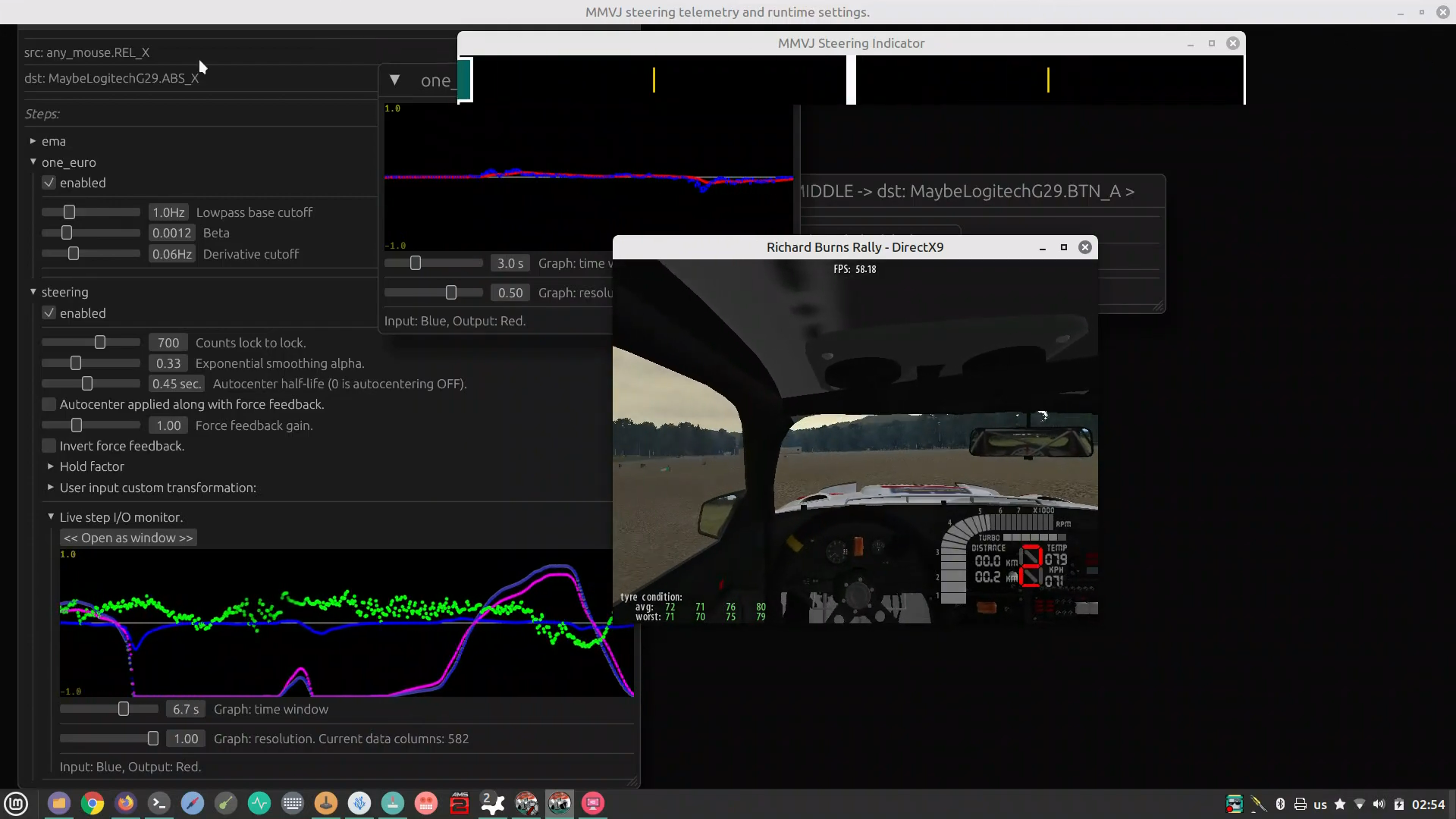
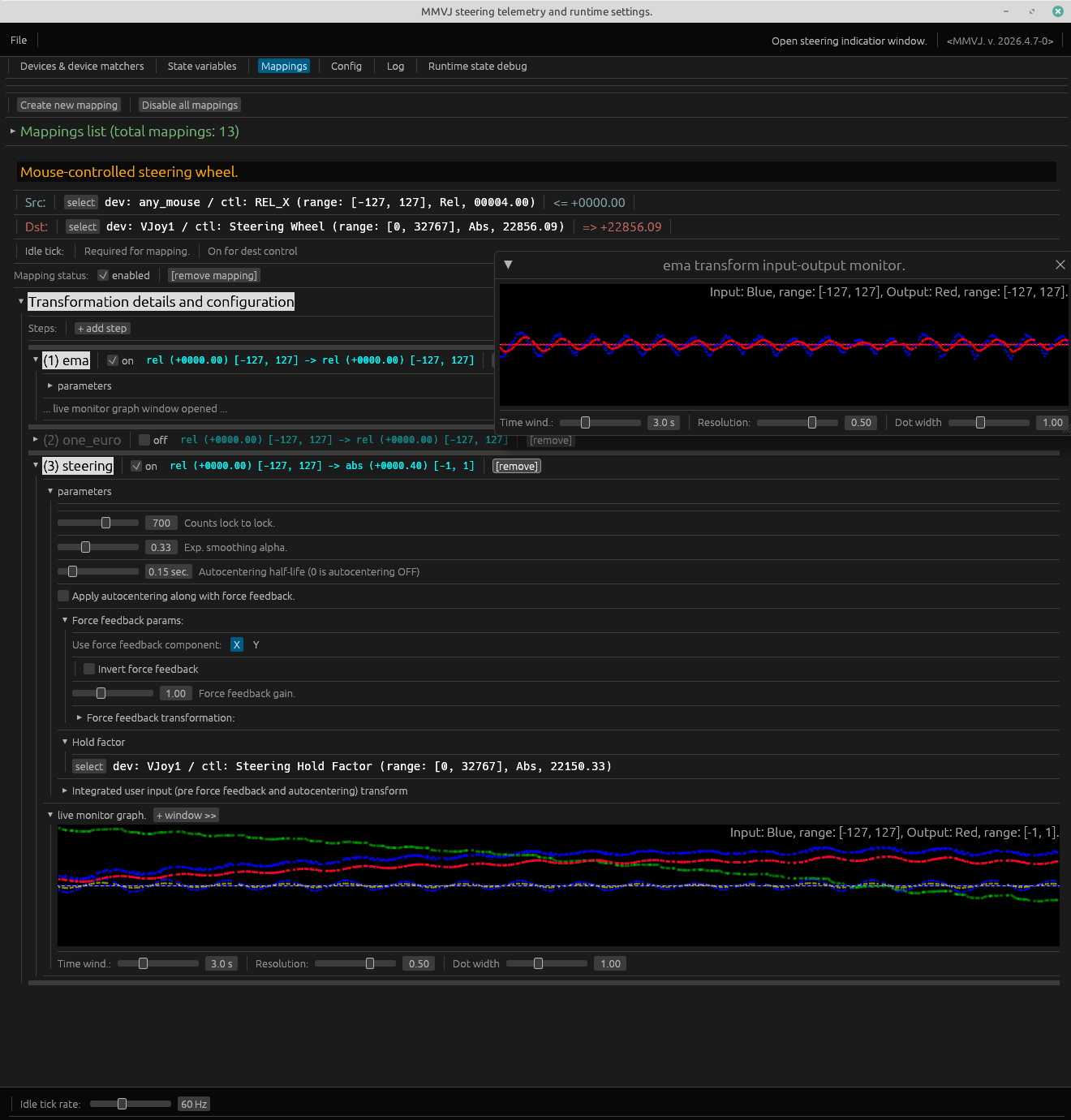
NB 2: Regarding steering emulation functionality in particular, force feedback works perfectly with "Richard Burns Rally" (tested the latest variations with NGP) and many other titles like "Euro truck sim", "Race Room", "Rush rally 3" which use Constant force effect to report already calculated forces to the steering wheel. Some of other effects like Spring (e.g. used in "Rfactor 1"), Friction and Ramp are also supported (including envelope (fade-in/fade-out) and delay/repeat, but not trigger (WIP)). Damper, Intertia and Periodic (waveforms generators) effects are not yet supported (WIP). Until then we just fake the support for all those "other" effects (with warning emitted) if user configures them as supported in config. Stay tuned. If seeing trouble with it in your particular case and wish to help, please run the program with --debug-ff flag and send me the the output.
Some early video demos of MMVJ being applied in raw rally simulation:
- Scandinavian flick with the RWD classics in RBR
- Telemetry graphing (while debugging filters/curves effects and force feedback)
- Ride and replay with a FWD rally car simulation in RBR (early version of steering indicator without color encoding of hold factor).
- Replay of the AWD Lancia Delta HF simulation in RBR
- Replay of a RWD classics rally car simulation in RBR
> if you wish to make a review, please make sure to see the development status notice and if having any troubles with the app, please contact the author. I'd be totally happy to get direct feedback <
- Virtual HID devices creation: configure any number of Virtual Joysticks with any sets of controls.
- MIDI and any HID devices(Mice/Keyboards/Joysticks (including force feedback readings from virtual ones)/etc) as inputs: match multiple devices by name regex and map them to arbitrary number of outputs. [1].
- State Variables: configure any number of variables with ranges metadata to use as intermediate inputs or outputs in mappings graph.
- Configuration validation and hot-reload at runtime triggerend by configuration file changes when in command line mode and/or configuration manipulation through Gui, supports configurable virtual HID devices (e.g. Virtual Joysticks) persistence across configuration changes and (even in case of loading new configuration for sets of Virtual Joysticks defined in both configs).
- Mappings of many inputs to many outputs with advanced transformation steps applied such as curves, filters, intuitive steering wheel emulation, custom scripts and more.
- Combine those discrete steps arbitrarily to achieve desired effects.
- A detail about steering transformation for use in simracing, flight and other simulator gaming:
- Supports force feedback: accepts constant force and other effects (see the FAQ why this matters).
- Supports configurable autocentering (useful if no force feedback available or as an auxiliary behavior).
- Supports intuitive emulation of hands holding the steering wheel with different force (a.k.a "hold factor")
affecting the two mentioned above.
- Allows scripting with Luau: define scripted transformation steps having multiple optionally defined inputs or outputs (e.g. to use as hubs for smart signal routing).
- Gui (see --gui command line option) mode, but also operates in command-line only mode as well: visually configure mapped devices matchers, mappings of controls with arbitrary transformation pipelines, debug at runtime via telemetry graphs to see the effects of separate transformation steps like curves, filters, force feedback effects, etc.
- Console-based monitoring mode for HID (Mice/Keyboard/Joysticks/etc) and MIDI devices.
[1] One fancy example: using 2 mice devices, mapping one's X movement to steering, Y movement to "hold factor" and a button to handbreak, whereas Y movement of the second mouse mapped to two separate brake and throttle axis of a target virtual joystick (it's achievable by accumulating relative input and mapping upper subrange of the integrated value to throttle and lower subrange (inverted) to breaking (configuration examples using this technique are coming soon))
Are used to match existing devices by device name regex and corresponding controls. Each device matcher can match multiple devices so that when it's used as source - any device matched by the matcher will result in running relevant mappings whenever input from corresponding devices is seen. For each device matcher we specify control matchers. The latter are used to automatically classify the device matcher (Mouse/Joytick/Gamepad/Keyboard/etc), correlate it with existing host devices based on this classfication and as sources or destinations for mappings.
E.g. we can match any mouse device by creating a device matcher having ".*" name regex and providing some mouse-specific control matchers along with it (e.g. REL_X, REL_Y).
Similarly, we can match any keyboard by creating a device matcher with same name regex of ".*", but specifying keyboard-specific control matchers such as KEY_A, KEY_SPACE, etc.
To match a specific device we use name regex field and provide specific device's name. Currently it's not possible to match devices per bus-level properties such as vendor/produc/bus type info, but this functionality can be added on demand.
A "hybrid" device matchers having controls specific to different kinds of devices are also allowed. Those will act as a catch-all matchers, gathering or broadcasting all corresponding types of devices data. E.g. a device matcher with name regex ".*" and containing configuration of REL_X, ABS_X and KEY_A controls will be classified as a hybrid device matcher and will match any of Mouse, Joystick or a Keyboard device.
Example device matcher config:
devices:
  hid:
    any_mouse:
      enabled: true
      match_name_regex: .+
      controls:
        REL_X:
          type: REL_X
          range:
          - -127.0
          - 127.0
        REL_Y:
          type: REL_Y
          range:
          - -127.0
          - 127.0
Specify which control (in physical world those correspond to a "knob"/"button"/"slider"/"pedal" etc) type to capture or to write to, value range and control-specific properties (like initial value for asolute axis controls).
- Examples of controls for HID devices are absolute axes (e.g. ABS_X), buttons (e.g. BTN_SOUTH), keyboard keys (e.g. KEY_SPACE).
- For MIDI devices we abstract control types as a NOTE, PITCH_WHEEL, generic CONTROL_CHANGE (for the latter we specify predefined templates to match MODULATION_WHEEL, EXPRESSION_PEDAL and some other typical controls). Each MIDI control matcher additionally to basic type specifies relevant detalis: midi channel (or a set of such including any), note/control number (or a set of such including any).
Application contains predefined definitions for most HID and MIDI control matchers, please see corresponding file. Configuration directory contains example configurations in which you can see how these are used in contexts of device matchers and mappings. Predefined control templates can be used as is or as starting point to match a certain type of control: all the parameters of a control matcher can be configured by the user (e.g. you can override expected range (currently will result in clamping behavior relative to the device control range)).
Currently we allow Virtual Joysticks specification and creation, although, the engine is capable to spawn any type of virtual HID device. Support for latter is planned.
Example virtual device config:
devices:
  hid:
    Virtual Steering Wheel:
      enabled: true
      description: ''
      name: Virtual Steering Wheel.
      persistent: true
      bus:
        type: Usb
        vendor_id: 42
        product_id: 43
        version: 44
      force_feedback:
        enabled: true
        effects:
        - constant
        - spring
        - friction
        - ramp
        max_effects: 16
      controls:
        Axis X:
          type: ABS_RX
          range:
          - 0.0
          - 32767.0
          initial_value: 0.0
- Mapping is the scheduled entity of execution. It's used to transfer values coming from input devices controls to some outputs while providing with advanced value transformations along the way.
- Each mappings' transformation is executed sequentially.
- All mappings are executed concurrently.
- Set of all mappings constitute the total graph of transformations.
- Each mapping specifies at least one source (input) and at least one destination (output) and optional transformation pipeline, where you can specify steps of processing, executed in-sequnece on incoming samples.
- Distinct processing steps may have additional sources (inputs) or destinations (outputs) (e.g. a script processing step can have arbitrary number of both).
- Distinct processing steps may have child user-configurable transformation pipelines. E.g. steering transformation allows specifying custom pipeline to transform force feedback readings and custom pipeline for integrated user input. Script processing step allows specifying arbitrary number of child transformation pipelines to be triggerd from the script itself and executed synchronously as part of the script processing (this part is actively develped currently to support custom input range (current defaults to [-1,1]) and relativity (current defaults to Abs)).
For mappings configuration examples see full config examples here
Variables are named dynamically updated values that can be used as both sources and destinations anywhere within the total graph of transformation.
A variable has associated value range metadata, variables currently are treated as Abs values. It's possible to specify and reference/use any number of variables. Variables can be used as intermediate storage to transfer data between mappings or for any other purposes.
Example variable config:
variables:
  Steering Hold Factor:
    range:
    - 0.0
    - 100.0
    relativity: Abs
- Static values (with corresponding range). Those can be used as input parameters to transformations or even mappings.
- Dynamic value references.
Variable reference.
Device control matcher reference (in source role they capture values coming from matching devices controls and cache those for further use in mapping).
- Beware that those can correspond to multiple devices controls (whenever the device matcher matches many devices by name regex) and will get "push-updated" with the latest value of the latest changed control of any of matching devices. It can be convenient whenever you use those devices only one at at time (e.g. matching REL_Y of any mouse while having many mice devices attached but using only one at a time), but can result in interference when those devices trigger control changes simultaneously. For the latter case consider configuring device matchers with better granularity (e.g. match exact devices names).
Examples of sources in the context of main mapping source:
mappings:
  - source:
      var: My Variable
    <...>
mappings:
  - source:
      device: My Virtual Joystick
      control: Axis X
    <...>
- Void: this type of destination will discard any input. It's mainly used as a reasonable default.
- Dynamic value references: same as for sources, variable references and device control matcher references with the following notes:
- Writes to variable references can collide if done concurrently from multiple sources (e.g. from different mappings). If - for some reason - you deside to update a variable from multple sources in many cases it's better to use a script with multiple inputs defined and this variable as an output, which will do the multiplexing intelligently.
- If a device control matcher used as destination from multiple sources - same principle as with variables applies: make sure you have no concurrent inputs happening either by using an intelligent script-based multiplexing or by thinking through your usecase (e.g. multiple intputs are triggered by different input devices that you don't manipulate simultaneously)
- Whenever a device control matcher matches controls of multiple devices, the value gets broadcasted to all of them.
Examples of destinations in the context of main mapping destination:
mappings:
  - destination:
      var: My Variable
    <...>
mappings:
  - destination:
      device: My Virtual Joystick
      control: Axis X
    <...>
Processing is happening either due to active user input (event-driven, with the frequency of user input) or by the internal clock with configurable frequency. The latter is necessary for transformations that require processing post-user-input (e.g. autocentering during steering simulation, filters application) or require by-timer processing irrespective to user input happening or not (such as scripts).
make sure you override joysticks to be DInput and not XInput in Wine control panel, because XInpit controls do not support this kind of FFB, which is specific to steering wheels and not gamepads.
Open Wine Control panel and go to "Game controllers", or run in terminal with e.g.
wine control joy.cpl
(make sure this wine is the one you are running your game with in case you have many of them in the system. If using Lutris or alike open wine control panel from the GUI to configure the proper one). If joystick is present among XInput ones, select the controller on the left and press "Override" button on the right. Go to DInput tab and check that joystick is selected, check that ConstantForce is displayed in the list of force feedback effects.
Be conservative with configurations for practicality: because the engine allows mapping of many sources to many destinations including broadcast scenarios even from single mapping (e.g. when destination device control matcher matches with same control on multiple different devices) make sure that you can handle it while setting controller in a game (depending on your configurations some controls can move simultaneously or in relation to each other and games WILL get confused on what controller is meant to be set to a function :) ).
E.g. steering an RWD group B rally car feels totally different from controlling a FWD group A or a modern AWD one. And is also different from steering an airplane... or a spaceship or... whatever! Riding on snow will have different characteristics than going to tarmac or gravel... multiply it all by weather conditions, surface variations, tires type and wear, etc.
So, power users may have different configurations for different use-cases. They need align the setup with application context for the best performance possible.
As an example, for a particular rally car and type of ride one MAY want to
* ... Decrease or increase autocentering timing (make it snappy or disable it by setting to 0),
* ... Decrease of increase force feedback influence: to balance between help with self-alignment resulting in e.g. steering wheel counter-rotations while going sideways vs reducing strain not to fight too much of a prominent FFB if feeling that too much excessive counter-movement is required.
* ... Use harder or softer smoothing on user input (lower steering.smoothing_alpha, e.g. 0.2 or increase smoothing or do the opposite for more quicker response). Think of simulating a heavier or a lighter steering wheel.
* ... Apply some filtering for force feedback signal.
* ... Use a flatter curve for user input (e.g. a power curve between 1.0 and 1.1) to keep response in the center as agile as at the extremes, or more concave-up one (1.3 or more )- to make it less responsive in the center, or maybe even a bit less than 1 like 0.975 to make it more responsive in the center and less - at the sides.
* ... Maybe after steering transformation step install another concave up exp curve (exp > 1.0) to make overal steering wheel movement (not only user input, but including force feedback and autocentering) gentler in the center.
* ... Add a low-pass/one-euro filter at the end of pipeline to finally smoothen the overal wheel movement eliminating to much high-frequency movements.
Who knows what a user may consider comfortable based on personal preferences, hardware specifics and target application context?
Whatever you are tweaking, see the telemetry graphing, device monitoring and --debug modes are there to help you with it.
While the configuration guide is WIP (configuration format is being stabilized), please read example configuration files.
- Linux (uses evdev/uinput).
- Rust >= 1.92.0 (MSRV)
- ALSA for Rust crate midir for MIDI devices access (usually included by default in desktop Linux installations).
- Membership in the
inputgroup or (generally not advised) root access.
- My personal preference is jstest-gtk: https://github.com/Grumbel/jstest-gtk
- Or can use e.g. a command-line jstest utility , but it's not "visually" informative.
# Add user to input group (for virtual joystick creation)
sudo usermod -a -G input $USER
# Logout and login again for group changes to take effect

# Enable uinput module (for force feedback)
sudo modprobe uinput
Download binary pre-releases here or build manually with cargo if binary release doesn't work on your system (takes a few minutes, see below for instructions).
# Clone the repository
git clone --depth 1 https://github.com/leosat/MMVJ

# Enter the repository clone directory
cd MMVJ

############## >>> BUILD <<< ###############
# >>> Build the project with GUI and MIDI support (Mice devices are enabled in core)
cargo build --release -j4

# >>> This is same as:
# cargo build --release -j4 --no-default-features --features "gui midi"

# >>> Do not enable neither GUI nor MIDI support:
# cargo build --release -j4 --no-default-features --features ""

# >>> Enable only mice and MIDI suport, but no GUI:
# cargo build --release -j4 --no-default-features --features "midi"

############## >>> FIRST RUN <<< ###############
# Display help
./target/release/mmvj --help

# Run mapping engine with default configuration (conf/default.yaml).
./target/release/mmvj
# Run mapping engine with default configuration.
./target/release/mmvj

# Run mapping engine with custom configuration file.
./target/release/mmvj -c my_config.yaml

# Enable debug output.
./target/release/mmvj --debug

# Run with GUI
./target/release/mmvj --gui
# List available MIDI devices.
./target/release/mmvj enum-midi

# Monitor MIDI messages from a device.
./target/release/mmvj monitor-midi "Korg"

# Auto-learn MIDI controls.
./target/release/mmvj midi-learn

# List available HID (Mice/Keyboard/Joysticks/etc) devices.
./target/release/mmvj enum-hid

# Monitor HID (Mice/Keyboard/Joysticks/etc) events.
./target/release/mmvj monitor-hid

# Validate configuration file.
./target/release/mmvj validate-config
The application uses YAML configuration files to define:
- Inputs: MIDI Devices.
- Inputs: Mouse Devices.
- Outputs: Virtual Joysticks: specifying properties and controls.
- Mappings: multiple inputs can map to multiple outputs, each mapping having separate transformation pipeline.
- Clamping: can be used to saturate values at low/high bounds and optionally override current associated value range.
- Inversion: for both relative inputs or absolute values, within the defined range.
- Integration: linearly accumulates relative inputs within a specified range.
- Curves: linear, quadratic, cubic, S-curve, smoothstep, exponential, etc.
- Steering: emulating intuitive steering with...
- Autocentering with configurable dynamics via halflife-parametrized exponential decay. Very useful when no force feedback available.
- Force feedback application to augment or be used instead of autocentering.
- Force feedback filtering/smoothing.
- Steering Wheel "hands hold factor" emulating how firmly your hands are holding the steering wheel.
- Affects autocentering and force feedback application dynamics.
- Alpha-smoothing and arbitrary user input filtering.
- Filter for pedals emulation: enabling smoother or intercorrelated pedal movements with
- Rize and fall rates
- Fall rate hold factor: other control state can be assigned to facilitate fall rate e.g. clutch fall rate can depend on throttle control value.
- Fall timeout can be used to facilitate value change without immediately going to "off" state (useful when discrete MIDI note events with distinct velocities are mapped to such a control). Further optional moving average filtering can facilitate this to simulate smoother value change.
- General filters:
- EMA (exponential moving average)/lowpass.
- OneEuro: velocity-adaptive lowpass.
- PLANNED: High-pass, Band-pass, Sensitivity scaling, Deadzone(as separate step), Median/Spike-filter, Convolution.
- Scripted (Luau) processing with support for multiple inputs and outputs.
WIP.
[i] Minimal mouse steering-oriented config example + some keyboard mappings to joystick buttons, default config
[i] Mouse OR Keyboard steering-oriented config example (uses Luau scripting for smart signal routing) with autoswitching between modes and hold factor for mouse being linked to Y movement and for keyboard - to DOWN button // Both Mouse and Keyboard modes add force feedback signal to input and use additional autocentering.
[i] Predefined control matchers config dump for definitions that you can reference in your config.
- Low latency: < 1ms processing time.
- Event-driven, on idle input base update rate is configurable from 10 to 1000 Hz.
AppImage release.
fuse: mount failed: Permission denied
Cannot mount AppImage, please check your FUSE setup.
You might still be able to extract the contents of this AppImage
if you run it with the --appimage-extract option.
See https://github.com/AppImage/AppImageKit/wiki/FUSE
for more information
---------------------------------

Solution: run without trying to use fuse:


./mmvj --appimage-extract-and-run
Libasound.so.2 not found (needed for MIDI devices input)
# Install a libasound2* library,
# e.g. on Debian/Mint/Ubuntu/:

sudo apt-get install libasound2
Any other library:
Rebuild from source code, see instructions above.
Permission denied errors.
# Option 1: Add to input group (recommended)
sudo usermod -a -G input $USER
# Logout and login

# Option 2: Run as root (not recommended)
sudo ./mmvj
Force Feedback isn't working.
# Load uinput module
sudo modprobe uinput

# Check if module is loaded
lsmod | grep uinput

# Make uinput persistent
echo "uinput" | sudo tee -a /etc/modules
MIDI Device not found.
# List all MIDI devices
./mmvj enum-midi

# Check ALSA MIDI devices
aconnect -l

# Check permissions
ls -la /dev/snd/
This application is in active development state and is used as a toy project by the author to learn the new programming language (with all the consequences) and is provided as is without any warranties. Not everything works and it is far from ideal currently. Nevertheless, while still in development I'm finding it already quite useful and capable, so, I've decided to opensource it and provide for those who are looking for such a tool. When/if the project reaches production state, this warning will not be here.
For any questions (or anything else) feel free to contact me at leonid.satanovsky@gmail.com (Leonid Satanovskiy).
https://github.com/berarma/ffbtools
All rights reserved. Copyright: Leonid Satanovskiy.
When this app reaches production state this will be changed.
/* "GNU is not Unix." */
Pull requests are not yet accepted,
because please see the WARNING/DISCLAIMER at the top.
It will change as soon as the project gets in production-ready state.