Version 2.0 - Now with Adapter Pattern for Multi-Dataset Support! 🎉
This repository includes a Python-based procedure for the following tasks:
- 1) Convert Matlab MVIEW-compatible EMA (electromagnetic articulography) data (
.mat) into pickle.pklformat - 2) Convert from
.pklback to MVIEW-compatible.mat - 3) Visualize articulatory trajectories with the corresponding waveform
- 4) Generate synchronized animations with audio
- 5) NEW: Extensible architecture for multiple EMA datasets
Supported Datasets:
- ✅ Haskins IEEE Rate Comparison Dataset (Link) - Fully supported
- 🔜 mngu0, MOCHA-TIMIT, XRMB - Framework ready, adapters pending
The new Adapter Pattern architecture makes it easy to add support for other EMA datasets from different machines (AG500, AG501) or formats. See docs/mviewer_guide.md for extension guide.
- Python 3.8+ (Python 3.12 recommended)
- uv for package management
- (Optional) ffmpeg for animation generation
# Clone or download the repository
cd Python-EMA-Viewer

# Create virtual environment with uv
uv venv --python 3.12

# Activate environment
source .venv/bin/activate

# Install dependencies
uv pip install -r requirements.txt# Activate environment
source .venv/bin/activate
# Run main demo
python mviewer.py
# Or run test demo (plot + animation)
python test/test_demo.pyNew in v2.0: Choose your dataset type explicitly:
from mviewer import Viewer

# Default (Haskins IEEE)
viewer = Viewer()

# Explicit dataset type (recommended)
viewer = Viewer(dataset_type='haskins')

# Future: other datasets
viewer = Viewer(dataset_type='mngu0') # When implemented- (1) Convert
.matto.pkl
from mviewer import Viewer
mm = Viewer()
mm.load('example/F01_B01_S01_F01_N.mat') # load .mat file
mm.mat2py(save_file='example/F01_B01_S01_F01_N.pkl') # convert .mat to .pkl & save as .mat file

pprint(mm.data)

	{'AUDIO': {...},
	 'JAW': {...},
	 'JAWL': {...},
	 'LL': {...},
	 'ML': {...},
	 'TB': {...},
	 'TR': {...},
	 'TT': {...},
'UL': {...}}- (2) Convert
.pklto.mat
f = open('example/F01_B01_S01_F01_N.pkl', 'rb') # load .pkl file
data = pickle.load(f); f.close()
from mviewer import Viewer
mm = Viewer()
mm.py2mat('example/F01_B01_S01_F01_N_new.mat', data, save=True) # convert .pkl to .mat & save as .pkl file- (3) Visualize
from mviewer import Viewer
mm = Viewer()
mm.load('example/F01_B01_S01_F01_N.mat') # load .mat file
mm.mat2py(save_file='example/F01_B01_S01_F01_N.pkl') # convert .mat to .pkl & save as .mat file
mm.plot(channel_list=['AUDIO','TR', 'TB', 'TT'], show=True)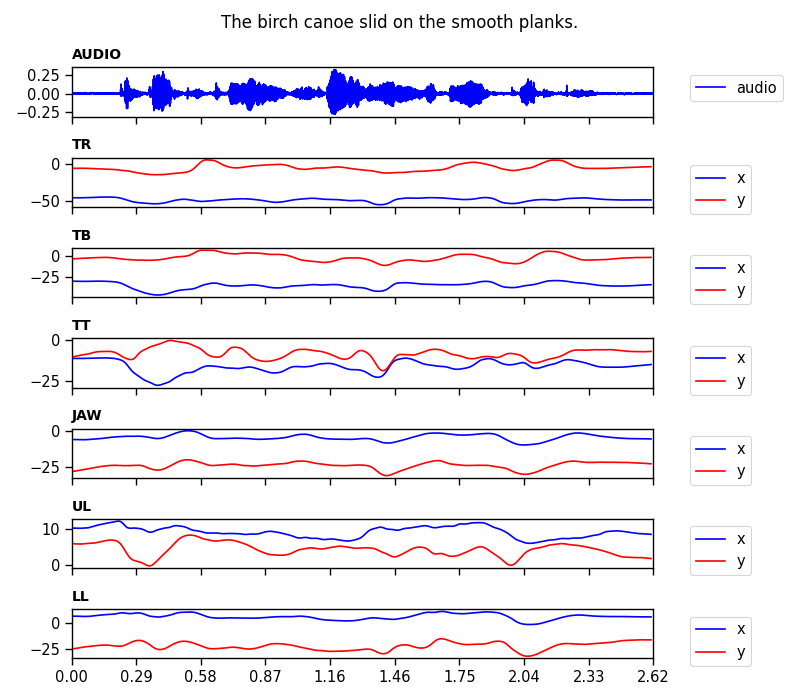
- (4) Update meta information (phone/word labels and time info in TextGrids)
from mviewer import Viewer
mm = Viewer()
mm.load('example/F01_B01_S01_F01_N.mat') # load .mat file
dictionary = mm.mat2py() # outputs dictionary instead of saving it
dictionary = mm.update_meta(dictionary, 'example/F01_B01_S01_F01_N.TextGrid')
# => label information updated!- (5) Update audio information (when you modified your audio signal; eg. amplitude normalization)
from mviewer import Viewer
mm = Viewer()
mm.load('example/F01_B01_S01_F01_N.mat') # load .mat file
dictionary = mm.mat2py() # outputs dictionary instead of saving it
dictionary = mm.update_audio(dictionary, 'example/F01_B01_S01_F01_N.wav')
# => AUDIO information updated!- If you want to specify meta information (channel names or field names in struct), you can do so (See
class Viewerinmviewer.py) - If you are not sure about the meta information, you can specify
ignore_meta=Truewhen initiatingclass Viewer.
The structure of the re-organized python dictionary including the EMA and AUDIO data looks like following:
{'AUDIO': {
	'NAME': {...},
	'SRATE': {...},
	'SIGNAL': {...},
	'SOURCE': {...},   # eg. S07_sen01_HS01_B01_R01_0004_01
	'SENTENCE': {...}, # eg. The birch canoe slid on the smooth planks.
	'WORDS': {...},    # eg. {'LABEL': ..., 'OFFS': ... }
	'PHONES': {...},   # eg. {'LABEL': ..., 'OFFS': ... }
	'LABELS': {...},   # eg. {'NAME': ..., 'OFFSET': ..., 'VALUE': ..., 'HOOK': ... }
},
 'JAW': {
 	'NAME': {...},
	'SRATE': {...},
	'SIGNAL': {...},
	'SOURCE': [],
	'SENTENCE': [],
	'WORDS': [],
	'PHONES': [],
	'LABELS': [],
 },
 'JAWL': {
 	'NAME': {...},
	'SRATE': {...},
	'SIGNAL': {...},
	'SOURCE': [],
	'SENTENCE': [],
	'WORDS': [],
	'PHONES': [],
	'LABELS': [],
 },
 'LL': {
 	'NAME': {...},
	'SRATE': {...},
	'SIGNAL': {...},
	'SOURCE': [],
	'SENTENCE': [],
	'WORDS': [],
	'PHONES': [],
	'LABELS': [],
 },
 'TB': {
 	'NAME': {...},
	'SRATE': {...},
	'SIGNAL': {...},
	'SOURCE': [],
	'SENTENCE': [],
	'WORDS': [],
	'PHONES': [],
	'LABELS': [],
 },
 'TR': {
 	'NAME': {...},
	'SRATE': {...},
	'SIGNAL': {...},
	'SOURCE': [],
	'SENTENCE': [],
	'WORDS': [],
	'PHONES': [],
	'LABELS': [],
 },
 'TT': {
 	'NAME': {...},
	'SRATE': {...},
	'SIGNAL': {...},
	'SOURCE': [],
	'SENTENCE': [],
	'WORDS': [],
	'PHONES': [],
	'LABELS': [],
 },
 'UL': {
 	'NAME': {...},
	'SRATE': {...},
	'SIGNAL': {...},
	'SOURCE': [],
	'SENTENCE': [],
	'WORDS': [],
	'PHONES': [],
	'LABELS': [],
}}- Python 3.8+ (3.12 recommended)
- uv package manager
- See
requirements.txtfor full dependency list
Key dependencies:
- numpy==2.4.0
- scipy==1.16.3
- matplotlib==3.10.8
- seaborn==0.13.2
- tgt==1.5
Optional:
- ffmpeg (required for animation generation)
- mview (MATLAB tool by Mark Tiede @ Haskins Labs)
Dataset:
- Haskins IEEE Rate Comparison Dataset
Legacy Requirements (Original 2020 version)
- This procedure was tested on macOS as of 2020-12-31
- python==3.7.4
- numpy==1.18.5
- scipy==1.4.1
- matplotlib==3.3.3
- seaborn==0.11.0
- tgt==1.4.4
- Support for Haskins IEEE dataset
- Fix
.animate()method - NEW: Implement Adapter Pattern for extensibility
- NEW: Create comprehensive documentation (docs/mviewer_guide.md)
- NEW: Add unit test suite (21 tests)
- Implement mngu0 adapter
- Implement MOCHA-TIMIT adapter
- Implement XRMB adapter
- Provide support for data compression (bz2)
- User Guide: docs/mviewer_guide.md - Complete guide with API reference and examples
- Developer Guide: CLAUDE.md - Architecture and development information
- Test Documentation: test/README.md - Testing guide and coverage
- The example files in
examplefolder (i.e.,F01_B01_S01_R01_N.matandM01_B01_S01_R01_N.mat) were retrieved from the original data repository (Link) without any modifications only for demonstration (version 3 of the GNU General Public License).
- 2020-12-31: First created
- 2024-12-03: Dev branch created
- 2025-12-26: Migrated to uv package manager, updated to Python 3.12, modernized dependencies
- 2025-12-27: Version 2.0 - Refactored with Adapter Pattern, added comprehensive documentation, created unit test suite (21 tests)