Releases: intel/Edk2Code
V2.0.0

EDK2Code 2.0.0
Thank you for installing the new version of the EDK2Code extension! 🎉
For detailed documentation, please visit: EDK2Code Documentation.
You can find our GitHub repository here: EDK2Code GitHub Repository.
If you find this extension useful, please consider giving us a star on GitHub or leaving a review in the VSCode Marketplace. Your support is greatly appreciated! ⭐
New features
Edk2Code sidebar
The extension now lives in its own dedicated activity bar container, replacing the old Edk2 panel under the Explorer view. You can find all Edk2Code views grouped together in the sidebar, including the new Workspace and Module Info views.
Workspace view
The new Workspace view provides a unified, navigable representation of your parsed EDK2 workspace. It replaces the previous Module Map / Reference Tree / Library Tree commands with a single, persistent tree.
Key capabilities:
- Sub-trees and includes — DSC, INF, FDF and source files are organized hierarchically. Header includes and library sub-trees are integrated into the tree, so you can navigate dependencies in one place.
- Search and filter — Use the search action to quickly find nodes anywhere in the workspace tree. A dedicated filter is available to hide inactive (grayed-out) elements.
- Reveal active editor — Jump from the currently open file to its location in the workspace tree.
- Drag and drop — Reorganize and rearrange tree nodes via drag and drop.
- Multiple workspaces — When multiple build configurations are loaded, you can switch between them from the view title bar. Searching for symbols automatically switches to the workspace that owns the result.
- Copy node path / Copy tree — Quickly copy the path of a node or export the entire tree as text.
- Welcome view — When no workspace is loaded, the view guides you through discovering build folders or opening the configuration UI.
Module Info view
The new Module Info view shows the EDK2 module information for the file you are currently editing. As soon as you open a C, INF or related source file that belongs to a module, the view populates with:
- The owning INF and DSC declaration
- Libraries linked to the module
- Quick navigation actions (go to definition, open file, go to DSC declaration)
Double-click any entry to jump directly to the corresponding source location.
Build folder auto-discovery
EDK2Code can now scan your workspace and automatically detect existing build output folders.
- Run
EDK2: Discover build foldersto scan the workspace. - Once discovered, run
EDK2: Use discovered build foldersto load them directly — no manual configuration needed. - The Workspace view welcome page surfaces these actions when nothing is loaded yet.
Compile EDK2 file
You can now compile an individual EDK2 file (e.g. a .c belonging to a module) directly from the editor.
- A play (▶) icon is shown on supported source files.
- The command
EDK2: Compile Edk2 fileinvokes the build for the parent module of the active file.
MCP server integration
EDK2Code now exposes an MCP (Model Context Protocol) SSE server that lets AI agents and external tools query your parsed EDK2 workspace.
- Start with
EDK2: Start MCP SSE Serverand stop withEDK2: Stop MCP SSE Server. - The server port is configurable via the
edk2code.mcpServerPortsetting (default3100).
Settings UI
A graphical Workspace configuration (UI) panel has been added to make managing build configurations easier. Launch it from the Workspace view title bar ($(gear) icon) or via the EDK2: Workspace configuration (UI) command — no more hand-editing JSON for common setups.
Goto overwriting definition
When a symbol is overwritten in a DSC (libraries, PCDs, modules), a new code action lets you jump directly to the overwriting definition.
Other improvements
- Disable cscope — A new
edk2code.useCscopesetting lets you turn off cscope integration entirely. When disabled, the cscope database is not built or queried. - Unload workspace — New
EDK2: Unload workspacecommand to clear the currently loaded build configuration. - Refresh workspace config — Reload the workspace configuration without restarting VS Code.
- Focus INF from C files — Improved navigation from C source files back to their owning INF module.
- Better module symbols — DSC parser now recognizes module sub-context sections, build options, and improved symbols for libraries and modules.
- Loading and discovery indicators — Progress indicators are shown while the workspace is being parsed or build folders are being discovered.
- Improved grayout controller — Inactive code regions are computed and updated more reliably.
- Path improvements — Missing paths now report folders instead of file names, and tooltips include the full path.
- Extensive test suite — New parser and workspace tests covering ASL, DEC, DSC, FDF, INF and VFR.
v1.1.2
🆕 Features & Enhancements
🔗 VSCode Link Support for References
- New Configuration: Added
edk2code.addVscodeLinksToReferencessetting- When enabled, the tree output includes clickable markdown links that open files at specific line numbers
- Default:
false - Perfect for creating documentation with direct file links
📊 Enhanced Diagnostic Handling
- Improved Performance: Added diagnostic caching and duplicate detection
- Symbol Validation: Added automatic validation for INF file symbols against DEC files
- Validates GUIDs, Protocols, PPIs, and PCDs
- Shows errors when symbols are not found in referenced DEC files
- Better Error Management: Prevents duplicate diagnostics from cluttering the Problems panel
Full Changelog: v1.1.1...v1.1.2
v1.1.1
- Added support to handle VsCode workspaces and create
.edk2codefolder outside them. - Improved conditional logic parsing for DSC and FDF files
- Added error messages for conditional logic in DSC and FDF files
Full Changelog: v1.1.0...v1.1.1
v1.1.0
New features
Module map
You can right click on a compiled INF file and select EDK2: Show Module Map
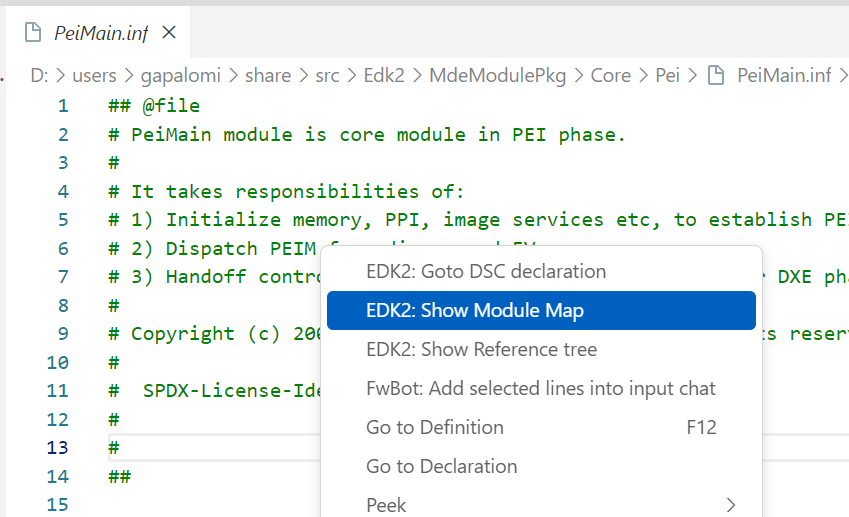
This will open the EDK2 submenu showing the libraries and source files that were used to compile that INF.
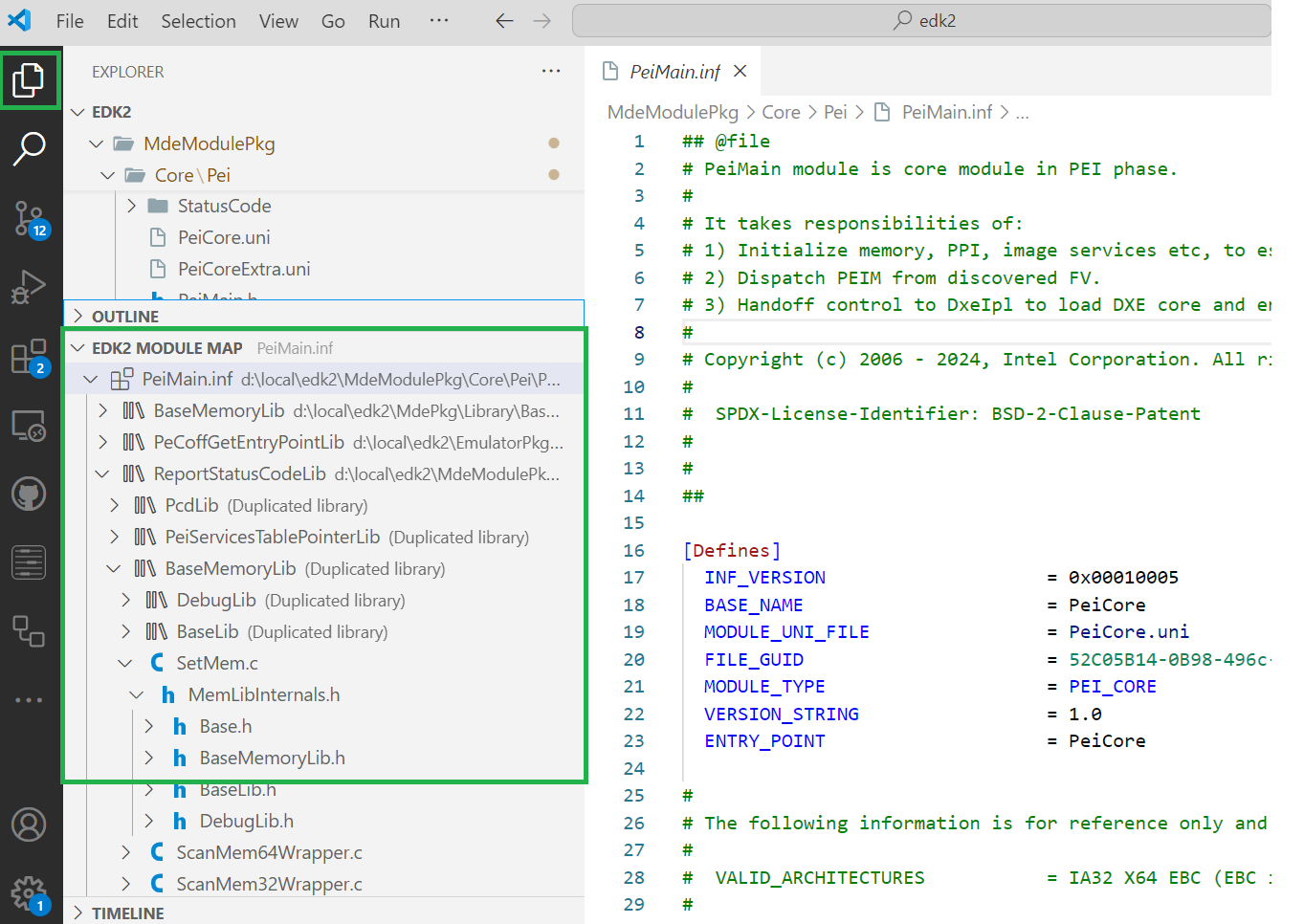
This feature is helpful in visualizing how a module includes various libraries. It also provides insights into how C files within the module include header files. By understanding these relationships, developers can better manage dependencies.
Error Detection
The DSC analysis can identify potential issues within the DSC files, such incorrect paths, duplicated libraries, etc. These issues are highlighted and shown in the Visual Studio Code "Problems" window.
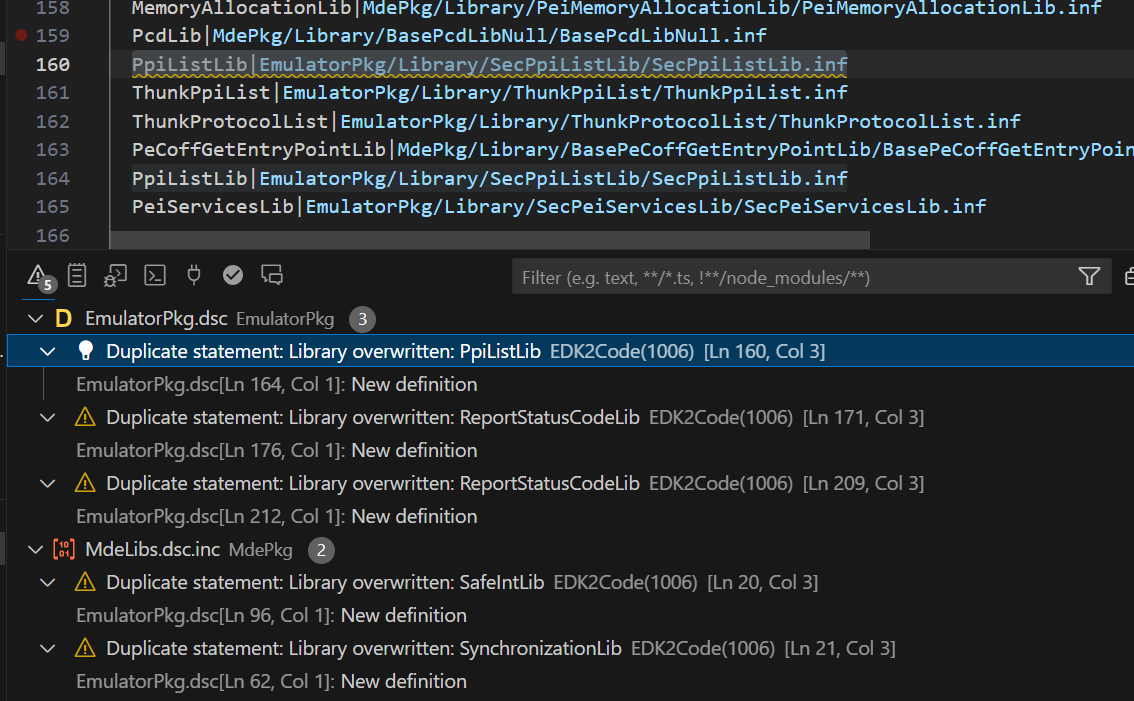
You can disable this using the edk2code.enableDiagnostics setting
Edk2Code_1.0.8
What's Changed
- fix a bunch of misspellings by @WilliamLeara in #7
- Add more if pairs for VFR format by @lxvs in #9
- Add clangd config check in checkCompileCommandsConfig() by @YangGangUEFI in #10
Enhancements
- JSON Configuration & Syntax:
- Added new keyword pairs:
warningif,inconsistentif,disableif,nosubmitiftoedk2_vfr.conf.jsonandedk2_vfr.tmLanguage.jsonfor improved syntax highlighting and language support. 🆕✨
- Added new keyword pairs:
Bug Fixes
- Typographical Errors:
- Corrected misspelled words:
seetingtosettingandGenerationgtoGenerating. 📝🛠️ - Fixed a typo in the message: "c_cpp_properties.json points to wrong compile_commands.json". 📝🔧
- Corrected misspelled words:
Features
- New Commands:
- Introduced
edk2code.copyTreeDatacommand to copy tree data to clipboard in a formatted string. 📋🌳
- Introduced
- Clangd Support:
- Added support for Clang compile commands in the workspace configuration. 🛠️🔧
- Automatically updates
clangdconfiguration with the correct--compile-commands-dirargument ifvscode-clangdextension is installed. 🆕🔄
- Automatically updates
- Added support for Clang compile commands in the workspace configuration. 🛠️🔧
Code Quality
- Refactoring & Cleanup:
- Improved code readability by trimming redundant spaces and unifying function behavior. 🧼🛠️
- Renamed
edksymbol.tstoedkSymbols.tsfor consistency. 📂🗂️
New Contributors
- @WilliamLeara made their first contribution in #7
- @lxvs made their first contribution in #9
- @YangGangUEFI made their first contribution in #10
Full Changelog: Edk2Code_1.0.7...Edk2Code_1.0.8
Contributors


Assets 3
Edk2Code_1.0.7
Version 1.0.7 🚀
New Features 🌟
- Introduced
DiagnosticManagerfor managing diagnostics within the extension. This includes a comprehensive list of diagnostic codes and descriptions for various errors and warnings that can occur during the parsing and analysis of EDK2 code. 🛠️ - Added support for reading and writing the
cscope.filesusing theCscopeclass, enhancing the handling of file paths and improving compatibility with different operating systems. 📁 - Implemented a new method for handling conditional statements within the EDK2 workspace, providing more accurate processing and error reporting. 🔍
- Enhanced the library and module parsing capabilities to include better path resolution and error handling, ensuring that missing paths and other common issues are correctly identified and reported. 📚
Improvements ✨
- Updated the handling of
cscope.filesto use arrays and improved file path manipulation, making the generation of cscope files more robust and error-resistant. 🔄 - Improved the configuration and management of diagnostic reports, allowing for more precise and informative error and warning messages. 📊
- Enhanced the user interface messages and added new wiki links for better user guidance and support. 💡
Bug Fixes 🐛
- Fixed an issue where the
.ignorefile generation was not correctly excluding files from the EDK2 workspace analysis, leading to more accurate and efficient indexing. 🚫 - Addressed a bug in the handling of include paths and library paths, ensuring that all paths are correctly parsed and resolved. 🛠️
- Corrected the regex patterns used for parsing library paths, allowing for a wider range of file extensions to be recognized and processed. 📂
Full Changelog: Edk2Code_1.0.5...Edk2Code_1.0.7
Edk2Code_1.0.5
- Adding Library tree view command.
- Added autocompletion for depex blocks in INF files
- Added setting to overwrite cscope command path
Full Changelog: Edk2Code_1.0.4...Edk2Code_1.0.5
Edk2Code_1.0.4
- Fixed call Hierarchy logic
- Modified logic to generate .ignore
- Fixed condition to take latest DSC changes of main DSC file when graying out text
- Fixed some variable types
- Added
UNIfiles on unused task bar
Full Changelog: Edk2Code_1.0.1...Edk2Code_1.0.4
Edk2Code_1.0.1
Bug fixed:
- Avoid unnecessary rescan windows
Full Changelog: Edk2Code_1.0.0...Edk2Code_1.0.1
Edk2Code_1.0.0
Mayor refactor to integrate optimizations
- Created specific .edkfolder for workspace settings.html
- Created own configuration page for workspace
- Improved autocomplete on inf files
- Improved EDK parser methods
- Removed unused code
- Added new goto commands
Full Changelog: Edk2Code_0.0.5...Edk2Code_1.0.0