An unofficial Baserow Websocket SDK for connecting the baserow websocket API in androids to listen the realtime changes in your database. You can check the Websocket documentation here : https://baserow.io/docs/apis/web-socket-api
Let see how we can implement it in our project, it is much easy to set it up in less than 5 mins.
You can get started with this library very easily.
You can download the Baserow library from here.
After downloading it you have to place that file in your lib folder of your project like this :
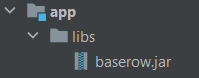
After adding the baserow library, you have to configure the jar in your gradle by adding the below line in your dependency and click on sync now button to complete the procedure.
// for adding our jar from libs dir
implementation fileTree(include: ['*.jar'], dir: 'libs')
Now you have added the Baserow library into your app and can use it to make your apps.
It's really simple to use it. Just a few lines of code and you are done with it.
You have to follow few steps to listen changes in your database.
Step 1 : Initilializing the BaserowWebSocket instance.
BaserowWebSocket socket = BaserowWebSocket.initialize(this, BaserowWebSocket.DEFAULT);
// 1st parameter : activity
// 2nd parameter : Your baserow URL, if you are using your self hosted baserow then you can give it here or use the DEFAULT url.
Step 2 : Generating the JWT Token
You must have a JWT token for connecting the websocket. Baserow socket API requires JWT token for connection and it can be only generated by your account username and password. You can generate it within your server and can make it available with database or else you can generate it within the app[not recommended].
Here is how you do it.
TokenGeneratorListener tokenGeneratorListener = new TokenGeneratorListener() {
    @Override
    public void onTokenGenerated(String response, String token) {
        Log.i(TAG, "onTokenGenerated: " + token);
        JWT = token;
        // JWT token is now generated. You can store it in a variable and can go ahead connecting the web socket
    }

    @Override
    public void onError(Exception e) {
        Log.i("BaserowWebSocket", "onError : ", e);

    }
};

// It is a static method so you don't need to use the baserow instance here.
BaserowWebSocket.generateJWTToken(this,
    BaserowWebSocket.DEFAULT,
    "<username>",
    "<password>",
    tokenGeneratorListener);
Step 3 : Connecting the Web socket.
Now we have generated our token and can proceed ahead connecting the web socket.
ConnectionListener connectionListener = new ConnectionListener() {
    @Override
    public void onConnected(String response) {
        Log.i(TAG, "onConnected: Our web socket has been connected now");
    }

    @Override
    public void onDisconnected(String response) {
        Log.i(TAG, "onDisconnected: This callback will be raised when web socket disconnected");
    }

    @Override
    public void onError(Exception e) {
        Log.e(TAG, "onError: ", e);
    }
};

// Connect the web socket with baserow instance by passing the generated JWT token and above created listener
socket.connect(JWT, connectionListener);
Step 4 : Subscribing the page Currently there is only table page is available, that you can subscribe and can listen change in it.
SubscriptionListener subscriptionListener = new SubscriptionListener() {
    @Override
    public void onSubscribed(String tableId, String response) {
        Log.i(TAG, "onSubscribed: We have subscribed now and can listen changes in our table");
    }

    @Override
    public void onFailedToSubscribe(String error) {
        Log.e(TAG, "onFailedToSubscribe: maybe due to invalid JWT token");
    }
};

// Pass the table id which you want to subscribe with a callback listener
socket.subscribe(tableId, subscriptionListener);
Step 4 : Listening the database changes You have all set up, now just set the database change callback and listen all the changes.
DatabaseChangeListener listener = new DatabaseChangeListener() {
    @Override
    public void onDataChanged(String s, String s1) {
        // You can listen the row added, row updated, and row deleted events directly from the callback but the
        // all other events such as row moved would be listened with this callback
        Log.i(TAG, "onDataChanged: Other changes");
    }

    @Override
    public void onRowAdded(int rowId, String response) {
        Log.i(TAG, "onRowAdded: A new row has been added");
    }

    @Override
    public void onRowDeleted(int rowId, String response) {
        Log.i(TAG, "onRowDeleted: Row is removed");

    }

    @Override
    public void onRowUpdated(int rowId, String response) {
        Log.i(TAG, "onRowUpdated: Row is updated");

    }
};

// Pass the above database listener
socket.setDatabaseChangeListener(listener);
We have finished setting up the websocket now you can cusomtize the code as your needs.
You can check the sample app's code for more understandings.
Author : Sumit Kumar
Website : sumitkmr.com
If you found this library useful then you can donate me via Paypal.