Tutorial "Local Library" website written in Django.
This web application creates an online catalog for a small local library, where users can browse available books and manage their accounts.
The main features that have currently been implemented are:
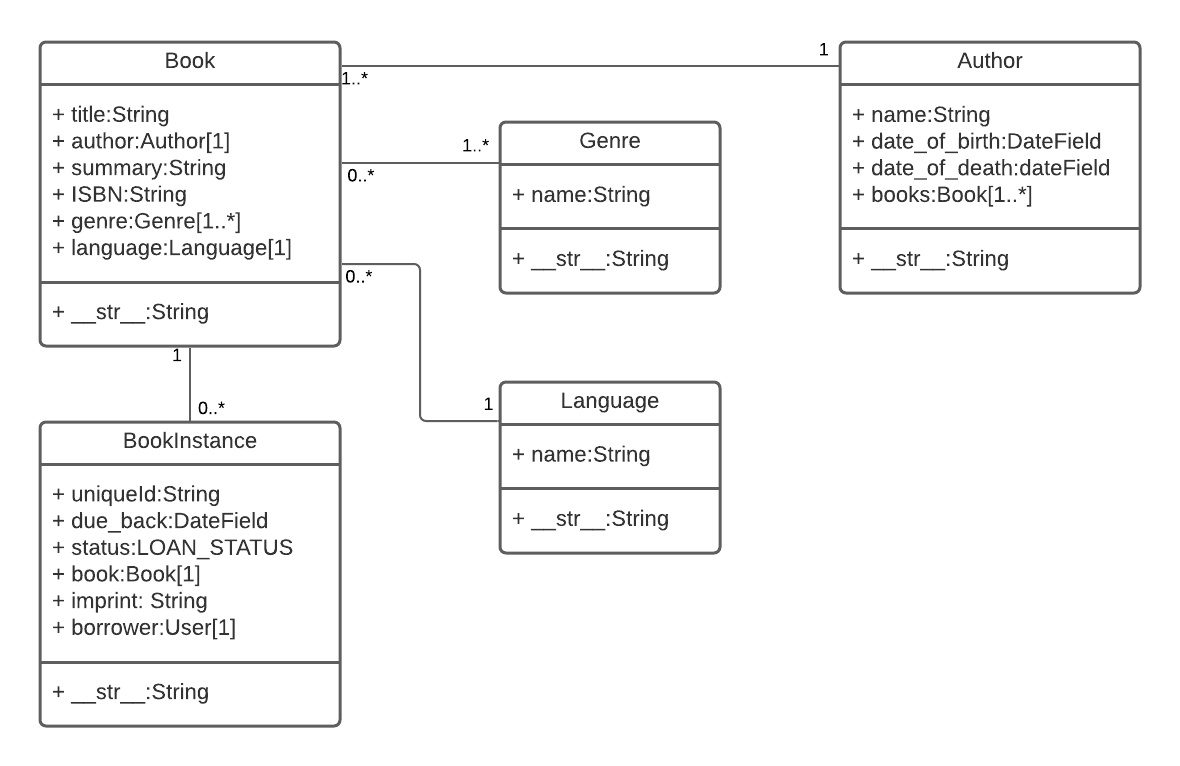
- There are models for books, book copies, genre, language and authors.
- Users can view list and detail information for books and authors.
- Admin users can create and manage models. The admin has been optimised (the basic registration is present in admin.py, but commented out).
- Librarians can renew reserved books
To get this project up and running locally on your computer:
- Set up the Python development environment.
- Assuming you have Python setup, run the following commands (if you're on Windows you may use
pyorpy -3instead ofpythonto start Python):pip3 install -r requirements.txt python3 manage.py makemigrations python3 manage.py migrate python3 manage.py collectstatic python3 manage.py test # Run the standard tests. These should all pass. python3 manage.py createsuperuser # Create a superuser python3 manage.py runserver - Open a browser to
http://127.0.0.1:8000/admin/to open the admin site - Create a few test objects of each type.
- Open tab to
http://127.0.0.1:8000to see the main site, with your new objects.