
-
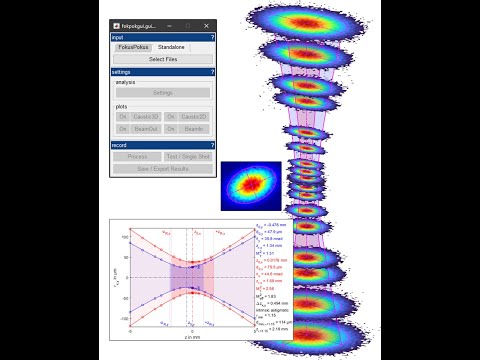
This code can be used for ISO11146 analysis of stigmatic and simple astigmatic lasers.
-
This code was developed to be used with a proprietary system developed at IFSW University of Stuttgart for online analysis.
-
However, most of the code can be used offline script-based or via the GUI if a series of beam profiles are provided.
- The latter is a scenario often encountered at the IFSW, as most processing stations are equipped with axis systems and appropriate camera systems.
-
All you need to do is record images of your beam profiles along the caustic using your camera system. If you use additional optical elements and filters ensure they don't introduce ghosting and/or aberrations.
-
(Make sure to record enough near- and far-field images for a robust fit of the caustic hyperbola.)
-
(Note: Background subtraction using a dark image/video is risky without specific knowledge of the behaviour of your camera system and setup. Pre-process your images this way if you are certain you are not compromising the data.)
-
Without Installation, MATLAB >= 2021a
- Simply start the GUI via startGUI.m.
- If you enable some of the debugging features the image processing toolbox is required.
- It is recommended to experiment with the GUI and test datasets first.
- For custom data input analyze your data via script: analyze_example.m.
-
Using the installer
- Install the application using the installer.
- The binaries require the R2021a (9.10) runtime. The installer will download the required dependencies. A full installation of MATLAB is not required.
- Start the GUI/App.

- Load and tag your images / specify pixelpitch and wavelength.
- It is attempted to extract the z-position from the filename. Reproduce the naming scheme of the test datasets for your data to use this feature.

- Adjust analysis / plot settings if required.

- Review / export plots. Some plots are interactive.

- And export the data to .xlsx / .mat.

- Code is provided "as is".
- Please forward bugs, errors and suggestions via mail.