Releases: daust/opal-tools
Version 2.11.0 (release: 23.09.2025)

You can see the full list of issues with details in the milestones page.
New features
- #125: Upgrade sqlcl libraries to 25.2
- #126: Environment specific deployment of files
- #118: Add version of OPAL TOOLS in validateConnections
Bug fixes
Changed behaviour
- With sqlcl 25.2, by default, APEX application exports will no longer overwritten, you have to specify the command line switch
-overwrite-files: e.g.apex export-application -applicationid 121 -overwrite-files
Upgrade instructions
Upgrade from version 2.10.0 to 2.11.0
- replace all files in the directory
opal-tools/lib, your existing environment will continue to work - make changes to your APEX export files and include the
-overwrite-files switch as needed
Deprecated features (still available but will go away eventually)
- none
Obsoleted features (no longer available)
- none
Known issues
- Please check the current list of open issues: https://github.com/daust/opal-tools/issues.
Version 2.10.0 (release: 06.06.2025)
You can see the full list of issues with details in the milestones page.
New features
- see milestones page
Bug fixes
- see milestones page
Changed behaviour
- All custom export files in
opal-tools/export-templatesneed to be changed to work with the newer JDBC layer issue 122.
Upgrade instructions
Upgrade from version 2.9.0 to 2.10.0
- replace all files in the directory
opal-tools/lib, your existing environment will continue to work - In an existing project, update all custom export files in
opal-tools/export-templatesto work with the newer JDBC layer issue 122.
Deprecated features (still available but will go away eventually)
- none
Obsoleted features (no longer available)
- none
Known issues
- Please check the current list of open issues: https://github.com/daust/opal-tools/issues.
Version 2.9.0 (release: 22.10.2023)
You can see the full list of issues with details in the milestones page.
New features
- see milestones page
Bug fixes
- see milestones page
Changed behaviour
- In an existing project, update the files
conf/opal-export.confandscripts/opal-export-pre-script.sqlas described in issue 111. - Update files
setProjectEnvironment.shandsetProjectEnvironment.cmdas described in issue 114.
Upgrade instructions
Upgrade from version 2.8.0 to 2.9.0
- replace all files in the directory
opal-tools/lib, your existing environment will continue to work - In an existing project, update the files
conf/opal-export.confandscripts/opal-export-pre-script.sqlas described in issue 111. - Update files
setProjectEnvironment.shandsetProjectEnvironment.cmdas described in issue 114.
Deprecated features (still available but will go away eventually)
- none
Obsoleted features (no longer available)
- none
Known issues
- Please check the current list of open issues: https://github.com/daust/opal-tools/issues .
opal-tools v2.8.0 (release: 04.02.2022)
You can see the full list of issues with details in the milestones page.
New features
- see milestones page
- the documentation has been updated and expanded significantly
Bug fixes
- see milestones page
Changed behaviour
- No behaviour has changed so that your existing environment will not break. You only have to replace the
opal-tools/libdirectory. - Nevertheless, a number of changes will affect a new and clean installation which are very helpful. This is why we advise to do a new, clean install:
- scripts that should not be modified have been moved from
opal-tools/bintoopal-tools/bin/internal - all target directories for apex, rest, sql sources will have their own environment variable defined in the
setProjectEnvironment.[cmd|sh]file. This is also picked up in all of the generated scripts making them even more transparent and easier to use - the source directory has been reorganized, a new level
srchas been introduced - also, the generated scripts will call their respective .sql files in the same directory which simplifies things a lot.
- you can use the parameter
fileFilterinstead offileRegexfor connection mappings as well as encoding mappings with a simplified syntax. This also simplifies cross-platform development for both MacOS/Linux and Windows. You can still usefileRegex, your existing environment will not break.
- scripts that should not be modified have been moved from
Upgrade instructions
Upgrade from version 2.7.3 to 2.8.0
- replace all files in the directory
opal-tools/lib, your existing environment will continue to work
Deprecated features (still available but will go away eventually)
- none
Obsoleted features (no longer available)
- none
Known issues
- Please check the current list of open issues: https://github.com/daust/opal-tools/issues .
opal-tools v2.7.3 (release: 19.02.2021)
You can see the full list of issues with details in the milestones page.
New features
- see milestones page
Bug fixes
- see milestones page
Changed behaviour
- none
Upgrade instructions
In order to upgrade from version 2.7.2 to 2.7.3 you only need to replace a single file in the /lib directory:
- Remove opal-tools.2.7.2.jar from your /lib folder
- Copy opal-tools.2.7.3.jar into your /lib folder
In order to upgrade from version 2.6.0 to 2.7.3 you only need to replace the /lib directory:
- Delete all files from /lib directory
- Copy all files from the /lib directory of the distribution
Deprecated features (still available but will go away eventually)
- none
Obsoleted features (no longer available)
- none
Known issues
- Please check the current list of open issues: https://github.com/daust/opal-tools/issues .
opal-tools v2.7.2 (release: 12.02.2021)
You can see the full list of issues with details in the milestones page.
New features
- see milestones page
Bug fixes
- see milestones page
Changed behaviour
- none
Upgrade instructions
In order to upgrade from version 2.6.0 to 2.7.2 you only need to replace the /lib directory:
- Delete all files from /lib directory
- Copy all files from the /lib directory of the distribution
Deprecated features (still available but will go away eventually)
- none
Obsoleted features (no longer available)
- none
Known issues
- Please check the current list of open issues: https://github.com/daust/opal-tools/issues .
opal-tools v2.7.1 (release: 11.02.2021)
You can see the full list of issues with details in the milestones page.
New features
- see milestones page
Bug fixes
- see milestones page
Changed behaviour
- none
Upgrade instructions
In order to upgrade from version 2.6.0 to 2.7.1 you only need to replace the /lib directory:
- Delete all files from /lib directory
- Copy all files from the /lib directory of the distribution
Deprecated features (still available but will go away eventually)
- none
Obsoleted features (no longer available)
- none
Known issues
- Please check the current list of open issues: https://github.com/daust/opal-tools/issues .
opal-tools 2.7.0 (release: 10.02.2021)
You can see the full list of issues with details in the milestones page.
New features
- see milestones page
Bug fixes
- see milestones page
Changed behaviour
- none
Upgrade instructions
In order to upgrade from version 2.6.0 to 2.7.0 you only need to replace the /lib directory:
- Delete all files from /lib directory
- Copy all files from the /lib directory of the distribution
Deprecated features (still available but will go away eventually)
- none
Obsoleted features (no longer available)
- none
Known issues
- Please check the current list of open issues: https://github.com/daust/opal-tools/issues .
opal-tools v2.6.0 (release: 11.12.2020)
You can see the full list of issues with details in the milestones page.
New features
- see milestones page
Bug fixes
- see milestones page
Changed behaviour
- changed names in documentation and the default in the setup routine, so that it matches the video and instructions:
scott hr=>schema1 schema2
- OPTIONAL: The naming of
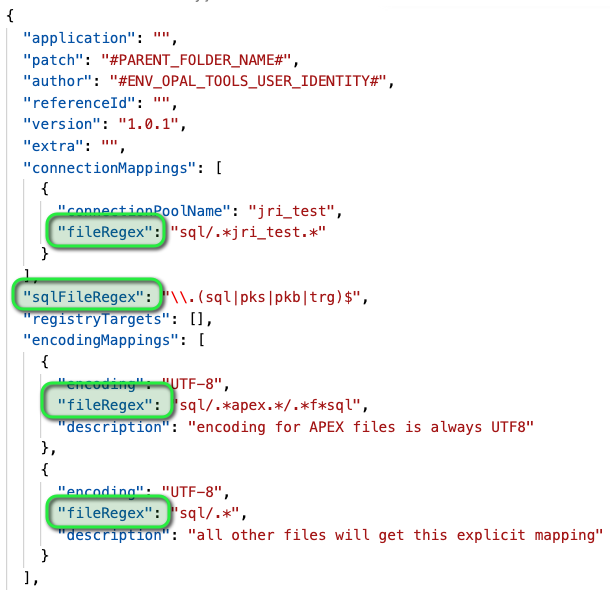
SourceFilesCopy.txtandSourceFilesReference.txttoSourceFilesCopy.confandSourceFilesReference.conf. These files are called from the shell scripts and passed as parameters. Your existing patches will continue to work. New releases will generate different patch-templates that will use these different filenames in the filesystem and call them automatically in the shell scripts. - MANDATORY: In order to streamline the naming of properties, the following attributes have changed in the
opal-installer.jsonfile (else these properties will no longer be read):matchRegEx => fileRegexsqlFileRegEx => sqlFileRegex
Deprecated features (still available but will go away eventually)
- none
Obsoleted features (no longer available)
- none
Known issues
- Please check the current list of open issues: https://github.com/daust/opal-tools/issues .
opal-tools v2.5.0 (release: 03.12.2020)
You can see the full list of issues with details in the milestones page.
New features
- see milestones page
Bug fixes
- see milestones page
Changed behaviour
- none
Deprecated features (still available but will go away eventually)
- none
Obsoleted features (no longer available)
- none
Known issues
- Please check the current list of open issues: https://github.com/daust/opal-tools/issues .