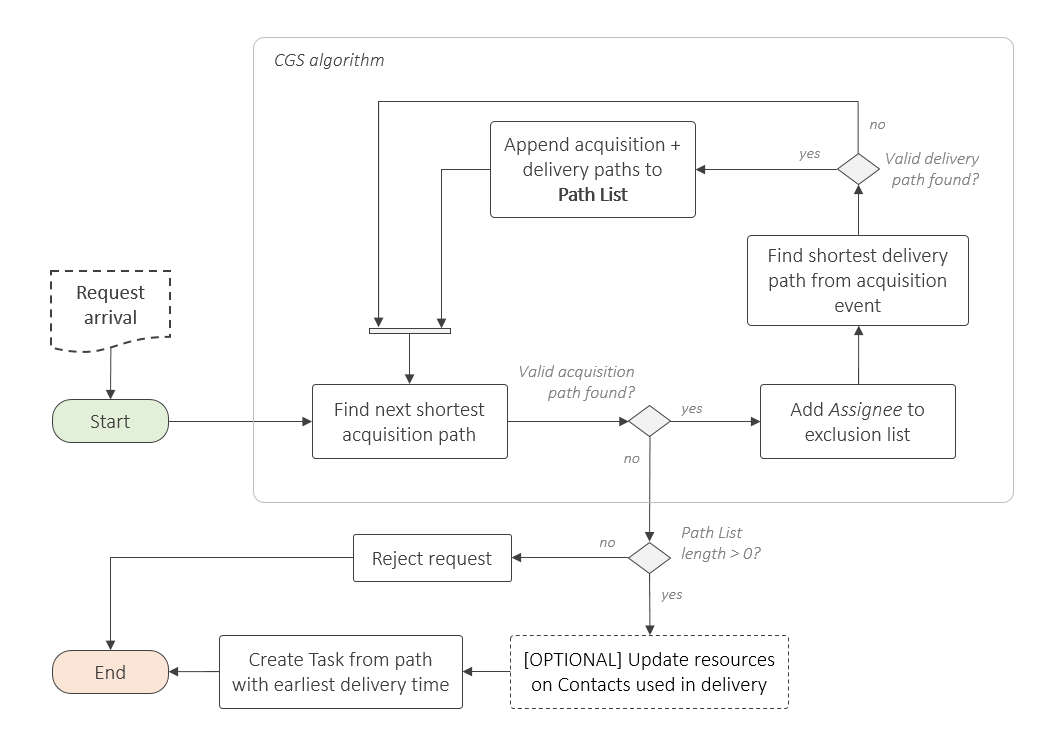
Contact Graph Scheduling (CGS) is a method of assigning pick-up and delivery schedules in delay- and disruption tolerant networks. The principle application is that of assigning image capture and delivery in intermittently connected satellite networks, in which both tasks and image data are routed through the network via ground-space, space-space and space-ground contact opportunities. This code was originally developed by Christopher Lowe and has been adapted by Beth Probert, both of the Applied Space Technology Laboratory at the University of Strathclyde.
"Delay-tolerant network approach to satellite pickup and delivery scheduling", Christopher Lowe, Ruaridh Clark, Ciara McGrath, Malcolm Macdonald, Dec 2023, Ad Hoc Networks, DOI: https://doi.org/10.1016/j.adhoc.2023.103289A
This codebase includes a Discrete Event Simulation (DES) implementation of a Space Network, in which requests for location-specific images are submitted to a central scheduler. This scheduler implements CGS to define tasks that are issue throughout the constellation, such that task assignees receive the request in good time to execute the image acquisition, and use Contact Graph Routing to deliver data to the ground in the minimum time possible.
The DES is established using the simpy library, whereby image requests are submitted based on the invocation of a generator function that yields Request objects according to some probability distribution. The submission of Request objects triggers the CGS procedure on the Scheduler node, which, if successful, adds a Task object to the task table. This task table is then distributed throughout the network.
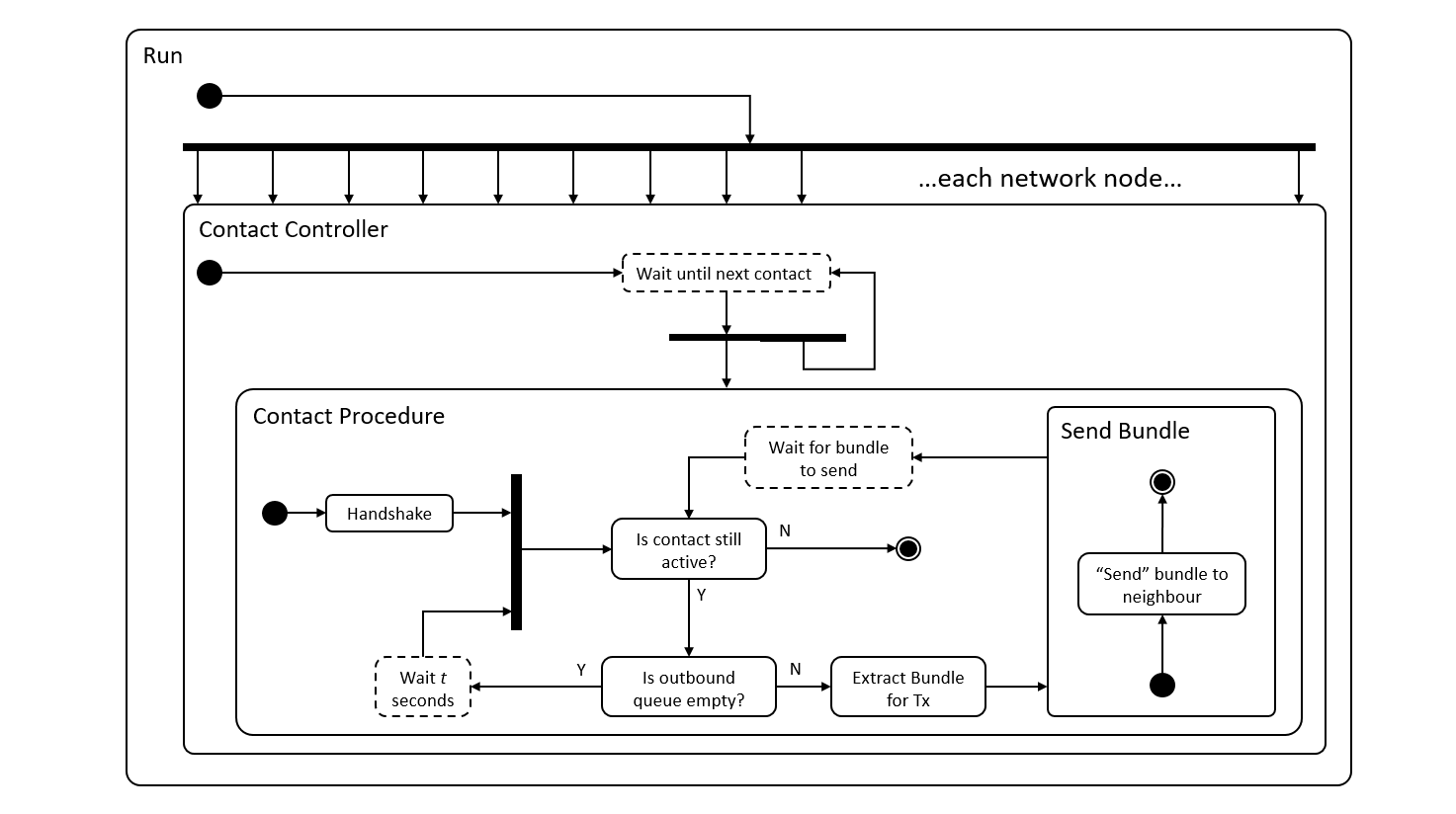
A simplfied representation of the Contact Controller function, which lives on board each node in the network, is presented below. The Contact Controller handles the Contact Procedure when two nodes are communicating, and waits when not. Multiple instances of the Contact Controller may be running at any one time, if deemed feasible on the node, for example if both an inter-satellite and space-ground contact are happening simultaneously. Within the Contact Procedure, the Send Bundle event is triggered if the necessary conditions are met, else a wait time is imposed before again checking the data buffer, or the process is exited.
To install the required Python dependencies, run:
pip install -r requirements.txt
You will also need to install Microsoft Visual C++ (MSVC) at version 14.0 or greater. Get it with "Microsoft C++ Build Tools".
This software is compatible with Python 3.13.
There are two options for executing the CGS simulation:
- Single-scenario execution
- Multiple-scenario execution
To run a single scenarion, do the following:
- Navigate into the
srcdirectory - At the bottom of the
main.pyfile, set thefilenamevariable to be the path location of the JSON file containing the mission definition to be evaluated. - Run the
main.pyfile
Some summary analysis of the simulation will be displayed in the console, and a pickled version of the Analytics object saved in the directory /results/single/{filename}
Multiple scenarios can be run from a single execution, to provide additional convenience when performing trade-off analyses. The multiple scenarios must be based off of a single input file (JSON), with specific attributes that contribute to the problem space, being defined manually.
To run:
- Open the
mainMulty.pyfile - Comment/Uncomment (as appropriate) the values for schemes, uncertainties and congestions. These lists define the possible design options and a full-factorial analysis will be carried out (i.e. every possible combination of entries)
- Define the base input file to be used for the simulation, in the
filenamevariable - Run the
mainMulti.pyfile, which will iterate over each of the combinations and save a Pickle file, per simulation, into the/results/multidirectory. - If required, manually move the new results files into their own directory
Note that the value for traffic.congestion and traffic.msr get updated automatically during the execution, as defined by the congestions and schemes item, respectively.
It is recommended that the plotting is done either for a set of scheduling schemes
at a particular level of uncertainty, or a single scheme at different
uncertainties. To set up plotting, in the plotResults.py file:
- Ensure only one of either the
schemeoruncertaintyvariable (list) has multiple entries, with the other just having a single entry. - Update the
rslsvariable to match thecongestionsused in the inputs - Update the
schemeanduncertaintylists to match those defined in the simulation inputs - Modify the
filenamevariable to match the path to the results files - Run the
plotResults.pyfile