
My personal build of dwm and other tools to form a suckless X11 environment.


sucklessX11 is a personal build of dwm (Dynamic Window Manager) and other tools that form a minimalist X11 environment, inspired by the Suckless philosophy of simplicity and efficiency. This collection is not limited to just Suckless applications; it encompasses a variety of lightweight tools designed specifically for a minimal installation of CentOS, along with adaptations for other RedHat-based distributions
Be aware that the name of this repository may be slightly misleading. While it prominently features Suckless implementations, it also includes various other applications that complement the overall experience.
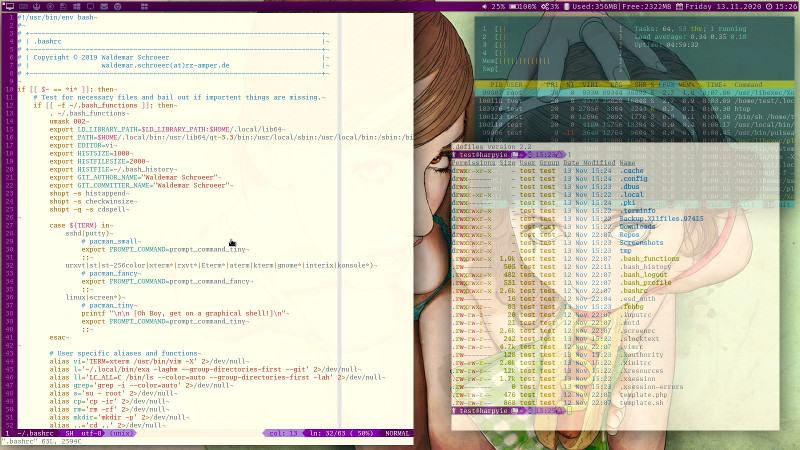
The primary motivation behind WieWaldisucklessX11 was to develop a straightforward and efficient desktop environment that prioritizes essential features for a clean and productive operating experience. As a network administrator, I often find myself with multiple console sessions open, connecting to various network devices via SSH, executing pings and traceroutes, and comparing configurations side by side.
Initially tailored for CentOS, the project has since evolved to support all RedHat-based distributions, including Fedora and Rocky Linux. This broader compatibility allows a wider audience to benefit from a minimalistic setup, reducing bloat while maintaining functionality and user-friendly interaction.
By leveraging the strengths of these distributions, WieWaldisucklessX11 enables users to experience a seamless window management experience alongside streamlined applications that adhere to the Suckless philosophy. My aim is to empower users, particularly in network administration roles, to take control of their desktop environment, ensuring it is both lightweight and effective for daily tasks that require managing numerous open sessions and quick access to crucial data.
- Any RedHat-based distribution (e.g., CentOS, Fedora, Rocky Linux)
- Minimal installation preferred
- Basic knowledge of terminal usage and Linux commands
Installation is split up in two parts. First you have to run the preparation script as root. This will prepare your system by adding needed repositories and packages and copying configuration files. During the preparation you will be asked if you want to have the Google Chrome and VirtualBox repository added.
Then you log in with your user account at the console and run the setup script. This will compile and install a bunch of applications.
At that point I suggest to install my .dotfiles as well.
Just to make that clear. You don't have to use the setup script. You may walk through all sub directories and pick what you want to build and install.
To get slock/gllock working you have to set uid correctly.
sudo chown root:root ~/.local/bin/slock
sudo chmod u+s ~/.local/bin/slock
sudo chown root:root ~/.local/bin/gllock
sudo chmod u+s ~/.local/bin/gllock
Use the following command to simplify cloning the repository.
curl -s https://raw.githubusercontent.com/WieWaldi/suckless.X11/master/bootstrap.sh | bash
This repository cotains the folloing applications. For convenience most of the suckless.org applications have been patched already.
- dmenu - dynamic menu (Version 5.0) contains the following patches.
- dwm - dynamic window manager (Version 6.5, 2024-10-05) contains the following patches.
- dwm-autostart-20210120-cb3f58a.diff
- dwm-center-6.3.diff
- dwm-cfacts-vanitygaps-6.5_full.diff
- dwm-cfacts-dragfact-6.5_full.diff
- dwm-colorbar-6.3.diff
- dwm-focusedontop-6.5.diff
- dwm-focusonclick-20200110-61bb8b2.diff
- dwm-fullscreen-compilation-rule-6.3_full.diff
- dwm-layoutmenu-6.2.diff
- dwm-movestack-20211115-a786211.diff
- dwm-namedscratchpads-6.2.diff
- dwm-netclientliststacking-6.5.diff
- dwm-pertag-6.5.diff
- dwm-resizecorners-6.5.diff
- dwm-status2d-6.3.diff
- dwm-statuscmd-nosignal-20210402-67d76bd.diff
- dwm-xresources-20210827-138b405.diff
- dwm-helper - A collection of wrapper and helper scripts for dwm.
- farbfeld - A lossless image format which is easy to parse, pipe and compress.
- feh — Image Viewer and Cataloguer (Release v3.10.3)
- gllock OpenGL extension to the simple screen locker slock.
- lsw - Lists the titles of all running X windows to stdout (lsw-0.3 (20141129))
- maim - Make Image (v5.7.4)
- rotwall - rotate wallpapers.
- sent - Simple plaintext presentation tool. (sent-1 (20170904))
- slock — simple X screen locker (Version 1.4) contains the following patches.
- slop - select operation
- sselp - Simple X selection printer.
- st - simple terminal (Version 0.8.4) contains the following patches.
- stw - a simple text window for X.
- surf - simple webkit-based browser (Version 2.0) contains the following patches.
- svkbd - Simple Virtual Keyboard.
- sxiv - Simple X Image Viewer.
- tabbed - generic tabbed interface.
- xclickroot - run command on button press on root window.
- xclientprop - show condenst X client properties through xmessage.
- xdotool - command-line X11 automation tool.
- xmenu - menu utility for X.
- xmerge - Merge and apply .Xresource.
- xssstate - display the state of the X screensaver extension.