LFM+ (Looking for Mythic Plus) enhances the default LFG UI for Mythic+ activies to make looking for, or creating, a group for keys in World of Warcraft.
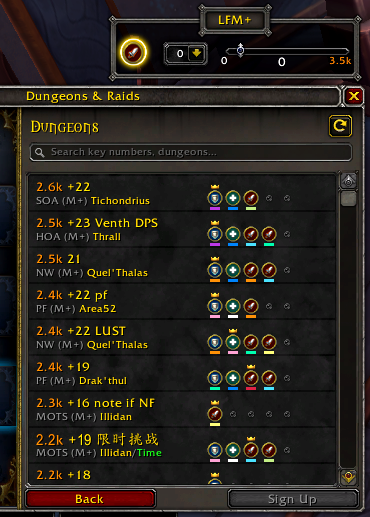
To open the options for LFM+ type "/lfm" into chat.
- Tga123 - Maintainer of https://github.com/Tga123/premade-filter
- WoWUIDev Discord
- WoW Addons; Discord
- Ketho Awesome VSCode Plugin!
- When multiple filters are selected, they are combined.
- Active Role Filter
- Indicated with an icon of your current spec roll (DPS, Healer, or Tank).
- When enabled (Yellow glow), only listings with a spot open for your current role are shown.
- Updated when you change specs.
- Dungeon Dropdown
- Filter listings by dungeon.
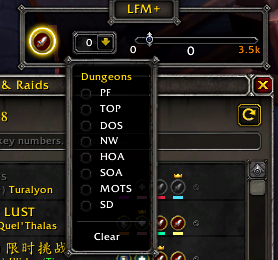
- Filter listings by dungeon.
- Class Dropdown
- Filter applicants by class.
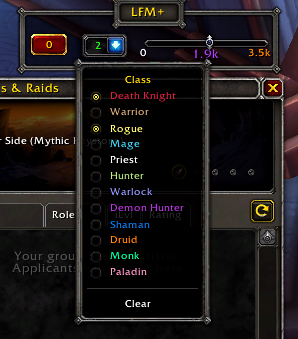
- Filter applicants by class.
- Minimum Score Slider
- Change the minimum score required for group listings or applicants.
- Set at intervals of 100 (100,200,300,2100,2400,3100, ect.)
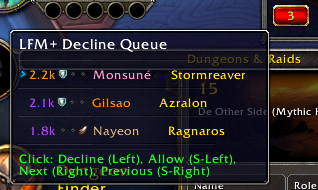
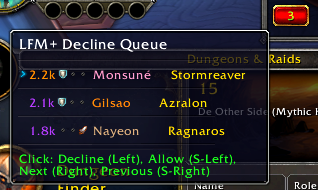
- Decline Queue
- Any applicants who do not meet your filter requirements come here to either whither away in die to send you a message about why they think they should not have been declined.
- Left Click to decline the selected applicant or just let them sit there and expire out....
- Shift-Left Click to have te selected applicant ignore your filters so they can be invited.
- Right Click to move to the next applicant.
- Shift-Right Click to move to the previous applicant
All LFM+ functions apply ONLY to M+ dungeon listings.
-
"Find a Group" Frame
- Filter listings with no open spot for your current role.
- Filter listings by Mythic Plus Rating
- If you set the filter to a minimum of 100 rating, it will filter most LFG spam listings.
- Using the addons built in dungeon selection dropdown, you can chose any combination of dungeons you would like to see.
- This allows you to use the actual search box for other things, such as key level.
- This allows you to use the actual search box for other things, such as key level.
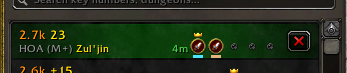
- 3 Role Icon displays in addition to the default display.
- Classed Colored Bar
- Adds a bar colored with the class of the player in that role below the default icon.

- Adds a bar colored with the class of the player in that role below the default icon.
- Role Icon over Class Color
- Changes the default role icon to a circle texture colored to the class in that role with a role icon added.

- Changes the default role icon to a circle texture colored to the class in that role with a role icon added.
- Class Icon with Role Icon
- Changes the default role icon to the class icon in that role with a role icon added.

- Changes the default role icon to the class icon in that role with a role icon added.
- Classed Colored Bar
- Listings will always show the role/class icons, even if you have applied to it.
-
"Applicant" Frame
-
Filter applicants by class and/or Mythic Plus Rating.
-
Filtered applicants are added to a "Decline Queue" that can be viewed and processed by hovering over the applicable button in the LFM+ frame.
- Left Click to decline.
- Shift-Left click to to exempt the group from filter criteria.
- Right click to goto the next applicant.
- Shift-Right click to goto the previous applicant.
-
Applicant scores are shortened and the highest scoring key completed is shown next to the score.
-
-
Default UI Enhancements "Most" settings can be toggled. If there is currently no option to toggle a specific setting, it will be added.
- Always show groups or applicants who are guild members, regardless of filters.
- The dungeon of your current keystone will be automatically selected when creating a group.
- Listings in the "Find a Group" will have the role icons replaced by the applicable class in that role with a smaller role icon attached to it.
- Smaller role icons are only shown for Tanks and Healers.
- Add the M+ rating for the group leader to listing names.
- Add the server of the group leader to each listing (attached to the end of the dungeon name.)
- Shorten dungeon names in listings.
- Double click on a listing to sign up.
- Auto focus the Sign Up window text box.
- Pressing enter after with the sign up box opened will finialize the sign up.
- Double Click on activity categories to open the next frame.
- Shift-Click on activity categories to start a group.
- Remove the shading overlay from the applicant viewer when you are not the leader.
- Better localization support.
- More applicant filters
- Only allow needed roles.
- This would mean that if you only had a spot for a healer, any DPS would be added to the decline queue.
- Groups with multiple players would need to be able to fit in your group.
- If a group of 3 DPS applies and you only need 2 DPS, that applicant will be added to the decline queue.
- Specify DPS type
- Ranged/Melee/Spell Caster
- Specify Utility
- Lust/Brez/Immunity/ect
- Only allow needed roles.
- Specify players/realms to be flagged or filtered out.
- Via right click on unit frames, search listings or applications.
- Ability to track players you have done keys with and record notes that can be referenced when you see that player again.
- Ability to add a realm and/or player to the addons internal flagging list.
- User specified short names for dungeons.
- Scaling
This addon does NOT use rating data from the RaiderIO addon and does NOT require the RaiderIO addon to be installed. Support for RaiderIO scoring/colors is possible if users would like it added.