




Inspector, testing framework, and app framework for MCP Apps.
Demo (Hosted) ~ Demo (Video) ~ Discord ~ Documentation ~ GitHub
Test any MCP server in replicated ChatGPT and Claude runtimes — no sunpeak project required.
sunpeak inspect --server http://localhost:8000/mcp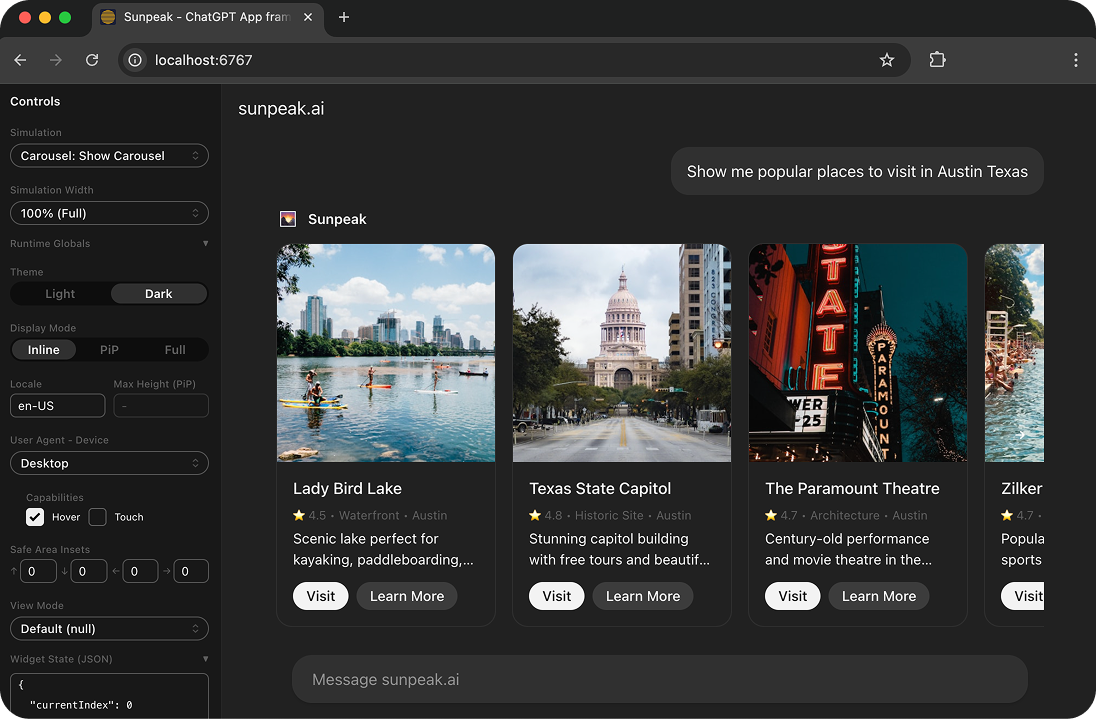
- Multi-host inspector replicating ChatGPT and Claude runtimes
- Toggle themes, display modes, device types from the sidebar or URL params
- Call real tool handlers or use simulation fixtures for mock data
- Built into
sunpeak devfor framework users
E2E tests against simulated hosts and live tests against real production hosts.
- Simulations: JSON fixtures defining reproducible tool states (example below)
- E2E tests: Playwright +
createInspectorUrlagainst the inspector (example below) - Live tests: Automated browser tests against real ChatGPT via
sunpeak/test
Next.js for MCP Apps. Convention-over-configuration project structure with the inspector and testing built in.
sunpeak-app/
├── src/
│   ├── resources/
│   │   └── review/
│   │       └── review.tsx            # Review UI component + resource metadata.
│   ├── tools/
│   │   ├── review-diff.ts            # Tool with handler, schema, and optional resource link.
│   │   ├── review-post.ts            # Multiple tools can share one resource.
│   │   └── review.ts                 # Backend-only tool (no resource, no UI).
│   └── server.ts                     # Optional: auth, server config.
├── tests/simulations/
│   ├── review-diff.json              # Mock state for testing (includes serverTools).
│   ├── review-post.json              # Mock state for testing (includes serverTools).
│   └── review-purchase.json          # Mock state for testing (includes serverTools).
└── package.json- Runtime APIs: Strongly typed React hooks (
useToolData,useAppState,useHostContext, etc.) - Convention over configuration: Resources, tools, and simulations are auto-discovered
- Multi-platform: Build once, deploy to ChatGPT, Claude, and future hosts
Requirements: Node (20+), pnpm (10+)
pnpm add -g sunpeak
sunpeak new| Command | Description |
|---|---|
sunpeak new [name] [resources] |
Create a new project |
sunpeak dev |
Start dev server + inspector + MCP endpoint |
sunpeak inspect --server <url|cmd> |
Inspect any MCP server (standalone) |
sunpeak build |
Build resources + tools for production |
sunpeak start |
Start production MCP server |
sunpeak upgrade |
Upgrade sunpeak to latest version |
Example Resource, Simulation, and testing file (using the Inspector) for an MCP resource called "Review".
Each resource .tsx file exports both the React component and the MCP resource metadata:
// src/resources/review/review.tsx

import { useToolData } from 'sunpeak';
import type { ResourceConfig } from 'sunpeak';

export const resource: ResourceConfig = {
  description: 'Visualize and review a code change',
  _meta: { ui: { csp: { resourceDomains: ['https://cdn.example.com'] } } },
};

export function ReviewResource() {
  const { output: data } = useToolData<unknown, { title: string }>();

  return <h1>Review: {data?.title}</h1>;
}Each tool .ts file exports metadata (with an optional resource link for UI tools), a Zod schema, and a handler:
// src/tools/review-diff.ts

import { z } from 'zod';
import type { AppToolConfig, ToolHandlerExtra } from 'sunpeak/mcp';

export const tool: AppToolConfig = {
  resource: 'review',
  title: 'Diff Review',
  description: 'Show a review dialog for a proposed code diff',
  annotations: { readOnlyHint: false },
  _meta: { ui: { visibility: ['model', 'app'] } },
};

export const schema = {
  changesetId: z.string().describe('Unique identifier for the changeset'),
  title: z.string().describe('Title describing the changes'),
};

type Args = z.infer<z.ZodObject<typeof schema>>;

export default async function (args: Args, extra: ToolHandlerExtra) {
  return { structuredContent: { title: args.title, sections: [] } };
}
Simulation files provide fixture data for testing UIs. Each references a tool by filename and contains the mock input/output:
├── tests/e2e/
│   └── review.spec.ts # This! (not pictured above for simplicity)
└── package.json
The Inspector allows you to set host state (like host platform, light/dark mode) via URL params, which can be rendered alongside your Simulations and tested via pre-configured Playwright end-to-end tests (.spec.ts).
Using the Inspector and Simulations, you can test all possible App states locally and automatically across hosts (ChatGPT, Claude)!
// tests/e2e/review.spec.ts

import { test, expect } from '@playwright/test';
import { createInspectorUrl } from 'sunpeak/inspector';

const hosts = ['chatgpt', 'claude'] as const;

for (const host of hosts) {
  test.describe(`Review Resource [${host}]`, () => {
    test.describe('Light Mode', () => {
      test('should render review title with correct styles', async ({ page }) => {
        const params = { simulation: 'review-diff', theme: 'light', host }; // Set sim & host state.
        await page.goto(createInspectorUrl(params));

        // Resource content renders inside an iframe
        const iframe = page.frameLocator('iframe');
        const title = iframe.locator('h1:has-text("Refactor Authentication Module")');
        await expect(title).toBeVisible();

        const color = await title.evaluate((el) => window.getComputedStyle(el).color);

        // Light mode should render dark text.
        expect(color).toBe('rgb(13, 13, 13)');
      });
    });
  });
}Install the create-sunpeak-app skill to give your coding agent (Claude Code, Cursor, etc.) built-in knowledge of sunpeak patterns, hooks, simulation files, and testing conventions:
npx skills add Sunpeak-AI/sunpeak@create-sunpeak-app