This repository contains the scripts and experimental workload for the article: Predictive and Semi-deterministic Concurrency Control for High-performance OLTP Databases
This is based on our previous work published on ICDM2024: PC3: Enhancing Concurrency in High-Conflict Transactions with Prior Cascading Control
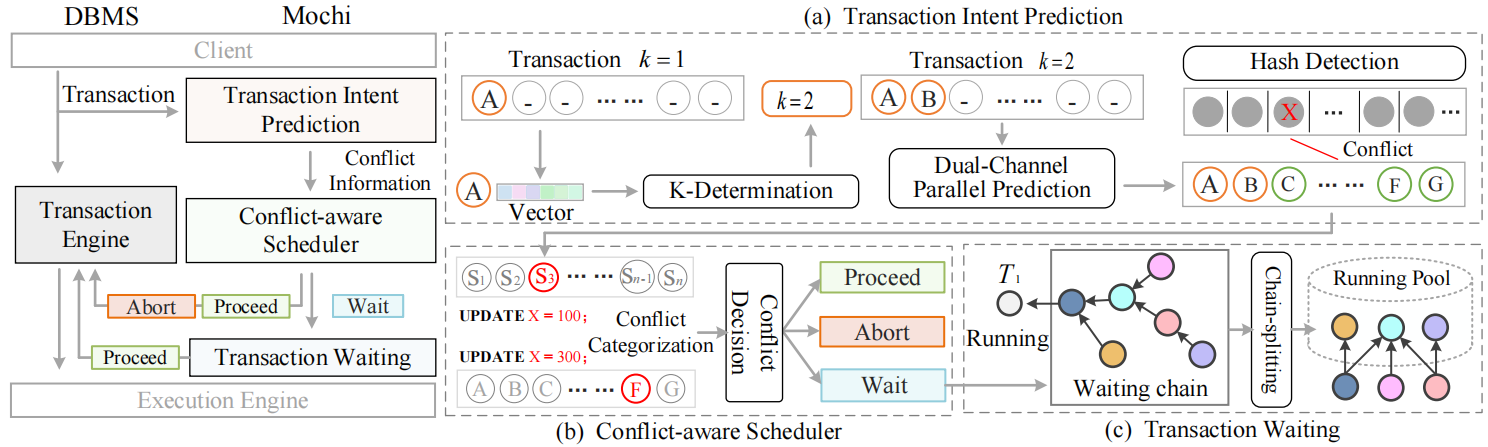
Mochi is a semi-deterministic concurrency control (SDCC) mechanism designed to address performance bottlenecks in OLTP systems under high-contention transactional workloads. By leveraging early transaction intent prediction and conflict-aware scheduling, Mochi enables proactive execution and conflict mitigation without requiring full transaction visibility. This design balances scheduling overhead and rollback cost, significantly improving system throughput. In high-contention TPC-C workloads, Mochi outperforms Tictoc by over 70%. The following sections outline the system architecture, usage instructions, and required environment.
-
⚡ Early-stage transaction intent prediction
-
🔗 Conflict-aware scheduling with wait/abort/proceed strategy
-
🔁 Adaptive fallback and model update mechanisms
-
📊 TPC-C & YCSB benchmark integration
-
Code/
Contains Python scripts for data analysis and model training related to conflict prediction and scheduling. -
Workloads/
Contains the Java implementation of the YCSB and TPC-C benchmark workload used in our experiments. -
PostgreSQL-Mochi/
Contains the source codes of PostgreSQL 13.9 used in our experiments, which can also be downloaded at PostgreSQL Download.
All experiments were conducted on PostgreSQL 13.9 with modified concurrency control mechanisms integrated to support Mochi in Ubuntu 20.04.
For installing and initializing PostgreSQL, the script PostgreSQL-Mochi/install_postgresql.sh is provided with the following commands:
#!/bin/bash

make clean

./configure --prefix=`pwd`/debug

make -j4 && make install

cd debug/bin

./initdb -D ../data
After the database initializing, we can start the database service:
# debug/bin
./pg_ctl -D ../data start-
TPC-C:
ant
-
YCSB:
mvn -pl site.ycsb:jdbc-binding -am clean package -DskipTests
# or
mvn clean package -DskipTests
-
TPC-C: Configurations are in
run/props.pg.# create database and table, and load data run/runDatabaseBuild.sh props.pg # run tests run/runBenchmark.sh props.pg
-
YCSB: Configurations are in
conf/db.properties.# create database and table psql > CREATE DATABASE ycsb; psql > \c ycsb psql > DROP TABLE IF EXISTS usertable; psql > CREATE TABLE usertable ( YCSB_KEY VARCHAR(255) PRIMARY KEY, FIELD0 TEXT, FIELD1 TEXT, FIELD2 TEXT, FIELD3 TEXT, FIELD4 TEXT, FIELD5 TEXT, FIELD6 TEXT, FIELD7 TEXT, FIELD8 TEXT, FIELD9 TEXT ); # load data bin/ycsb load jdbc -P workloads/myworkload -P conf/db.properties -cp lib/postgresql-42.2.6.jar # run tests bin/ycsb run jdbc -P workloads/myworkload -P conf/db.properties -cp lib/postgresql-42.2.6.jar