A lightweight Asset Manager for Autodesk Maya, built with Python and PySide2.
This tool helps you organize, browse, and manage shows and assets inside Maya projects with a simple UI.
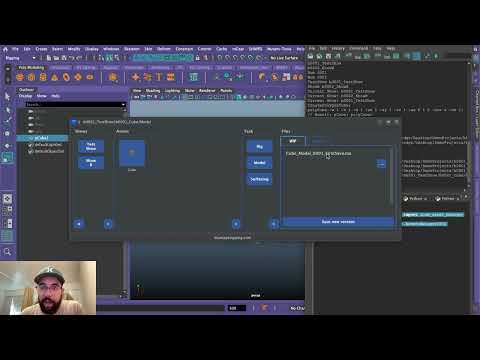
This is our first open source project. We are mostly a riggers with a lot of Python experience, and this tool was created using "vibecoding" to solve organizational issues we were having while rapidly growing our personal and professional projects.
We are still learning how open source works, and may not have set up the structure, code, or license perfectly.
All feedback, suggestions, and contributions are very welcome! Please feel free to help improve the project in any way.
-
Project Structure
- Organizes shows inside a base directory.
- Stores assets under each show.
-
UI Layout
- Sidebar with show buttons (dynamically generated).
- Main area with asset buttons.
- Organize Tasks and files per task.
-
Functionalities
- Create new shows and assets.
- Automatically populate shows and assets from the project path.
- Automatically creates a
workspace.melper show (if missing). - Automatically sets the Maya project to the show workspace when opening scenes from the manager.
- Stores the last used show for quick access.
- Easy-to-read and extendable code.
The default folder layout looks like this:
Project/
│── ShowA/
│   ├── Asset1/
│   │   ├── Modeling/
│   │   │   ├── WIP/
│   │   │   └── Publish/
│   │   ├── Rigging/
│   │   │   ├── WIP/
│   │   │   └── Publish/
│   │   └── Texturing/
│   │       ├── WIP/
│   │       └── Publish/
│   │
│   ├── Asset2/
│
│
│── ShowB/
│   ├── Asset3/
│   └── Asset4/
Download this repository into your Maya scripts folder: maya/[version]/scripts/Blue_Pipeline
In Maya, open the Script Editor and run:
import Blue_Pipeline
from importlib import reload
from Blue_Pipeline.UI.assets_manager import load_asset_manager
reload(load_asset_manager)
cAssetsManagerUI = load_asset_manager.AssetsManagerUI()
cAssetsManagerUI.show()
Oneliner for shelf usage
reload = __import__('importlib').reload if hasattr(__import__('importlib'), 'reload') else __import__('imp').reload;import Blue_Pipeline;from Blue_Pipeline.UI.assets_manager import load_asset_manager;reload(load_asset_manager);cAssetsManagerUI = load_asset_manager.AssetsManagerUI(); cAssetsManagerUI.show()- Built with PyQt5 and Python 3.
- The project is modular — UI setup, file operations, and state persistence are separated for clarity.
- Error handling is included to ensure a smooth workflow even if no shows/assets exist.
Feel free to fork the repo and submit pull requests!
Suggestions, issues, and improvements are welcome.
MIT License © 2025 Bluetape Rigging