




| 🚀 This project is funded and maintained by 🏦 | 🔗 |
|---|---|
| Regesta S.p.A. | https://www.regestaitalia.eu/ |
| Clarex S.r.l. | https://www.clarex.it/ |
trm-server is the server-side component of TRM.
🚚 TRM (Transport Request Manager) is a package manager inspired solution built leveraging CTS that simplifies SAP ABAP transports.

TRM introduces package-based software delivery to the SAP ecosystem, bringing with it semantic versioning, dependency management, and automated deployment activities.
Note
If you're looking for the REST implementation of trm-server, head over to trm-rest
It acts as the secure bridge between the SAP application server and the TRM client.
It exposes the APIs that allow TRM to import/export transports, and, as a consequence, it must be installed only on source and target systems, as its not required on any other system in the landscape.
              ┌──────────────────────────┐
              │        TRM Client        │
              └─────────────┬────────────┘
                            │
                            │  System Connector
                            │  (RFC SDK / REST / BTP / ...)
                            ▼
              ┌──────────────────────────┐
              │        trm-server        │
              │  (Installed on SAP)      │
              └─────────────┬────────────┘
                            │
                            │  Native SAP APIs
                            ▼
              ┌──────────────────────────┐
              │        SAP System        │
              └──────────────────────────┘
Full documentation can be seen at https://docs.trmregistry.com.
In a typical scenario, TRM Client connects to a SAP system through a System Connector (RFC SDK, REST, BTP, etc.).
After checking that trm-server is installed on the system, the client uses its APIs to perform secure and controlled transport export and import operations.
If not installed, the client can still communicate directly with the SAP system, but with limited capabilities and without extended TRM features.
trm-server is the server-side component of TRM.
It acts as the secure bridge between the SAP application server and the TRM client.
It exposes the APIs that allow TRM to import/export transports, and, as a consequence, it must be installed only on source and target systems, as its not required on any other system in the landscape.
The first installation must be performed using the standalone installer.
The standalone installer is a self-contained ABAP report that allows the installation of trm-server and trm-rest.
The installer will import trm-server transports (and eventually trm-rest transports too, if needed) into your system and automatically move its objects into the temporary package $TRM (which will also be generated).
After the initial installation, it is recommended to install subsequent theit updates via TRM.
- Download the report source code from here
- Open transaction
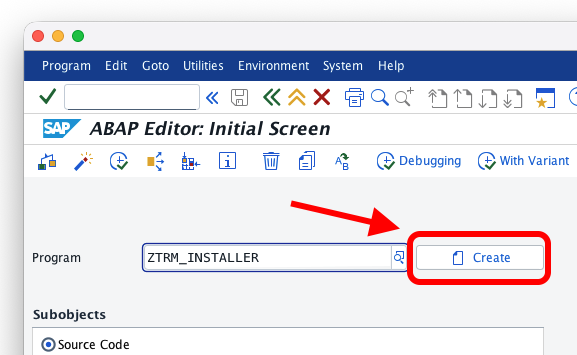
SE38and create a new report calledZTRM_INSTALLER
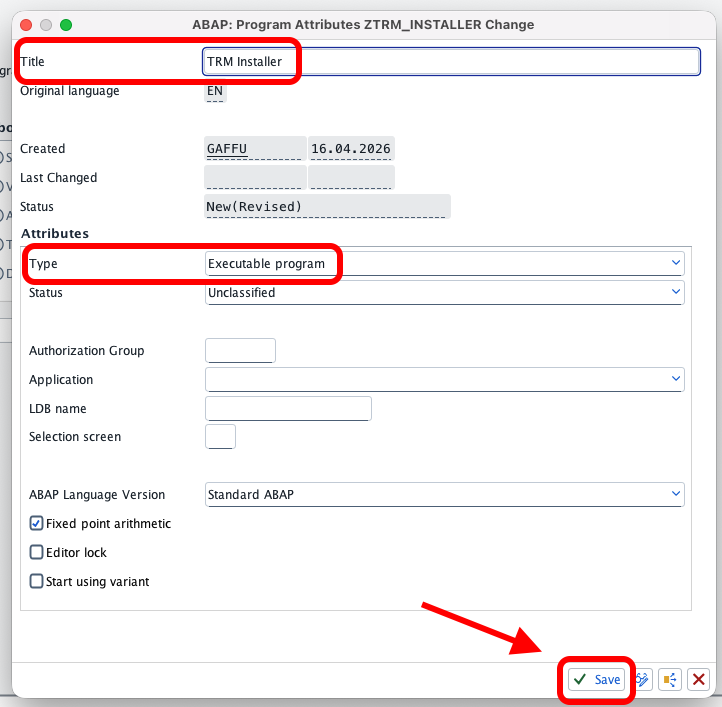
- Give it a title and make sure to set the type to "Executable program"
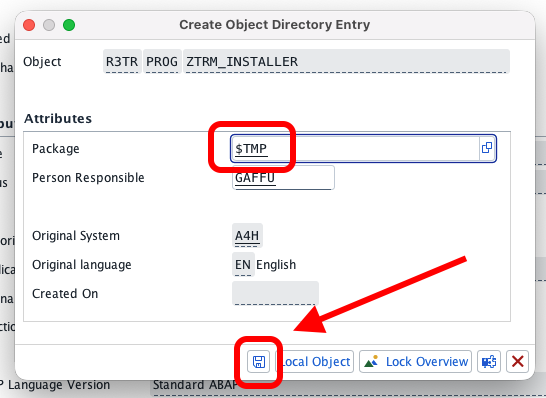
- Save as a local object (or in temporary package
$TMP)
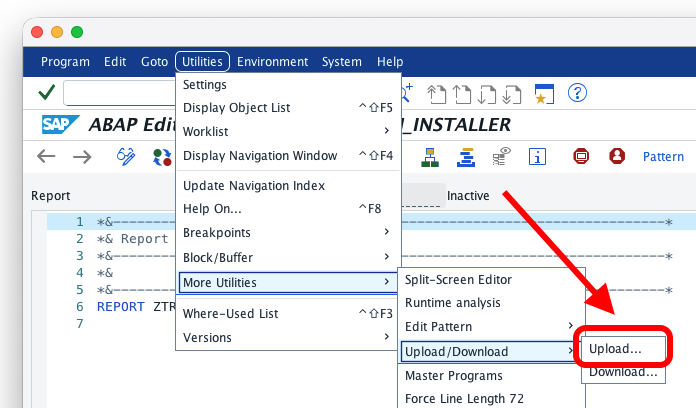
- Copy and paste the source code of the report (or upload) and activate
The online installation is only possible if your system is allowed to connect to the external server https://trmregistry.com.
This paragraph is courtesy of abapGit.org
- Using Google Chrome to go to https://trmregistry.com
- Click on the lock icon near the address bar, then click on "Connection is secure"
- On the Security tab, click on "Certificate is valid"
- Go to the "Details" tab and select "Export..." to download the certificate to a file
- In the "Certification hierarchy" box, select the parent node of the GitHub certificate and export it as well. Repeat the same with the root node.

- Use Firefox to go to https://trmregistry.com
- Click on the lock icon and then "More Information ..." and there "View Certificate"
- Switch to the Details Tab, choose the first certificate of the hierarchy and click Export
- Do the same for the next certificate in the hierarchy
- Use Safari to go to https://trmregistry.com
- Click on the lock icon and then "View Certificate"
- In the certificate hierarchy, select the root certificate
- Holding down the Option key (⌥), drag the large certificate icon into a text editor
- Save the document as a
.PEMfile
This paragraph is courtesy of abapGit.org
- Install the certificates in transaction
STRUST: - Open the "SSL client Client SSL Client (Anonymous)" folder
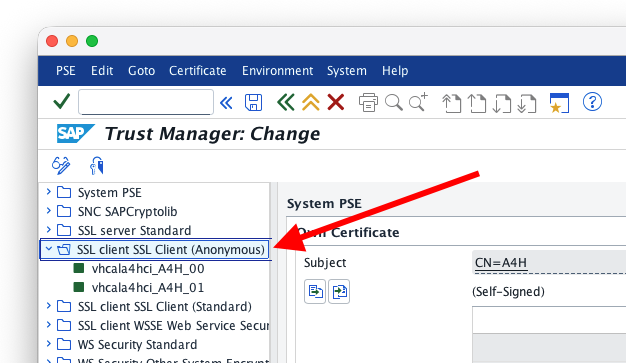
- Click on the Change button
- In the third box called "Certificate", click on the bottom-left button "Import certificate" to bring the certificate into the system
- Select "Add to certificate list"
- Repeat the process for all downloaded certificates
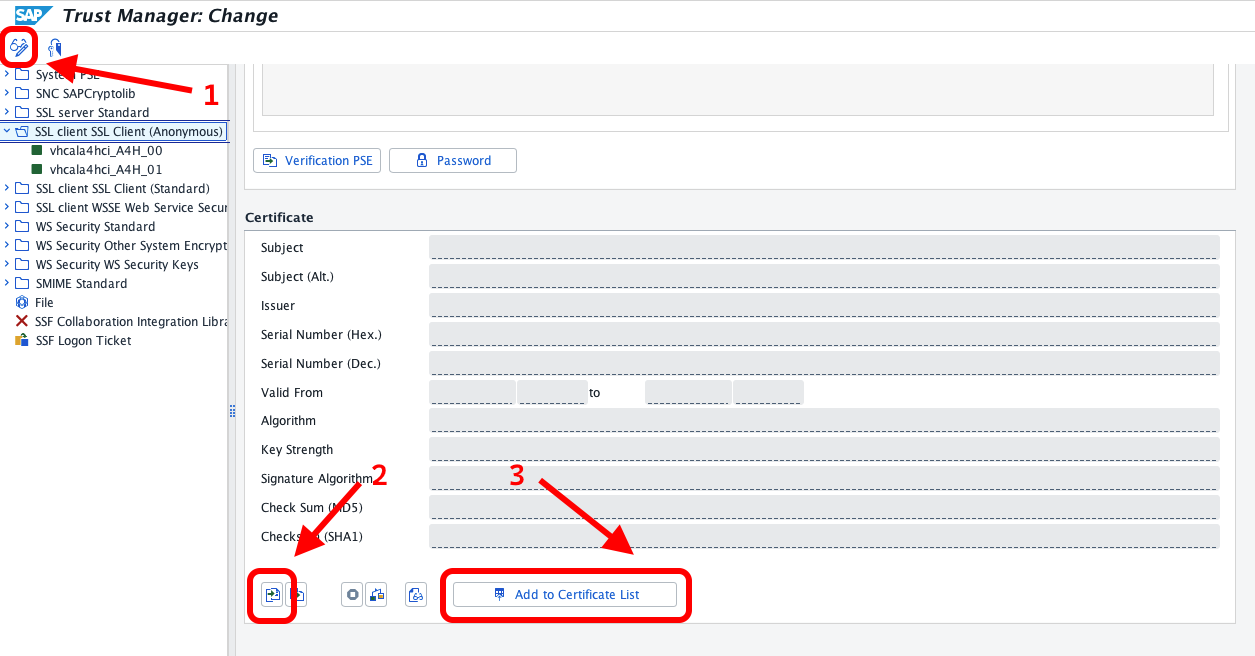
- Save
- Open SE38 and run
ZTRM_INSTALLER - In the report you can configure connection settings (if needed) and select/deselect
trm-restinstall - Execute
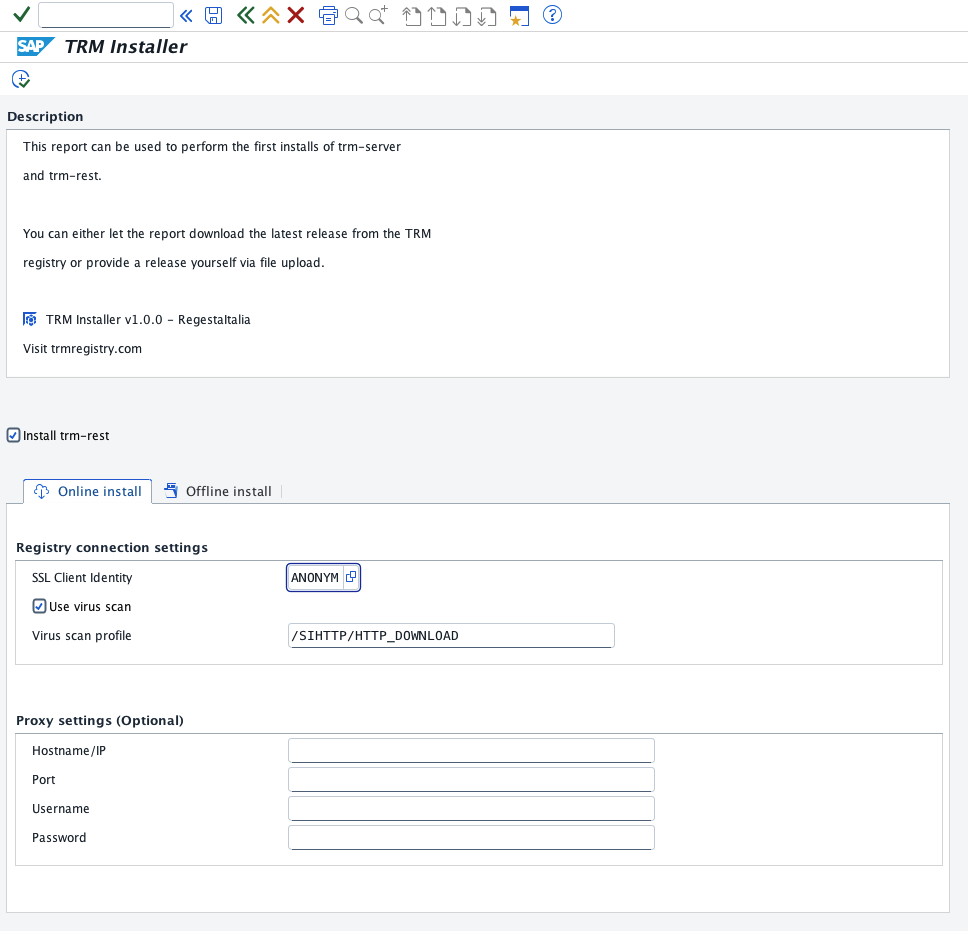
- Go to https://trmregistry.com and search for
trm-server - In the release page, press the Download button
- Download
trm-resttoo, if needed - Open SE38 and run
ZTRM_INSTALLER - Open the Offline tab and select the file(s) downloaded
- Execute
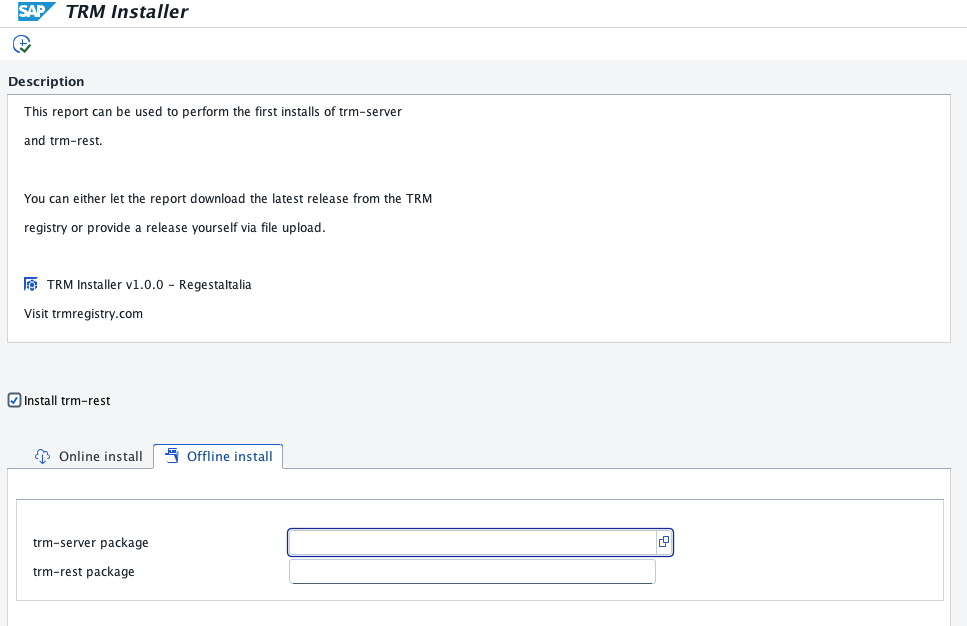
- Execute transaction
SE16 - Create a new record in table
/ATRM/USERS
For security reasons, by default, TRM does not allow any user to execute RFC functions unless explicitly authorized.
To verify that a user has access to RFC functions:
- Log into the system as the user you want to test
- Execute function module
/ATRM/PING
If the user is authorized, no errors should occur. If not authorized, access will be denied.
Because this package is in namespace /ATRM/, install via abapgit needs a system with this namespace installed.
If you are running a demo system, you can use the following keys
Development key: 18531191373370851361
Repair key: 00211665563784583720
For abapGit to work, you need to generate a valid developer key using the Development Namespace Application.
Like every other TRM open-soruce projects, contributions are always welcomed ❤️.
Make sure to open an issue first.
Contributions will be merged upon approval.
Click here for the full list of TRM contribution guidelines.