Transparent Reasoning & Parallel Execution Agent




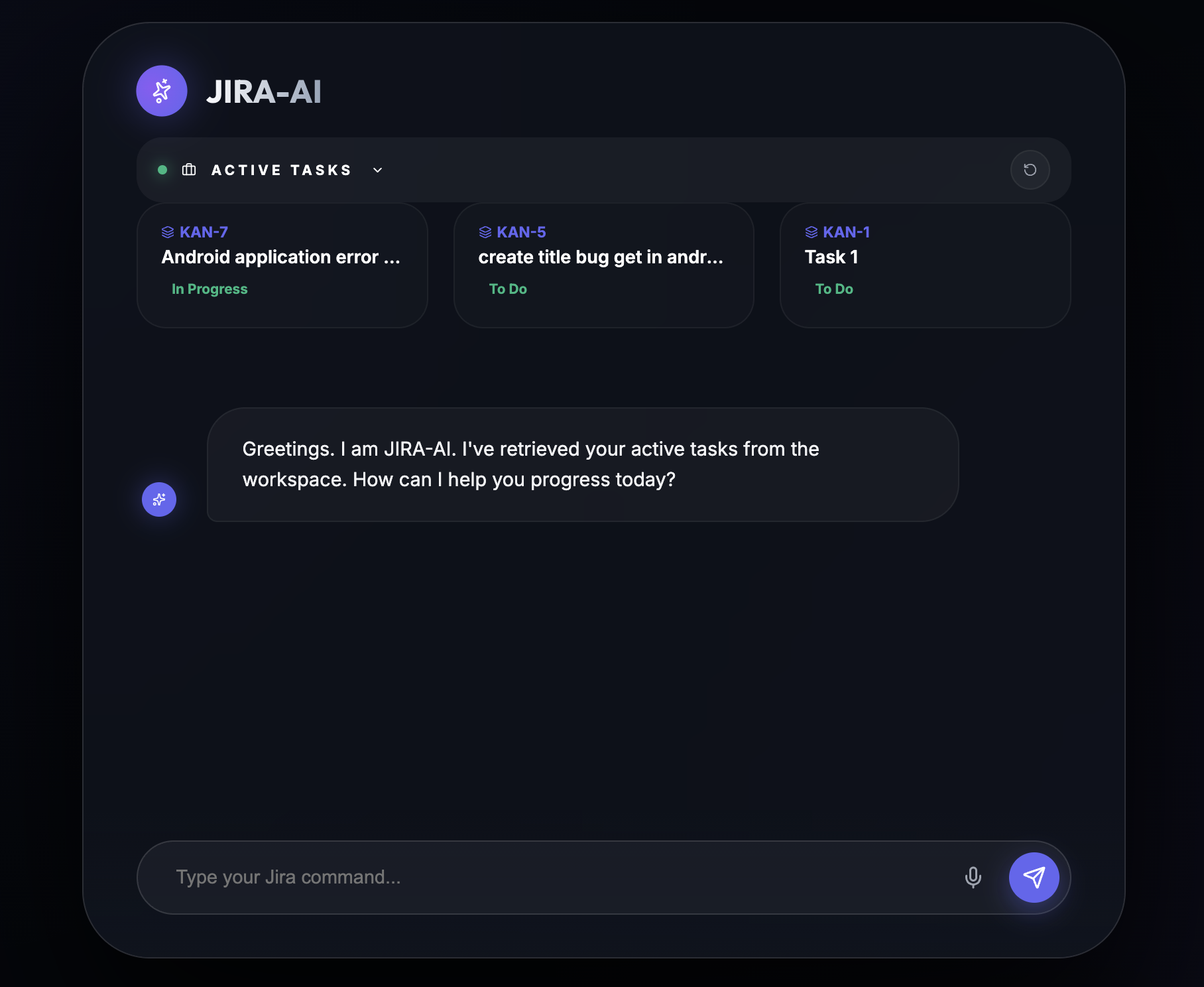
A state-of-the-art, premium AI agent for Jira management. Built for speed, transparency, and a "WOW" SaaS experience.
- Execution Logs (Transparency): Watch the agent's "Internal Thoughts" in real-time. No more guessing—see exactly which JQL is being run or which task is being updated.
- Parallel Tooling (Performance): Handles complex, multi-action requests (e.g., "Create 3 tickets and move KAN-5 to Done") in a single parallel execution pass.
- Agent-Grade Data: Automated Markdown Table generation for all summaries and task lists.
- Premium Glassmorphism: A stunning, curvy UI with deep shadows, translucency, and organic animations.
- Active Task Scroller: Professional-grade task management sidebar that stays synced with your assigned Jira issues.
The JIRA-AI agent is designed to handle natural language as if you were talking to a project manager. Below is the full matrix of supported actions.
| Action | Example Command | Data Extracted |
|---|---|---|
| Search Tickets | "Find all high priority bugs in KAN project" | JQL: project=KAN AND priority=High AND type=Bug |
| Summarize Work | "Give me a summary of my assigned tasks" | Identity-linked JQL + AI Summary Table |
| Create Issue | "Create a story in APP: Add login with Google" | Summary: "Add login with Google", Type: Story, Project: APP |
| Update Status | "Move APP-123 to In Progress" | IssueKey: APP-123, TargetStatus: "In Progress" |
| Add Comment | "Tell the team on KAN-5 that the API is ready" | IssueKey: KAN-5, Text: "the API is ready" |
| Assign User | "Assign KAN-10 to Himanshu" | Calls searchUser -> extracts AccountId -> updateIssue |
A state-of-the-art, premium AI agent for Jira management. Built for speed, transparency, and a "WOW" SaaS experience.
- Execution Logs (Transparency): Watch the agent's "Internal Thoughts" in real-time. No more guessing—see exactly which JQL is being run or which task is being updated.
- Parallel Tooling (Performance): Handles complex, multi-action requests (e.g., "Create 3 tickets and move KAN-5 to Done") in a single parallel execution pass.
- Agent-Grade Data: Automated Markdown Table generation for all summaries and task lists.
- Premium Glassmorphism: A stunning, curvy UI with deep shadows, translucency, and organic animations.
- Active Task Scroller: Professional-grade task management sidebar that stays synced with your assigned Jira issues.
The JIRA-AI agent is designed to handle natural language as if you were talking to a project manager. Below is the full matrix of supported actions.
| Action | Example Command | Data Extracted |
|---|---|---|
| Search Tickets | "Find all high priority bugs in KAN project" | JQL: project=KAN AND priority=High AND type=Bug |
| Summarize Work | "Give me a summary of my assigned tasks" | Identity-linked JQL + AI Summary Table |
| Create Issue | "Create a story in APP: Add login with Google" | Summary: "Add login with Google", Type: Story, Project: APP |
| Update Status | "Move APP-123 to In Progress" | IssueKey: APP-123, TargetStatus: "In Progress" |
| Add Comment | "Tell the team on KAN-5 that the API is ready" | IssueKey: KAN-5, Text: "the API is ready" |
| Assign User | "Assign KAN-10 to Himanshu" | Calls searchUser -> extracts AccountId -> updateIssue |
- Auto-Summarization: If you send a long paragraph about a bug, JIRA-AI automatically distills it into a professional 5-word title for the ticket and keeps the original text as the description.
- Priority Detection: Words like "urgent", "critical", or "p1" automatically set the ticket priority to Highest.
- Contextual Memory: The agent remembers which ticket you were just talking about. If you say "Move it to Done", it knows "it" refers to the last ticket mentioned in the conversation.
- "Show me all tickets updated today"
- "Are there any blocked stories in the backlog?"
- "Find tickets created by Himanshu"
- "Change the priority of KAN-22 to Low"
- "Move KAN-44 to In Review"
- "Create a new Task: Setup Redis database connection"
- "Who is assigned to APP-9?"
- "Assign the login bug to myself"
- "Search for a user named 'John Doe'"
JIRA-AI uses a Dual-Agent Architecture to deliver high-precision results and zero-latency feedback.
graph TD
    A[User UI] -->|1. Message| B[Express API]
    B -->|2. processMessage| C[Orchestrator Service]
    C -->|3. Intent Analysis| D{Intent Classifier}

    D -->|General/Chat| E[Baseline Response]
    D -->|Jira Task| F[Jira Gemini Agent]

    F -->|4. Tool Reasoning| G{Function Calling Loop}
    G -->|Tool Call| H[Jira MCP Server]
    H -->|REST API| I[Jira Cloud]
    I -->|Data| H
    H -->|Result| G

    G -->|5. Final Answer| F
    F -->|6. Reasoning Steps| C
    C -->|7. JSON Response| B
    B -->|8. Render| A
The Orchestrator is the "Brain" that classifies your goal before executing any Jira tasks. This ensures "Hello" messages are handled instantly without token waste.
| Intent | Trigger Logic |
|---|---|
SEARCH_JIRA |
"What is the status of...", "Find all bugs..." |
CREATE_TICKET |
"Make a new story...", "Report a bug..." |
ADD_COMMENT |
"Put a comment on...", "Tell the team that..." |
UPDATE_TICKET |
"Move KAN-5 to Done", "Change priority to High" |
CLEAR_MEMORY |
"Forget everything", "Clear session" |
Once an intent is flagged, the agent enters a Multi-Turn Reasoning Loop:
- Parallel Tool Execution: When you request multiple actions, the agent generates parallel function calls executed concurrently via
Promise.all. - Reasoning Logs: Every internal tool pick generates a step description (e.g.,
🔍 Searching Jira...) which is streamed to your Execution Logs console for 100% transparency.
- Backend: Node.js, TypeScript, Express, @google/genai (Gemini 2.0), Redis (for session memory).
- Frontend: React, Framer Motion (Animations), Lucide (Iconography), Zustand (State), Axios.
- Integration: Jira Cloud API via custom MCP (Model Context Protocol) patterns.
- Node.js 20+
- A Jira Cloud instance with API permissions.
- A Google Gemini API Key.
- Clone the repository.
- Configure
.env(Root and Frontend):# Root .env GEMINI_API_KEY=your_key JIRA_API_URL=https://your-domain.atlassian.net JIRA_USER_EMAIL=your@email.com JIRA_API_TOKEN=your_token # Optional security AGENT_SECRET_TOKEN=premium_secret_123
- Install dependencies:
npm install
npm install --prefix frontend
- Run Development Mode:
npm run dev