

Automatically generate SVG cards for your GitHub stats and embed them in any README.
This project runs entirely with GitHub Actions: no local installation required. Images are generated on a schedule you control and hosted on GitHub Pages, with public URLs.
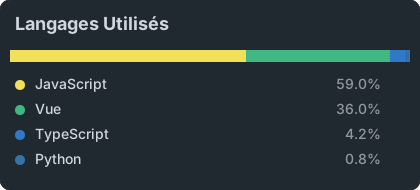
This project generates SVG images showing your GitHub statistics and most used languages.
stats-top4.svg- Top 4 languagesgithub-stats.svg- Global GitHub stats

# Clone the project
git clone https://github.com/FabioDevCode/github-stats.git
cd github-stats

# Remove existing SVG files (they will be regenerated with your stats)
rm -f *.svgAfter cloning, make sure the following structure is present:
github-stats/
├── .github/
│   └── workflows/
│       └── update-stats.yml
├── config.json
├── generate-stats.js
├── github_colors.json
├── README.md
└── README.fr.md
In config.json, update values to match your needs:
{
  "USERNAME": "your-username",
  "TITLE": "Top Languages",
  "STATS_TITLE": "GitHub Stats",
  "BG_COLOR": "#202830",
  "BORDER_COLOR": "#202830",
  "TITLE_COLOR": "#D1D7E0",
  "TEXT_COLOR": "#D1D7E0",
  "PERCENT_COLOR": "#9298A1",
  "ICON_COLOR": "#6e7681",
  "VALUE_COLOR": "#41B883",
  "VARIANTS": [2, 4, 6],
  "IGNORE_LANGUAGES": ["HTML", "CSS", "Handlebars", "SCSS"]
}
📝 Note: See the Available options section for full parameter details.
- Go to GitHub → Settings → Developer settings → Personal access tokens → Tokens (classic)
- Click "Generate new token (classic)"
- Name:
GitHub Stats - Select these permissions:
- ✅
repo(all sub-items) - ✅
read:user
- Generate and copy the token (you will not see it again)
- In your GitHub repository → Settings → Secrets and variables → Actions
- Click "New repository secret"
- Name:
GH_TOKEN - Secret: paste your token
- Click "Add secret"
- Repository Settings → Pages
- Source: Deploy from a branch
- Branch:
main// (root) - Click "Save"
Two options:
Option A - Automatic:
git add .
git commit -m "Initial setup"
git push
Option B - Manual:
- Open the "Actions" tab in your repository
- Select the "Update GitHub Stats" workflow
- Click "Run workflow"
After deployment, your images are available at:
https://your-username.github.io/github-stats/stats-top2.svg
https://your-username.github.io/github-stats/stats-top4.svg
https://your-username.github.io/github-stats/stats-top6.svg
https://your-username.github.io/github-stats/github-stats.svg
Note:
stats-topN.svgfiles depend on theVARIANTSsetting inconfig.json.github-stats.svgcontains your global stats (stars, commits, PRs, issues, contributions).

<img
  src="https://your-username.github.io/github-stats/stats-top4.svg"
  alt="Top Languages"
/>
<img
  src="https://your-username.github.io/github-stats/github-stats.svg"
  alt="GitHub Stats"
/>All settings are configured in config.json:
{
  "USERNAME": "your-username",
  "TITLE": "Top Languages",
  "STATS_TITLE": "GitHub Stats",
  "BG_COLOR": "#202830",
  "BORDER_COLOR": "#202830",
  "TITLE_COLOR": "#D1D7E0",
  "TEXT_COLOR": "#D1D7E0",
  "PERCENT_COLOR": "#9298A1",
  "ICON_COLOR": "#6e7681",
  "VALUE_COLOR": "#41B883",
  "VARIANTS": [2, 4, 6],
  "IGNORE_LANGUAGES": ["HTML", "CSS", "Handlebars", "SCSS"]
}| Option | Description | Exemple |
|---|---|---|
USERNAME |
Your GitHub username | "FabioDevCode" |
TITLE |
Title shown on languages SVG | "Top Languages" |
STATS_TITLE |
Title shown on global stats SVG | "GitHub Stats" |
BG_COLOR |
Background color | "#202830" |
BORDER_COLOR |
Border color | "#202830" |
TITLE_COLOR |
Title color | "#D1D7E0" |
TEXT_COLOR |
Text color | "#D1D7E0" |
PERCENT_COLOR |
Percentage color (languages) | "#9298A1" |
ICON_COLOR |
Icon color (global stats) | "#6e7681" |
VALUE_COLOR |
Value color (global stats) | "#41B883" |
VARIANTS |
Variants to generate (top N) | [2, 4, 6, 8] |
IGNORE_LANGUAGES |
Languages excluded from stats | ["HTML", "CSS"] |
In .github/workflows/update-stats.yml, set the cron value to match your preferred schedule:
schedule:
  - cron: "0 0 * * *" # Every day at midnight
  - cron: "0 */6 * * *" # Every 6 hours
  - cron: "0 0 * * 1" # Every Monday
💡 The default schedule is defined in this file. Keep only one active
- cron:line.
Language colors are defined in github_colors.json. This file contains official GitHub language colors and can be customized if needed.
- Check that the
GH_TOKENsecret is correctly configured - Check that
USERNAMEinconfig.jsonis correct - Review logs in the "Actions" tab
- Wait 2–3 minutes after the first push (GitHub Pages deployment)
- Confirm GitHub Pages is enabled in repository settings
- Check URL format:
https://your-username.github.io/repo-name/stats-top4.svg
- Open the "Actions" tab
- Select "Update GitHub Stats"
- Click "Run workflow"
This project is distributed under the MIT license. You are free to use, modify, and redistribute it.
Note: Forked repositories are excluded from stats calculation. Update frequency is configurable in Change update frequency.