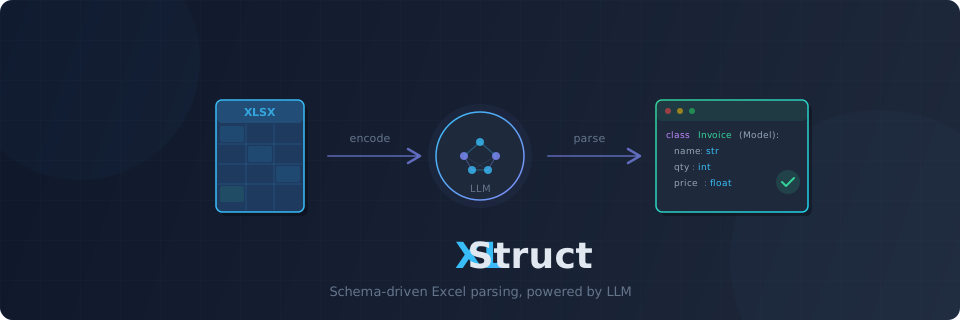


LLM-powered Excel/CSV parser — Define a Pydantic schema, get structured data from any spreadsheet.
Excel File + Pydantic Schema → LLM → Validated Structured Data
- Schema-driven extraction — Define a Pydantic model, get validated instances from any spreadsheet. No parsing code needed.
- Excel + CSV —
.xlsx,.xlsm,.xltx,.xltm,.xls, and.csvsupported out of the box - Any Excel layout — Flat tables, merged cells, multi-level headers, form+table hybrids — handled by a single API
- Two extraction modes — Direct LLM extraction for small sheets; code generation for large ones. Auto-routed by sheet size, or choose manually.
- Reusable scripts — Codegen mode produces a standalone Python script. Run it without LLM calls — pay for generation once, use forever.
- Script caching — Generated scripts are cached by sheet structure signature. Same layout = instant reuse, no LLM call. Public cache API for listing, clearing, and removing entries.
- Progress tracking —
on_progresscallback forextract_batch()andextract_workbook(). Integrates with tqdm or custom UIs. - Error codes — Every exception carries a machine-readable
ErrorCodefor programmatic error handling (STORAGE_NOT_FOUND,CODEGEN_MAX_RETRIES, etc.) - Schema suggestion —
suggest_schema()analyzes a spreadsheet and generates a Pydantic model for you - Extraction report — Every extraction returns an
ExtractionReportwith mode used, token usage, and optional row provenance - Row provenance — Track which Excel row each record came from. Enable with
track_provenance=True. - DataFrame export —
result.to_dataframe()converts results to pandas DataFrame (optional dependency) - Multi-sheet extraction —
extract_workbook()extracts different schemas from different sheets in parallel - Batch extraction —
extract_batch()processes multiple files in parallel with configurable concurrency - Fast hybrid reader — calamine (Rust) for speed + openpyxl for formula extraction. Both passes in one call.
- Token-aware encoding — Compressed markdown encoding with head+tail sampling. Auto-chunks large sheets to fit within token budget.
- Prompt caching — Anthropic cache_control markers applied automatically; OpenAI cached_tokens tracked
- Sandboxed execution — Generated scripts run in a subprocess with blocked imports (network, subprocess) and stripped credentials. Optional Docker backend for OS-level isolation.
- Multi-provider LLM — OpenAI, Anthropic, Gemini via Instructor
- Cloud storage — Read from S3, Azure Blob, GCS via fsspec
- Async-first — Async API with sync convenience wrappers. Jupyter-compatible via nest_asyncio.
pip install xlstruct# LLM providers
pip install "xlstruct[openai]"
pip install "xlstruct[anthropic]"
pip install "xlstruct[gemini]"
# Cloud storage
pip install "xlstruct[s3]" # AWS S3
pip install "xlstruct[azure]" # Azure Blob Storage
pip install "xlstruct[gcs]" # Google Cloud Storage
# DataFrame support
pip install "xlstruct[pandas]"
# Docker sandbox
pip install "xlstruct[docker]"
# Everything
pip install "xlstruct[all]"from pydantic import BaseModel, Field
class InvoiceItem(BaseModel):
description: str = Field(description="Item description")
quantity: int
unit_price: float
total: floatfrom xlstruct import Extractor
extractor = Extractor(provider="openai/gpt-4o")
results = extractor.extract_sync("invoice.xlsx", schema=InvoiceItem)
for item in results:
print(item.model_dump())import asyncio
from xlstruct import Extractor
async def main():
extractor = Extractor(provider="anthropic/claude-sonnet-4-6")
results = await extractor.extract("invoice.xlsx", schema=InvoiceItem)
for item in results:
print(item.model_dump())
asyncio.run(main())from xlstruct import ExtractionConfig, ExtractionMode
config = ExtractionConfig(
output_schema=InvoiceItem,
mode=ExtractionMode.DIRECT,
sheet="Sheet1",
header_rows=[1],
instructions="Parse dates as YYYY-MM-DD. Skip empty rows.",
track_provenance=True,
)
results = extractor.extract_sync("invoice.xlsx", extraction_config=config)Every extraction returns an ExtractionReport via result.report:
results = extractor.extract_sync("invoice.xlsx", schema=InvoiceItem)

print(results.report)
# ExtractionReport
# ----------------------------------------
# Mode:      direct
# Tokens:    1,780 (input: 1,509 / output: 271)

print(results.report.mode)          # ExtractionMode.DIRECT
print(results.report.usage) # TokenUsage(llm_calls=1, ...)Track which Excel row each record was extracted from:
config = ExtractionConfig(
    output_schema=InvoiceItem,
    header_rows=[1],
    track_provenance=True,
)

results = extractor.extract_sync("invoice.xlsx", extraction_config=config)

for item, rows in zip(results, results.report.source_rows):
    print(f"{item.description} ← Excel row {rows}")
# Widget Alpha ← Excel row [2]
# Widget Beta ← Excel row [3]pip install "xlstruct[pandas]"results = extractor.extract_sync("invoice.xlsx", schema=InvoiceItem)
df = results.to_dataframe()
print(df)Don't know the spreadsheet structure? Let the LLM suggest a schema:
Schema = extractor.suggest_schema_sync("unknown_data.xlsx")

# Inspect the generated model
print(Schema.model_json_schema())

# Use it directly with extract
results = extractor.extract_sync("unknown_data.xlsx", schema=Schema)
# With hints
Schema = extractor.suggest_schema_sync(
"report.xlsx",
sheet="Q1 Sales",
instructions="Focus on financial columns only",
)Extract different schemas from different sheets in a single workbook:
results = extractor.extract_workbook_sync(
    "report.xlsx",
    sheet_schemas={
        "Products": ProductSchema,
        "Orders": OrderSchema,
    },
)

for sheet_name, sheet_result in results:
print(f"{sheet_name}: {len(sheet_result.records)} records")Process multiple files in parallel:
results = extractor.extract_batch_sync(
    ["file1.xlsx", "file2.xlsx", "file3.xlsx"],
    schema=InvoiceItem,
    concurrency=5,
)

for file_result in results:
print(f"{file_result.source}: {len(file_result.records)} records")Monitor batch or workbook extraction with the on_progress callback:
from xlstruct import ProgressEvent

def on_progress(event: ProgressEvent):
    print(f"[{event.completed}/{event.total}] {event.source}: {event.status}")

results = extractor.extract_batch_sync(
    files, schema=InvoiceItem, on_progress=on_progress,
)
Works with tqdm:
from tqdm import tqdm

bar = tqdm(total=len(files))
results = extractor.extract_batch_sync(
    files, schema=InvoiceItem,
    on_progress=lambda e: bar.update(1) if e.status != "started" else None,
)
CSV files work with the same API — no extra configuration needed:
results = extractor.extract_sync("data.csv", schema=MyModel)XLStruct auto-routes based on data row count:
| Mode | Trigger | How it works |
|---|---|---|
| Direct | ≤ 20 data rows | Sheet encoded as markdown → LLM → Pydantic models |
| Codegen | > 20 data rows | LLM generates a standalone Python parsing script → runs in sandbox |
You can force a specific mode:
from xlstruct import ExtractionConfig, ExtractionMode

config = ExtractionConfig(
    mode=ExtractionMode.CODEGEN,    # Force code generation
    output_schema=MySchema,
    header_rows=[1],
)- Header Detection — Auto-detect header rows via lightweight LLM call
- Phase 0 (Analyzer) — LLM analyzes spreadsheet structure →
MappingPlan - Phase 1 (Parser Agent) — LLM generates openpyxl-based parsing script → validated via subprocess
Each phase includes self-correction — errors are fed back to the LLM (up to max_codegen_retries).
script = extractor.generate_script_sync("report.xlsx", config)
print(script.code)          # Reusable Python script
print(script.explanation) # How it worksInspect and manage the codegen script cache:
extractor = Extractor(provider="openai/gpt-4o", cache_enabled=True)

# List cached scripts
for entry in extractor.cache.list_entries():
    print(f"{entry.schema_name} | {entry.sheet_name} | {entry.created_at}")

# Clear all cached scripts
extractor.cache.clear()

# Remove a specific entry by signature
extractor.cache.remove("a1b2c3d4e5f6g7h8")# AWS S3
results = await extractor.extract(
"s3://my-bucket/data/report.xlsx",
schema=MySchema,
key="AWS_KEY", secret="AWS_SECRET",
)
# Azure Blob Storage
results = await extractor.extract(
"az://my-container/report.xlsx",
schema=MySchema,
account_name="...", account_key="...",
)
# Google Cloud Storage
results = await extractor.extract(
"gs://my-bucket/report.xlsx",
schema=MySchema,
token="/path/to/credentials.json",
)# Suggest a Pydantic schema from an Excel file
xlstruct suggest invoice.xlsx
# Save to file
xlstruct suggest report.xlsx --output schema.py
# With options
xlstruct suggest report.xlsx \
--provider anthropic/claude-sonnet-4-6 \
--sheet "Q1 Sales" \
--instructions "Focus on financial columns"Instance-level configuration for the Extractor:
| Parameter | Default | Description |
|---|---|---|
provider |
"anthropic/claude-sonnet-4-6" |
LLM provider (openai/gpt-4o, anthropic/claude-sonnet-4-6, etc.) |
api_key |
None |
API key (falls back to environment variables) |
max_retries |
3 |
LLM API retry count |
token_budget |
100_000 |
Max tokens per sheet |
temperature |
0.0 |
LLM temperature |
max_tokens |
8192 |
Max tokens for LLM generation |
thinking |
False |
Enable Anthropic extended thinking mode (forces temperature=1) |
max_codegen_retries |
3 |
Self-correction attempts for code generation |
codegen_timeout |
60 |
Script execution timeout in seconds |
export_dir |
None |
Directory to auto-save generated codegen scripts |
cache_enabled |
True |
Enable script caching for codegen mode |
cache_dir |
None |
Directory for script cache (default: ~/.xlstruct/cache/) |
provider_options |
{} |
Provider-specific kwargs passed to instructor.from_provider() |
storage_options |
{} |
Storage backend options (S3 credentials, Azure keys, etc.) |
Per-extraction configuration:
| Parameter | Default | Description |
|---|---|---|
output_schema |
(required) | Pydantic model class defining the target structure |
mode |
"auto" |
Extraction mode: auto, direct, codegen |
header_rows |
None |
1-indexed header row numbers (e.g. [1, 2]). None = auto-detect. |
sheet |
None |
Target sheet name. None = first sheet. |
instructions |
None |
Natural-language hints for the LLM |
track_provenance |
False |
When True, tracks source Excel row numbers per record |
from xlstruct import ExtractorConfig

config = ExtractorConfig(
    provider="openai/gpt-4o",
    temperature=0.0,
    token_budget=200_000,
    cache_enabled=True,
)
extractor = Extractor(config=config)For OS-level sandboxing, pass a DockerBackend via execution_backend:
pip install "xlstruct[docker]"from xlstruct import Extractor
from xlstruct.codegen.backends.docker import DockerBackend, DockerConfig
extractor = Extractor(
execution_backend=DockerBackend(
config=DockerConfig(image="python:3.12-slim", mem_limit="1g"),
),
)Direct: Storage (fsspec) → Reader → CompressedEncoder → ExtractionEngine (Instructor) → ExtractionResult[T]
Codegen: Storage (fsspec) → Reader → CodegenOrchestrator → [Header Detection → Analyzer → Parser] → GeneratedScript
src/xlstruct/
├── extractor.py          # Public API — Extractor class, ExtractionResult
├── config.py             # ExtractorConfig, ExtractionConfig, ExtractionMode
├── storage.py            # fsspec-based file reading (local, s3://, az://, gs://)
├── exceptions.py         # Exception hierarchy
├── cli.py                # Typer CLI (xlstruct extract ...)
├── _tokens.py            # tiktoken token counting
├── reader/
│   ├── base.py           # SheetReader protocol
│   ├── hybrid_reader.py  # HybridReader (calamine + openpyxl)
│   └── csv_reader.py     # CsvReader (stdlib csv)
├── encoder/
│   ├── base.py           # SheetEncoder protocol
│   ├── compressed.py     # CompressedEncoder (sample-based)
│   └── _formatting.py    # Shared formatting helpers
├── extraction/
│   ├── engine.py         # ExtractionEngine (instructor.from_provider wrapper)
│   └── chunking.py       # ChunkSplitter for large sheets
├── codegen/
│   ├── orchestrator.py   # CodegenOrchestrator (multi-phase pipeline)
│   ├── engine.py         # CodegenEngine (LLM calls for codegen)
│   ├── executor.py       # Security scanning (AST-based import/builtin checks)
│   ├── validation.py     # ScriptValidator
│   ├── cache.py          # ScriptCache (structure-signature-based caching)
│   ├── schema_utils.py   # Pydantic schema → source code utilities
│   └── backends/
│       ├── base.py       # ExecutionBackend protocol
│       ├── subprocess.py # SubprocessBackend (default sandbox)
│       └── docker.py     # DockerBackend (OS-level isolation)
├── schemas/
│   ├── core.py           # SheetData, WorkbookData, CellData
│   ├── codegen.py        # GeneratedScript, MappingPlan, CodegenAttempt
│   ├── report.py         # ExtractionReport
│   ├── usage.py          # TokenUsage, UsageTracker
│   ├── batch.py          # BatchResult, FileResult
│   ├── workbook.py       # WorkbookResult, SheetResult
│   ├── progress.py       # ProgressEvent, ProgressStatus
│   └── suggest.py        # SuggestedFields (for suggest_schema)
└── prompts/
    ├── system.py         # Shared system prompts
    ├── extraction.py     # Direct extraction prompts
    └── codegen.py        # Codegen phase prompts (analyzer, parser)
Excel — HybridReader uses a 2-pass approach:
- Pass 1 (calamine, Rust) — values, merged cells, data types, dimensions
- Pass 2 (openpyxl, read-only) — formula strings (
.xlsx/.xlsmonly)
CSV — CsvReader uses Python stdlib csv module. No extra dependencies.
CompressedEncoder converts sheet data to markdown tables with structural metadata:
- Column types, formula patterns, merged regions
- Optional head+tail sampling for large sheets (20 rows by default)
Generated scripts run in SubprocessBackend (or optionally DockerBackend) with security layers:
- Allowlist imports — only safe modules (openpyxl, pydantic, stdlib math/data) permitted via AST scanning
- Blocked builtins —
exec,eval,__import__,open, etc. rejected before execution - Stripped credentials — API keys and cloud credentials removed from subprocess environment
- Timeout — enforced via
codegen_timeoutconfig
Every exception carries an optional code attribute (ErrorCode enum) for programmatic handling:
from xlstruct import ErrorCode, StorageError

try:
    results = extractor.extract_sync("missing.xlsx", schema=MyModel)
except StorageError as e:
    if e.code == ErrorCode.STORAGE_NOT_FOUND:
        print("File not found")
XLStructError (base) code
├── StorageError STORAGE_NOT_FOUND, STORAGE_PERMISSION_DENIED, STORAGE_READ_FAILED
├── ReaderError READER_UNSUPPORTED_FORMAT, READER_PARSE_FAILED
├── ExtractionError EXTRACTION_LLM_FAILED, EXTRACTION_HEADER_DETECTION_FAILED,
│ EXTRACTION_OUTPUT_PARSE_FAILED
└── CodegenValidationError CODEGEN_MAX_RETRIES, CODEGEN_SYNTAX_ERROR, CODEGEN_EXECUTION_FAILED
uv sync                            # Install dependencies
uv run pytest tests/ -v            # Run all tests
uv run ruff check src/ tests/      # Lint
uv run pyright src/xlstruct/ # Type checkMIT