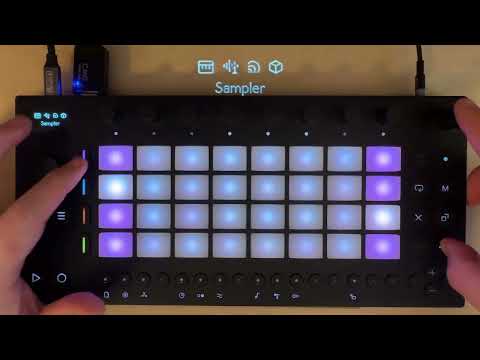
An unofficial framework for running custom instruments, effects, and controllers on Ableton Move.
Move Everything adds a Shadow UI that runs alongside stock Move, enabling additional Synths, FX, and other tools to run in parallel to the usual UI.
This project is in no way approved, endorsed or supported by Ableton.
This project modifies software on your Ableton Move. Back up important sets and samples before installing and familiarize yourself with DFU restore mode (on Centercode) in case you need to restore your device. Move still works normally after installation; Move Everything runs alongside it.
This is, in the truest sense of the word, a hack. It is not stable, or generally usable as a daily driver, but it's interesting, and super fun. Be warned, but have fun!
Also: this code is heavily written by coding agents, with human supervision. If that makes you nervous or you disagree with the approach, totally fine! Thanks for checking it out.
Download the Move Everything Installer for your platform (macOS, Windows, Linux). It handles SSH setup, module selection, and upgrades via a graphical interface.
Prerequisites:
- Move connected to WiFi
- A computer on the same network
- Mac/Linux: Terminal
- Windows: Git Bash (comes with Git for Windows)
Install:
curl -L https://raw.githubusercontent.com/charlesvestal/move-anything/main/scripts/install.sh | shScreen reader only (accessible install):
curl -sL https://raw.githubusercontent.com/charlesvestal/move-anything/main/scripts/install.sh | sh -s -- --enable-screen-reader --disable-shadow-ui --disable-standaloneNote: Uses -sL (silent) for minimal output, suitable for screen readers.
The installer will:
- Guide you through SSH setup if needed (generates key, shows how to add it to Move)
- Download and install the Move Everything framework
- Offer to install modules (synths, effects) from the Module Store
- Copy assets for modules that need them (ROMs, SoundFonts, etc.)
Installation options:
# Enable screen reader (TTS announcements) by default
./scripts/install.sh local --enable-screen-reader

# Install only screen reader, without UI features
./scripts/install.sh --enable-screen-reader --disable-shadow-ui --disable-standalone

# Skip module installation prompt
./scripts/install.sh --skip-modules
For managing files on your Move, you can also use Cyberduck (SFTP to move.local, select your SSH private key).
For troubleshooting and manual setup, see MANUAL.md.
curl -L https://raw.githubusercontent.com/charlesvestal/move-anything/main/scripts/uninstall.sh | sh- Shadow UI: Runs custom signal chains alongside stock Move so you can layer additional synths and effects. Use Shift+Vol+Track (and +Menu) to access these signal chain slots.
- Overtake modules: Full-screen modules that temporarily take over the Move UI (e.g., MIDI controller apps). Use Shift+Vol+Jog click to access overtake modules.
- Quantized Sampler: Shift+Sample opens a sampler that records to
Samples/Move Everything/. Choose resample (including Move Everything synths) or Move Input, set duration in bars, and recording starts on a note event or pressing play. - Skipback: Shift+Capture writes the last 30 seconds of audio to
Samples/Move Everything/Skipback/. - Screen Reader: Optional TTS announcements for accessibility. Toggle via Shadow UI settings, or Shift+Menu when Shadow UI is disabled.
- Standalone: Runs Move Everything without the stock app, including the Module Store. Use Shift+Vol+Knob 8 to access Standalone mode.
Usage details, shortcuts, and workflows are documented in MANUAL.md.
In Master FX > Settings, Resample Src controls whether Move Everything audio is fed into native Move sampling workflows:
Off: Disabled (default)Replace: Replaces native sampler input with Move Everything master output
Mix is retained only as a legacy config value and is treated as Replace.
For the most reliable native sampling behavior with this feature:
- Set
Resample Srcto Replace - In Move's sampler, set sample source to Line In
- Set monitoring to Off
If monitoring is on (or source/routing is configured differently), audio feedback may occur.
- MANUAL.md - User guide and shortcuts
- BUILDING.md - Build instructions
- docs/ARCHITECTURE.md - System and Shadow UI architecture
- docs/MODULES.md - Module development, Shadow UI integration, overtake modules
- docs/API.md - JavaScript module API
- src/modules/chain/README.md - Signal Chain module notes
Installer:
- move-everything-installer - Cross-platform desktop installer (macOS, Windows, Linux)
Sound Generators:
- move-anything-braids - Mutable Instruments macro oscillator
- move-anything-clap - CLAP plugin host
- move-anything-dx7 - Yamaha DX7 FM synthesizer
- move-anything-hera - Juno-60 emulation
- move-anything-jv880 - Roland JV-880 emulator
- move-anything-moog - RaffoSynth (Moog ladder filter)
- move-anything-obxd - Oberheim OB-X emulator
- move-anything-sf2 - SoundFont synthesizer
- move-anything-surge - Surge XT hybrid synthesizer
Audio FX:
- move-anything-cloudseed - Algorithmic reverb
- move-anything-ducker - MIDI-triggered sidechain ducker
- move-anything-junologue-chorus - Juno-60 chorus
- move-anything-nam - Neural Amp Modeler
- move-anything-psxverb - PlayStation SPU reverb
- move-anything-space-delay - RE-201 tape delay
- move-anything-tapescam - Tape saturation
Overtake/Utilities:
- move-anything-fourtrack - Four-track recorder
- move-anything-m8 - Dirtywave M8 Launchpad Pro emulator
- move-anything-sidcontrol - SIDaster III controller
- Discord: https://discord.gg/Zn33eRvTyK
- Contributors: @talktogreg, @impbox, @deets, @bobbyd, @chaolue, @charlesvestal
CC BY-NC-SA 4.0 - See LICENSE and THIRD_PARTY_LICENSES