CLI Hex Editor for Linux in C++
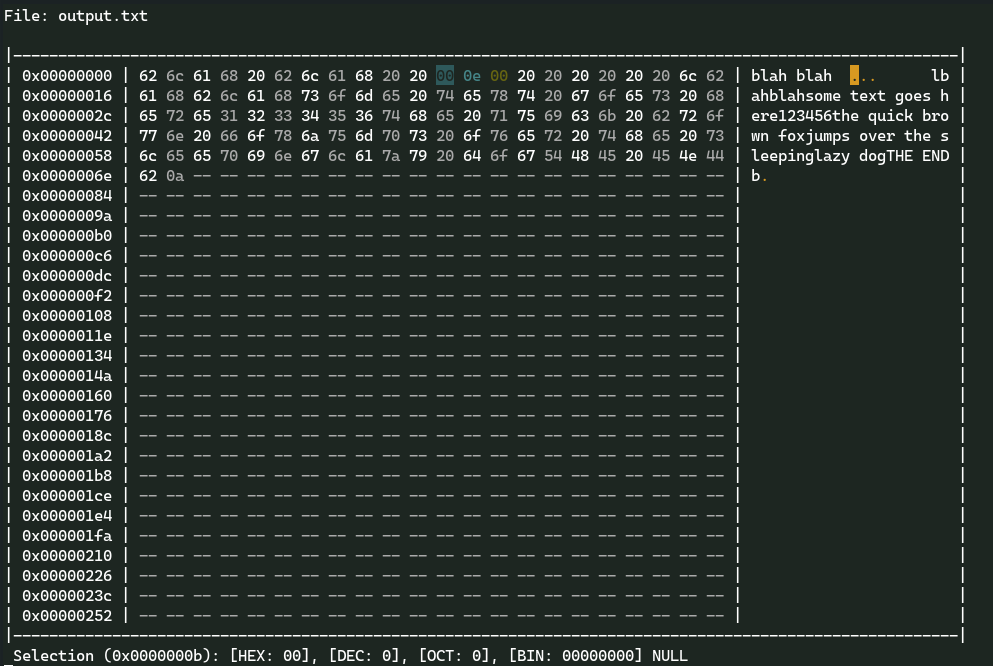
Clone the repository into a directory and run the makefile:
git clone https://github.com/Archaversine/Hexer.git && cd Hexer
make && sudo make install
Syntax:
hexer <filename>
Example:
hexer file.txt
The following are the keybindings to use Hexer. Movement of the cursor is controlled by both the arrow keys and the VIM (HJKL) keys. Also note that the following keybindings are CASE SENSITIVE.
r - [r]eplace the selected value at the cursor's position with a new value.
R - [R]eplace multiple values starting at the cursor's position.
i - [i]nsert a new value before the cursor's position.
I - [I]nsert multiple values before the cursor's position.
a - [a]ppend a value after the cursor's position.
A - [A]ppend multiple values after the corsor's position.
x - Delete the selected value.
X - Delete multiple values starting at the cursor's position.
g - [g]o to the byte at the specified offset (offset is in hexadecimal).
G - [G]o to the last byte in the file.
/ - Search for and highlight all occurences of a specified byte.
K - Turn off highlighting.
n - Go to the [n]ext highlighted byte.
N - Go to the previous highlighted byte.
W - [W]rite all changes to a specified file.
O - [O]pen a different file (Does not create new files).
q - [q]uit the editor (NOTE: DOES NOT ASK TO SAVE BEFORE QUITTING).
 : An inserted value that matches the search criteria.
 : An overridden value that matches the search criteria.
 : A value that matches the search criteria.
 : An inserted value.
 : An overridden value.