In order to search specific objects inside your Faraday workspace and execute several actions over them, we have created Searcher. To explain how we can use it, we will propose some cases to resolve, but first let's give it a look to the structure of Searcher and how or where we must make changes to have a good result.
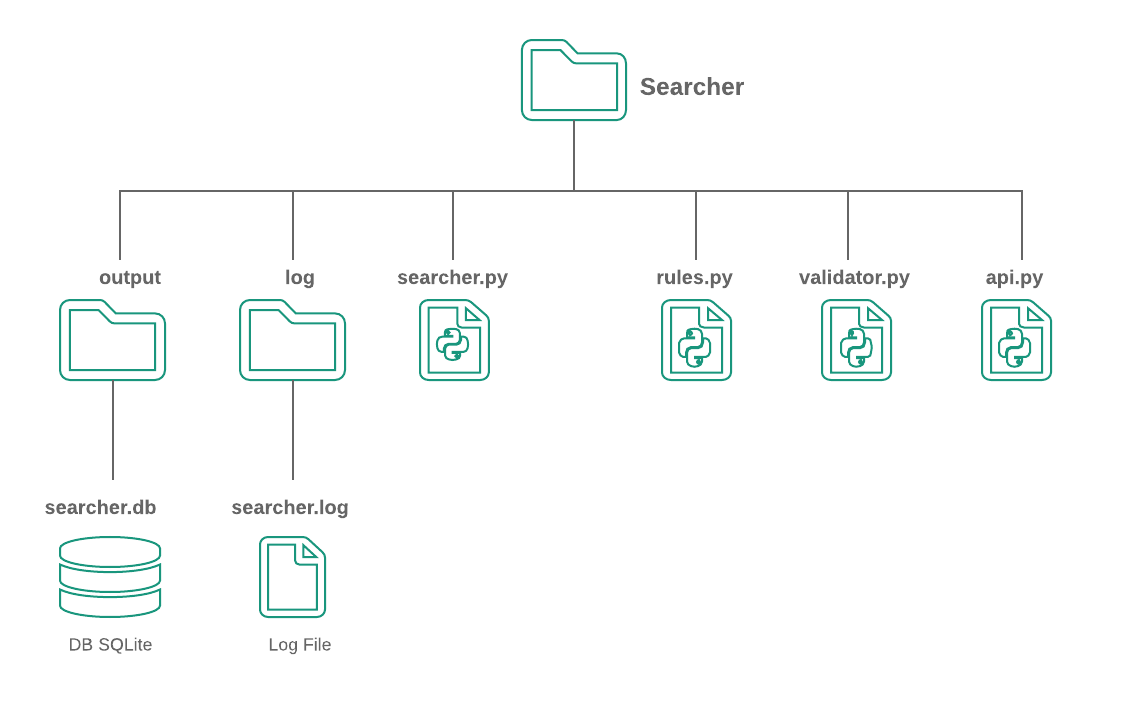
Searcher has the following structure:
-
output: Contains all outputs that searcher might have, in that case, is an SQLite DB to store each executed rule with data such as time, affected model and applied action.
-
log: Contains all searcher log files.
-
faraday-searcher: It’s the main file, it contains all logic to use Searcher and we must execute this file passing some arguments in the command line.
-
rules.json: Faraday searcher uses a json file with a list of rules to process against Faraday data.
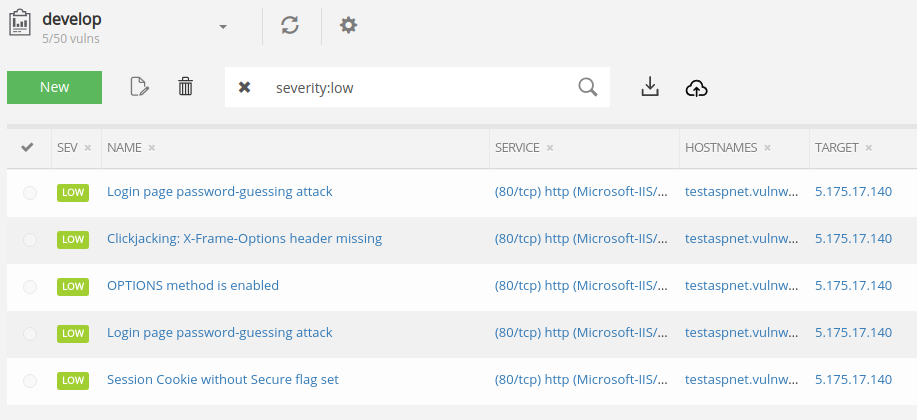
Now, let's propose a simple example that can help us to learn about Searcher, we are going to change every vulnerabilities that has as a low severity to a medium severity.
First, let's check the severity values distribution in our workspace, in my case with name develop.

After that, we can proceed to write the rule that allows us to execute the change of the severity value. The expression of this rule could be something like:
“TO CHANGE ALL VULNERABILITIES WHICH SEVERITY VALUE IS LOW TO SEVERITY MEDIUM VALUE”
Good! With this expression we have all we need to build a rule. Searcher needs a rule list to be used, these rules determine concepts such as the specific object to be selected and actions that will be executed if some conditions are met inside the current Faraday workspace.
Basically, a rule has a structure like this:
 [OBJECT]
 [IF]
 [THEN]
With this in mind, we use this global structure of a rule:
[{
    "id": "CU1",

    "model":"Vulnerability",
    "parent": "192.168.42.55"                                 OBJECT
    "fields":["name","desc","description"]
    "object":"creator=Nmap ref=nmap-10",

    "conditions":["refs=nessus-333","name=smb-vuln-056"],       IF

    "actions":["--UPDATE:confirmed=True"]                      THEN
}]
Where the fields 'model', 'parent', 'fields' and 'object' allow you to get the object that will be processed, and field 'conditions' tells us when the actions can be executed.
Now, let’s write our rule inside the rules.json file by following the expression that we created above:
TO CHANGE ALL VULNERABILITIES (model) WHICH SEVERITY VALUE IS LOW (object) TO SEVERITY MEDIUM VALUE” (action)
[{
     "id": "CHANGE_SEVERITY",
     "model": "Vulnerability",
     "object": "severity=low",
     "actions": ["--UPDATE:severity=med"]
}]
We can take a look at the following table that contains a brief description of every field. Each rule has optional and mandatory fields, it depends on our purpose:
| Field | Description | Mandatory | Examples | Allowed values |
|---|---|---|---|---|
| id | Rule identifier, must be unique | Yes | R1 | |
| model | Allows determinate which model select | Yes | Vulnerability, Host, Service | |
| parent | It works like a scope, we are going to search contained models into it, if isn’t specified, we are going to search models in the whole workspace, also it can be set with a services or host properties like name or Identifier. | No | 192.168.42.55, http, | |
| fields | Allows to compare using similarity between two model’s name, with this element we can determine if these objects has similar names and then select one to apply the actions | No | [‘name’, ‘description’, ‘desc’, ‘confirmed’] | Model’s fields |
| object | Allows know exactly what object should be to process, it has an specific format , also we can set it with a regex by name, in that way we have more options and a selecting generic process. | Yes | creator=Nmap confirmed=True regex=error$ name=OS%Config | Model’s fields |
| conditions | The conditions help us to decide if the actions can be executed or no, it are a list of matching between keys an values of current model, if each conditions are met, the action will run. | No | refs=nessus-333 name=smb-vul-056 | Specific format |
| actions | The actions are the response that each rule gives having account the desire goal. There are 4 kinds of actions: UPDATE, ALERT, DELETE and EXECUTE, these will be explained later | Yes | --UPDATE:severity=critical --UPDATE:confirmed=True --UPDATE:refs=nessus-333 --UPDATE:-refs=nmap-10 --UPDATE:template=tempId --ALERT:test@gmail.com --EXECUTE:/create_task.sh --DELETE: | Specific format |
Now we can run Searcher, it’s important to know all the options it needs to get a desired result, to do this we can execute faraday-searcher -h in the terminal.
usage: faraday-searcher [-h] -w WORKSPACE [-s SERVER_ADDRESS] [-u USER] [-p PASSWORD]
               [-o OUTPUT] [-e EMAIL] [-ep EMAIL_PASS] [-mp MAIL_PROTOCOL]
               [-pp PORT_PROTOCOL] [-l LOG] [-r RULES_FILENAME]

 Search duplicated objects on Faraday

optional arguments:
  -h, --help            show this help message and exit
  -w WORKSPACE, --workspace WORKSPACE Search duplicated objects into this workspace
  -s SERVER_ADDRESS, --server_address SERVER_ADDRESS Faraday server address
  -u USER, --user USER  Faraday user
  -p PASSWORD, --password PASSWORD Faraday password
  -o OUTPUT, --output OUTPUT Choose a custom output directory
  -e EMAIL, --email EMAIL Custom email
  -ep EMAIL_PASS, --email_pass EMAIL_PASS Email password
  -mp MAIL_PROTOCOL, --mail_protocol MAIL_PROTOCOL Email protocol
  -pp PORT_PROTOCOL, --port_protocol PORT_PROTOCOL Port protocol
  -l LOG, --log LOG     Choose a custom log level
Let's run the Searcher with our usage case: faraday-searcher -w develop -p <MY_PASS>. Once we have run the previous command, we can check the log file and database to see all changes.
03/06/2019 03:42:24 PM - Faraday searcher - INFO: Started
03/06/2019 03:42:24 PM - Faraday searcher - INFO: Searching objects into workspace develop
03/06/2019 03:42:31 PM - Faraday searcher - DEBUG: Getting hosts ...
03/06/2019 03:42:33 PM - Faraday searcher - DEBUG: Getting services ...
03/06/2019 03:42:34 PM - Faraday searcher - DEBUG: Getting vulnerabilities ...
03/06/2019 03:42:36 PM - Faraday searcher - INFO: --> Validating rules ...
03/06/2019 03:42:36 PM - Faraday searcher - INFO: <-- Rules OK
03/06/2019 03:42:36 PM - Faraday searcher - DEBUG: --> Start Process vulnerabilities
03/06/2019 03:42:36 PM - Faraday searcher - DEBUG: Getting models
03/06/2019 03:42:36 PM - Faraday searcher - DEBUG: Getting object
03/06/2019 03:42:36 PM - Faraday searcher - INFO: Running actions of rule 'CHANGE_SEVERITY' :
03/06/2019 03:42:36 PM - Faraday searcher - INFO: Changing property severity to med in vulnerability 'Login page         password-guessing attack' with id 47
03/06/2019 03:42:37 PM - Faraday searcher - INFO: Done
03/06/2019 03:42:37 PM - Faraday searcher - DEBUG: Inserting rule CHANGE_SEVERITY into SQlite database ...
03/06/2019 03:42:37 PM - Faraday searcher - DEBUG: Done
03/06/2019 03:42:37 PM - Faraday searcher - INFO: Changing property severity to med in vulnerability 'Session Cookie     without Secure flag set' with id 41
03/06/2019 03:42:37 PM - Faraday searcher - INFO: Done
03/06/2019 03:42:37 PM - Faraday searcher - DEBUG: Inserting rule CHANGE_SEVERITY into SQlite database ...
03/06/2019 03:42:37 PM - Faraday searcher - DEBUG: Done
03/06/2019 03:42:37 PM - Faraday searcher - INFO: Changing property severity to med in vulnerability 'Login page     password-guessing attack' with id 44
03/06/2019 03:42:38 PM - Faraday searcher - INFO: Done
03/06/2019 03:42:38 PM - Faraday searcher - DEBUG: Inserting rule CHANGE_SEVERITY into SQlite database ...
03/06/2019 03:42:38 PM - Faraday searcher - DEBUG: Done
03/06/2019 03:42:38 PM - Faraday searcher - INFO: Changing property severity to med in vulnerability 'OPTIONS method     is enabled' with id 22
03/06/2019 03:42:38 PM - Faraday searcher - INFO: Done
03/06/2019 03:42:38 PM - Faraday searcher - DEBUG: Inserting rule CHANGE_SEVERITY into SQlite database ...
03/06/2019 03:42:38 PM - Faraday searcher - DEBUG: Done
03/06/2019 03:42:38 PM - Faraday searcher - INFO: Changing property severity to med in vulnerability 'Clickjacking:     X-Frame-Options header missing' with id 3
03/06/2019 03:42:38 PM - Faraday searcher - INFO: Done
03/06/2019 03:42:38 PM - Faraday searcher - DEBUG: Inserting rule CHANGE_SEVERITY into SQlite database ...
03/06/2019 03:42:38 PM - Faraday searcher - DEBUG: Done
03/06/2019 03:42:38 PM - Faraday searcher - DEBUG: <-- Finish Process vulnerabilities
03/06/2019 03:42:38 PM - Faraday searcher - DEBUG: --> Start Process services
03/06/2019 03:42:38 PM - Faraday searcher - DEBUG: <-- Finish Process services
03/06/2019 03:42:38 PM - Faraday searcher - DEBUG: --> Start Process Hosts
03/06/2019 03:42:38 PM - Faraday searcher - DEBUG: <-- Finish Process Hosts
03/06/2019 03:42:38 PM - Faraday searcher - INFO: Finished
Let’s check Faraday !

1- We are going to change the severity to "critical" and the confirmed status to "True" on all the vulnerabilities whose names begin with ‘Device’ and parent is ’50.56.220.123’. The conditions to make this change is that there should be another vulnerability with severity="info" in this same host and another vulnerability which creator is Nessus and its name begin with ‘OS’:
[{
    'id': 'CLIENT_TEST',
    'model': 'Vulnerability',
    'parent': '50.56.220.123',
    'object': "regex=^Device",
    'conditions': ["severity=info", "creator=Nessus regex=^OS"],
    'actions': ["--UPDATE:severity=critical", "--UPDATE:confirmed=True"]
}]
2- In this example we are adding the item VCritical to old vulnerability’s refs field with creator=Nessus, also we are setting its confirmed value to "True" if in its parent, whose id is '320131ea90e3986c8221291c683d6d19bfe8503b', exists another vulnerability with severity "info" and creator=Nessus:
[{
    'id': 'CLIENT_TEST_3',
    'model': 'Vulnerability',
    'parent': '320131ea90e3986c8221291c683d6d19bfe8503b',
    'object': "creator=Nessus --old",
    'conditions': ["severity=info", "creator=Nessus"],
    'actions': ["--UPDATE:refs=VCritical", "--UPDATE:confirmed=True"]
}]
3- With this rule we can search pairs of similar vulnerabilities by name inside a same level and then to confirm the more recent of them, Ex ‘Auth error’ and ‘Auth error 2’:
[{
    'id': 'CU3A',
    'model': 'Vulnerability',
    'fields': ['name'],
    'actions': ["--UPDATE:confirmed=False"]
}]
4- This rule is similar to example 3, but now we are going to select the older vulnerability from the current pair:
[{
    'id': 'CU3B',
    'model': 'Vulnerability',
    'fields': ['name'],
    'object': "--old",
    'actions': ["--UPDATE:confirmed=True"]
}]
5- We are going to apply the template “EN-Cifrado Debil (SSL weak ciphers)” to all vulnerabilities with name “OS Identification”:
[{
    'id': 'CU5B',
    'model': 'Vulnerability',
    'object': "name=OS%Identification",
    'actions': ["--UPDATE:template=EN-Cifrado Debil (SSL weak ciphers)"]
}]
6- We can remove all services with name “http” from the workspace:
[{
    'id': 'CU6',
    'model': 'Service',
    'object': "name=http",
    'actions': ["--DELETE:"]
}]