- Intro
- How to filter by one field
- How to filter by many fields
- Grouping Vulnerabilities
- Confirmed Vulnerabilities
- Usage Cases
You can search or filter your data by specifying a keyword or multiple keywords.
You can find the text filter on:
In order to perform a search, type the keyword in the text field above the table.
Field values are not case-sensitive

In order to perform a search by one field, follow these steps:
- Enter the name of the field (e.g. severity).
- Type a colon (:) right next to the name of the field specified above.
- Type in the word that you want to find inside quotation marks (").
Examples:
- severity:"unclassified"
- name:"Nessus scan info"

In order to perform a search by many fields, you can use the logical operators and & or. To perform a search, follow the next steps:
- Type a search for one field.
- Type and or or.
- Type a search for another field.
Examples:
- severity:"unclassified" and target:"173.252.100.18"
- severity:"low" or service:"ssh" or target:"173.252"


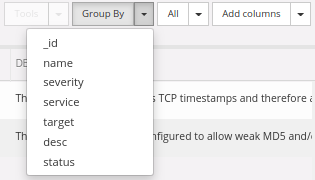
To group vulnerabilities by field you can use the Group By button. After the vulns are grouped you can select them for easy batch editing.
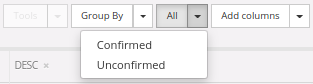
You can filter your vulnerabilities by confirmed, unconfirmed or all by clicking on the All button:
Now, let's take a look at which fields are available for filtering with an example. All of them are searched through the search field.
- name:"TCP timestamps"
- description:"Vulnerability testing"
- severity:"medium"
- target:"127.0.0.1"
- service:"https" (only service's name)
- easeofresolution:"moderate"
- references:"cvss"
- resolution:"Resolution for testing vuln"
- data:"Search and filter"
- request:"POST"
- response:"OK"
- method:"POST"
- pname:"Parameter name"
- params:"Vulnerability parameters"
- path:"Vulnerability Path"
- query:"name:test"
- website:"Vulnerability website"
- creator:"Nessus"
- type:"vulnerability_web"
- confirmed:"true"
- id:"57448"
For searching in Hosts tab, just type the keyword that you want to search without quotation marks (excepting Tags). The following fields are available for searching in Hosts tab:
- IP (ex: 127.0.0.1).
- Hostname (ex: www.google.com).
- Services (ex: https). Only service's name.
- OS (ex: Linux)
To search by Tags:
- tags:internal
- name:http
- version:2.4
- port:8080
- protocol:tcp
- status:closed
- vulns:1 (number of vulns created in this service)
- credentials:1 (number of credentials created for this service)
- tags:prod