Program that reads the data from an DHT22 sensor on a Raspberry Pi using C language with the WiringPi library.
For this project you will need:
- One RaspberryPi of any model.
- One DHT22 sensor: Datasheet1, Datasheet2
- GCC installed for code compilation.
- WiringPi installed on your raspberry. Details on how install it here.
In the default configuration of the project, you should connect the sensor pins to Raspberry like this:
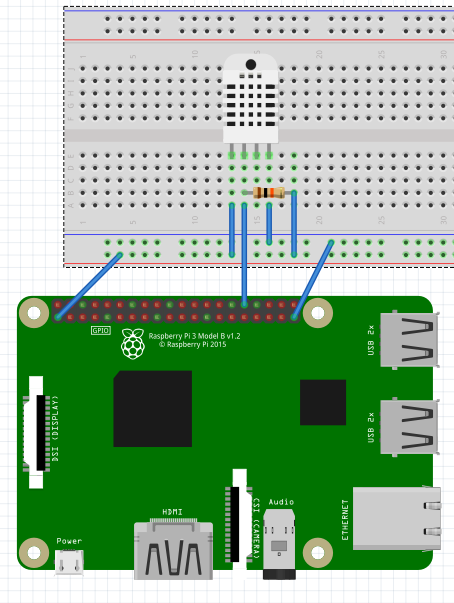
The resistor is a 10KΩ with +-5% tolerance.
You can change the data pin, but make sure you change it on the code too.
Use the WiringPi pin numeration. See the pin numbers by executing this command in shell gpio readall. On the default code, we are using GPIO 12, that is equivalent to the WiringPi pin number 26.
To compile, execute the folowing:
sudo gcc -odht22.out DHT22.c -lwiringPi
After compiled, you should run the compiled artifact this way:
sudo ./dht22.out