import Code from 'mdx-code'; import { comic } from "mdx-deck/themes";
export const theme = { ...comic, colors: { ...comic.color, background: "white", }, };



Event loop, Micro queue, Threads... what?


- callbacks
- promises
- async/await

const second = () => {
  console.log('Hello there!');
}

const first = () => {
  console.log('Hi there!');
  second();
  console.log('The End');
}

first();

A LIFO (Last in, First out) structure, which is used to store all the execution context created during the code execution
const second = () => {
  console.log('Hello there!');
}

const first = () => {
  console.log('Hi there!');
  second();
  console.log('The End');
}

first();
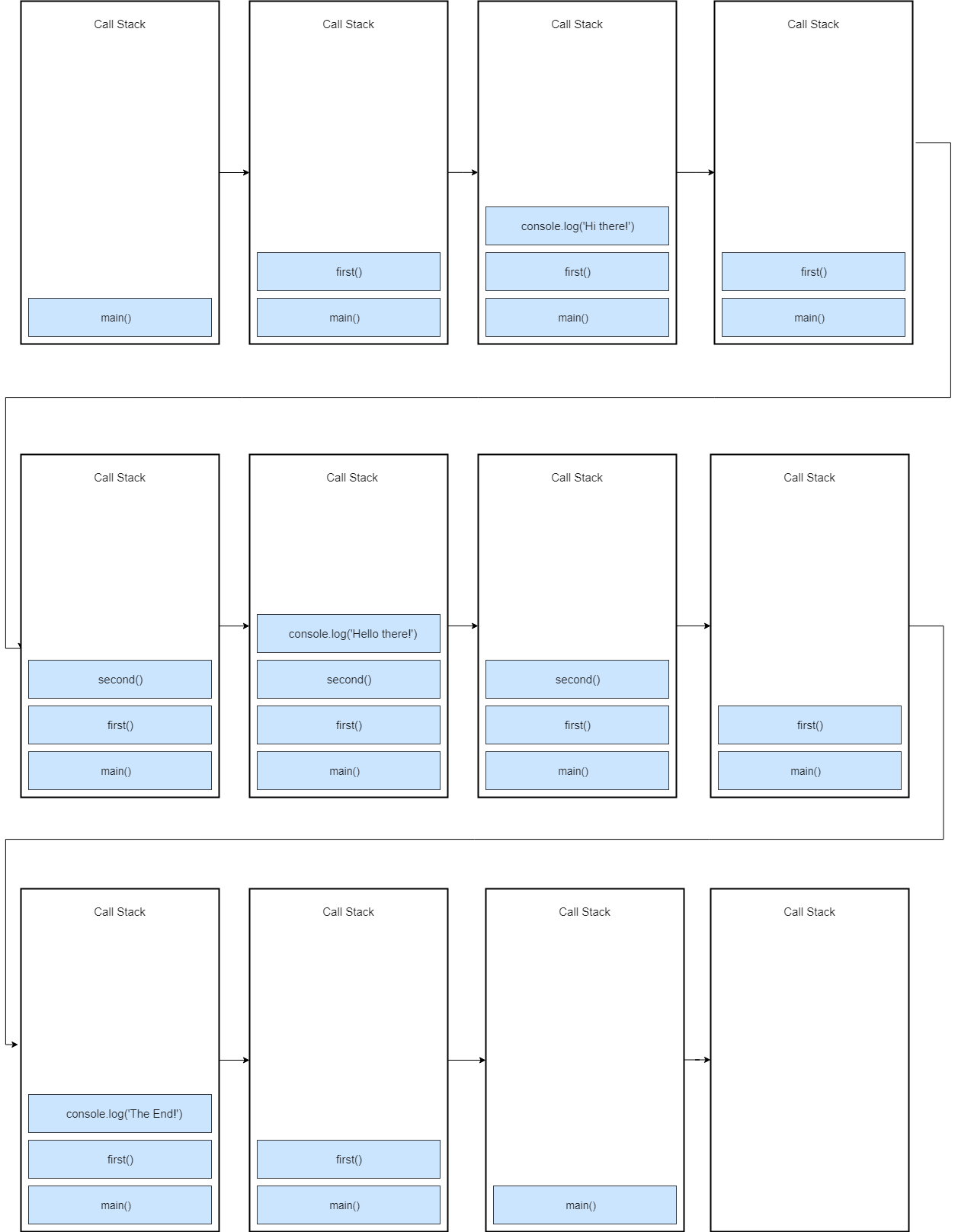

first();

const first = () => {
  console.log('Hi there!');
  second();
  console.log('The End');
}

const second = () => {
  console.log('Hello there!');
}

const first = () => {
  console.log('Hi there!');
  second();
  console.log('The End');
}

const first = () => {
  console.log('Hi there!');
  second();
  console.log('The End');
}


const processImage = (image) => {
  /**
   * doing some operations on image
   **/
  console.log('Image processed');
}

const networkRequest = (url) => {
  /**
   * requesting network resource
   **/
  return 'someData';
}

const greeting = () => {
  console.log('Hello World');
}

processImage('logo.jpg');
networkRequest('www.somerandomurl.com');
greeting();

const networkRequest = () => {
  setTimeout(() => {
      console.log('Async Code');
    }, 2000);
};

console.log('Hello World');
networkRequest();
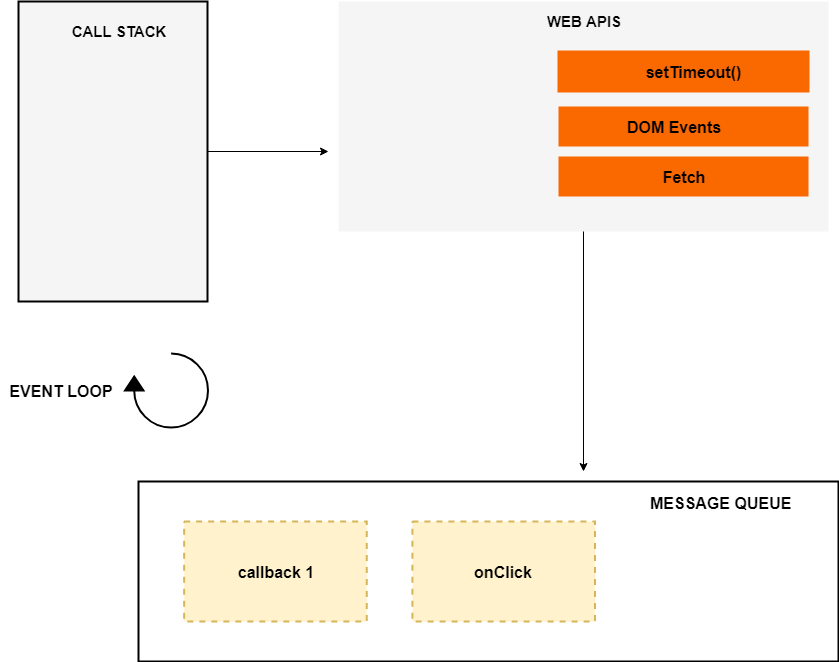
*The event loop, the web APIs and the message queue are not part of the JavaScript engine, it’s a part of browser’s JavaScript runtime environment
const networkRequest = () => {
  setTimeout(() => {
    console.log('Async Code');
  }, 2000);
};

console.log('Hello World');
networkRequest();
console.log('The End');
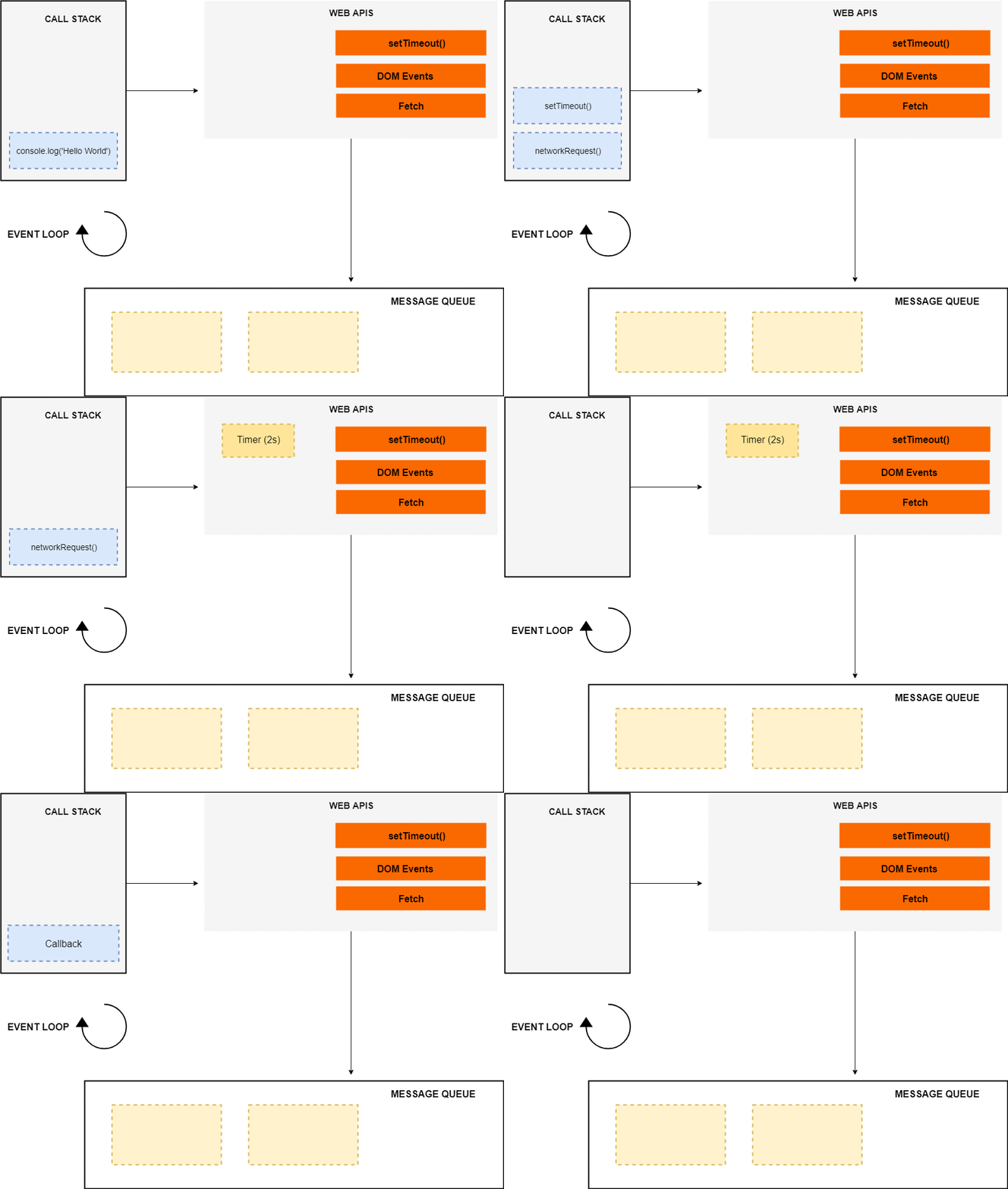

The job of the Event loop is to look into the call stack and determine if the call stack is empty or not
If the call stack is empty, it looks into the message queue to see if there’s any pending callback waiting to be executed
The event listener sits in the web APIs environment waiting for a certain event to happen, and when that event happens, then the callback function is placed in the message queue
document.querySelector('.btn').addEventListener('click',(event) => {
  console.log('Button Clicked');
});


console.log('Script start');

setTimeout(() => {
  console.log('setTimeout');
}, 0);

new Promise((resolve, reject) => {
  resolve('Promise resolved');
})
  .then(res => console.log(res))
  .catch(err => console.log(err));

console.log('Script End');
console.log('Script start');

setTimeout(() => {
  console.log('setTimeout 1');
}, 0);

setTimeout(() => {
  console.log('setTimeout 2');
}, 0);

new Promise((resolve, reject) => {
  resolve('Promise 1 resolved');
})
  .then(res => console.log(res))
  .catch(err => console.log(err));

new Promise((resolve, reject) => {
  resolve('Promise 2 resolved');
})
  .then(res => console.log(res))
  .catch(err => console.log(err));

console.log('Script End');
console.log('Script start');

setTimeout(() => {
  console.log('setTimeout');
}, 0);

new Promise((resolve, reject) => {
  resolve('Promise 1 resolved');
})
  .then(res => console.log(res));
    new Promise((resolve, reject) => {
      resolve('Promise 2 resolved');
    })
      .then(res => {
        console.log(res);
        return new Promise((resolve, reject) => {
          resolve('Promise 3 resolved');
        })
})
  .then(res => console.log(res));

console.log('Script End');

- How asynchronous Javascript works
- Call stack
- Event loop
- Message queue
- Micro task queue