You signed in with another tab or window. Reload to refresh your session.You signed out in another tab or window. Reload to refresh your session.You switched accounts on another tab or window. Reload to refresh your session.Dismiss alert
This problem has remained unresolved since January 19, 2023, and my issue has now been closed.
See: linuxmint/nemo#3167 (comment)
That's why I'm posting it here as a feature request.
Preliminary information: The problem exists in all LinuxMint versions LM21.x - LM22.3Cinnamon
aktuell in:
 * Nemo version 6.6.3
 * Is issue with desktop or windowed nemo: both
 * Distribution:  LinuxMint 22.3 Cinnamon (zena)
 * Graphics hardware: Intel UHD Graphics 620, Driver: Kernel 6.8.0-100-generic
 *  64 bit
Is the problem with the desktop or the window model from nemo: both
Problem: The icon spacing on the desktop is not reproducible.
By re-clicking > Desktop > Adjust, two sliders allow you to adjust the horizontal and vertical spacing of the icons.
Unfortunately, there are no scales on the sliders and no values are displayed for reproduction.
Expected behaviour
For testing we can use the terminal command: gsettings set org.gtk.Settings.Debug enable-inspector-keybinding true
and then: re.-click > desktop > adjust
followed by: Ctrl & Shift & d
Start the GTK inspector and select >properties< in the drop-down menu with the target (top left) after marking a slider and set >draw-value< to >true< with a double-click. Now you can see the value of the slider, see attachment #1
The test shows that it is possible to display the values. Unfortunately, this state is only temporary and is lost after closing the window: Desktop > Adjust.
Through further testing we discovered that window layout and labelling cannot be defined in a >css< but can be defined in the >nemo-desktop-overlay.glade< and is included in the >nemo-desktop-overlay.c< when compiling.
So we changed the appropriate places in the >glade file<
Select: <object class="GtkScale" id="horizontal_adjust_slider"> <property name="draw_value">False</property>- -> <property name="draw_value">True</property>
and the same in
Select: <object class="GtkScale" id="vertical_adjust_slider"> <property name="draw_value">False</property>- -> <property name="draw_value">True</property>
Then we created >Nemo< from the sources whereupon the "values" are displayed.
The result of compiling on a < German-Language-Test-System > was that nemo and the desktop context are now shown in < English > and some things are shown < twice > in the context menu, see attachment #2
It would be good for the Cinnamon design and the usability to add these scales and display of the set values, as already in the settings: Sound, as is already the case in the settings.
< < We ask you to consider this possible change in the next nemo update. > >
Best regards
kuehhe1 and Wolfgang58 (Information: @Wolfgang58 has not been active on LMU since November 9, 2024.)
reacted with thumbs up emoji reacted with thumbs down emoji reacted with laugh emoji reacted with hooray emoji reacted with confused emoji reacted with heart emoji reacted with rocket emoji reacted with eyes emoji
 Linux Mint


Uh oh!
There was an error while loading. Please reload this page.
Uh oh!
There was an error while loading. Please reload this page.
-
This problem has remained unresolved since January 19, 2023, and my issue has now been closed.
See: linuxmint/nemo#3167 (comment)
That's why I'm posting it here as a feature request.
Preliminary information: The problem exists in all LinuxMint versions LM21.x - LM22.3Cinnamon
aktuell in:
Is the problem with the desktop or the window model from nemo: both
Problem: The icon spacing on the desktop is not reproducible.
By re-clicking > Desktop > Adjust, two sliders allow you to adjust the horizontal and vertical spacing of the icons.
Unfortunately, there are no scales on the sliders and no values are displayed for reproduction.
Expected behaviour
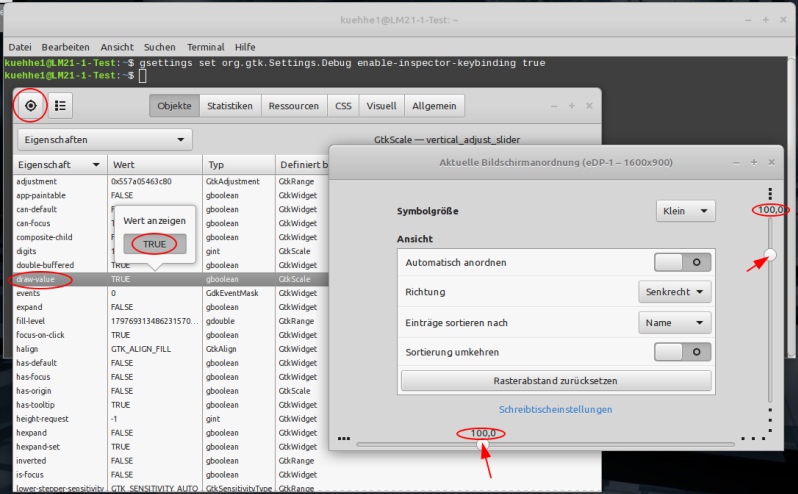
For testing we can use the terminal command:
gsettings set org.gtk.Settings.Debug enable-inspector-keybinding trueand then:
re.-click > desktop > adjustfollowed by:
Ctrl & Shift & dStart the GTK inspector and select >properties< in the drop-down menu with the target (top left) after marking a slider and set >draw-value< to >true< with a double-click. Now you can see the value of the slider, see attachment #1
The test shows that it is possible to display the values. Unfortunately, this state is only temporary and is lost after closing the window: Desktop > Adjust.
Through further testing we discovered that window layout and labelling cannot be defined in a >css< but can be defined in the >
nemo-desktop-overlay.glade< and is included in the >nemo-desktop-overlay.c< when compiling.So we changed the appropriate places in the >
glade file<Select:
<object class="GtkScale" id="horizontal_adjust_slider"><property name="draw_value">False</property>- -> <property name="draw_value">True</property>and the same in
Select:
<object class="GtkScale" id="vertical_adjust_slider"><property name="draw_value">False</property>- -> <property name="draw_value">True</property>Then we created >Nemo< from the sources whereupon the "values" are displayed.
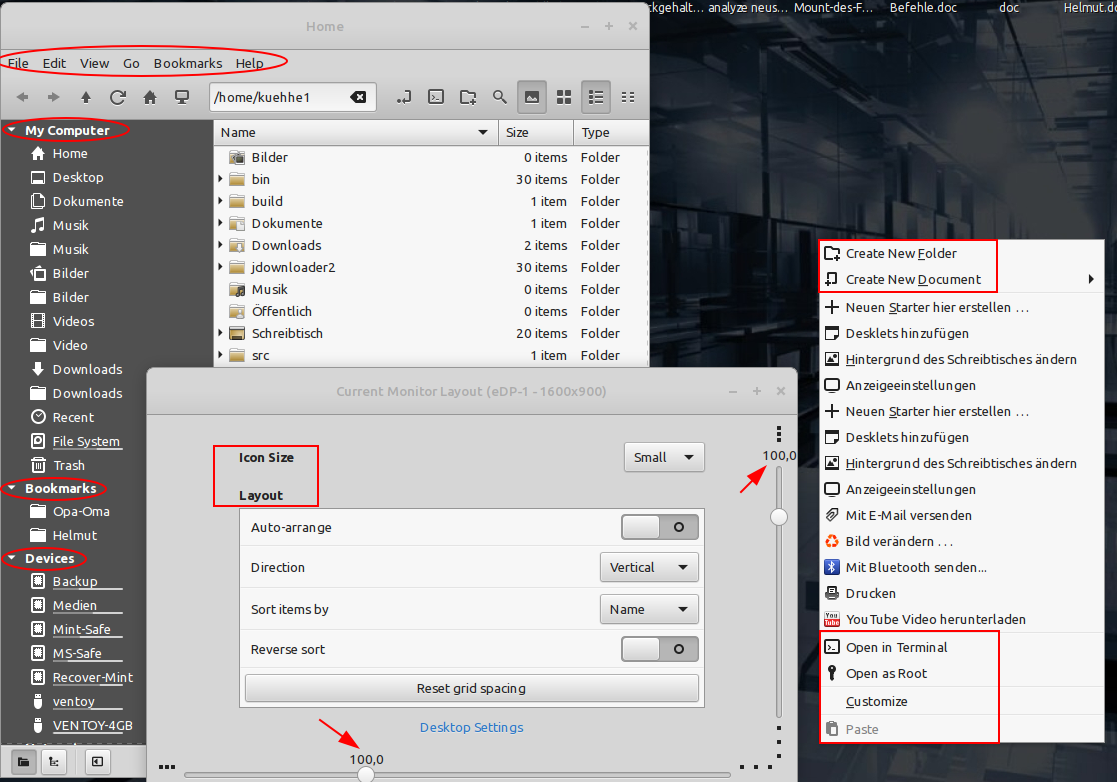
The result of compiling on a < German-Language-Test-System > was that nemo and the desktop context are now shown in < English > and some things are shown < twice > in the context menu, see attachment #2
It would be good for the Cinnamon design and the usability to add these scales and display of the set values, as already in the settings: Sound, as is already the case in the settings.
< < We ask you to consider this possible change in the next nemo update. > >
Best regards
kuehhe1 and Wolfgang58 (Information: @Wolfgang58 has not been active on LMU since November 9, 2024.)
Other information
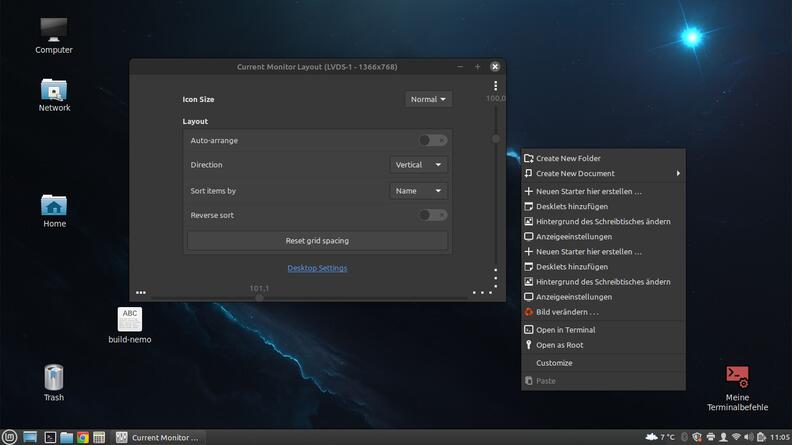
This problem was discussed at: https://www.linuxmintusers.de/index.php?topic=76471.msg990351#msg990351
Beta Was this translation helpful? Give feedback.
All reactions