-
Notifications
You must be signed in to change notification settings - Fork 3
Expand file tree
/
Copy pathgit.Rmd
More file actions
executable file
·316 lines (188 loc) · 5.52 KB
/
git.Rmd
File metadata and controls
executable file
·316 lines (188 loc) · 5.52 KB
1
2
3
4
5
6
7
8
9
10
11
12
13
14
15
16
17
18
19
20
21
22
23
24
25
26
27
28
29
30
31
32
33
34
35
36
37
38
39
40
41
42
43
44
45
46
47
48
49
50
51
52
53
54
55
56
57
58
59
60
61
62
63
64
65
66
67
68
69
70
71
72
73
74
75
76
77
78
79
80
81
82
83
84
85
86
87
88
89
90
91
92
93
94
95
96
97
98
99
100
101
102
103
104
105
106
107
108
109
110
111
112
113
114
115
116
117
118
119
120
121
122
123
124
125
126
127
128
129
130
131
132
133
134
135
136
137
138
139
140
141
142
143
144
145
146
147
148
149
150
151
152
153
154
155
156
157
158
159
160
161
162
163
164
165
166
167
168
169
170
171
172
173
174
175
176
177
178
179
180
181
182
183
184
185
186
187
188
189
190
191
192
193
194
195
196
197
198
199
200
201
202
203
204
205
206
207
208
209
210
211
212
213
214
215
216
217
218
219
220
221
222
223
224
225
226
227
228
229
230
231
232
233
234
235
236
237
238
239
240
241
242
243
244
245
246
247
248
249
250
251
252
253
254
255
256
257
258
259
260
261
262
263
264
265
266
267
268
269
270
271
272
273
274
275
276
277
278
279
280
281
282
283
284
285
286
287
288
289
290
291
292
293
294
295
296
297
298
299
300
301
302
303
304
305
306
307
308
309
310
311
312
313
314
315
316
---
title: "Version control with git for scientists"
subtitle: https://github.com/mbjoseph/git-intro
author: "Max Joseph"
date: "July 27, 2016"
output:
beamer_presentation:
latex_engine: xelatex
fonttheme: "structurebold"
header-includes:
- \usepackage{graphicx}
- \beamertemplatenavigationsymbolsempty
- \usefonttheme{professionalfonts}
- \renewcommand{\familydefault}{\sfdefault}
- \usepackage{xcolor}
- \definecolor{foreground}{RGB}{0,0,0}
- \definecolor{background}{RGB}{255,255,255}
- \definecolor{title}{RGB}{0,120,255}
- \definecolor{gray}{RGB}{155,155,155}
- \definecolor{subtitle}{RGB}{204,0,0}
- \definecolor{hilight}{RGB}{102,255,204}
- \definecolor{vhilight}{RGB}{255,111,207}
- \setbeamercolor{titlelike}{fg=title}
- \setbeamercolor{subtitle}{fg=subtitle}
- \setbeamercolor{institute}{fg=gray}
- \setbeamercolor{normal text}{fg=foreground,bg=background}
- \setbeamercolor{local structure}{fg=title}
- \setbeamertemplate{frametitle}{\begin{centering} \insertframetitle \par \end{centering}}
---
```{r global_options, include=FALSE}
knitr::opts_chunk$set(fig.width=6, fig.height=5.5, fig.align='center',
warning=FALSE, message=FALSE)
```
## Discuss
What is your current version control system?
1. How do you manage different file versions?
2. How do you work with collaborators on the same files?
3. How much would your science suffer if your workstation exploded right now? (scale from 1-10)
## What is git
Version control system
- manage different versions of files
- collaborate with yourself
- collaborate with other people
## Why use git
"Always remember your first collaborator is your future self, and your past self doesn't answer emails"
- Christie Bahlai
## What is git good for?
- backup
- reproducibility
- collaboration
- organization
- transparency
## What you get
[Tour of a git repository](https://github.com/mbjoseph/trait_factors)
## Overview
1. Git on the command line
2. Git in RStudio
3. Github vs. GitLab vs. Bitbucket for remote mirroring
## Command line git
Make a directory with a file
```
mkdir test
cd test
nano sim.R
```
Then write a short simulation, e.g.
```{r, eval=FALSE}
x <- rnorm(10)
save(x, file = "x.RData")
```
## Initializing a repository
Prerequisites:
- git installed (check with `which git`)
- git configured (check with `git config --list`)
```
git config --global user.name "Vlad Dracula"
git config --global user.email "vlad@tran.sylvan.ia"
git config --global color.ui "auto"
git config --global core.editor "nano"
```
## Initializing a repository
```
git init
```
Notice the `.git/` directory
## Checking repository status
```
git status
```
## Adding your file
```
git add your_filename.R
```
or, to add everything
```
git add --all
```
## Your changes are now staged

(Image from Software Carpentry)
## Committing
Changes aren't final until they're committed
```
git status
```
## Committing
Once you're sure that you're changes are worth saving
(THIS WILL GO ON YOUR PERMANENT RECORD)
```
git commit -m 'changed x, y, and z'
```
## Commit messages
- Describe why and the what "in a nutshell"
- Note to your future self (and to anyone else who you're collaborating with)
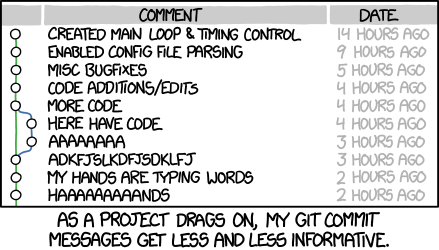
## What did we do?
```
git status
git log
```
## Make another change
1. Change file
2. Add changes
3. Commit changes
4. View updated log
## Now, do something really stupid
"Accidentally" introduce some errors to your file
## Woops
Not that this ever happens...
```
git diff
git checkout HEAD your_file.R
```
## What happened?

(Image from Software Carpentry)
## Wait, what does HEAD refer to?

(Image from Software Carpentry)
## What if you really screw up?
__A git choose your own adventure__
http://sethrobertson.github.io/GitFixUm/fixup.html
## Mirroring your repository on the internet
__Setting up a "remote"__
1. Create repository on Githubwith no .gitignore, no README, and no license
2. Add that as a remote
```
git remote add origin https://www.github.com/user/test.git
```
__How to check:__
```
git remote -v
```
## Once your repository has been linked to remote
Push your changes
```
git push -u origin master
```
Check the remote (Github or Bitbucket) to see new changes
## Overview

(Image from Software Carpentry)
## RStudio's interface
Start a new project
Check it out from your remote git repository using ssh or html
(ssh is better, html may require additional config w/ RStudio)
## Demo of adding, committing, pushing
## Github vs. GitLab vs. Bitbucket
Private repos:
- free on Bitbucket (w/ < 6 collaborators)
- free on GitLab (unlimited collaborators)
- not free on Github
## Github vs. GitLab vs. Bitbucket
- all very similar
- Popularity & user base (4 vs. ?? vs. 1 million)
- free vs. pay
- open source vs. closed source
**You can use all three if you want!**
## Continuing education & additional resources
**Motivation**
- [Ram K. 2013. Git can facilitate greater reproducibility and increased transparency in science.](https://scfbm.biomedcentral.com/articles/10.1186/1751-0473-8-7)
**Instruction**
- [Pro Git](https://progit.org/)
- [Software carpentry](http://swcarpentry.github.io/git-novice/)
- [Git for scientists](http://nyuccl.org/pages/gittutorial/)
**Alternative interfaces**
- [GUIs for the command line averse](https://git-scm.com/book/en/v2/Git-in-Other-Environments-Graphical-Interfaces)
