CTRL+D: Stops current standard input entry from the terminal? CTRL+C: Terminate a program, signal?
- fu*ked up grub? -> bootrepair
Substitution happens before the command is run.
*match any chars?match exactly one arbitrary char- to prevent globs, enclose in quotes like
'*'
Send output from a command to a file, create or re-create file from output of command
$ command > filePipe standard out from one command to input of another
$ head /proc/cpuinfo | tr a-zPipe standard out and standard error
$ ls /notexisting > stdout-sink 2> stderr-sinkSend standard error to same place as standard out
$ ls /notexisting > stdout-sink 2>&1Stream Ids
- stdout: 1
- stderr: 2
Send file to program stdin
$ head < /proc/cpuinfo
$ head lscpu # more common$$ a shell variable that evaluated to the current shells pid
Assign the return value of a shell command to a variable
$ JETT=$(ps -f -C java | grep jetty | awk '{ print $2 }')cat /proc/meminfohttp://www.linuxjournal.com/article/10678
The filesystem cache, program code and shared libraries have a filesystem source, so the RAM associated with any of them can be reused for another purpose at any time. Should they be needed again, Linux can just read them back in from disk.
Program data and stack space are a different story. These are placed in anonymous pages, so named because they have no named filesystem source. Once modified, an anonymous page must remain in RAM for the duration of the program unless there is secondary storage to write it to. The secondary storage used for these modified anonymous pages is what we call swap space.
The problem with this is twofold. First, programs often ask for more memory than they use. The most common case is during a process fork, where an entire process is duplicated using copy-on-write anonymous pages.
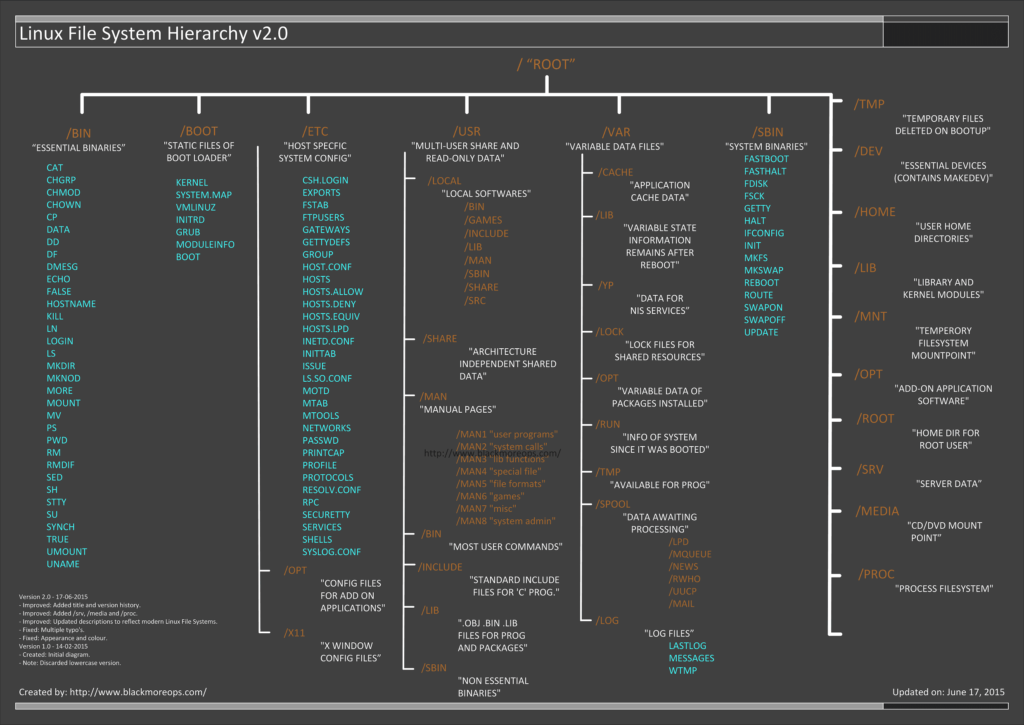
Includes most unix commands like ls, cp. Mostly binary but also shell scripts.
Core system config directory (pronounces EHT-see)
Configuration files called dot files .bashrc .login or directories .ssh
Use .[]* or .??* to get all dot files except the current and parent directories.
System statistics and kernel internal stuff.
sudo blkid Get UUID of partition

Permissions for all other users are also called world permissions. Each read, write and execute permission is called a permission bit.
Add group and world read permissions
$ chmod g+r file
$ chmod o+r file
# or
$ chmod go+r file
# or
$ chmod 644 file
Listing contents of a directory requires read permission, accessing a file in a dir requires execute permission for the dir.
Offer quick access to dir paths. Links can also point to other links (chained sym links).
$ ln -s target linkname# find largest files
$ find -type f -exec du -SH {} + | sort -rh | head -n 5
# find largest directories
$ du -Sh | sort -rh | head -5
# find oldest files
$ find -type f -printf '%T+ %p\n' | sort | head -n 10The kernel presents many of the device I/O interfaces to user processes as files. Sometimes called device nodes.
Not all devices have device files because device I/O interfaces are not appropriate in all cases. For example, network interfaces don’t have device files.
The kernel assigns devices in the order in which they are found, so a device may have a different name between reboots.
Block
Programs access data from a block device in fixed chunks, the total size is fixed and easy to index, processes have random access to any block in the device.
Character
Character devices work with data streams and don’t have a size.
Pipe
Named pipes are like character devices, with another process at the other end of the I/O stream instead of a kernel driver.
Socket
Represent Unix domain sockets.
Find the name of a device
- query
udevdusingudevadm - look in /sys
- guess the name from output of
dmesg - for a disk device that is already visible, check output of
mount - run
cat /proc/devicesto see block and char devices for which system currently has drivers. Correlate with/devusing major number.
To provide a uniform view for attached devices based on their actual hardware attributes.
Base path for devices is /sys/devices
$ udevadm info --query=all --name=/dev/sdaRead from an input file or stream and write to an output file or stream, possibly doing some encoding. dd copies data in blocks of a fixed size.
Write raspberry image to sd card in junks of 4MB
$ dd if=2016-11-25-raspbian-jessie.img of=/dev/sdd bs=4M/dev/sda, /dev/sdb represent entire disks, /dev/sda1 and /dev/sda2, are the partitions.
Terminals are devices for moving characters between a user process and an I/O device.
- https://blog.serverdensity.com/80-linux-monitoring-tools-know/
- ls, cp, mv, rm, cat, touch, cd, mkdir, rmdir
- grep, less, pwd, diff, file, find, head, tail, sort
- top,fg,bg
3 different styles: Unix, BSD, GNU
Find PID of all java processes where jetty is included in the command line.
$ ps -f -C java | grep jetty | awk '{ print $2 }'Show all of your running processes
$ ps aShow all processes on the system, not just the ones you own
$ ps axInclude more info, often used as ps aux
$ ps uShow full command line
$ ps wFind process id of last started java process
$ pgrep -n javaFind process which contain "jetty" in their command line
$ pgrep -f jettyDefault TERM signal
$ kill pid
$ kill -TERM pid
$ kill -SIGTERM pid
$ kill -15 pid
Freece a process via STOP signal and continue it later via CONT
$ kill -STOP pid
$ kill -CONT pid
Sends an interrupt signal, same as using CTRL+C to terminate a process that is running in the current terminal
$ kill -INT pid
$ kill -SIGINT pid
$ kill -2 pid
Most brutal way, does not give process time to 'clean up'. OS terminates the process forcibly removing it from memory.
$ kill -KILL pid
$ kill -SIGKILL pid
$ kill -9 pid- http://bencane.com/2014/04/01/understanding-the-kill-command-and-how-to-terminate-processes-in-linux
# show context switches of process $PID every 1 second
$ pidstat -w -p $PID 1

# show context switches of process $PID and its children (usefull for java) every 1 second
$ pidstat -w -t -p $PID 1Normally when running a unix command from the shell the command runs to completion while blocking the current terminal.
Detach a program via adding & (will continue running even if user logs out).
david@david-ubuntu:~$ date; sleep 50 &
Don Jän  5 17:51:10 CET 2017
[1] 19698
Be aware that some programs expect input via stdin or terminal, those programs will effectively freeze. Also it might print to stdout which suddenly shows up when you run a different program in foreground. Best way is to redirect the output (and possibly input).
Send TSTP (stop) via CTRL+Z and later bring to foreground fg or background bg
Continues a stopped job by running it in the foreground.
$ tar cvf archive-to-create.tar file1 file2
$ tar xvf archive-to-extract.tarGet current state of connections
$ ss -tan
$ netstat -anpe --tcp
Unix always closes all open descriptors when a process terminates. UNP
Linux ephemeral ports
pi@raspberrypi:~ $ cat /proc/sys/net/ipv4/ip_local_port_range
32768 60999- http://highscalability.com/blog/2015/5/27/a-toolkit-to-measure-basic-system-performance-and-os-jitter.html
- http://highscalability.com/blog/2015/4/8/the-black-magic-of-systematically-reducing-linux-os-jitter.html
- https://www.kernel.org/doc/Documentation/kernel-per-CPU-kthreads.txt
- https://www.researchgate.net/publication/258406264_Exploratory_Study_on_the_Linux_OS_Jitter
perf listlist all possible event typesperf statscounts events (uses efficient in kernel counter)perf recordsamples events (higher overhead relative to the rate of events), use -g to include call graph/stack traceperf reportreport from a perf.data fileperf scriptdump a perf.data file as text
- http://techblog.netflix.com/2015/07/java-in-flames.html
- http://www.brendangregg.com/FlameGraphs/cpuflamegraphs.html#Java
- Containerized: http://blog.alicegoldfuss.com/making-flamegraphs-with-containerized-java/
See: